


Omen Vines Overlay
- By
Omen Vines Overlay
A beautiful Clearcasting overlay for the built-in Cooldown Manager.
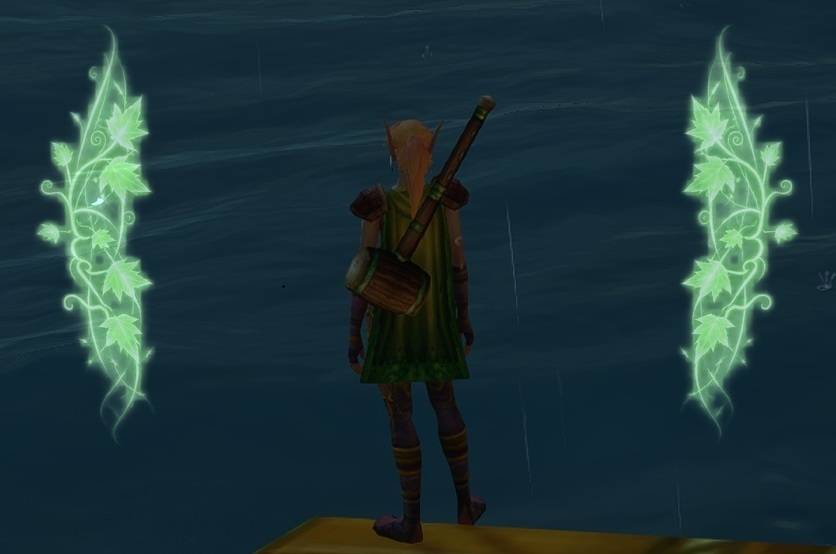
On retail, a Clearcasting proc lights up the screen with a spell activation overlay. WoW Forever doesn't have that, so Omen Vines Overlay brings it back: whenever Omen of Clarity procs, a softly pulsing vine overlay appears around your character, just like on retail, and it fades away when the proc is used or expires.
Omen Vines Overlay doesn't track anything on its own. It watches the Cooldown Manager's Clearcasting icon and mirrors it, so it works in combat, where the game hides buffs from addons.
Why the Cooldown Manager?
WoW Forever uses the same addon restrictions as modern retail: during combat, the game hides your buffs from addons. An addon can't read whether Clearcasting is active, and the combat log and combat text aren't available to addons either. This is intentional on Blizzard's side, and no addon can work around it.
The built-in Cooldown Manager is the game's own way to track buffs in combat, so it still knows when Clearcasting is up. Omen Vines Overlay simply follows its Clearcasting icon. This way it works reliably in combat, uses only what the game officially allows, and won't break or trigger errors.
Features
- Glowing vine overlay that pulses gently while Clearcasting is active
- Works in combat, driven by the built-in Cooldown Manager
- Movable and resizable; position and size are saved between sessions
- Never blocks your mouse clicks during normal play
- Tiny and fast: a single Lua file with no libraries
Setup
- Install the addon and log in on your druid.
- Turn on the Cooldown Manager and add Clearcasting to its tracked buffs (as an icon or a bar).
- Type
/omen testto show the overlay, drag it where you like, then type/omen testagain to lock it. - Adjust the size with
/omen size <number>(default 210).
The Cooldown Manager must stay enabled with Clearcasting tracked. Without it, the overlay can only show out of combat. If Omen Vines Overlay can't find the icon in combat, it tells you once in chat.
Commands
| Command | Description |
|---|---|
/omen |
Show the command list |
/omen test |
Show the overlay and unlock it for moving (type again to lock) |
/omen size &lt;32-1024&gt; |
Set the overlay height |
/omen reset |
Move the overlay back to the screen center |
/omen id &lt;spellID&gt; |
Track a different spell ID (default: 16870) |
Troubleshooting
The overlay doesn't show up when Clearcasting procs. Make sure the Cooldown Manager is enabled and Clearcasting is in its tracked buffs.
I can't move the overlay. Moving only works in test mode and out of combat. Test mode turns itself off automatically when you enter combat.
Feedback
Found a bug or have an idea? Leave a comment or open an issue on the project page.
License
MIT. Code and artwork by Karanthir.
Omen Vines Overlay Team
