Olympus Recruitment List
- By
02_request_flow.png
Description
If anyone wants to take this and iterate on it or modify it, feel free to do so. At the moment it seems like the only way to get around the restrictions, and at least it keeps track of people who want an invite instead of spamming invites to random players.
================================================================================
OLYMPUS INVITE - Version 1.9.1
Function-by-function explanation
================================================================================
WHAT IT DOES
------------
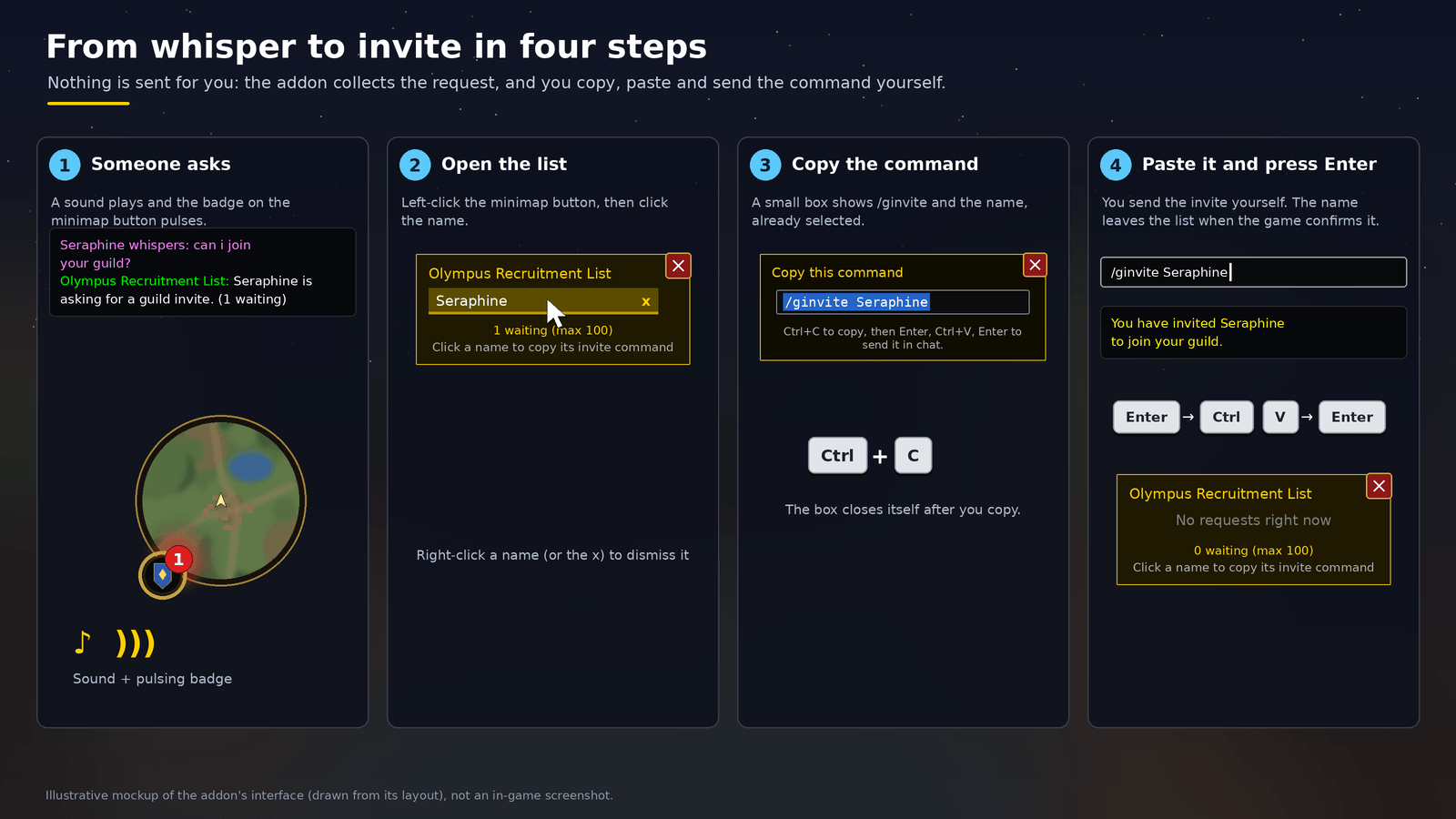
When another player whispers you asking for a guild invite (in any of many
ways, such as "guild invite", "can i join your guild?" or "are you
recruiting?"), they are added to a request list.
* A red badge on the minimap button shows how many people are waiting.
* Left-click the minimap button to open the list.
* Click a name in the list. A small "copy box" appears with this selected:
/ginvite PlayerName
* Press Ctrl+C to copy it (the box closes). Then press Enter to open your
chat, Ctrl+V to paste, and Enter to send.
* Once the game confirms the invite went out, the name disappears from the
list.
The addon never sends the invite itself, and it never opens or fills your chat
box. You paste and send the command yourself.
WHY YOU COPY AND PASTE THE COMMAND YOURSELF
-------------------------------------------
Blizzard protects guild invites. On WoW: Forever, addons are not allowed to send
guild invites at all, and elsewhere they only work from a real mouse click or key
press. Addons that try to invite straight from an event, such as an incoming
whisper, are blocked by the game.
Earlier versions (1.7 and 1.8) tried to help by opening and filling in your chat
box. That does not work: when addon code touches the chat box, the game treats
the command you send afterwards as coming from the addon, blocks it, and shows
"OlympusInvite has been blocked from an action only available to the Blizzard
UI". (The game calls this "taint".)
So version 1.9 never touches your chat box. It just shows the command in its own
little box. You copy it and paste it into chat yourself, so the invite really is
sent by you. Other guild recruitment addons do the same on WoW: Forever. The
addon does not use tricks to get around the rule, and none should be used.
USING THE LIST
--------------
Minimap button
Left-click Show or hide the request list.
Right-click Turn the addon on or off. When it is off, the icon turns
gray and new whispers are ignored (names already in the list
stay there).
Drag Move the button around the edge of the minimap.
Badge The red number on the button is how many players are waiting
(it shows 99+ for 100 or more, and is hidden at zero).
The list window (opens near the middle of the screen)
Drag Move it by its title or background. The spot is remembered.
Size Bigger than before; change it with /oi scale 1.6 (0.5 to 3).
Click a name Opens the copy box with "/ginvite Name" selected.
Right-click a name Dismisses that player without inviting them.
Click the "x" Same as right-click: dismisses that player.
Close button Hides the list. Requests keep collecting in the background.
Names leave the list on their own when the game prints either of these system
messages: "You have invited <name> to join your guild." or "<name> has joined
the guild." If an invite fails (for example the player is offline), no message
like that appears, so the name stays on the list and you can try again or
dismiss it.
If someone is dismissed or invited and then whispers you again, they are added
back to the list. The list only holds each name once at a time.
The copy box
Ctrl+C Copies the command. The box closes itself a moment later.
Enter/Esc Closes the box without copying.
Drag Move the box. Where you leave it is remembered.
The text can't be edited; if you type or paste into it, it resets.
After copying: press Enter to open chat, Ctrl+V to paste, Enter to send.
HOW REQUESTS ARE RECOGNIZED
---------------------------
All matching ignores capitalization and punctuation, and matches whole words
only. A whisper counts as a request if it is short (80 characters or fewer)
AND either:
1. It contains one of the "standalone" words or phrases, such as
ginvite, ginv, g invite, g inv, recruiting, recruitment,
looking for a guild, lf guild, need a guild, want a guild
2. It contains at least one GUILD word (guild, guilds) AND at least one
ASK word (invite, invited, invitation, inv, join, joining, apply,
application, accepting, recruit, open).
Examples that ARE recognized:
guild invite can i get a guild invite pls?
invite me to your guild Can I join your guild??
is your guild open? ginv
g inv please are you recruiting?
looking for a guild lf guild
Examples that are IGNORED:
inv pls / invite me (could mean a party invite)
can i join? (no mention of a guild)
hello (no request)
anything over 80 characters (usually another guild's recruitment ad)
Because nothing is sent until you press Enter, a wrongly recognized whisper is
harmless: just dismiss it.
To change what is recognized, edit the lists at the top of OlympusInvite.lua
(STANDALONE, GUILD_WORDS, ASK_WORDS, MAX_LENGTH). Words in other languages
work too; just add them in lowercase (for example "gilde" or "guilde").
Use /oi test <message> to check how a message would be treated.
UPGRADING FROM EARLIER VERSIONS
-------------------------------
* Version 1.9.1 makes the request list larger and opens it near the middle of
the screen instead of under the minimap. You can drag it, resize it with
/oi scale, and reset its position with /oi resetpos.
* Versions 1.0 to 1.4 tried to invite automatically the moment the whisper
arrived. The game blocks that, so no invite was sent.
* Versions 1.5 and 1.6 showed a pop-up with an Invite button, 1.7 opened your
chat box automatically, and 1.8 filled it in when you clicked a name.
* Versions 1.7 and 1.8 caused the game message "OlympusInvite has been blocked
from an action only available to the Blizzard UI", because opening or
filling your chat box from addon code "taints" it (see WHY YOU COPY AND PASTE
THE COMMAND YOURSELF). Version 1.9 never touches your chat box. Clicking a
name now opens a small copy box instead.
* The addon no longer whispers anything to players automatically. You can
reply to them by hand if you like.
* The minimap button's left-click used to turn the addon on/off. Now
left-click opens the list, and RIGHT-click turns the addon on/off.
* "/oi" now shows/hides the list (it used to toggle the addon). Use
"/oi toggle" for on/off.
* Removed commands: /oi skip and /oi reset (use the "x" in the list instead).
* Key bindings changed: the "Put next request in chat box" binding is now
"Copy next request's command". Assign keys again under Options > Key Bindings
> AddOns > Olympus Invite.
If you installed this under its original name "GuildInviteWhisper", delete that
folder from Interface/AddOns/ first. If two versions are installed, both will
react to the same whisper.
INSTALLATION
------------
1. Unzip the download.
2. Copy the "OlympusInvite" folder into the AddOns folder for your game:
Retail: World of Warcraft/_retail_/Interface/AddOns/
WoW: Forever: World of Warcraft/_forever_/Interface/AddOns/
(You can install it in both if you play both.)
3. Restart the game or type /reload.
4. If the game lists the addon as "out of date", update the "## Interface:"
numbers in OlympusInvite.toc to match your client, or tick "Load out
of date AddOns" on the character select AddOns screen.
5. Optional: open Options > Key Bindings > AddOns > Olympus Invite and assign
keys to "Show/hide request list" and "Copy next request's command".
COMPATIBILITY
-------------
The .toc file lists two interface numbers, so one folder works on both:
120105 Retail (patch 12.1.5)
16001 WoW: Forever
WoW: Forever shares retail's modern UI engine and most of its addon API, so
the addon's code is the same on both. It has not been tested in game on
either client. Known points:
* WoW: Forever restricts addons in the same way Midnight does, so the addon
cannot read whispers or game messages while you are inside an instance.
* On WoW: Forever, Blizzard does not let addons send guild invites. That is why
you paste the command into chat yourself.
* During the Forever beta some addon authors reported that saved settings
were not being read back after a /reload. If that still happens, the addon
will start switched on with the minimap button in its default position each
time you log in.
* If a future patch changes the interface numbers, edit the "## Interface:"
line in OlympusInvite.toc, or use "Load out of date AddOns".
FILES
-----
OlympusInvite.toc Tells WoW the addon's name, version, which file to load,
and which variable to save between sessions
(OlympusInviteDB).
OlympusInvite.lua All of the addon's code.
Bindings.xml Adds the two key bindings to the Key Bindings screen.
README.txt This document (WoW ignores it).
SLASH COMMANDS
--------------
("/olympus" works exactly the same as "/oi".)
/oi Show or hide the request list.
/oi next Open the copy box for the first waiting player.
/oi clear Remove everyone from the list.
/oi toggle Turn the addon on or off (same as right-clicking the button).
/oi scale Make the request list bigger or smaller, e.g. /oi scale 1.6
(any number from 0.5 to 3). It is remembered.
/oi resetpos Put the request list and the copy box back in their default
places (useful if you moved them somewhere awkward).
/oi button Show or hide the minimap button.
/oi test Type a message after it (for example: /oi test can i join your
guild) to see whether it would count as a request. Nobody is
added to the list.
SETTINGS YOU CAN EDIT (top of OlympusInvite.lua)
------------------------------------------------
MAX_LENGTH Whispers longer than this are ignored. Default: 80
STANDALONE Words/phrases that count as a request on their own.
GUILD_WORDS One of these plus one ASK_WORD counts as a request.
ASK_WORDS See GUILD_WORDS. (Details in HOW REQUESTS ARE RECOGNIZED.)
INVITE_COMMAND The command shown in the copy box before the player's name.
Default: "/ginvite"
MAX_ROWS How many names the list shows at once. Any extra are counted
as "+ N more waiting". Default: 10
LIST_SCALE How big the request list window is (1 = original size).
Default: 1.4. /oi scale overrides it and is remembered.
ICON_TEXTURE The icon on the minimap button. Any icon path works.
Default: Interface\Icons\INV_Shirt_GuildTabard_01
SAVED DATA (OlympusInviteDB)
----------------------------
Saved between sessions:
enabled true/false. Whether the addon is switched on.
minimapAngle Where the minimap button sits around the minimap, in degrees.
Default 220.
hideButton true/false. Whether the minimap button is hidden.
copyBoxPos Where you dragged the copy box to.
listPos Where you dragged the request list to.
listScale The size you set with /oi scale.
NOT saved (kept in memory only, cleared on login or /reload):
The request list (queue and queued).
TOP-LEVEL VARIABLES
-------------------
ADDON_NAME The addon's folder name. WoW passes it in automatically. Used
to detect when this addon (and not another) has finished
loading.
MAX_LENGTH, STANDALONE, GUILD_WORDS, ASK_WORDS, INVITE_COMMAND, MAX_ROWS,
LIST_SCALE, ICON_TEXTURE
The settings described above.
BINDING_... Text WoW shows for the key bindings in the Key Bindings screen.
PREFIX, WARN The green and orange "Olympus Invite:" labels in chat messages.
ROW_HEIGHT Height of each name row in the list, in pixels (22).
atan2 Math helper used for dragging the minimap button. Uses
math.atan2 if it exists, otherwise math.atan.
button The minimap button frame. Empty until CreateMinimapButton runs.
badge The red number badge on the minimap button.
list The request list window. Empty until CreateList runs.
copyBox The small window that shows the command to copy. Empty until
CreateCopyBox runs.
rows The name rows inside the list window, created as needed.
queue Names of players waiting for an invite, oldest first.
queued A lookup of the same names (lowercase) so nobody is added to
the list twice.
SENT_PATTERNS Patterns built from the game's own "You have invited X to join
your guild." and "X has joined the guild." messages, used to
notice when an invite has gone out.
FUNCTIONS
=========
IsEnabled()
-----------
Returns true if the addon is currently switched on, false/nil otherwise. It
reads the saved "enabled" setting. It first checks that the saved table exists
so it never errors before the addon has finished loading.
RefreshButton()
---------------
Updates how the minimap button looks to match the on/off state. When the
addon is on, the icon is shown in full color. When it is off, the icon is
desaturated (turned gray) and dimmed to half opacity. Does nothing if the
button hasn't been created yet.
SetEnabled(on)
--------------
Turns the addon on (true) or off (false). It saves the new state, calls
RefreshButton() so the icon changes, and prints a message to your chat window.
Turning it off does not clear the list; it only stops new requests being added.
Called by right-clicking the minimap button and by /oi toggle.
Normalize(text)
---------------
Prepares a whisper for matching: lowercases it, replaces punctuation and
control characters with spaces, collapses repeated spaces, and puts a space at
each end. The padding lets the matcher find whole words only (so "inv" does not
match inside another word).
HasWord(norm, wordList)
-----------------------
Returns true if any word or phrase in "wordList" appears in the normalized text
as whole words. Used with STANDALONE, GUILD_WORDS and ASK_WORDS.
IsInviteRequest(text)
---------------------
Decides whether a whisper counts as a guild invite request. It returns false if
the text is longer than MAX_LENGTH. Otherwise it normalizes the text and
returns true if it contains any STANDALONE entry, or if it contains at least
one GUILD_WORDS entry and at least one ASK_WORDS entry. Used by the whisper
handler and by /oi test.
ShowCopyBox(name)
-----------------
Opens the copy box with "/ginvite <name>" typed in and selected, and gives it
keyboard focus so Ctrl+C works straight away. It remembers the text so the box
can restore it if anyone edits it. It deliberately does not touch your chat
box (see WHY YOU COPY AND PASTE THE COMMAND YOURSELF). Called when you click a
name in the list.
CopyFirst()
-----------
Runs ShowCopyBox() on the first (oldest) name in the list, or prints "No one is
waiting" if the list is empty. Used by /oi next and the key binding.
RemoveAt(i)
-----------
Removes the entry at position i from the list and from the duplicate lookup.
BaseName(name)
--------------
Returns a player's name in lowercase without any "-Realm" part, so a name
typed as "Bob" matches "Bob-Realm". Used when comparing names.
RemoveByName(name)
------------------
Removes every entry whose base name matches "name", then refreshes the badge
and list. Returns true if anything was removed. Used when an invite goes out,
when someone joins, and when you dismiss a name.
ClearQueue()
------------
Empties the whole list and refreshes the badge and list window. Used by
/oi clear.
Enqueue(name)
-------------
Adds a player to the end of the list. It ignores the player if they are already
on it. It prints a chat message saying who asked and how many are waiting, then
refreshes the badge and list.
FormatToPattern(fmt)
--------------------
Converts one of the game's message templates (such as "You have invited %s to
join your guild.") into a Lua pattern that captures the player's name. It
escapes the punctuation, turns "%s" into a capture, and anchors both ends.
Used once at load time to build SENT_PATTERNS.
GetRow(i)
---------
Returns the i-th name row in the list window, creating it the first time it is
needed. Each row holds the name text, a highlight when hovered, and a small
"x" button. Left-click on the row calls ShowCopyBox(); right-click or the "x"
calls RemoveByName(). Hovering shows a short tooltip.
UpdateList()
------------
Refreshes everything that shows the list: the red badge on the minimap button
(number, or hidden when zero; "99+" for 100 or more) and the list window (fills
in the rows, hides unused rows, shows "No requests right now" when empty,
shows "+ N more waiting" past MAX_ROWS, and resizes the window to fit). Called
whenever the list changes.
ApplyListScale()
----------------
Sets the size of the list window from your saved /oi scale value, or from
LIST_SCALE if you haven't set one.
PlaceList()
-----------
Puts the list window where you last dragged it (the saved "listPos"), or, if
you never moved it, near the middle of the screen: its top edge a little above
the center and to the left, so the list grows downward as names are added.
CreateList()
------------
Builds the list window once, when the addon loads. It creates a dark window
with a gold outline, the title, a close button, the "No requests" and "+ N
more" text, and a hint line. You can drag it (by its title or background) and
the position is saved. It is kept on screen, sized with ApplyListScale(),
placed with PlaceList(), and starts hidden.
PlaceCopyBox()
--------------
Puts the copy box where you last dragged it (the saved "copyBoxPos"), or, if
you never moved it, just to the right of the request list.
CreateCopyBox()
---------------
Builds the copy box once, when the addon loads. It is a small dark window with
a gold outline, a title, a close button, a text box holding the command, and a
hint line. Details:
- The text box can't really be edited: if text is typed or pasted into it, it
puts the command back and selects it again.
- Selecting happens automatically when the box gets focus.
- Pressing Enter or Esc closes the box. Pressing Ctrl+C (Cmd+C on a Mac)
closes it about a third of a second later, after the copy has happened, so
your next Enter opens the chat box.
- Hiding the box takes keyboard focus away from it.
- You can drag the box; where you drop it is saved as "copyBoxPos".
- It is placed with PlaceCopyBox().
It starts hidden.
ToggleList()
------------
Shows the list window if it is hidden (refreshing it first), or hides it if it
is showing. Used by left-clicking the minimap button, /oi, and the key binding.
UpdateButtonPosition()
----------------------
Places the minimap button on the edge of the minimap. It takes the saved
angle (default 220 degrees), converts it to radians, and uses cosine and sine
to work out the X/Y offset from the minimap's center. The distance from the
center is half the minimap's width plus 5, which keeps the button just on the
rim. It clears the button's old position first so it doesn't end up anchored
in two places.
OnDragUpdate()
--------------
Runs continuously (every frame) while you drag the minimap button. It reads
where the mouse cursor is, adjusts for the minimap's UI scale, then works out
the angle from the minimap's center to the cursor using atan2. That angle is
saved as "minimapAngle", and UpdateButtonPosition() moves the button to match.
ShowTooltip(self)
-----------------
Builds and shows the tooltip when you hover over the minimap button. It shows
the addon name, a green "Enabled" or red "Disabled" status line, how many
players are waiting, and short hints for left-click, right-click and drag.
"self" is the button the tooltip attaches to.
CreateMinimapButton()
---------------------
Builds the minimap button, once, when the addon loads. It:
- Creates a 31x31 button parented to the minimap.
- Adds the dark circular background, the icon (with slightly trimmed edges
so it looks clean), and the gold round border, layered in that order.
- Adds the red round badge in the button's top-right corner, with the count
text on it. (If the game can't draw the round mask, the badge is square.)
- Registers the left and right mouse buttons for clicking, and the left
button for dragging.
- Attaches these handlers:
OnClick Right-click turns the addon on/off with SetEnabled() (and
refreshes the tooltip if it is showing). Left-click calls
ToggleList().
OnEnter Shows the tooltip (ShowTooltip).
OnLeave Hides the tooltip.
OnDragStart Highlights the button and starts running OnDragUpdate
every frame.
OnDragStop Stops running OnDragUpdate and removes the highlight.
- Positions the button, sets its on/off look, and shows or hides it based
on the saved "hideButton" setting.
EVENT HANDLER (frame "f", OnEvent script)
-----------------------------------------
A hidden frame listens for three game events and runs this one function for
all of them.
ADDON_LOADED
Fires each time any addon finishes loading. The handler ignores every
addon except this one. When it is this addon, it creates the saved-data
table if it doesn't exist yet, fills in defaults for any missing settings
(enabled = true, minimapAngle = 220), then builds the minimap button, the
list window and the copy box.
CHAT_MSG_WHISPER
Fires whenever someone whispers you. In order, the handler:
1. Stops if the addon is switched off.
2. Stops if the message or sender is a "secret value". Under Midnight's
addon rules, chat text is hidden from addons inside instances; this
check prevents errors and means the addon simply stays silent there.
3. Stops if the text or sender is missing.
4. Asks IsInviteRequest() whether the message looks like a request for
a guild invite (see HOW REQUESTS ARE RECOGNIZED).
5. If it does, adds the sender to the list with Enqueue().
Nothing is sent to anyone.
CHAT_MSG_SYSTEM
Fires for game system messages. The handler skips hidden ("secret") text,
then checks the message against SENT_PATTERNS. If it is "You have invited
<name> to join your guild." or "<name> has joined the guild.", it removes
that name from the list with RemoveByName().
KEY BINDING FUNCTIONS
---------------------
OlympusInvite_CopyNext() and OlympusInvite_ToggleList() are thin global
wrappers around CopyFirst() and ToggleList(). Bindings.xml can only call
global functions, so the key bindings use these.
SLASH COMMAND HANDLER (/oi and /olympus)
----------------------------------------
Runs when you type /oi. It trims spaces from whatever you typed after the
command, makes it lowercase, then:
"next" Runs CopyFirst().
"clear" Runs ClearQueue() and prints a confirmation.
"toggle" Turns the addon on/off with SetEnabled().
"scale" Reads the number you typed (0.5 to 3), saves it as "listScale" and
applies it with ApplyListScale(). Without a valid number it tells
you the current size.
"resetpos" Clears the saved positions of the list and the copy box and puts
them back with PlaceList() and PlaceCopyBox().
"test" Runs the rest of what you typed through IsInviteRequest() and
prints whether it would be treated as a request. Adds no one.
"button" Flips the saved "hideButton" setting and shows or hides the
minimap button to match.
anything else (including nothing)
Shows or hides the list with ToggleList().
GAME FUNCTIONS THE ADDON RELIES ON
----------------------------------
EditBox (InputBoxTemplate) The text box in the copy box.
IsControlKeyDown(), IsMetaKeyDown() Notice Ctrl+C / Cmd+C in the copy box.
ERR_GUILD_INVITE_S, ERR_GUILD_JOIN_S The game's own wording for "You have
invited..." / "... has joined the guild."
C_Timer.After(seconds, func) Runs a function after a delay.
issecretvalue(value) Detects values hidden from addons.
CreateFrame, SetScript, RegisterEvent Standard WoW UI building blocks.
GetCursorPosition Mouse position, used for dragging.
Minimap, UIParent The game's minimap and main UI frames.
GameTooltip The game's tooltip frame.
print Writes to your chat window.
The /ginvite command itself is Blizzard's. The addon only shows you the text.
LIMITATIONS AND NOTES
---------------------
* You always send the command yourself: copy it, paste it into chat, press
Enter. The addon never touches your chat box and cannot invite people
without you.
* Names leave the list when the game reports the invite. If the game's message
wording ever doesn't match, names simply stay until you dismiss them.
* Inside instances (dungeons, raids) Midnight hides chat text from addons, so
the addon will not see whispers or invite confirmations there.
* You need guild permission to invite. Blizzard's /ginvite command handles
that check; the addon cannot get around it.
* The addon can't tell whether an invite was accepted unless the game prints
"has joined the guild". If the player is already in a guild, is the other
faction, or is offline, the game rejects the invite itself.
* Recognition is based on keywords, so it can occasionally misread a message
(for example, someone talking about a guild invite rather than asking for
one). That only costs you a click on the "x".
* Blizzard's addon policy requires addons to be free and readable, to not
spam the chat system, and to follow the Terms of Use. This addon is plain,
readable code and sends nothing to other players on its own. If you share it,
keep it free. This document is not legal advice; Blizzard's current Terms of
Use and addon policy are what count.
* The list is not saved. Logging out or /reload clears it.
================================================================================
Olympus Recruitment List Team