Olympus Guild
- By
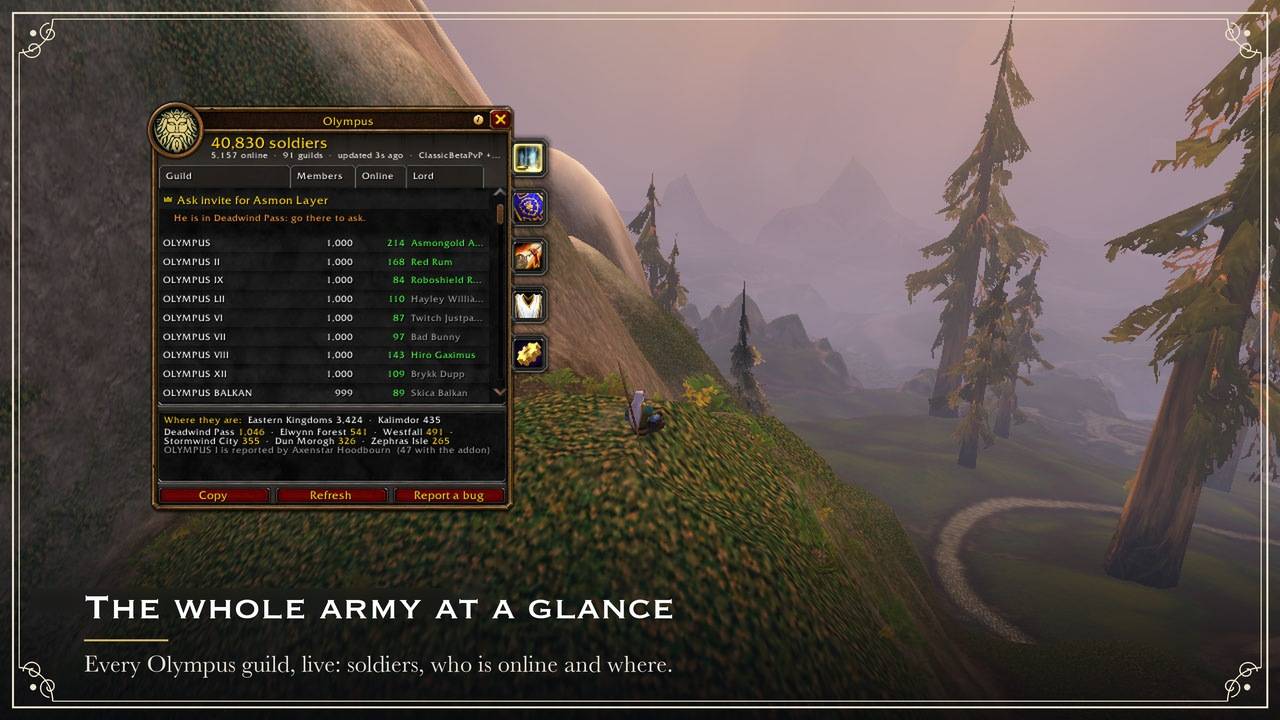
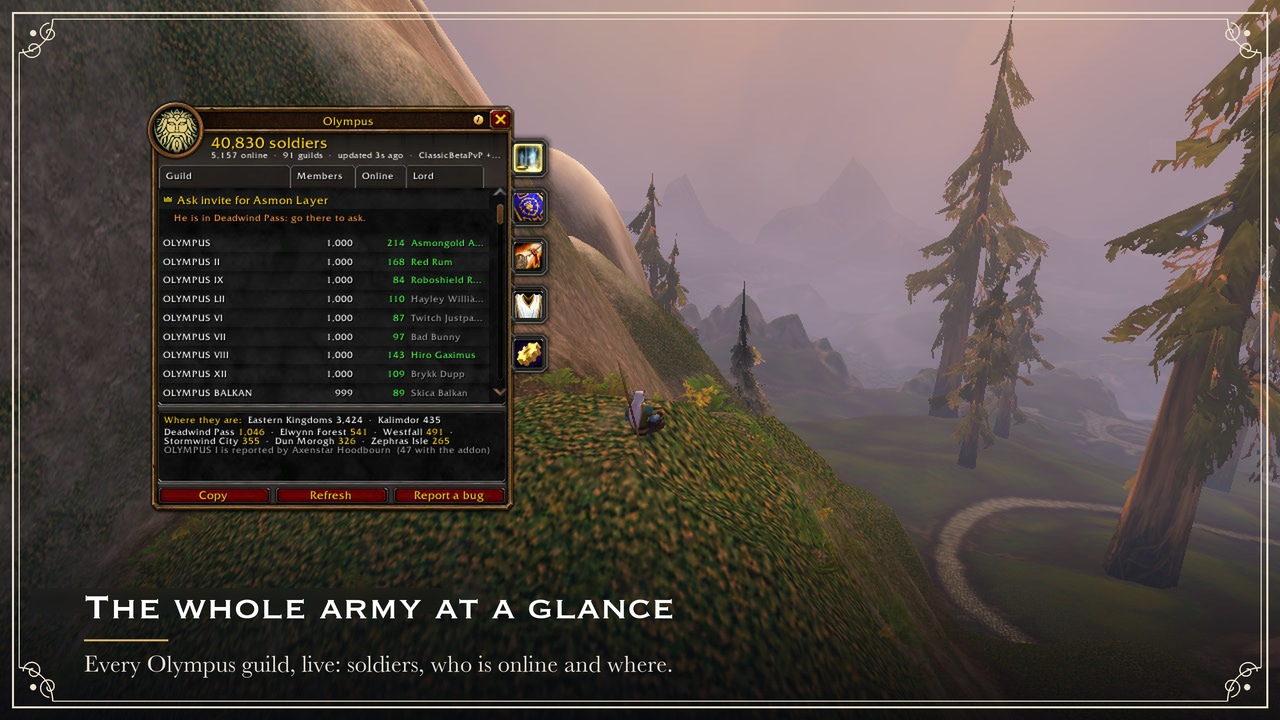
Every Olympus guild, live: soldiers, who is online and where.
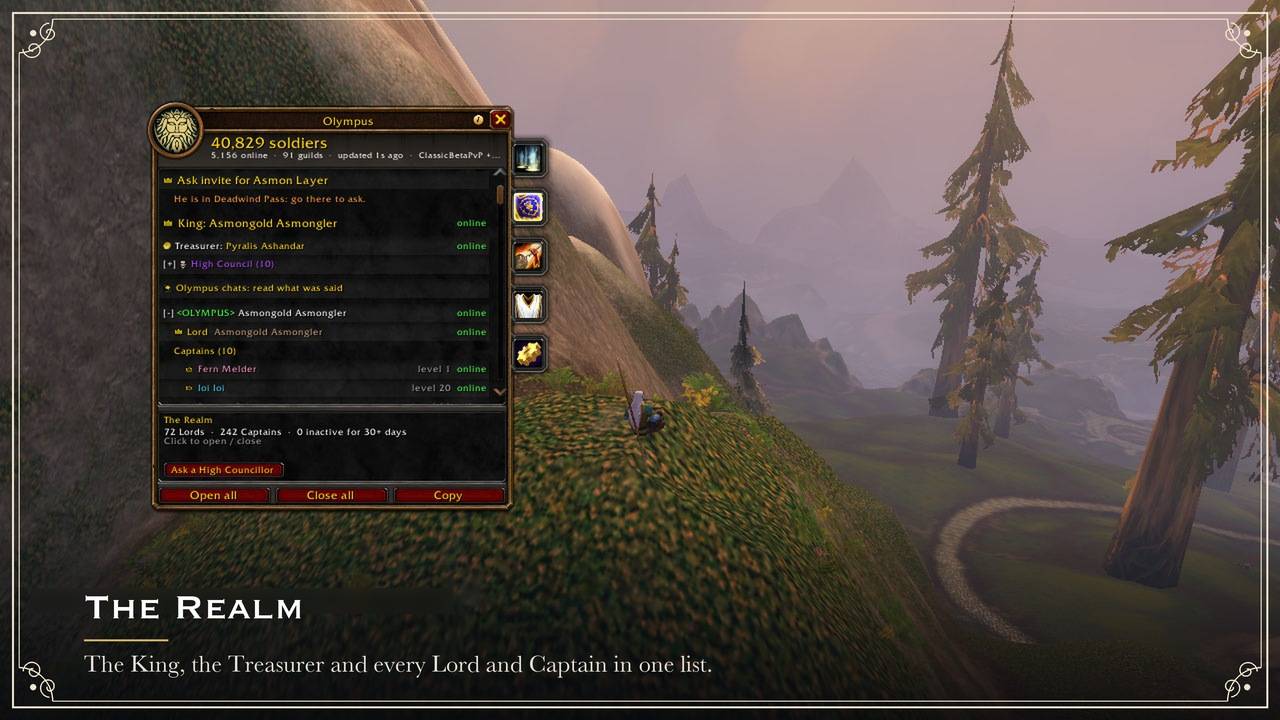
The King, the Treasurer and every Lord and Captain in one list.
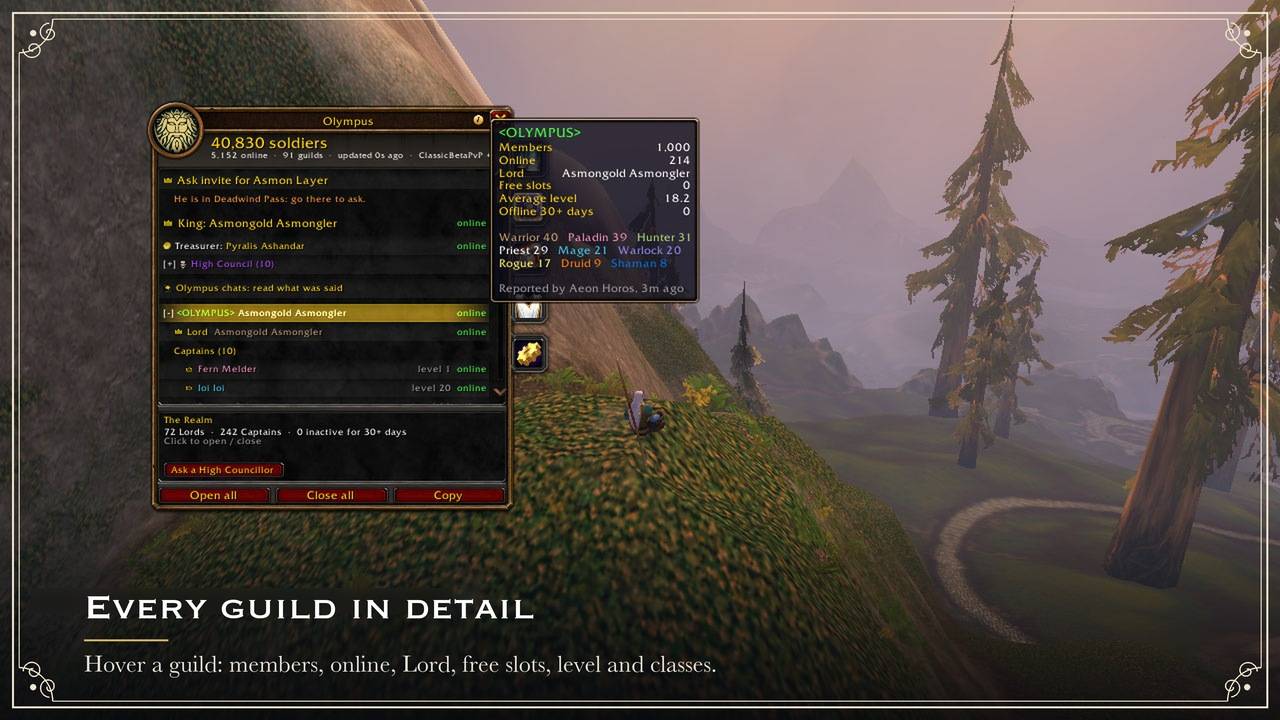
Hover a guild: members, online, Lord, free slots, level and classes.
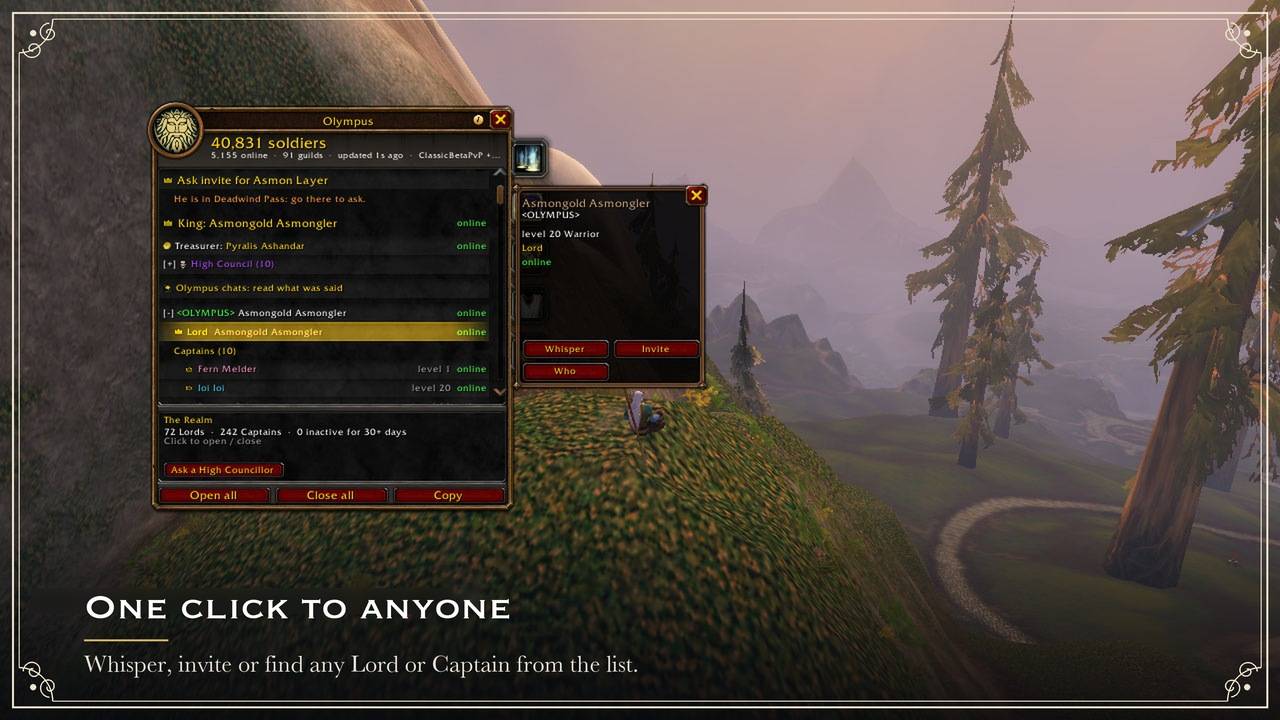
Whisper, invite or find any Lord or Captain from the list.
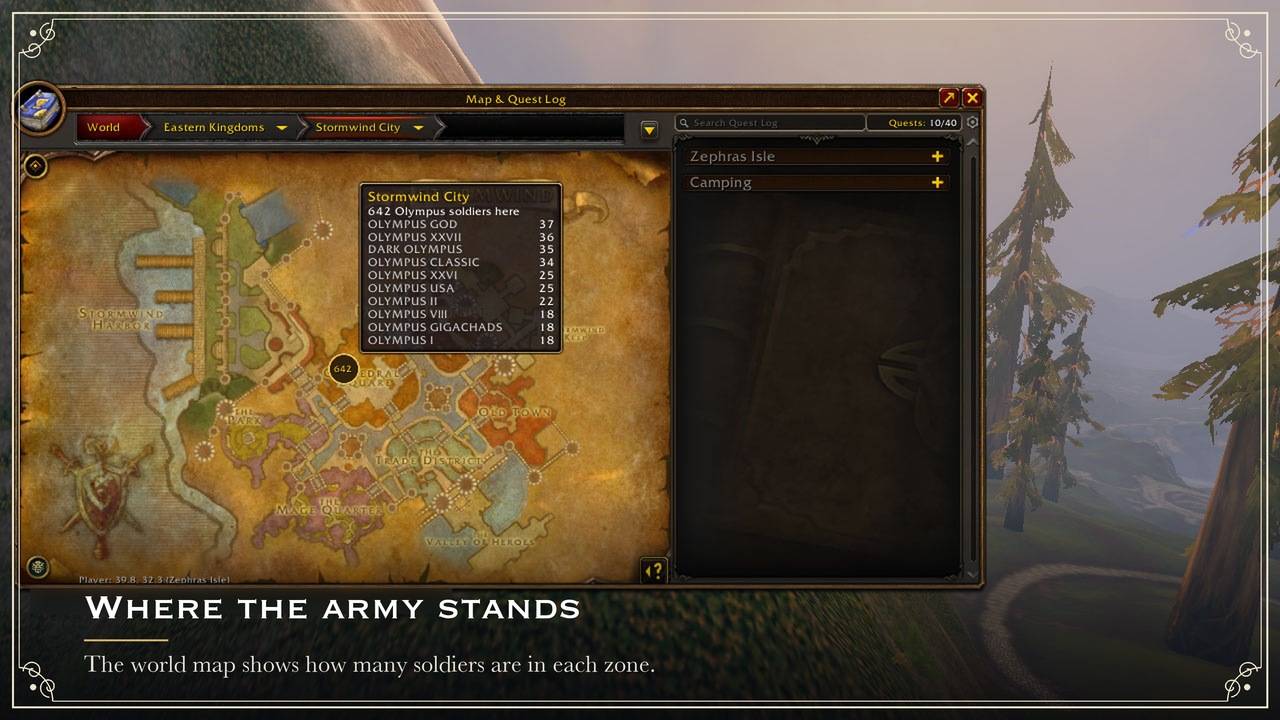
The world map shows how many soldiers are in each zone.
Description
Olympus
The whole Olympus army in one window, inside World of Warcraft: Forever.
Olympus is Asmongold's guild for World of Warcraft: Forever: Alliance, PvP ruleset, a place to find dungeon groups, organize raids, share class knowledge and build the guild together. It grew past 10,000 members during the beta. A WoW guild caps at 1,000 members, so Olympus is really a realm of many Olympus guilds. In game each player only ever sees the roster of their own guild. Nobody could tell how many Olympus guilds exist, who leads them, or where the army is.
This addon answers exactly that. It adds up every Olympus guild live, in a window that looks like Blizzard's Guild window and docks right next to it.
Status: built for WoW: Forever and running on the Forever beta (1.60.1), where the census already adds up reports from many Olympus guilds. Also tested on Classic Era (1.15) and Anniversary (2.5). Please report anything that looks wrong (
/oly bug).
Horde too. Olympus guilds on the Horde side use the same addon. The factions can't see each other's guilds, so each one gets its own census, channels, decrees and untabarded list: the addon picks yours from your character. On the Horde, the Crown is every Horde Olympus guild master and the officers of the Horde guild named exactly "Olympus", if there is one.
Recent versions
- 1.5.4: On Forever the census reaches every guild: a relay sends each reporter its snapshot whole, one reporter at a time and wrapped once (XOData, PRs #81 and #82), keeps census reports in pieces, sends an integration's presentation to its own guild alone and keeps one guild per reporter; a guild elects one reporter across sub-realms and lanes; the channel-text fallback the game blocked is gone. Guildmates on other Forever sub-realms are recognised by their roster row, and their names show plain in Olympus chat (XOData). Guild verifications cross relays (RW) and each ask is answered to the client that asked. A trusted client's other-family totals count again. The signed King's crown, presence and layer reach every relay's guilds, and he shows online from his guild's report. Layer-hop asks go to the asker's own guild over GUILD; a layer on another Forever sub-realm is listed apart with its server's label, a hop there finishes after the player logs out and back in (or restarts the game), the pending hop kept in the saved variables for 15 minutes, and the hop is marked experimental with a window that tells the flow at the first ask. Dues History skips a Treasurer known offline (ArithmeticLogic, PR #86). A message's pieces keep their assembly open while they keep arriving, up to five minutes (fiddlecat, PR #80). The Horde is kept apart: its relays and verifiers come from the signed list's Horde entries (no King by code off the beta's realms on either side), Horde totals no longer appear in the Alliance census nor the Alliance's in the Horde's, and on the Horde a guild named by one of the community's Horde-race banter words counts as an Olympus guild. The Church's public scores, the guild masters' nominations and the shared block terms reach every guild: each goes as one list (LS, Comm.SendList), which the relay collects whole and hands to each guild's reporter whole, where word by word a reporter got one to four of the Church's twenty-two rows and no master's list in more than one part; a relay sends a guild only a list it does not hold, the Church's rows once an hour, within shares of its whispers kept for the senders it can trust, so a member's flood never keeps them out and the census keeps most of its room. Every guild's verification clock starts again on the release night, with 7 days of grace where it was 48 hours. Modified builds: a client whose announced version is no release (its guild check-in or its Check version answer) is marked in the right-click menu ("modified build"), listed by
/oly buildsin a copyable window, shared among guild masters, officers and the High Council (one word per sighting an hour, kept with the reporter's name, 400 at most), and locked out: its words are dropped at the door, a relay takes no registration from it and forwards nothing to it, until it announces a release; a guildmate who answers none of three version checks over five minutes while checking in is marked silent to version checks, never locked. The relays keep the shared list too, pass it to one another and lock a listed character out until it announces a release to one of them, a clearing they share as well. The author's relay asks each locked client online to update every 30 minutes, with his usual ask by whisper (20 at most). Clients identify themselves to the relays with their version; after the date in the release notes relays serve only published versions, under rules the author's client hands them in game. - 1.5.3: Temporarily pause overdue verification notices for guild members. Guild master reminders, verification deadlines, approvals and High Council follow-up continue. Existing clients need this update to stop their local notice.
- 1.5.2: While no relay of the High Council answers, a guild's census report goes as its reporter's own text in the joined channel (which Forever delivers to everyone in it) and everyone takes it from there, so the census keeps moving in a realm family whose relays are offline; a relay's copy later is the same report again. The dev's second PvP character is a launch pin of that family. A family's store also drops another family's counts-only rows at open, a plain Forever realm's group row counts as its family's server (never "another" beside it), and its ruleset is its family's.
Every version's notes are in the GitHub releases. This page is the short one for CurseForge: the README has every section in full.
Who can use it
Only members of a guild with "Olympus" in its name, however it was spelled: OLYMPVS the Roman way, Olimpus, Olmps, Olympuz, Olympos, Olimpo and other misspellings count too (Olympia or Olympic do not), and a guild against Olympus ("ANTI OLYMPUS", "Olympus Haters") does not. The check is fixed in the code and cannot be switched off with a command. Outside an Olympus guild the addon joins no channel and hears nothing of the army, but for the author's signed list below, over its own guild. The only thing it offers there is the Join Olympus screen described below, and its own few addon whispers are the only ones it sends or hears there (1.1: which guild to ask, the answer, and your request, each to or from the one member concerned). Using it requires accepting its terms, the Olympus Accord, which shares your BattleTag with Olympus's staff only.
Approved guilds (1.1). A guild of Asmon's Olympus whose name the rule leaves out (it leaves
Olympian and Olympia out on purpose) counts as an Olympus guild once the author names it in his
signed list: the same list, signed with the same key on his own computer, that names the High
Council and the King's Steward, for one faction and realm group. No census vote counts, and nobody
else can add one. A few ship with the addon itself, so their members have nothing to paste: since
1.1, the Alliance's <OLYMPIAN>, and since 1.1.5 its <OLYMPIANS> too (only a new version takes one of those off). Its members' addons, no Olympus members
until they hold that list, take it over their own guild alone (the list only: nothing else is
read, and they send nothing). The first of them pastes it with /oly approved paste, or a click
on the Join Olympus screen's last line (the author
or a High Councillor hands out the signed text; it is checked like any list, so it can't be forged
or changed), and his addon passes it to his guild every 5 minutes. /oly approved lists the
approved guilds of your faction. A newer signed list without a guild ends it on every client.
Removed guilds (1.1.5). A guild the High Council removed from Olympus is no Olympus guild, whatever its name: its census, chats and marks are gone and its members' addon shows the Join Olympus screen. Its way back is an appeal to the council: once the author names it in his signed approved list, it counts again, with no new version. Until a player updates, the council's net-off word takes such a guild off the network live.
Not in Olympus yet?
First it asks the obvious question: "<Your Guild>? Disband immediately. What are you
doing?" Then it helps you get in. The Join Olympus screen uses the game's own /who to
find Olympus members online, groups them by guild, and whispers one of them a ready-made
request that you can edit ("Hi! I'd love to join Olympus. Does <Olympus II> have room for
one more?"). No answer? Try someone else picks a member you have not asked yet. Replies
are highlighted. It is rate limited, so nobody gets spammed.
Where to go (1.1): a search also asks one member's addon (an addon whisper, not a chat line)
where recruits should go, and its census answers: the guild the King opened the gates of
first, then the guilds with the most free slots, and a couple of their Lords and Captains
online (never the King). It names only what the census confirms: guilds two members' reports
agree on, and Lords and Captains two reports name. The screen lists them in that order, each
once /who found one of its members (the gates once a second member's answer agrees: one more
is asked), the guilds found with /who too, and a click asks one of those officers that /who
found in that guild, or another member it found there. Just before, their addon is asked
whether they take recruit whispers (again if it never answered): a member who set do not
contact (/oly nocontact on) is never offered, however many recruits ask him, and the
question closes before anything is sent. It stays one whisper per click, in your
own words (no dues line), 20 seconds apart. With it goes your request to the same member, so an
officer's addon shows it with Invite and Decline instead of a raw whisper. Members on
versions before 1.1 just get the whisper, as before.
What it does
Census: the army at a glance
- Every Olympus guild in one list: Guild · Members · Online · Avg lvl · Lord. Columns sort by clicking, like the Guild window.
- Total soldiers and online now across the whole realm.
- Where the army stands: top zones ("Stormwind City 742") and totals per continent (Eastern Kingdoms, Kalimdor), counted by the guilds whose census comes from a member who shares their zone (see Privacy, below).
- Hover a guild: members, online, free slots, average level, inactive members, classes online, top zones.
- Right after login (1.1) the header, the Census and the Realm say Rebuilding the census
after login: N guilds heard so far for about 3 minutes, while every guild's reporter answers.
The beta often loads an empty save: the army is not gone, and no
/reloadis needed. The line only waits: it asks nothing (no/who) and opens nothing. - An update line (1.1): when the author's own addon says on the Olympus channel that a newer
version than yours is out (he marks it once CurseForge lists it, never a build he is still
trying), a line at the foot of the Census, one line in chat once a session and
/oly statussay so. It is yours alone: nothing is sent and nobody is whispered. - Marked rows (1.1): a warning mark on a guild whose senders disagree (on its Lord or Captains, or on its size, by more than 5 members or 5% plus the 20 a minute a guild may gain or lose between their two reports), a question mark on one that a single sender stands behind. Its tooltip says which and who: check before calling a muster or opening the gates on it (the gates ask again, with the reason). A marked row can still be right, and the mark changes nothing that counts. Your own guild (your roster) is never marked.
- Asking to join (1.1): a recruit who asked you from the Join Olympus screen shows on top of
the Census, with their whisper. An officer (the game's guild invite permission) answers with
Invite (the game's own guild invite) or Decline (one whisper pointing to the gates'
guild while the King's gates are open, else naming your guild alone: never a guild the census
lists for its room, which two made-up characters could report), one click each; anyone else
can point them to an officer online. Dismiss sends nothing. In the Realm's Recruiting, one
click (or
/oly nocontact) sets your do not contact flag. - Search the census (1.1): a guild, a Lord, a Captain, a player of a guild's top five or one
seen online (the player shows under the guild's row), or a zone ("Stormwind": its soldiers
and its guilds, most first). Type recruiting (or
free 50) for every guild with room, most free slots first and the King's gates on top. - Tonight on this client (1.1): under the list, the most soldiers your addon saw online at once tonight and when, and (in its tooltip, and next to a zone you search) how each zone filled or emptied since. Counted by your own addon once a minute from the reports it already holds, starting about 3 minutes after login once the census is rebuilt: another player's client counts its own evening, and nothing is sent.
The Realm: the hierarchy
- War Room: members read their guild's records; its officers and verified War roles manage them. No cross-guild writes. Empty lists explain what is missing; role previews cannot act.
- The King, then every guild's Lord (guild master) and Captains (the officer rank
right below the guild master).
Each shows level, class and online or offline 3d. Long absences show in red
(
/oly warndays <days>, 3 by default). A Lord away (1.1): when a Lord crosses that, one chat line, once per absence: to his own guild's officers from their roster, and to the King, his Steward and his Hands for every guild's Lord, by the census's word (a guild that stopped reporting included, counted from its last report even when that showed him online). Never a popup, and nothing is done to anyone. - The Treasurer of Olympus (Pyralis Ashandar, chosen by Asmongold's chat) right under the King, with a gold coin next to his name wherever he shows, his tooltip and his lines in the Olympus chats included. Only that exact character of the guild OLYMPUS gets it: look-alikes don't.
- Members online under each guild: your own guild's from your roster, any other's from
/who. Opening a guild searches/whofor that guild alone (up to 50 of its players). Click a name to whisper, invite or/whothem. - The ranks of each guild with how many members hold them.
- Inactive members: offline 7+ and 30+ days, per guild. Your own guild's line (or
/oly inactive) opens the list by name (1.1): members offline 7, 14 or 30 days and more, with rank, class, level and last online, from your own roster, longest away first. A rank that may remove members (as in the game's Guild window: ranks below yours) removes one person per click, after a question that shows their rank and days away, a few seconds apart. There is no kick-all, and nothing is sent. - Mentors (1.1): a Lord opens Recruits and their mentors on that page (or
/oly recruits): his guild's lowest rank and whoever joined since he logged in. He clicks a recruit who is online, then one of his Captains, and says yes: one whisper to each from that click, the Captain told who to look after, the recruit told who to ask. The pair shows on his list (his client's alone); nothing goes on the channel. - Legates and correspondents (1.1.5): a guild master of an Olympus guild (not the King's)
has a tab of his own in the Throne's place, Guild (or
/oly nominees), laid out as the King's Hands page: + Name a legate (his target, or a name he types), his list (a click takes a title back, asked first), and a line per High Council department to name its correspondent. Since 1.2.4, up to 25 Legates and one correspondent per department (6 at most), members of his own guild only: the addon refuses a 26th Legate, a second correspondent for a department, one name twice and anyone outside his roster, and says why. By decision of the High Council, Legates and correspondents no longer receive the bronze dragon frame merely for their office: a Legate gets the Legate shield and a correspondent gets their department's shield. A signed High Councillor likewise gets their department shield without replacing the Council's silver frame. Earned honours remain round the portrait underneath the separate badge. Offices count only while verified in the guild. Existing appointees receive this explanation once; a real office or department change explains the new badge again. His own client sends the list on the Olympus channel; every addon takes it from that guild's master alone (proven as for his bronze wings: your roster for your own guild, two census senders for another), retains accepted bounded lists across logouts and offline periods, and drops the duty when a verified removal or change of guild master is seen./oly nominees legate <name>(the oldcenturionspelling remains an alias),/oly nominees correspondent <department number> <name>and/oly nominees remove <name>do it in chat. A confirmed correspondent also sees a Guild workspace for their own department. War and Justice duties apply only to their own guild, checked against its fresh roster and its current guild master's nomination; neither title grants federal powers. Artisanry links to its existing board and says its dedicated workflow is not available yet. Heraldry runs its own guild's Decrees, Agenda and musters; its current appointment grants no global Crown authority. A Church contact still needs a Church appointment for its private room and recruitment numbers. A Legate organizes an agreed raid group of 40 including themselves (up to 39 guildmates), coordinating attendance at events, raids and wars. Groups are optional and fluid, not exclusive partitions or restrictions on playing with another leader when theirs is offline. The appointed character receives a quiet explanation once per appointment. They can edit their own group's list, not another leader's; existing authorized officers retain oversight. Old oversized saved groups stay read-only until an authorized, confirmed replacement archives the original membership privately. No guild invitations, removals or native promotions happen automatically. An online member of the group has Invite online member to raid (1.4.0): one party invite on the Legate's click, only while the guild roster still lists that member. - Level race: the highest level players of the realm.
- Recruiting: the guilds that still have free slots, so new players go where there is room (the five with the most, then every one on a click, 1.1). When the King opens the gates of a guild, it tops the list: send new recruits there.
- Layers of your zone, named after the highest ranked Olympus member on each one ("Asmongold's layer"), with how many members are there.
Layer hop: join the King's layer without begging in chat
While Asmongold is online, the top of the Census and the Realm shows "Ask invite for Asmon
Layer" with his crown. One click (or /oly hop) and the addon does the asking:
- You must already be in his zone (a layer is read per zone): if you are not, the line says where he is and nothing is asked.
- It asks the Olympus players on his layer who can invite (alone, or leading a group with a free seat). Only a handful answer, picked at random on each player's side, so a crowd of askers is spread over many players instead of flooding one.
- It picks one of them, favouring players outside a group and with fewer recent invites. They
get "X wants to join your layer" with Invite, Not now and Always invite. No
answer or a no, and the next one is asked. Always invite invites the next ones without
the window while that player is alone or with only the addon's hop guests; clicked while they
lead a party or raid of their own, it also covers that group until it ends (1.1.5, GitHub
issue #50: the window came back with every request there). That group's permission is never
saved: a later group asks first again, after a
/reloadthe window asks once more, and/oly layerauto offends it at once. - The invite is accepted for you when that player is one the addon can vouch for (a member of
your own guild, the King, his Steward or Hands, or, once the author's signed list is on, a Lord
or Captain of
<Olympus>it names; never a census rank); anyone else's, and every invite while Blizzard's gamepad UI is on, waits for your click in the game's own invite window. The game moves you to the layer, and the addon takes you out of the group as soon as it sees the move (or offers a Leave group button if it can't tell).
Players alone on the King's layer are asked once per login: "Asmon is online and you are on his layer. May the addon invite the players who want to join, and take them out of the group once they are there?" with For Olympus!, Can't right now and Invite manually, and a Don't ask me again box. With For Olympus! the addon invites on its own (only while you are alone or with its guests, never into a group of your friends) and lets each guest go after 90 seconds: the guest's addon leaves the group, since only a click may remove someone.
Any other layer in the Realm tab's layer list works the same way: click it. Everyone who
shares their zone and layer (/oly location on) and said yes to layer help (1.1: the
first-open page, or /oly layerhelp on) helps: a player who keeps them private is never asked, since an offer would tell the asker where they are. /oly layerhelp
off stops the requests, /oly layerhelp on also forgets the answer to the King's layer
window, /oly layerauto on invites them without the window. Helpers must be in the same zone
as the layer they are on, and the King himself is never asked.
Continued in the README: Layer hop: join the King's layer without begging in chat.
Person details
Click any Lord, Captain, racer or inspected player. Their profile opens in the Olympus window, at
its size, with the census facts Olympus knows: level, class, zone, rank and status. Back
returns to the same list or Realm subpage, one opened from another first; Whisper,
Invite and Who stay on it (offline: Who alone). It is not the Blood Arena
companion's profile, and opening it sends no query. /oly profile Name (or Name-Realm) opens
one by name. Yours is My profile (1.2.4: /oly profile, the Realm, the Games tab, the Games
window's Edit my profile): Look (frame, title, nickname, emblem; one not released yet in
grey), Icons, Who sees what, Letters (the King's), and you as others see you.
Any soldier can reach the Lord of another Olympus guild in two clicks.
Continued in the README: Person details.
Right-click a player (1.1.2)
Right-click a player (the target frame, party and raid frames, a name in chat, the Who list, the friends list, a community roster) and the game's menu gets an Olympus part at the bottom:
- Their version: "Olympus 1.1.1 (out of date)", "up to date" or "not seen yet", and under it where it came from and when. Guildmates show up by themselves (their addon says hello to your guild), and so does a known version on the person card. Opening the menu sends nothing.
- Check version: for anyone else, one tiny addon whisper that their addon answers with its version and nothing else (a player once every 2 minutes, 6 a minute). Only 1.1.2 and newer answer, so no answer in 10 seconds can mean no Olympus, an older one, a dungeon or raid, or no Olympus guild (outside one the addon sends nothing). The author's check is his roll call to that player alone, which every version since 0.9.9 answers, and only after their yes to his roll calls.
- Ask to update (1.2.1: the author, the King and the High Council only; others' asks are
dropped), when they are behind the newest version your addon knows: nothing goes before you
confirm. On 1.1.2 or newer their addon shows a compact notice with both versions and where to
update; Read update opens a plain-language parchment letter: reviewed public release notes
and the safe next step. For an older one, confirming opens a whisper you send with the ask. One
ask per player a day, 5 an hour;
they see one a day at most, Don't remind me hides them for 7 days (on the beta, which forgets
addon data at login, these last until you log out), and a player they block (
/oly block) or ignore, or one the moderators took off, never gets through. The notice never names a version the author has not released. The author's pick sends his usual update window, naming the version he marked as out (/oly released). - Tell them about Olympus, when their addon did not answer: a whisper with a short invite and the CurseForge link (to get it, or update an old one) opens in Olympus's own window, for you to edit and send yourself. The click sends nothing.
- Ask for a bug report (the author alone, on a player running 1.1.2 or newer): their addon
opens a window of its own, never a game popup, saying the author asks for their Olympus bug
report, with See what is sent (the exact text, the same as
/oly bug), Send and Not now. Send goes to him alone, in game; Not now sends nothing; an ask from anyone else is ignored. On his side the report he asked for opens by itself in a window you can copy from (the sender and time on top, Select all), and stays in the Workshop's list; chat gets one short line. A report nobody asked for gets its line and the list only. Since 1.1.5 his addon keeps the last 30 reports in its saved variables: where the game loads those back, a logout or a/reloadloses none, and his list opens them in the same window, the date on top for one from an earlier day. The Forever beta, which forgets addon data at every login, still loses them at each logout or/reload. No other player's addon keeps any, and the Workshop's copy for Discord says only how many came, never who sent them or what they say. His version checks and his/oly statusopen in copy windows too. A window that opens by itself takes no keyboard, waits until a fight is over, and never covers a report he is reading. - In a dungeon, a raid or a match the game holds addon messages: the lines that send show greyed and say why. Not on yourself, enemies, offline names or Battle.net friends, and only while you are in an Olympus guild. It uses the game's own way for addons to add to its menus (a client without it gets no lines); no Blizzard function is replaced, and nothing opens the game's chat box.
Continued in the README: Right-click a player (1.1.2).
Decrees
| Decree | Who | What happens |
|---|---|---|
| Call to arms! | The Crown, the High Council, the King's Hands | Alarm for every Olympus guild: raid warning, sound, red marker at the caller's position for 5 min |
| Muster here | The Crown, the High Council, the King's Hands | Rally point: horn marker on the map for 30 min, soft alert |
| Royal decree | The Crown, the High Council | A proclamation with free text, as a raid warning to the whole army |
| Tabard inspection | The Crown, the High Council | Announces an inspection at the caller's position: wear your colors |
Continued in the README: Decrees.
Channels
Chat for the whole federation, carried by the addon over its hidden Olympus channel (no WoW channel number to join). Each channel is exclusive to a rank:
| Channel | Command | Who reads and writes |
|---|---|---|
| [Olympus] | /ol <text> |
every member of every Olympus guild |
| [Captains] | /olc <text> |
the Captains (rank 1) and Lords of every Olympus guild |
| [Lords] | /oll <text> |
the Lords (every guild master, the King included) and the officers of <Olympus> (their lines show to <Olympus>'s own members, and to everyone for the Hands the King's list or a Steward's own names, 1.0.0) |
Continued in the README: Channels.
The Chat tab (1.1.1)
The Olympus chats in a tab of the Olympus window, Chat, right after the Realm, like the chat
pane of the Guild & Communities window. Click the tab, type /oly talk (or /ol, /olc or
/oll with nothing after it), or Shift-click the minimap button: each opens the Olympus window
on its Chat tab, on that channel. /oly talk lords
opens it on [Lords]; the same command again closes the window.
When the side column of the new look runs out of room, its canonical tail continues from the
bottom of the window's left edge upward. Reading the right top-to-bottom and then the left
bottom-to-top always gives the same tab order; changing role or debug view never rearranges it.
Continued in the README: The Chat tab (1.1.1).
Role rooms (1.2.4)
Roles, after Guild: the rooms of the roles you hold, each line a logged whisper to each member.
Continued in the README: Role rooms (1.2.4).
The Board: who is looking for a group, and where (1.1)
The Realm tab links the Board (or /oly lfg): who in Olympus wants a group right now, from
what each player chose to share, and the King's week.
Continued in the README: The Board: who is looking for a group, and where (1.1).
Net-off (1.1): the moderators hide a character or take a guild off the network
The King, his Steward, a Hand (the King's list or a Steward's) or a High Councillor of the
author's signed list can hide one character for the whole army: Hide a character in
The Watch (the name or your target, then the reason), or /oly netoff Name: reason. Every
addon then hides that character on every Olympus surface: their [Olympus], [Captains] and
[Lords] lines (and the lines the Olympus chats kept), their pinned line, their decrees, their layer and hop offers,
their Vox Populi votes and questions, their requests at court, and (1.1, Konig's review) their
signups to the King's week, their flags and camps on the Board (the camps' map badges too),
their listing, answers and recipe lists as a crafter, and their elite border and nameplate mark
(they show as no Olympus player). The names their player already linked as alts are hidden with
them (alt links, below). The rest of their guild, and
the census, are not touched: one name stops the spam.
Continued in the README: Net-off (1.1): the moderators hide a character or take a guild off the network.
Alt links (1.1): one player, counted once
One player in three guilds used to swell the army by three and look like three donors. Link your alts and the census counts people:
The list is in the README, with the rest of this section: Alt links (1.1): one player, counted once.
The Throne (the King and his Hands)
A tab with a crown that only the King sees: the guild master of the guild named exactly "Olympus" (of his faction), and on the Alliance that very character, Asmongold Asmongler: the addon knows him by name, like the Treasurer. It opens on the Throne Room (the queue of his court while it is open, and the army's key), and holding court takes him there. Since 1.1.5 the Treasury has its own tab alone, and under the Throne Room are the King's guild's Legates: up to 25 explicitly appointed members, named by the King or real High Council. A council title does not automatically appoint a group leader. Each Legate organizes an agreed group of up to 40 including themselves in the War Room. Each of his tools lives where it belongs:
The list is in the README, with the rest of this section: The Throne (the King and his Hands).
The King's Steward (1.0.0)
The King's right hand, so that he needn't set everything up himself: a character the author marks as Steward in the High Council's signed titles list. On the Steward's client the Throne opens as the King's, with Acting for the King on top of every page, and in the King's name he:
- names and removes Hands of his own, beside the King's (the Hands button on the Throne): the King's list stays the King's, and his own is his;
- names and removes the treasury's keepers, and sets what the army sees of the treasury (its three switches), on the Treasury tab, and sees the whole treasury as the King does: the balance, the ranking, every keeper's shared book and the guild bank, whatever the switches (every keeper is told so before he shares his book);
- uses every tool of a Hand: the Agenda, Summon the Lords, the Royal Inspection, Vox Populi and the gates;
- sends the Crown's decrees for
<Olympus>(Royal decrees, Tabard inspections, Calls to Arms, Musters), whatever his own rank: every client takes them by his name,<Olympus>'s own members' too, and they never wait behind the flood guard, like the King's. For the other guilds his [Lords] lines are the Crown's, as the Hands' are.
Continued in the README: The King's Steward (1.0.0).
The Treasury (its keepers, the King, and the army when the King says so)
A tab with a coin for the treasury's keepers, for the King, and for every member once the King shows the army something of it (1.1: for every member on the Treasurer's realms, with the dues' button alone until then).
Continued in the README: The Treasury (its keepers, the King, and the army when the King says so).
Tabards: tabard inspection and the untabarded list
- Patrol: walk through the crowd and the addon inspects nearby Olympus members level 15 and up, one by one (about 28 yards). Younger players are never flagged. It records who wears a tabard, who wears the wrong one and who wears none. Players it could not see properly are never accused.
- Mark a player (with a note:
/oly mark complained about the rule) or a whole guild. - Gear seen (1.1, officers): target a player in range (about 28 yards) and click Inspect
gear on the Tabards tab (or type
/oly gear). The addon inspects him once, in turn with every other inspection (one at a time, never in combat), and keeps what he wears in your saved variables, under Gear seen: a click shows his items in their slots, each with its own tooltip. A Captain can check a raid signup's last-seen gear days later without pulling him again. Only the guild master and the officer rank right below keep gear; nothing is scored, compared or sent, and nobody is told how to play. - Shared among officers (1.1): what an officer's own inspections find (a player without the
colors or with another tabard, and one caught before who wears ours again) goes to his guild's
officers over guild addon messages, once a minute at most, and an officer's addon asks the others
for the day's findings once a session: after its login, or at his yes if that came later. Each
officer's Tabards page shows them with his own, the officer who found each in its tooltip, for a
day (his own later inspection of that player replaces it). Nothing is inspected more or sooner for
it, nothing goes on the Olympus channel, and only officers (the guild master and the rank right
below, by each addon's own roster) send or keep it. The King's untabarded list stays his: another
officer's finding never joins it, never rides in a Royal Inspection's report and never replaces
what the King saw himself. Off until you say yes (officers get its line on the first-open page, or
/oly patrolshare on);/oly patrolshare offstops it. - Per guild: "5 of 20 with problems".
- Untabarded (the "Wall of Shame" before 0.9.2): the players the Royal Inspection found without the colors are on the King's list, which only he sees. He alone can let the army see it (a switch on the Throne, off by default): then it shows on the Tabards page, quietly (no raid warning, no chat line, no sound), and it leaves every screen when he turns it off or stops repeating it. Nobody else can publish one. Players under level 15 are exempt: never flagged, never listed.
- Hover any player in the world to see their last inspection in the tooltip.
Loot notes (1.1)
Loot arguments restart every raid because nobody kept last week's decision: the Loot notes of
your guild keep it (on the Realm tab, or /oly loot).
Continued in the README: Loot notes (1.1).
Crafters tab (1.1.4)
"Who can make this?" is a chat scroll: the top-level Crafters tab turns it into one
whisper to a named crafter (/oly craft).
- When you open one of your professions, Olympus reads it (its skill, and the recipes you know:
their recipe and item ids, never a specialization tree) and asks once, in a window of its own,
whether to list it. With your yes the board of every Olympus player of your realm and faction
shows you: your name, guild, that profession and its skill.
/oly crafter offtakes you off at once;/oly crafter onlists every profession read again. - Ask who can make an item: shift-click it after
/oly craft(or type part of its name). The crafters listed who know its recipe answer by whisper, their addons by themselves; the page shows who can, with their skill and the item, and a click whispers one of them. (From 1.2 the tab's Ask who can make an item… button opens the request page instead: see below.) - A crafter's row opens a whisper to him and, on a click, the recipes he listed (hover one for the item). Search the board by crafter, guild or profession.
- It stays light on the Olympus channel and on your own messages: your listing goes once at login, every 45 minutes, and after a change (a profession listed or taken off 2 minutes after the last at the soonest, a skill up 10 minutes), so about 1.3 an hour while you play and 6 at most while you level. Your recipes go a part each 6 seconds (10 messages a minute at most), to two players at a time, and only while your addon's own messages (the census first) are few; the next player is told you are busy and clicks again a minute later.
- Nothing is crafted, ordered, bought or sold for anyone, nothing touches the auction house, and nothing is whispered for you: the whisper is yours to write. Old clients ignore the board.
Crafting requests (1.2)
On the Crafters tab, Ask who can make an item… opens the request page: search an item
(your own recipes, the recipe lists other crafters sent you, the answers to your /oly craft ask,
and gathered herbs, ores and leathers) or paste its link, choose the quantity and the details, and
publish the request to the board.
- The request is a card on the board of every Olympus player of your realm and faction: the item and quantity, your guild, who brings the materials, a price reference and your details. It only ever says open, taken, cancelled or expired: never who took it, the terms or how it ended.
- A listed crafter who makes it, or for a gathered material a player whose own Herbalism, Mining or Skinning skill shows it (read on his client, sent nowhere), sees it marked and hears it once. The first claim to reach the requester wins; everything after it (the terms, the delivery, the request's chat) is a logged whisper between the two of them, and on the guild-mediated rail with the treasury keeper who holds the goods and the gold. Olympus fills a mail or says what to send: you press Trade or Send.
- Once a claim wins, Olympus opens the request's own chat on both players' Chat tab, with the Olympus window in front. It waits as Olympus's other windows do: in an instance or Busy until you are out (its line waits on the Decrees tab), in a fight until it ends, and while you are typing in the Chat tab's box until you send or leave it; by then it opens only if the deal is still open. It stays while the deal is open; once the deal is over you may remove it, and the request's Open chat brings it back.
- The guild's 6% of a direct sale: the seller owes the guild 6% of each direct sale made through the board, in gold, by 3 days after the sale the buyer confirmed (a sale the buyer never confirmed and nobody disputed owes it all the same, 3 days after the delivery the seller recorded or the trade both addons saw). He mails it to the guild's fee receiver (the Treasurer's mail character) titled "Olympus craft fee" and the request (his sale's line fills the mail). Late, he is warned and takes no new requests until it is paid; a fee mail that comes back is owed again. Both parties' addons tell the Treasurer's characters of the sale. The Treasurer, the King, the High Council and the author see the debtors, the most overdue first, each with his step on the guild's ladder (late, a warning from his guild's Watch, his guild's decision up to removal), and every fee owed; the reminders to a debtor are the Treasurer's and the King's. A sale only the buyer reported, or a buyer's price above the seller's, waits apart until the Treasurer confirms it. Nothing here removes anyone. There is no guarantee fund yet.
The Missionary Church of Olympus (1.1.6)
Guild fullness (1.2.4). The correspondents' ranking counts the current correspondent's own management of that guild, not invitation points. Every new appointment starts afresh, including the same person returning after another correspondent. Only completed server UTC days score: all admitted native-roster observations must be above 950; any observed 950 or fewer breaks the streak. An unobserved or budget-capped day is unknown: no point and no erasure of the proved streak. Each qualifying day's observations are averaged first, then those daily means receive equal weight in the streak's tie-break. This is role-authenticated, client-observed evidence, not server certification or proof of continuous 24-hour fullness. Incomplete, filtered or stale rosters and census totals do not supply observations. The counter reuses the existing complete native roster cache and its captured server timestamp; it performs no second 1,000-member scan. Current verified correspondents send only live own-guild observations privately to a Church keeper; census-only appointments and retrospective correspondent claims cannot establish a day elsewhere. Authorized keepers privately relay only retained admitted observations, in requested batches of at most 150, rotating through the bounded cache. Contiguous same-count observations are coalesced without changing their count or mean. Seven days of relay evidence, 128 guilds and 20,000 runs at most are retained; older days fold into this client's durable checkpoint for that exact person and appointment, with at most 32 management checkpoints per guild. Checkpoints are never accepted from another client: a fresh client without older evidence keeps that history unknown. A predecessor's proof, a person's former appointment and an old unscoped guild aggregate cannot score the new management. Ordinary presence with an unchanged appointment does not reset its own proven streak. No new honour, gold rule or public/general-channel feed is added.
Continued in the README: The Missionary Church of Olympus (1.1.6).
World map
- Soldiers per zone on zone and continent maps, and per continent on the world map (none with Blizzard's gamepad mode since 1.1.5: see below).
- Decrees are round icons (the horn, the war cry…) where they were called, and the King's crown where he stands; the Board's camps (1.1) one fire badge per zone, with how many. Over a zone's circle they move just outside its edge, top right first, so its number stays readable; several around one circle each take a place of their own.
- The round Olympus button in the bottom left corner of the map switches markers (army per zone, decrees, camps) on and off.
- Every zone of the game counts, not only Azeroth's (1.1): on TBC Anniversary Outland's zones
get their circles, and Outland's total shows on the map above Azeroth and Outland. A zone a
new patch adds is found by itself the first time a guildmate stands in it; one the addon still
can't place shows as plain text in the census, and
/oly status(and/oly bug) lists its name under "zones without a map id".
Olympus Link: your Discord role (its own addon since 1.4.0)
Olympus Link lets players in game prove to the Olympus bot on Discord that a character is yours,
so the bot gives you your role. It is not part of this addon: since 1.4.0 it is its own addon,
Olympus_Link, kept and released separately, and it is not open yet. Without it,
/oly discord says it is not installed and nothing of it runs; everything else in Olympus works
the same. Installed next to Olympus, it loads by itself at login (the README's
Integrating with Olympus),
/oly discord and its line in /oly help are its own, and its own documentation says what it
does and what it sends.
Everywhere
- Copy: every tab produces a ready-to-paste text for Discord.
- Version letters (1.1.5): after the addon updates, once a version, a short letter on
parchment, in a window like the Olympus window's, says what changed in that version, in the
dev's own words. It waits until the privacy page is closed, and never opens in combat, in a
dungeon or outside an Olympus guild. Without saved history the letter stays quiet and unread.
If the beta forgets saved data, it cannot detect updates; manual history stays available
without repeat login popups. With retained data, updates can show once. The Olympus window's help button
(the i left of the X) keeps every letter: Version letters on its page lists them,
newest first, and a click opens one;
/oly letters(or/oly letters 1.1.4) does too. Nothing is sent: which letters you saw is kept on your computer, for your account. - Duty letters (1.4.0, not sent yet): the King's letter for each office a character holds, the
first time it holds it; a guild master's has a live checklist of whom to name, reopened from his
Guild tab. The author turns them on at the launch; until then only he and the King preview them
(the Workshop, the Realm). Read ones stay under My profile > Letters, and
/oly dutiesreopens them. Nothing is sent. - What this client saw (1.1, the Decrees tab and
/oly log): a log of the acts your addon took while you were online (decrees, the gates opening and closing, pardons, the King's visibility switches for the treasury and the untabarded list, and the shared block terms' edits), each with the sender's name as the server stamped it, the newest 300. So "who opened the gates" has an answer after the message is gone. Only acts heard from whoever did them: a repeat or a relay of someone else's act (the Treasurer's book carrying the King's switches, another editor's list carrying a block term) and a state caught up on after a later login are not written. On the King's screen, while the council's names are hidden there (his stream), every sender but the King shows cut short, and the shared terms' words too, as everywhere on his screen. Kept on your computer only, never sent, never in/oly bug; a record, not proof (anyone can edit their own saved files). The Decrees tab lists it with a search box and a copy;/oly log [n | word | copy | clear]in chat. - Backup (1.1):
/oly backupputs one text in the copy box (keepers also have Copy a backup of your book and settings on the Treasury tab): this character's book of the treasury (its opening, its 500 lines and its sums of all time, each giver's weeks of the dues and each week's amount with them; on the Treasurer's characters his mail character's book too), the King's switches and keepers on his client or a Steward's, and your settings (sound, map, minimap, borders, nameplates, Vox, your chat windows and mutes, the players you blocked), and (1.2.4) your own signed halves of the Bones games and duels that count (this month's and last month's Bones games, the newest 400, and your newest 200 duels; never the other player's: a Bones game's comes back when your addon asks him, a duel's from his repeats or the clerk's carousel). Keep it in a text file: when the beta wipes the saved variables,/oly restoreopens a box to paste it back, says what it restores and waits for your yes. Clipboard only: nothing is uploaded or sent anywhere (a keeper's book goes out afterwards as it always does). A book goes back only into that character's (merged with what it wrote since, nothing counted twice), a text that was cut or changed is refused, and it never holds your yeses to sharing (the addon asks them again). It never holds or sets the channel key, on anyone's character: a text someone else made would move your guild to another channel (your officers hand the key out in game as ever, or/oly key); the confirm says a key in a text is left out, and warns when it is one your guild replaced. The players it would block are named one by one in the confirm (30 at most) and added only on your yes. - Search: a box on top of the Census (guilds, Lords, Captains, players, zones, recruiting),
the Realm (guilds, Lords, Captains, members seen online), Crafters (crafter, guild or profession), the
Tabards (inspected and untabarded players, by name or guild), the Treasury (donors in the
ranking and the book, and since 1.1 the bank's items), the Decrees (since 1.1: the log of what this client saw) and the Chat tab (since 1.1.1: a name, a guild or words of a line). Any case, accents too; only what matches shows, under the headers it belongs to (a Captain under his guild, opened
for you, a page of guilds at a time), with an x to empty it. Each tab keeps its text until
you log out or
/reload; a guild clicked in the Census opens in the Realm with its box emptied. It only changes what the list shows: Copy still gives everything, and nothing is sent. - The window opens from
/oly, the minimap button, or the round button in your guild window: the old Guild tab or the new Guild & Communities window, whichever one you use. Shift-click the minimap button for the Chat tab (1.1.1, above). - Next to Forever's Guild & Communities window it takes that window's look: icon tabs down the right side, its rows, column headers, buttons and member card. When the tabs do not all fit down that side, the canonical tail continues from the bottom of the left edge upward. Reading the right top-to-bottom and then the left bottom-to-top always gives the same tab order.
- Blizzard's gamepad mode (Forever's controller interface): Olympus asks its questions in
windows of its own instead of the game's popups, which Blizzard's gamepad code blocks (and
freezes) when an addon opens one. With mouse and keyboard, the game's popups as always.
Since 0.9.8 it also leaves the game's own frames alone there: no quiet
/whoon its own (Refresh and Find Olympus online still search, and so does the King's click on his Throne's /who line for his key rotation, 1.1: the answer shows in the game's Who list), and the Issue Reporter is the game's to show. Since 0.9.9 it leaves the world map alone there too: no zone counts, decrees, crown or guildmate dots on it (the minimap keeps the crown and the dots), because each of those went through the map library into the gamepad map's own state; since 1.1.5 its continent totals and Olympus button go too, the gamepad map being the game's alone. If the game still says it blocked Olympus, a/reloadclears it; to tell us what it was, open the Olympus window, press its help button (left of the X), then Report a bug. The gamepad gate (1.1.5). Every way Olympus reaches into the game's own windows is listed in one place and asks one gate before it acts, so a new feature can't reach them with the gamepad UI on by accident. With the gamepad UI on, Olympus registers no typed command (/oly,/olympus,/ol,/olc,/oll): the game's chat box runs a command's function and then closes itself in that function's name, which is the very call the gamepad UI refuses. Nor does it put its round button in the game's guild windows, where the gamepad cursor would select it. Open Olympus with the minimap button (it shows there even when/oly minimaphid it), and use its window (its help button: Report a bug). Switched to the gamepad UI in the middle of a session (Options, Gamepad), Olympus steps back from the game's windows on the next frame: its marks, borders and buttons there hide, its tooltip lines and menu lines stop, and what the game keeps until a/reload(the commands typed with mouse and keyboard among it) is told once, in Olympus's own window, with a Reload button. Back to mouse and keyboard, it all comes back without a/reload. - English, Portuguese, Spanish (Spain and Latin America), German, French, Italian and Russian,
every line (since 1.4.0; the Answers of 1.1.2 stay in English), the Agenda's day words
included. It follows the game language, and only the text on your screen changes: nothing
sent between players does, and a line the addon whispers to another player stays English.
/oly statusshows the language in use.
Other addons: the Olympus API (1.2.4)
Another addon can read, with your permission, what Olympus already shows you: the Wanted list
and its bounties, the public rankings (the Slayers, the Church's top three, the games the King
made public, the donors' top three while he shows the Treasury's ranking), your own frame and
title, your Olympus guild, rank and role, whether a player your game shows you now is in an
Olympus guild, and the King's presence as his lines and the Realm tab
show it (online, the zone they name, his crown while he shares it, whether you are on his layer,
and his zone's layers with their "~N with Olympus" counts while you are there). The King's
presence, the player-sighting searches and the profile presentation below are reserved for addons
the Olympus team has authorized; any other addon is asked only about the rest. An addon that asks gets its own line on the privacy
page and nothing until your Yes there or the page's deliberate Authorize all action
(/oly privacy changes it at any time; Keep current choices grants nothing). Ordinary reads
send nothing. A compatible addon can also let an authorized player start a short exact-name
last-seen search, maintain a bounded set of exact-name searches while a visible tool session the
player started remains on, or start a five-minute hostile-area search for one selected zone or
micro-map, which may be widened to labelled not-hostile players outside Olympus guilds (or with
none), never the observer's group. Its visible Start declares selected/configured names and any included list source. A
handle has one area at a time: current map or an owned exact-result map until its row expires, then cancel
and wait 60 seconds to rotate. Its UI shows map/position and Stop/Off; it never opens the map or
resumes after No or /reload automatically. Olympus sends each exact Name-Realm sought, or the
selected map ID, to the network.
Members who separately enabled Guild tools: player sightings may answer privately from a
current target, nameplate or mouseover observation or one their client kept only in memory after
the game directly showed that player. While that permission and location sharing stay on, each
client keeps at most 64 observations for up to 15 minutes, never saves them, and clears them on
permission, location-sharing or network opt-out. Each observer can contribute at most six hostile
observations to one area search and the requester keeps at most 48 distinct players. An exact-name
answer gives that observer's name and guild; a public area row omits both. If WoW returns a native
point for the visible unit, or the same identity as a party or raid unit, the result carries that
target point. Otherwise it carries the observer's nearby encounter point, rounded to 0.1% of the
map. The kind, observation time, expiry and layer are labelled, so this is last-seen information,
not continuous tracking. Requests and answers expire, and turning either permission off cancels or
withdraws them. On an explicit action the requester can show sanitized area rows with Olympus-owned
world-map pins; they clear on cancellation, expiry, permission revocation or /reload. Olympus
can also host one bounded profile presentation. A current signed issuer or the addon's author opens it; an admitted
member may enable only Olympus's fixed style and pre-approved caption on themself. It accepts no target, asset path or arbitrary text,
and No closes that addon's state. Olympus
never gives another addon the census, other players' private data or Olympus's keys; each addon gets
its own bounded copy. What that addon then does with a copy is up to it, so authorize only addons
you trust. After the update it loads once the game restarts (not on a /reload).
Continued in the README: Other addons: the Olympus API (1.2.4).
Install
Easiest: install Olympus Guild from the CurseForge app or WowUp. It installs in the right place and keeps it updated. For Forever, pick the Forever (beta) installation of the game in the app, not Classic Era.
By hand:
- Download
Olympus-x.y.z.zipfrom the Files tab here (or GitHub Releases). - Open your World of Warcraft folder. On Windows it is usually
C:\Program Files (x86)\World of Warcraft\(on Mac:/Applications/World of Warcraft/). - Open the folder of the game version you play. For the Forever beta it is the one with
beta in its name (for example
_classic_beta_); Classic Era is_classic_era_, TBC Anniversary is_anniversary_. - Go into
Interface\AddOns\(createInterfaceandAddOnsif they don't exist) and extract the zip there, so you end up with...\Interface\AddOns\Olympus\Olympus.toc. Careful: Windows' Extract All adds a folder named after the zip (AddOns\Olympus-0.8.1\Olympus\...). If that happens, move theOlympusfolder up intoAddOns; the game only loads it fromAddOns\Olympus\. From 1.3.3 the zip holds three folders:Olympus,Olympus_Arena(the Blood Arena's screens, loaded only when you open the arena) andOlympusSiteAggregate(the deliberate, no-upload website reporter). All three go inAddOns, and all three move up if Extract All added a folder. Keep them together and update them together; both additional folders need Olympus enabled. - Restart the game. If the addon list says out of date, tick Load out of date AddOns.
The addon only shows live data: guilds appear as soon as one of their members with the addon is online (give it a few minutes). There is no demo mode any more.
One member per guild is enough for that guild to appear for everyone. The more guilds have at least one install, the more complete the census gets.
For officers: seal the channel (recommended)
Type once, with a secret the Olympus officers agree on:
/oly key <secret>Your guildmates with the addon receive it automatically through guild chat. From then on the Olympus channel has a name and password derived from the secret, and outsiders can't find or join it. Share the same secret with the officers of the other Olympus guilds (for example in the officers' Discord), so all guilds meet on the same sealed channel. Since 1.1 the King (or his Steward, for him) can also rotate the army's key from the Throne: his new key reaches the Lords and Captains online of the guilds he picks whom his own /who saw in them by whisper, and their guilds over guild chat, never on the Olympus channel.
If a guild was accidentally given a different private key and lost the shared census and
Olympus chat, one of its current officers can use /oly key off. The recovery instruction stays
inside Blizzard's guild channel, returns updated guildmates to the public Olympus channel, and
retires the old private key so a delayed message cannot split them again.
How it works
- Every guild member can read their own guild's roster: name, level, class, zone, rank, online and last seen.
- Members with the addon find each other through hidden addon messages in guild chat and elect one reporter per guild. The first name alphabetically wins, and every client computes the same answer. Each realm of WoW: Forever has a hidden channel of its own, so a guild with members on several realms elects one reporter on each realm (since 1.0.0).
- The reporter sends a compact summary of its guild about every 3 minutes on the hidden Olympus channel.
- Every client adds up all the summaries: that is the census.
On WoW: Forever these words travel by whisper through the relays (the signed High Council's, the King's, the Treasurer's and the author's characters). Since 1.5.4 a client identifies itself to them with its version; after the date in the release notes they serve only published versions (an older client still gets the census from an updated guildmate), under rules the author's client hands them in game.
The addon itself talks only in game, through the game's own addon messages: it has no server of its own, and nothing it sends leaves the game. One exception is the Olympus Companion app, only if you install it (Privacy, below). Olympus Link (above), the Discord role, is its own addon, not part of this one: it goes outside the game only if you install it and choose to link a character, as its own documentation says.
Realms vs layers. A realm (ClassicBetaPvP, ClassicBetaPvP2…) is a separate world with its own guilds; layers are copies of a zone inside one realm. Guilds on the same realm always see each other, whatever layer they are on. The hidden channel stays inside one realm (PvP and PvP 2 each have their own), while guild chat reaches a guild's members on both. So since 1.0.0 each realm elects its own reporter for a guild, and the High Council's lists cross over through guild chat. Realms whose guilds span each other share one census and one realm key: PvP and PvP 2 on the beta from the start, and any realm your guild turns out to be homed on. Alts on any other realm keep their census apart, and the window shows which realms you are counting.
Privacy
The addon itself talks only through the game's own addon messages: it has no server of its own, and what it sends stays in the game. One exception is the Olympus Companion app, only if you install it: its own bridge addon takes your character's name and BattleTag and the Olympus and guild chat lines your client shows to Olympus's server, for its staff alone (the Companion's rows below). Olympus Link, the Discord role, is its own addon (Olympus_Link), not part of this one: nothing of it goes out unless you install it and choose to link a character, or to confirm other players' links, and its own documentation says what then goes where. Your name is on every message (the game adds it). What goes where:
The table is in the README, with the rest of this section: Privacy.
Security and trust
What the author's character can see. The author (Faladoriel Skylance) has a Workshop tab
to keep the addon healthy. It reads the install counts every guild report already carries,
plus the addon versions of each guild's users. On demand he can ask for a roll call: each
addon online (a share of them when the army is large) answers, by addon whisper to him only,
with its version, game client, and whether it joined the channel, is its guild's reporter and
has the channel sealed with a key. Nothing about the character (no guild, level or class), no
position, no chat, nothing else. He may ask one player alone the same way, by addon whisper:
the same answer, and each addon answers him once every 4 minutes at most, however he asks.
He can also ask a player on an old version to update: a fixed window with the two version
numbers and nothing else. Only his character on his realm group
can do either: every addon checks the sender's name, which nobody else can carry. Since 1.1
a roll call is answered only after the player's yes (the first-open page, or /oly rollcall on),
and /oly rollcall off refuses both. Since 1.1 your addon also reads the released version his addon
announces on the channel (his presence): newer than yours, the Census, /oly status and one chat
line a session tell you to update. That is local to your client, sends nothing, and shows
whatever /oly rollcall says. He runs a new build on his own PC before it is published, so his
presence names only the version he marked as out with /oly released [version] (his character
only; the Workshop tab shows it) once CurseForge lists it, never the build he runs, and never one
newer than that build; addons before 1.1 read none of it. The addon's error catcher keeps only Olympus's own errors (for
/oly bug), never another addon's. For the store's screenshots he has a photo mode (/oly
photo, his character only): on his own screen it fades everything but Olympus and the world
map to invisible, and gives every frame its look back on the second /oly photo or a
/reload. Never in combat, not with the gamepad UI, not on a screen of more than 1000 frames
(it says so and leaves them as they are), and nothing is sent to anyone.
To check the elite borders his own rank doesn't carry, /oly borders test <tier> (his
character only) shows one of the borders round his own portrait, and on his target frame when he
targets himself, and its nameplate mark after his own name on his player frame and on every
friendly player's nameplate (/oly borders test member: the member's star alone), on his screen
alone until /oly borders test off or a /reload. It follows the borders' and the marks' own
rules (none with the gamepad UI, made out of combat), and nothing is sent.
The addon is plain Lua running on each player's computer, so anyone can edit their own copy. No addon can prevent that. What this one does is check what every copy sends; what a few characters working together can still reach is said plainly further down (What colluding characters can reach):
The list is in the README, with the rest of this section: Security and trust.
What colluding characters can reach
Votes are counted per sender name, and nothing the server tells an addon proves which guild a sender belongs to: a census report is its sender's word. So a few characters working together can still reach the following today (1.0.0); each outcome was checked against this version's code.
The list is in the README, with the rest of this section: What colluding characters can reach.
Built for a crowd of thousands
- One summary per guild about every 3 minutes, not one per player.
- In a full guild only the members who could be elected keep saying hello; the rest go quiet.
- Layers are announced by officers plus a stable 1 in 8 sample who share them, every 10 minutes (the King's alone every minute, while his crown shows: one client, one message a minute).
- A layer request goes out once; only about 6 players answer it, each by a whisper to the asker.
- Messages are spaced 1.2 s apart, below Blizzard's addon message limits, and alert sounds play at most once every 15 seconds.
- Chat has its own short lane: a line goes out within about a second, and while reports are waiting it never takes more than every other message slot.
- The Board (1.1): a flag is repeated every 10 to 30 minutes (less often the fuller the Board), and a Board's ask is answered by whisper, by about 40 flag holders at most.
Commands
| Command | |
|---|---|
/oly |
open or close the window |
/oly realm · /oly decrees · /oly tabard |
open a tab |
/oly loot |
your guild's loot notes and points on the Realm tab (its officers write them; not a bid window) |
/oly craft [item or name] · /oly crafter on|off |
who can make it (the top-level Crafters tab: shift-click an item after /oly craft); list your professions read so far, or take them off |
/ol <text> · /olc <text> · /oll <text> |
write in [Olympus], [Captains] or [Lords]; alone (/ol, /olc, /oll): open the Chat tab on that channel (1.1.1) |
/oly mute olympus · /oly mute captains · /oly mute lords |
hide or show a channel in chat |
/oly chatwindow tab · /oly chatwindow <number or name> [olympus|captains|lords] · /oly chatwindow main |
the Olympus chats in a chat tab named Olympus (without the channel's name; it says how to make the tab), in another chat window (with Chattynator, one of its tabs, by name), or back in the main one |
/oly privacy |
the first-open page again: what the addon shares, and your Yes or No to each (1.1) |
/oly chat on|off |
the Olympus chats on this client; off, nothing is sent or shown (1.1: off until you say yes) |
/oly talk [olympus|captains|lords] |
open or close the Olympus window on its Chat tab, on that channel; also /ol, /olc or /oll with nothing after it, or Shift-click the minimap button (1.1.1) |
/oly helpme [text] (or Ask a High Councillor on the Realm tab) |
ask the High Council (the moderators) for help: it goes by whisper to up to three of them online who take requests |
/oly hop |
ask for an invite to the King's layer (while he is online) |
/oly lfg · /oly lfg dungeon|raid|pvp|layer [note] · /oly lfg off |
the Board (1.1): who is looking for a group; raise your flag (a box with your note first) or lower it |
/oly week |
the week on the Board and Decrees: army and own-guild Agenda entries for 7 days, alongside your guild's calendar; eligible schedulers see separate army and guild buttons ("Sat 20:00 Raid night") |
/oly location on · /oly location off |
share (or not) your zone and layer on the Olympus channel |
/oly borders on · /oly borders off |
elite borders round the portrait of your target, focus, party members and your own frame (Forever): the game's gold wings for the King, silver wings for the High Council and Max's bronze wings for Olympus guild masters (none for a character or guild the moderators took off, net-off). Legates and correspondents use separate verified office shields instead of the old wingless bronze role frame; signed High Council departments use the same shield family without replacing silver, and earned honours remain. Since 1.1.5 the old rank borders (gold for Lords, silver for Captains, bronze for Raiders and Veterans) are gone, and any other member has the nameplate star alone. On by default, hidden with the gamepad UI. Off, the nameplate marks go too |
/oly nameplates on · /oly nameplates off |
a small mark left of the name on friendly players' nameplates (Forever; friendly nameplates show with Shift+V): the game's gold elite mark for the King, silver for the High Council, bronze for guild masters, the verified Legate or department shield for an appointee, and a star for any other member of an Olympus guild (none for a character or a guild the moderators took off, net-off); on by default, hidden with the gamepad UI and with /oly borders off |
/oly chatmarks on · /oly chatmarks off |
1.1.5: the verified mark before a player's name in the game's own chat (channels, say, yell, emote, party, raid, instance and whispers; guild and officer chat the office marks alone, never the star): the King's gold dragon, a High Councillor's silver then their icon, a guild master's bronze, the Legate or department shield for an appointee, and the star for any other member your addon can check. Olympus's own lines carry none. Through the game's own name filter, so the name's link, right-click and /r stay the game's; on by default, hidden with the gamepad UI, and a councillor's on the King's screen while the council's names are hidden |
/oly block <name> |
ignore a player |
/oly filter add|remove <word> · /oly filter |
block terms: hide, on your screen, lines of addon text (Olympus chats, writs, decrees, Vox) with a word; the list (1.1) |
/oly alt add Name · /oly alt remove Name · /oly alt |
link a character of this account as your alt (log it and say yes there), take a link apart, or see your links: the census and the treasury count you once (1.1) |
/oly sound · /oly sound on|off |
every alert sound on or off |
/oly bug |
copyable bug report (also: the help button left of the window's X, then Report a bug) |
/oly status |
diagnostics in chat (1.0.0: whom your addon knows as the King's Steward, and the lists of Hands it holds, whose each is; 1.1.2: the author's in a copy window) |
Every command in the README: Commands.
Reporting a bug
While the addon's author is online, the Report a bug window also has a Send to Faladoriel Skylance button: your report goes to him in game, by addon whisper, and nowhere else (once every 10 minutes at most, unless he asked for it). It first checks he is really there: the rest follows only once he answers, and you are told when he got it.
Since 1.1.2 the author can also ask you for it from the right-click menu: your addon shows you the exact text first, in a window of its own, and sends nothing without your Send.
Type /oly bug (or press Report a bug), copy the text and open an issue on GitHub. Errors are
also saved in WTF/Account/<ACCOUNT>/SavedVariables/Olympus.lua.
Credits
- Asmongold and his team (Daily Dose of Asmongold, Max, Heuto, Fernmelder and the High Council), for making Olympus the army's addon and for the ideas.
- Security reviews: Konig, bjess9 (jess), lordjumper and Fadirstave, who read the code and showed what an attacker could do.
- Code and ideas: RoyLeviGit (Olympus chats in their own chat window), Artz (hiding the Issue Reporter), bjess9 (CI and the shared checks), hypertectonic (Chattynator's tabs), Bernardo Costa / Costafitness (exact layer-hop confirmation and stale-request regressions, adapted from PR #51), Rick-laboratory (bounded transport, cancellation and admission regressions, adapted from PR #52), HTX (the Board's group listings, applications and invites, adapted from PR #62), XOData (a relay's snapshot sent whole to each reporter and wrapped once, and guildmates on other Forever sub-realms recognised, from PRs #81 and #82), ArithmeticLogic (Dues History asks that skip a Treasurer already reported offline, from PR #86), and fiddlecat (chunk assemblies kept alive while their pieces keep arriving, from PR #80).
- Feature requests: Fernmelder, whose 39 posts became 1.1 (the Fernmelder release);
shenanigans_ (the nameplate marks), Valdericht (
<OLYMPIAN>) and Pyralis Ashandar (taking donations). - Art: Max (the bronze elite borders, drawn over the game's own; the winged one remains the guild masters').
- Reports from the field: Riukensei and PartyRockAce (the gamepad UI; PartyRockAce's report of the world map blocked in controller mode, fixed in 1.0), Ignitheus (whispers to Forever names), Pyralis Ashandar, the Treasurer (the treasury and the guild bank), the player who told us WoW had handed him the channel, and, for the census on Forever, knomegnome (the relay snapshot's queue loss, #85), fiddlecat (#79's measurements and the blocked channel text), ForMooAz (#79's relay captures) and Legis (the 1.5.1 relay key collision, on CurseForge).
- Everyone who reported a bug, tested in game or asked for a feature.
License
MIT. Not made or endorsed by Blizzard Entertainment. The Olympus emblem belongs to its owners and is used for the community.
Sources for the Olympus description: the Olympus Discord welcome message, Prism on X (10K+ members in the beta), Dexerto.
Source code: https://github.com/dnl-gentile/olympus-addon
Olympus Guild Team