


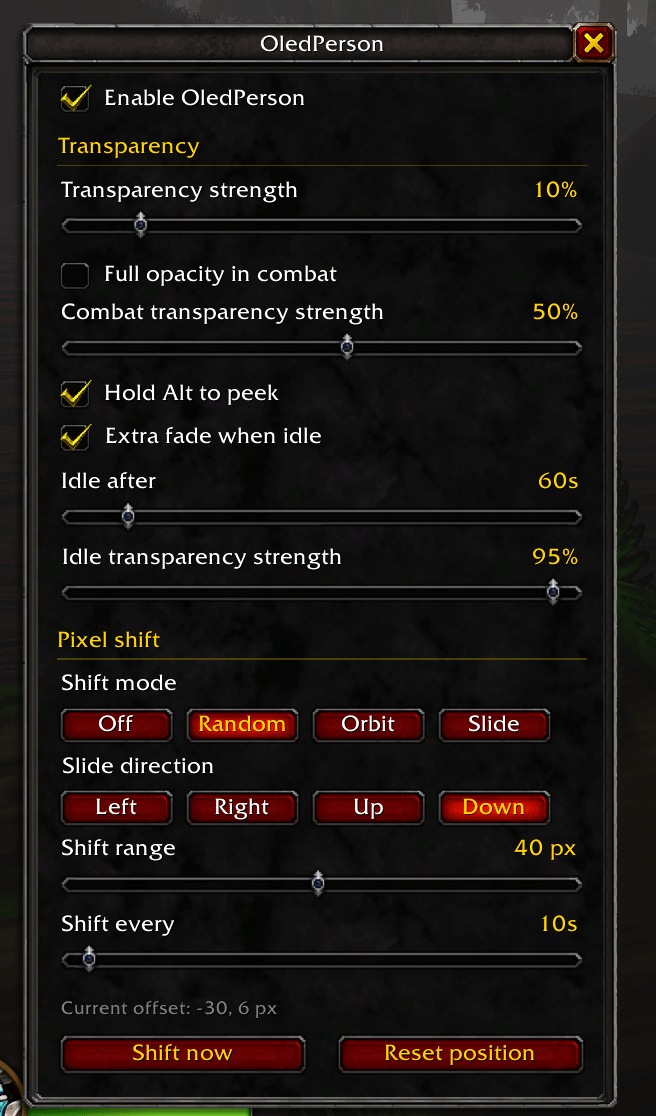
OledPerson_screenshot_options.png
Description
OledPerson
Burn-in protection for OLED monitors and TVs. OledPerson fades your whole interface and gently shifts it around the screen over time, so action bars, unit frames, chat, and the minimap never sit on the exact same pixels for hours.
Built for WoW Forever
Features
Whole-UI transparency
- One slider (0–90%) fades your entire interface.
- It covers windows you open later too: bags, character sheet, map, spellbook, and more.
- Smooth fade, no flicker.
Combat options
- Full opacity in combat: the UI snaps back to 100% when combat starts.
- Combat transparency slider: choose your own fade level for combat instead.
Idle fade
- Fades the UI further after a period with no mouse movement, character movement, or casting.
- Choose the delay (10s to 10 min) and the idle fade strength.
Hold Alt to peek
- Hold Alt to see the UI at full opacity at any time.
Pixel shift
- Moves the whole UI a few pixels on a timer so static elements don't wear the same pixels.
- Random: a new random position each time.
- Orbit: cycles in a ring around center.
- Slide: steps left, right, up, or down, then bounces back.
- Shift range from 1 to 80 px.
- Shift interval from 10 seconds to 60 minutes.
- Shifts never happen during combat; they wait until combat ends.
Easy setup
- Type `/op` to open the options window with every setting in one place.
- The options window itself is never faded or shifted, so it's always readable.
- Settings are also available in Esc → Options → AddOns → OledPerson.
Commands
| Command | What it does |
|---|---|
| `/op` | Open or close the options window |
| `/op on` / `/op off` | Turn OledPerson on or off |
| `/op strength 40` | Set transparency strength (0–90) |
| `/op combat full` | Full opacity in combat |
| `/op combat 30` | Set combat transparency (0–90) |
| `/op idle on` / `/op idle off` | Turn the idle fade on or off |
| `/op idle 60` | Seconds before the idle fade starts |
| `/op idlestrength 70` | Idle transparency strength (0–95) |
| `/op shift random` | Shift mode: random, orbit, slide, or off |
| `/op dir left` | Slide direction: left, right, up, or down |
| `/op range 10` | Max shift distance in pixels (1–80) |
| `/op every 30s` | Shift interval, for example `15s`, `30`, or `2m` |
| `/op now` | Shift immediately |
| `/op center` | Reset the UI to its normal position |
| `/op status` | Print current settings |
| `/op help` | List all commands |
FAQ
Does it fade nameplates?
No. Nameplates are drawn in the game world, not the UI layer.
Why didn't the UI shift during a fight?
The game blocks moving the interface during combat. OledPerson waits and applies the shift when combat ends.
Another addon also fades my whole UI. Will they conflict?
Possibly. If another addon (for example, a "zen" or auto-fade mode in a UI suite) also controls whole-UI transparency, turn that feature off in one of them.
Will a big shift range push things off-screen?
Above roughly 30–40 px, elements at the screen edges can slide partly off-screen. Lower the range if that bothers you.
Is this allowed?
Yes. OledPerson only changes how your own screen looks. It doesn't automate gameplay, send any data, or affect other players.
Feedback
Found a bug or have an idea? Leave a comment on this page with what happened and any error text.
OledPerson Team
