Screenshot 2026-10-12 at 8.58.25â¯AM.png
Description
A single, clean threat meter for Forever. It lists your group against your hostile target with the highest threat on top, using the client's UnitDetailedThreatSituation.
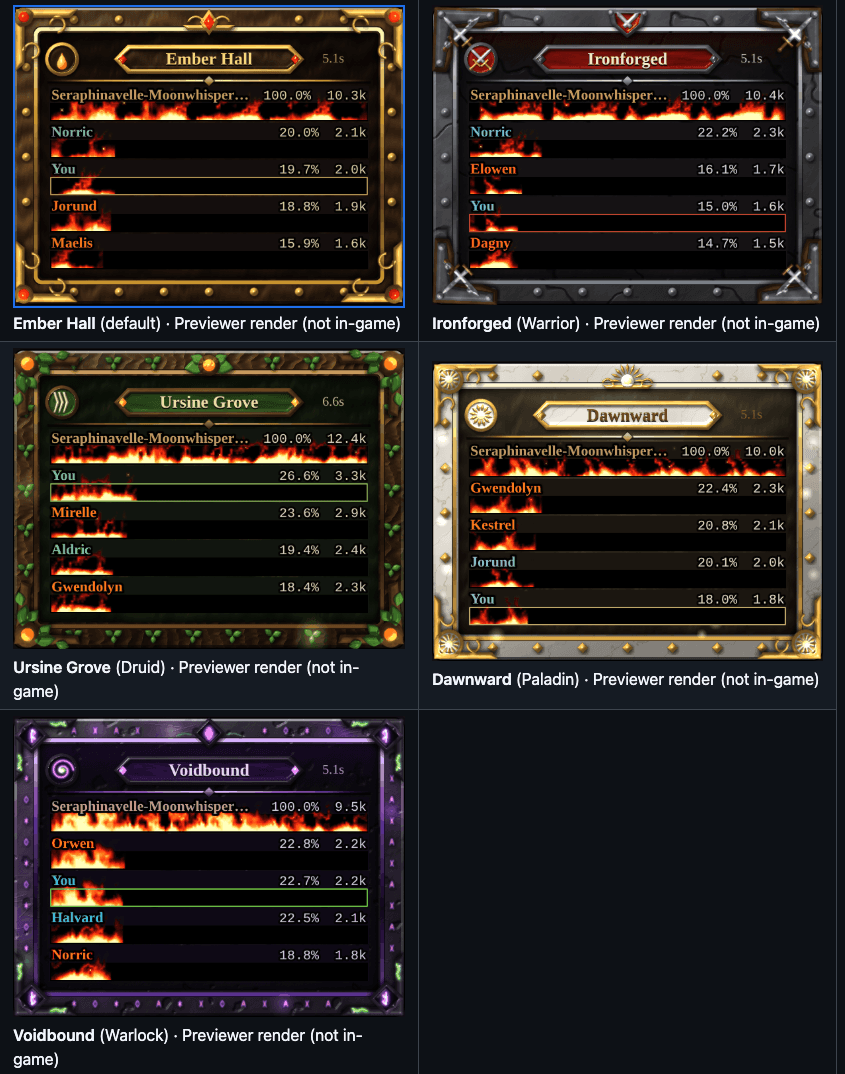
- One bar meter: each row shows the first name (realm stripped, long names cut off with …, class-colored text) above a black bar, with % and raw threat (12.3k) on the right. Your own row gets a theme-colored outline and stays pinned when you fall outside the shown rows.
- The fire is the bar: the default "Fireplace" fire is a baked, seamless flame wall whose width is your threat %. It's cropped, never stretched, and its tips rise above the bar. It has sparks, a glow and a white-hot core above 90%. A lighter "Classic" style, "Castbar fire" (layered scrolling fire, smoke and embers, new in 1.2.0) and "Off" (plain bar) are also available. All fire art is original and generated by
wow-threat/tools/. - Five themes: Ember Hall (default), Ironforged (Warrior), Ursine Grove (Druid), Dawnward (Paladin) and Voidbound (Warlock). Each has a textured frame, corners, crest, medallion and plaque, a light animation (gem glow, rocking swords plus a glint, rustling leaves, a turning sun with motes and a light sweep, pulsing runes with wisps). Every theme uses the same Ironforged fire. Auto picks by class.
- Motion: bars and numbers count smoothly, rows slide to their new rank, and a new #1 gets a short pop.
- Columns: Auto or 1–4, ranked across columns and capped at about 60% of the screen width, with up to 10 rows per column. Rows fade out when combat ends. With more than 20 rows the fire drops its glow layer and sparks stay on the top 10.
- Edit Mode: open Edit Mode to see a blue "WoW Threat" selection with preview rows. Drag it (snaps to 8 px), or click it for Scale, Max rows, Bar width, Columns, Theme, Fire style and Reset position. Positions are saved per Edit Mode layout. The meter can't be moved outside Edit Mode.
- Options panel: Esc > Options > AddOns > WoW Threat (or
/wtm options): Max rows, Columns, Bar width, Row height, Scale, Theme, Animate frame, Show fire, Fire style, Fire intensity, Fire speed, Flame overflow, Fire sound (off by default; SFX channel, in combat only), Reduced effects, Show pop, Number format, Show only in group, Hide out of combat, Class colors, Test mode and Reset position. It stays in sync with the Edit Mode dialog. - Slash commands (
/wtmor/wowthreat):options,test [raid20|raid40|swap|swapfast],theme <auto|emberhall|ironforged|ursinegrove|dawnward|voidbound>,style <fireplace|classic|castbar|off>,fire <0-1|off|on>,reset,debug(prints one threat-scale line per unit),probe(API check). Anything else prints the help. - Settings are saved in
WoWThreatDB(schema v3). Upgrades from 0.1.x and 1.0.0 migrate automatically. - Version
1.2.0(latest releasewow-threat-v1.2.0), Interface16001.
Ody Threat Team