ObsoleteQuestItems
- By
2026-11-24 10_10_59-World of Warcraft.png
2026-11-27 18_33_42-World of Warcraft.png
2026-11-25 23_28_17-World of Warcraft.png
2026-11-25 23_29_05-World of Warcraft.png
Description
Obsolete Quest Items
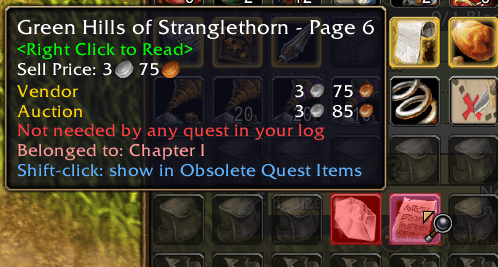
Ever wondered which of those quest items in your bags you can finally throw away? Obsolete Quest Items marks every quest item that no quest in your quest log needs anymore with a red overlay, in your bags and in your bank, including Bagnon and Baganator. An overview window shows which item belongs to which quest, including full quest chains.
Built for WoW Forever.
Requirements
- QuestieDB (comes with Questie) is required. It provides quest chains, the quests an item belonged to, quest rewards, repeatable quests and quest giver locations.
Features
- Red highlight on obsolete quest items, in your bags and in the bank window
- Bag addon support: works with Blizzard's default bags as well as Bagnon and Baganator (with Syndicator)
- Overview window (
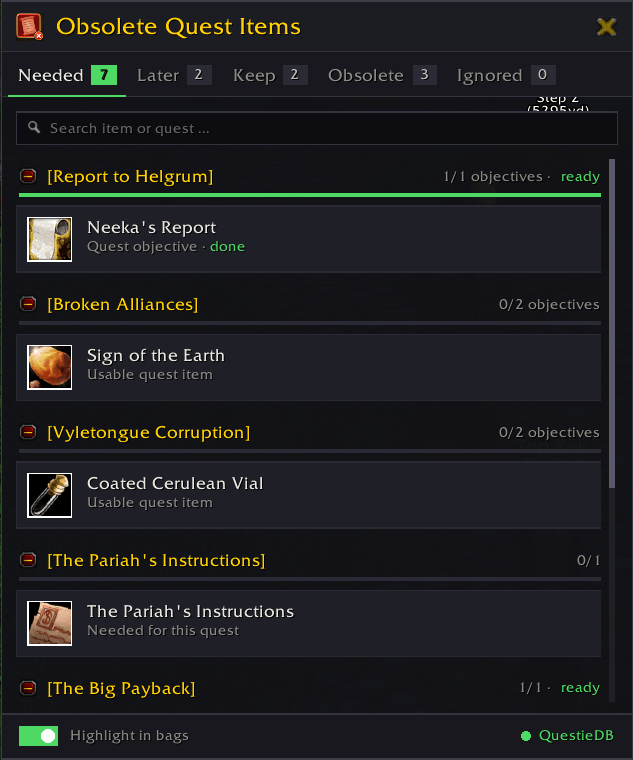
/oqi, the minimap button, or shift-click a marked item) with five tabs:- Needed: items needed by quests in your log, grouped by quest with progress, a progress bar and ready status; quests can be collapsed
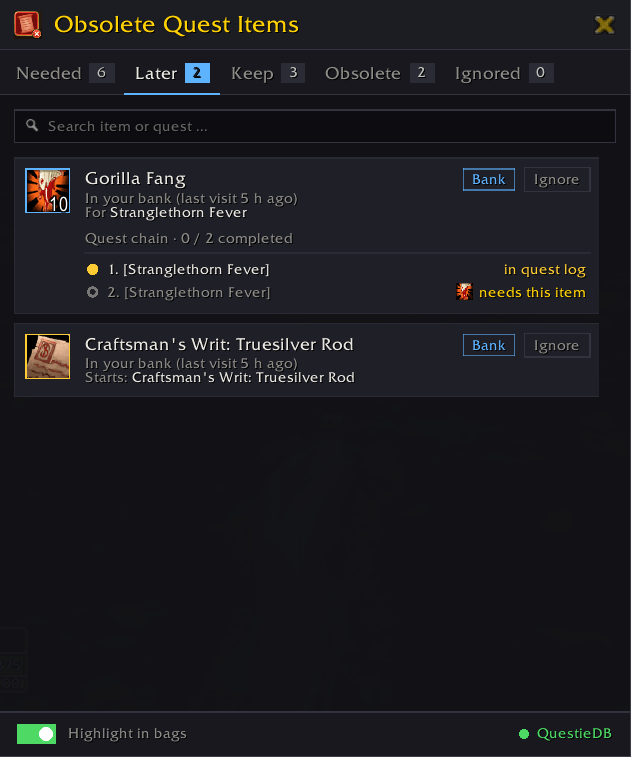
- Later: items needed later in a quest chain you are currently doing, and items that start a quest
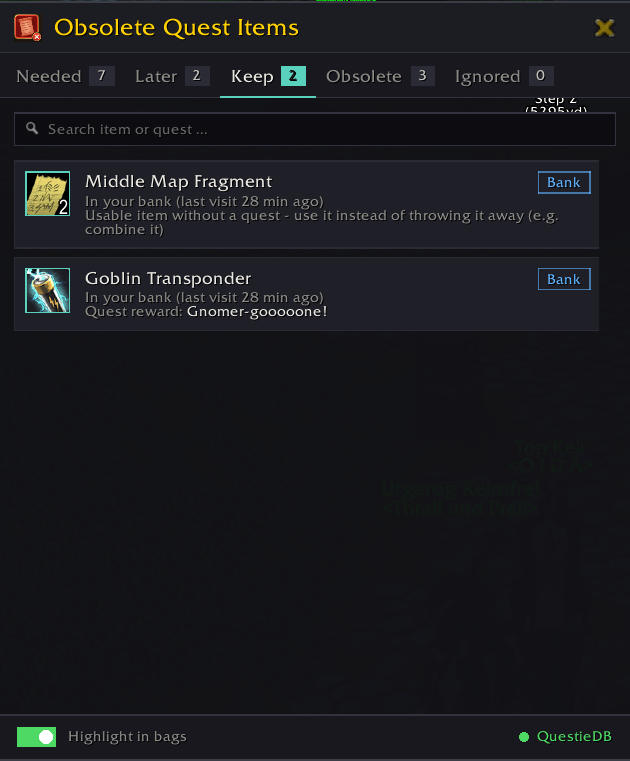
- Keep: items no quest needs right now, but that are worth keeping: items for repeatable quests, quest rewards like the Goblin Transponder, and usable items like map fragments you combine into a treasure map
- Obsolete: items you can throw away, with the quest they used to belong to
- Ignored: items on your ignore list
- Quest chains: for items that belong to a quest chain, the whole chain up to that quest is listed with each quest's status (completed, in quest log, abandoned, not done)
- Quest tooltips: hover a quest name to see its objectives and progress, or for quests not in your log: level, description, quest giver, turn-in and zone
- Click a quest name:
- quests in your log open in the quest log with full details
- other quests mark the quest giver on the map (uses TomTom if installed, otherwise the game's map pin)
- Bank support: bank contents are remembered on every visit, so the window shows your bank items anywhere, tagged Bank with the time of your last visit
- Abandoned quests are remembered per character and shown as (abandoned)
- Search box to filter by item or quest name
- Ignore button on every card for items you want to keep anyway
- Bag tooltip of marked items shows the quest they belonged to and the shift-click hint
- Minimap button: left-click opens the window, right-click toggles the highlight, drag to move it
- 7 languages: English, German, French, Russian, Spanish, Portuguese and Italian
Bag addons
- Bagnon: obsolete items are marked red in Bagnon's bag and bank windows, with tooltip hint and shift-click.
- Baganator: obsolete items get the red overlay plus a small red ✕ in a corner. Choose the corner under Baganator's Icon Corners settings (listed as Obsolete Quest Items).
- Syndicator: works out of the box, no setup needed.
Only the live inventory of the character you are playing is marked. Cached views of other characters, or of your bank while it is closed, stay unmarked.
How it works
A quest item is marked red when none of the following apply:
- A quest in your log needs it (objective, usable quest item, or a quest it belongs to according to QuestieDB)
- It starts a quest you have not completed yet
- It is needed for a later quest of a chain you are currently doing
- It is needed for a repeatable quest you can do, it is a quest reward that no quest uses, or it is a usable item without any quest (those go to Keep)
Slash commands
| Command | Description |
|---|---|
/oqi |
Open/close the overview window |
/oqi toggle |
Toggle the red highlight on/off |
/oqi minimap |
Show/hide the minimap button |
/oqi ignore <item link> |
Never mark this item |
/oqi unignore <item link> |
Mark this item again |
/oqi list |
Show the ignore list in the chat |
/oqi debug |
List all obsolete items and their former quests in the chat |
/oqi frame |
Troubleshooting: describes the bag/bank slot that last showed an item tooltip and the detected bag addons |
Tip: shift-click an item into the chat to insert its link after the command.
Known limitations
- Supported bag windows: Blizzard's default bags and bank, Bagnon and Baganator. Other bag addons (e.g. ArkInventory) are not supported yet.
- Bank items show up after your first bank visit with the addon installed, and reflect the state of your last visit.
- Quests abandoned before installing the addon can't be detected, because the game doesn't store this.
- QuestieDB is not yet complete for new WoW Forever content. There, the addon relies on its own memory of which items belonged to which quests. Use the Ignore button for anything it gets wrong.
ObsoleteQuestItems Team