Obsidian Bags
- By
standard-fancy-expanded.png
standard-fancy-collapsed.png
category-basic-collapsed.png
category-fancy-collapsed.png
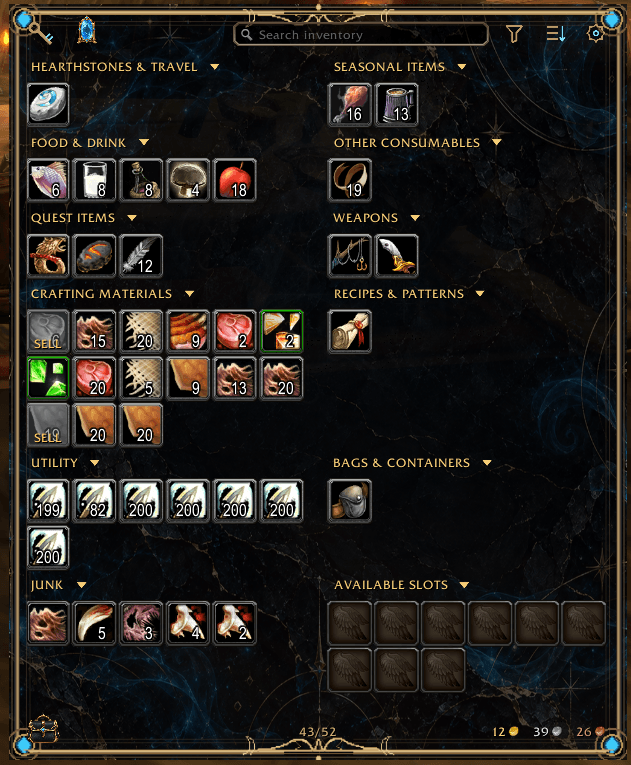
category-fancy-expanded.png
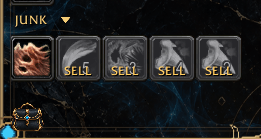
junk-category.png
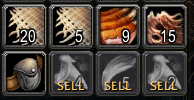
sell-preview.png
Description

Your Inventory. Your Way.
Your bags should fit the way you play, not ask you to change the way you play.
Obsidian Bags is a customizable inventory addon for World of Warcraft Forever, built around one idea: your inventory should adapt to you, not the other way around. Keep everything together in a familiar, compact view, or organize your items into detailed, personalized categories. Choose an ornate fantasy interface or a clean, minimalist one. Adjust only what matters to you, whenever it matters.
Simple when you want it. Flexible when you need it.
Two Ways to Organize
Different players look for different things when they open their bags. Obsidian Bags includes two distinct views, both built on the same inventory system.
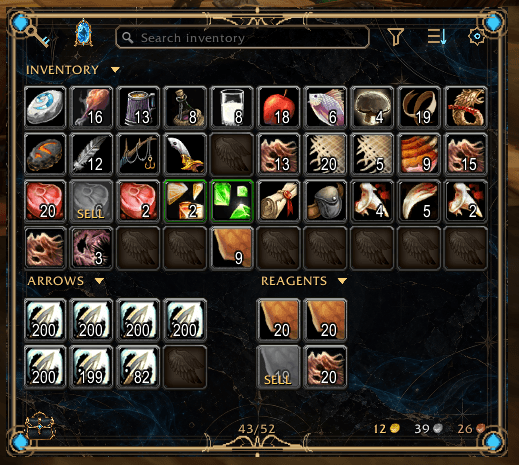
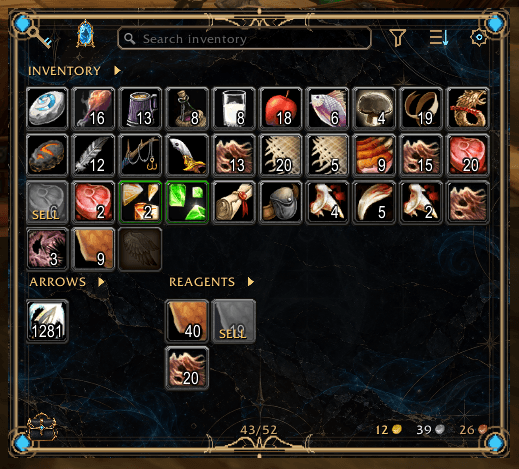
Standard View: Everything in One Place
Prefer a traditional inventory? Standard View keeps your items together in a unified window for quick access. Adjust its layout and expand or collapse supported sections to display only the slots you need.
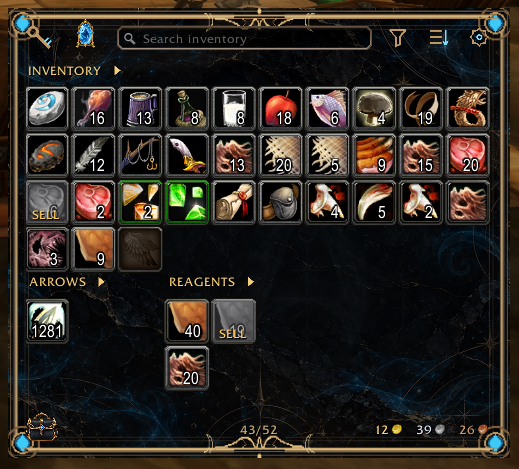
View Standard View with inventory sections expanded
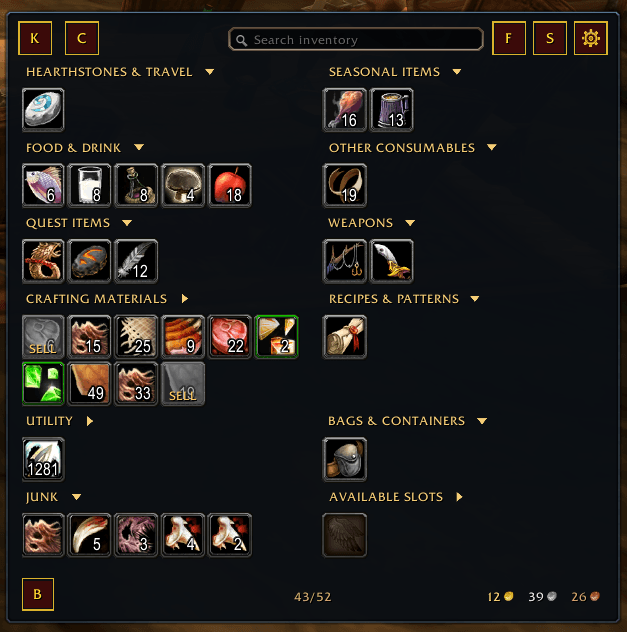
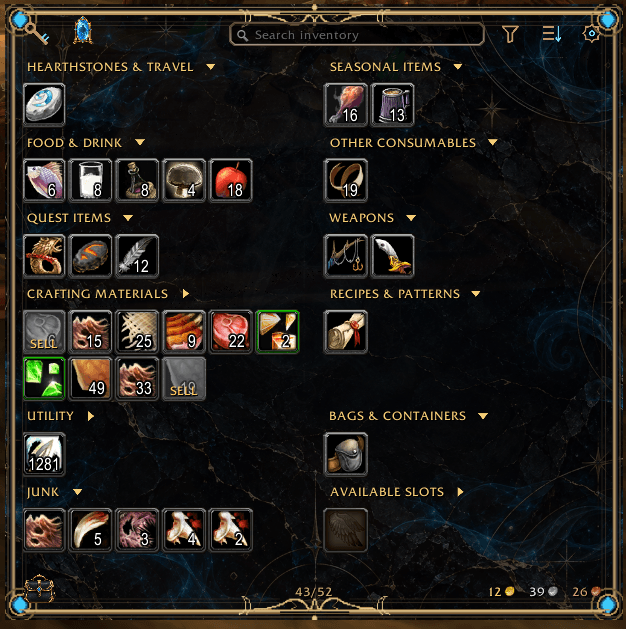
Category View: Organization on Your Terms
Want more structure? Category View groups your items into configurable, named categories. Position categories across columns, rearrange their order, and collapse individual sections when you want a more compact window.
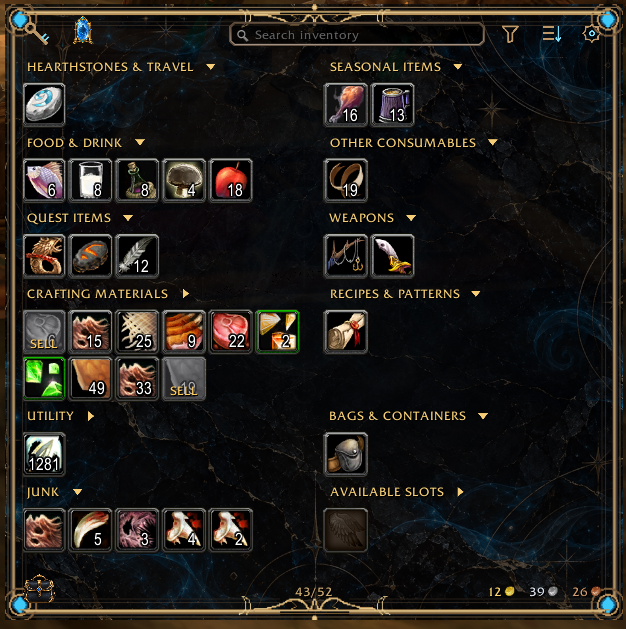
View Category View with additional sections expanded
Both views use the same underlying inventory system. Neither requires sacrificing functionality for your preferred arrangement.
Customization Without Complexity
Powerful customization should feel natural, not like a second project.
- Create and manage your own categories for the items you care about.
- Drag items into categories to assign them, or enter comma-separated item IDs for precise assignments.
- Rearrange category positions and columns to build the layout you want.
- Adjust inventory dimensions and section presentation to match your available screen space.
- Expand and collapse sections as your needs change.
- Customize through the in-game settings panel with supported configuration preferences and profiles.
Start with the defaults and change only what matters to you.

Two Distinct Themes
Choose the presentation that feels right for your screen. Both themes provide the same core inventory functionality.
- Fancy (default) is the Obsidian Arcanum signature: ornate gold framing, glowing blue arcane accents, decorative artwork, and illustrated controls.
- Basic takes a minimalist approach with simpler buttons, restrained framing, and adjustable background opacity.
| Fancy | Basic |
|---|---|
|
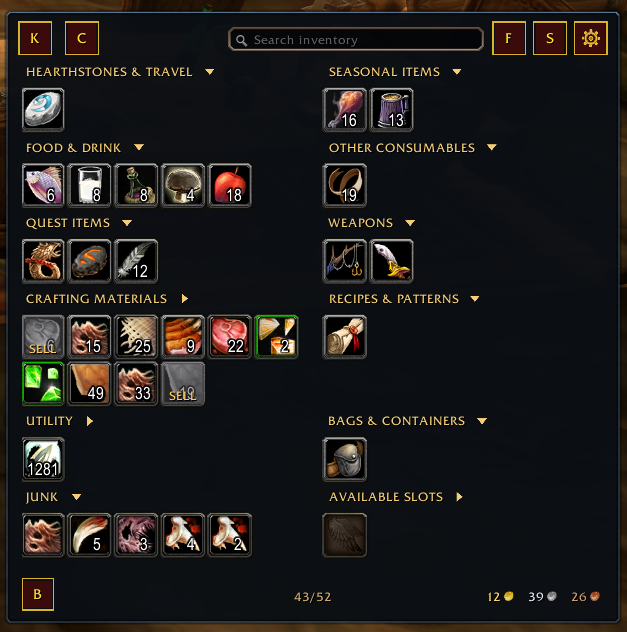 |
Two looks. One inventory system. Choose the style that suits your screen and your play style.
Intelligent Inventory Optimization
Obsidian Bags separates how your inventory is displayed from where items are physically stored. Its sorting system focuses on useful storage improvements rather than moving every item to imitate an on-screen arrangement.
- Consolidates compatible partial item stacks.
- Respects supported specialized bags and item placement rules.
- Avoids unnecessary physical item movements.
- Spreads sorting work across multiple game frames to reduce interruptions.
Use the dedicated Sort control whenever you want. Optional sort on bag open is available in settings and is disabled by default.
Effortless Junk Management
Mark it. Forget it. Get paid.
Alt-click an unwanted item to mark it for sale. The next time you visit a vendor, Obsidian Bags automatically sells eligible marked items so you don't need to find and click through them individually.


More Ways to Manage Your Items
One Stack presentation offers a compact way to represent stacks, with a pop-out for inspecting the items behind that summary when needed. Specialized sections help distinguish applicable ammunition, reagents, and other storage.
Bank management follows the same philosophy as your carried inventory, including organized views and tools for working with stored items. Obsidian Bags has dedicated bank interfaces and supports item transfers when the relevant in-game storage is available.
As with ordinary inventory interactions, actual item transfers are subject to the game's normal rules and restrictions.
Inventory Memory & Syndicator Integration
Syndicator is a required dependency. It provides essential data used by Obsidian Bags, including support for remembered bags and bank contents from other characters.
You can inspect previously recorded inventory information without switching characters just to check what Syndicator remembers. Remembered inventory is cached information, not live access to another character's bags.
Syndicator also provides item data used by other inventory-management features. It must be installed separately using a build compatible with World of Warcraft Forever.
Installation & Requirements
Supported game: World of Warcraft Forever
Required dependency: Syndicator, using a version compatible with World of Warcraft Forever.
Syndicator is required, not an optional enhancement. Obsidian Bags relies on it for essential inventory and item data and does not include Syndicator in its download.
Install Through CurseForge
-
Find Obsidian Bags in the CurseForge app and select a release compatible with your WoW Forever installation, if the client supports that installation.
-
Install the addon. CurseForge generally offers or installs declared required dependencies; confirm that Syndicator is also installed with a compatible version.
-
Enable both addons, then launch World of Warcraft Forever or reload your interface.
Manual Installation
-
Download the Obsidian Bags release ZIP and a WoW Forever-compatible Syndicator release.
-
Open your game's
Interface/AddOns/directory. -
Extract the
ObsidianBagsandSyndicatoraddon folders directly intoAddOns/, without creating extra nested folders. -
Confirm both addons are enabled. Launch the game, or type
/reloadif you are already in-game.
The expected Obsidian Bags addon folder contains ObsidianBags.toc directly inside Interface/AddOns/ObsidianBags/. Confirm the final release ZIP uses this structure before publication.
Open Settings
Click the cog in the upper-right corner of the Obsidian Bags window, or use either command:
-
/obags -
/obsidianbags
Compatibility note: Retail, Classic, and Classic Era have not been tested and are not officially supported.
Support & Development
Found a bug, have a suggestion, or want to request a feature? Visit Obsidian Bags GitHub Issues. For bug reports, please include your addon version, what happened, what you expected, and steps to reproduce the issue.
The Obsidian Bags source repository contains project information and development updates.
Developed by Obsidian Arcanum.
Syndicator is a separate addon developed by plusmouse and is required for Obsidian Bags to function as intended.

Obsidian Bags Team