
1.jpg
Description
NZT Group
Filter and sort Mythic+ applicants the way you actually want.
What it does
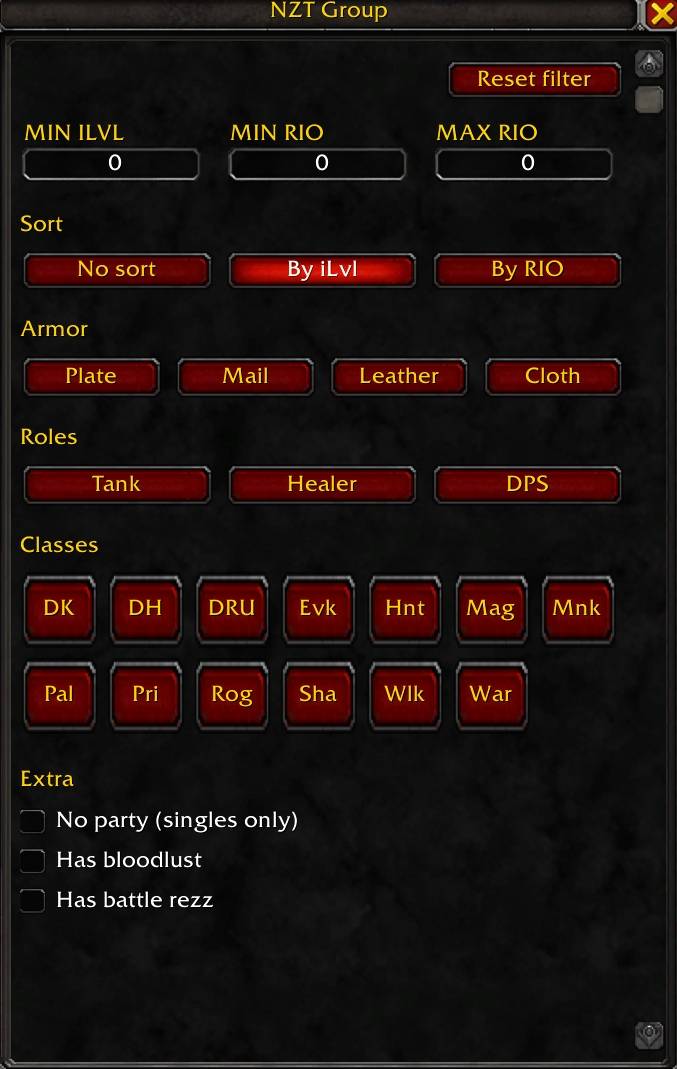
When you list a Mythic Keystone group, applicants pour in faster than you can read their names. NZT Group hides the ones that don't fit your criteria, so only relevant applicants show up in the list.
Filter by
- Item level (minimum)
- Mythic+ rating (minimum and maximum range)
- Armor type — Plate, Mail, Leather, Cloth
- Class — all classes
- Spec — only specs of selected classes are shown
- Role — Tank, Healer, DPS
- Solo applicants only (no pre-made parties)
- Has bloodlust (Evoker, Hunter, Mage, Shaman)
- Has battle rezz (Death Knight, Druid, Paladin, Warlock)
Sort by
- Item level (highest first)
- Mythic+ rating (highest first)
- Default Blizzard order
Sort applies after the filter, so you only see the best of the matching applicants.
Logic
Within a category, selections are OR'd. Between categories, AND'd.
Example: Armor = Leather + Mail, iLvl = 270+, RIO = 2900 → applicant must wear leather or mail, with item level ≥ 270 and Mythic+ rating ≥ 2900.
Usage
- Open Group Finder → Premade Groups, list your key.
- An NZT toggle appears next to the Refresh button.
- Click it to enable filtering and open the panel.
- Adjust filters — they apply instantly.
Settings are saved automatically per character.
Notes
- Pure quality-of-life addon. Reads only public LFG API, hides applicants visually. No automation, no auto-invite, no external actions.
- Optional integration with Raider.IO addon if installed.
- Slash commands:
/nzt showto force-show the panel,/nzt resetto wipe settings.
NZT Group Team
