Ny's To-Do List MapMarkers
- By
unnamed.webp
Screenshot 2026-11-28 144015.png
Screenshot 2026-11-28 144046.png
Screenshot 2026-11-28 143911.png
Description
Ny's To-Do List - Map Markers
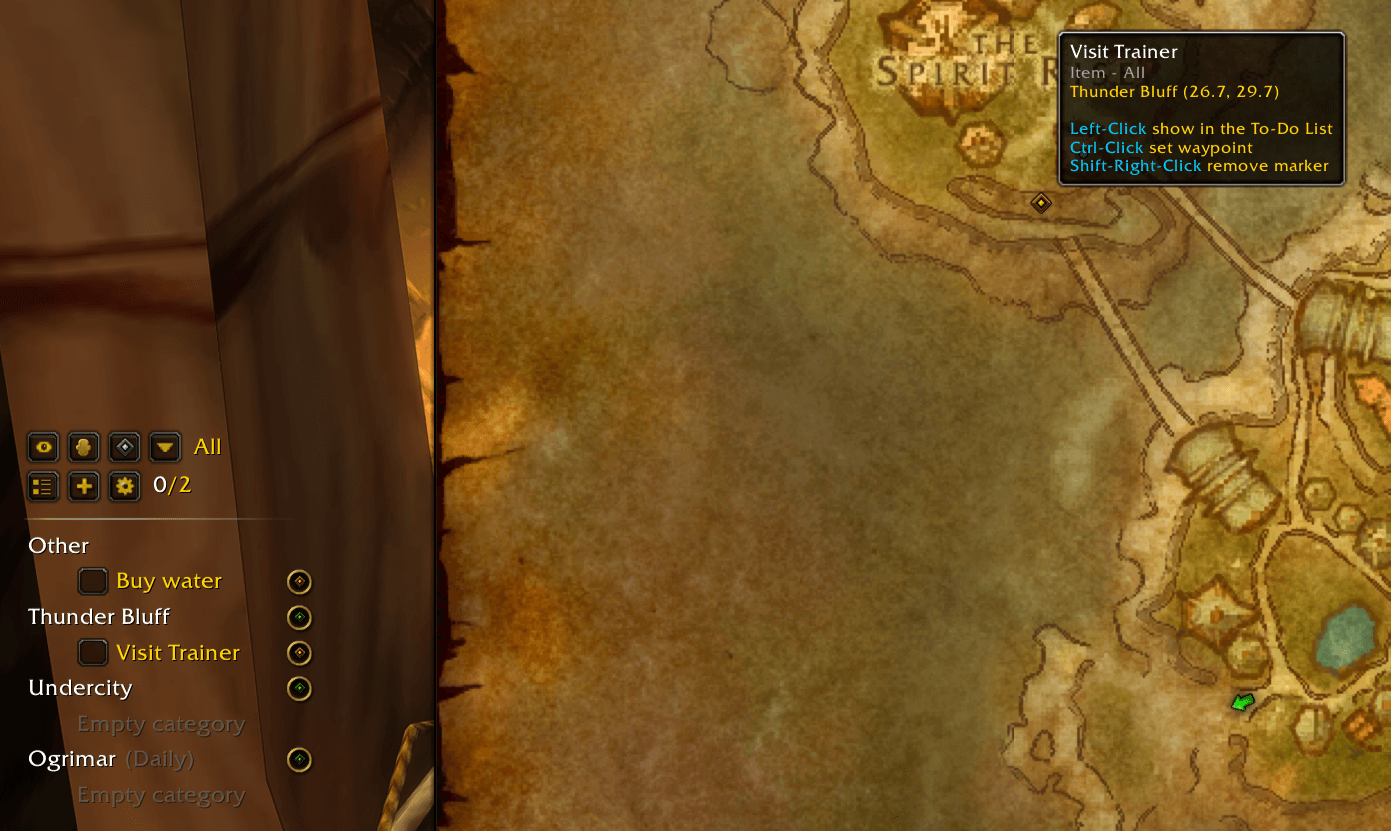
Turn your to-do list into a map. Attach a world map location to any note or category in Ny's To-Do List, then see your to-dos on the world map and minimap. You get a heads-up when you enter a zone that has some, and a live distance as you walk up to one.
Requires Ny's To-Do List. This is a companion addon: it doesn't change Ny's To-Do List itself, and you can turn it off at any time without losing anything.
Features
📍 Markers on your notes and categories
- Every note and category can have a map marker.
- In edit mode, each row gets a small round pin button. Click it to drop a marker at your current position, or right-click to choose any spot on the world map.
- Rows with a marker show the pin all the time: gold for notes, blue for categories (both colours can be changed).
- Alt-click a note or category name to jump to its marker on the map.
🗺️ World map
- Your markers show as pins on the world map, and also on the continent map and on sub-zone maps.
- Hover a pin to see the note or category, its tab and its location. Click it to open the To-Do List right on that entry: it switches tab, expands the categories and highlights the row.
- A pin button in the bottom-left corner of the map shows or hides all markers. Right-click it for filters: notes, categories, profile tabs, global tabs, hide done notes, or only the list's current tab.
- Picking a spot is easy: browse the map normally (open zones, cities and caves, zoom out with right-click), then click where the marker should go.
🧭 Minimap
- Markers on your current continent appear on the minimap and follow its zoom and rotation.
- Markers that are far away stay on the minimap's edge, so you always know which way to go.
🔔 Notifications
- Entering a zone with markers lists what's there: marked categories with how many notes they have, then marked notes (without repeating notes that are already inside a listed category).
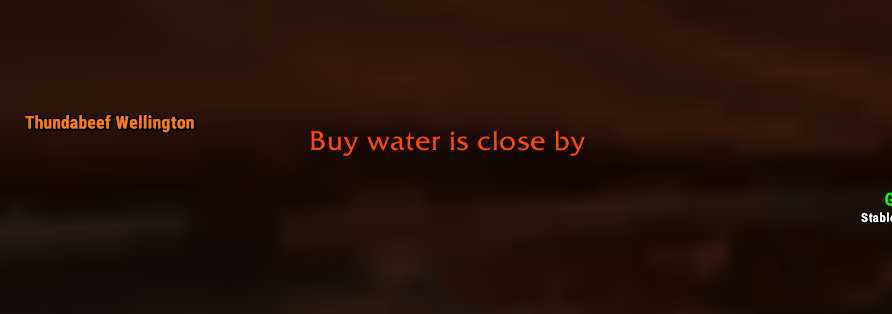
- Getting close to a marked note (200 yards by default) tells you it's close by.
- Shown in the chat and/or in the middle of the screen, with an optional sound.
📋 Zone panel on the floating To-Do List button
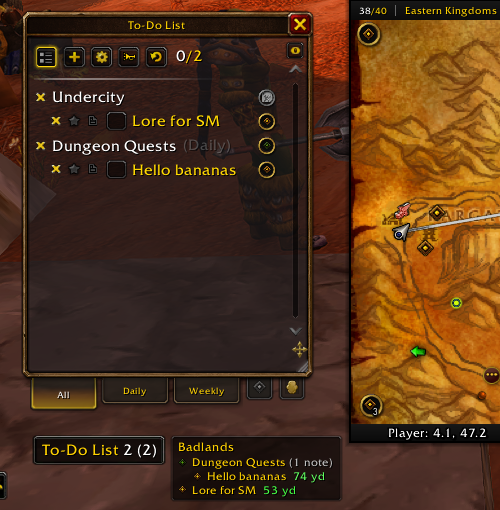
- The floating button's label shows what's in your current zone: for example,
To-Do List 1 (2)means one marked category covering two notes. - A panel next to the button lists the zone's marked categories and notes.
- When you get close to a note, it appears under its category with a live distance that counts down as you approach.
- Click a line to open it in the list, or right-click it to open the map.
🔍 "Only with markers" filter
- A new pin tab next to the profile/global switch shows only the notes and categories that have markers.
- It follows the mode you're in: profile tabs show your own marked notes, global tabs show the global ones.
- Also available in the clear view mode's top bar.
⚙️ Settings
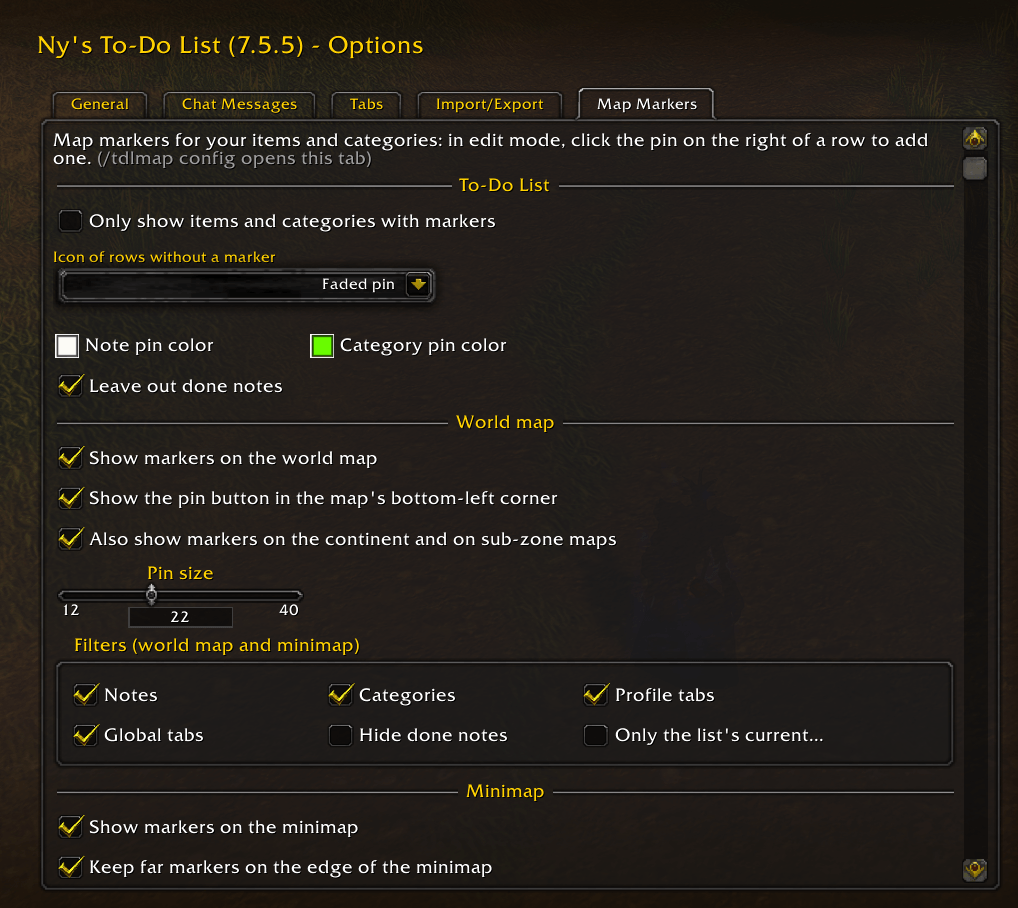
A Map Markers tab is added to Ny's To-Do List's own options window:
- pin colours and sizes, and the icon for rows without a marker
- world map and minimap on/off and filters
- notifications: zone and close-by alerts, distance, chat, screen and sound (with a Test button)
- the floating button's panel: position (right, below or above), number of lines, font, size, colour, outline, shadow and background opacity
- marker clean-up
Controls
| Where | Click | Shift-Click | Right-Click | Shift-Right-Click | Ctrl-Click |
|---|---|---|---|---|---|
| Pin in the list | Open on the map (or add a marker at your position) | Move it to your position | Choose a spot on the map | Remove the marker | Set a waypoint |
| World map pin | Show in the To-Do List | — | Zoom out | Remove the marker | Set a waypoint |
| Minimap pin | Show in the To-Do List | — | Open the world map | Remove the marker | Set a waypoint |
| Zone panel line | Show in the To-Do List | — | Open the world map | Remove the marker | Set a waypoint |
| Map corner button | Show / hide markers | — | Filters | — | — |
Alt-click a note or category name in the list to open its marker on the map.
Slash commands
| Command | |
|---|---|
/tdlmap |
Help |
/tdlmap config |
Open the Map Markers settings |
/tdlmap filter |
Toggle the "only with markers" list filter |
/tdlmap map |
Show / hide markers on the world map |
/tdlmap related |
Show markers on continent and sub-zone maps too |
/tdlmap checked |
Hide pins of done notes |
/tdlmap button |
Show / hide the map corner button |
/tdlmap icon [number] |
Change the icon of rows without a marker |
/tdlmap list |
List your markers in the chat |
/tdlmap clean |
Delete markers of notes and categories that no longer exist |
Good to know
- Markers are saved account-wide and work with both profile and global tabs.
- Deleting a note keeps its marker, so Undo brings both back.
- Inside dungeons and raids the game doesn't share your position, so minimap pins and close-by alerts pause there. Zone alerts still work.
- Tabs imported through Ny's To-Do List's import/export are created as new notes, so their markers don't carry over.
Support & links
- ☕ Buy me a coffee if this addon helps you
- 💻 GitHub: more of my projects
A companion addon for Ny's To-Do List. All credit for the to-do list itself goes to its author. Bug reports and suggestions are welcome in the comments.
Ny's To-Do List MapMarkers Team