
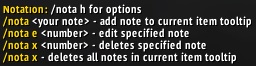
/nota h
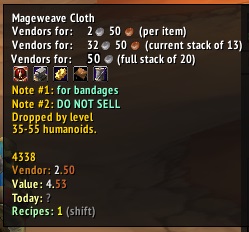
Example interaction with different addons that adds info in the tooltip.
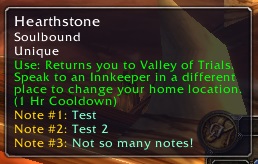
How it looks like in the game.
Description
Adds custom notes to item tooltips.
Basic Usage:
- 1. Hover over the item you want the note to appear in.
- 2. Type
/nota "your note"and enter. - 3. Note should appear immediately on the tooltip. If not, just rehover over it and it should update.
Commands:
/nota <your note> = add note to tooltip/nota e <number> <new note> = edit numbered note/nota x <number> = delete numbered note/nota x = deletes all notes for tooltip /nota c label/note <6 alphanumeric color hex> = sets color the label or note/nota c reset = resets color to default
Note: In the meantime use a site like https://htmlcolorcodes.com/color-picker/ to pick your desired color hex code
Current limitations / issues:
- If an item shares an item ID with another (e.g. equips that share the base item name but different suffixes) they will all show the same notes.
Planned features:
- add notes per char (currently it's global)
- reorder notes
- user interface / database of notes
Feel free to report errors/bugs in the comments. I made this for personal use but I thought maybe other people might have a use for it too, so it's not exactly well tested lol. Thanks!
Notation Team
