NostalgiusPanel
- By
A customizable, lightweight info panel featuring Account-wide Gold, Smart Reputation Tracking, stacked bars, and native Guild interactions.

Panel.png
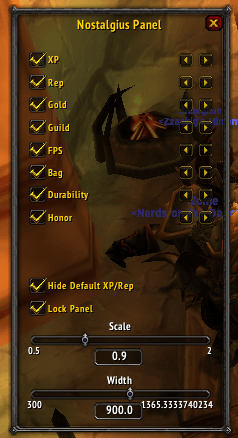
options.png
Description
Nostalgius Panel is a sleek, modular information bar designed to replace UI clutter with a clean, organized display at the top of your screen. It maintains the classic World of Warcraft aesthetic while providing modern, essential data at a glance.
✨ Key Features
👤 Character Profiles (NEW!):
Settings are now saved per-character! Customizing the layout on your alt won't ruin the setup on your main.
Easily copy settings from one character to another using the built-in dropdown in the Options menu.
💰 Account-Wide Gold & Session Profit:
Tracks gold across all your characters on the realm. Hover to see a full list of alts and your grand total.
Real-time Session Profit/Loss tracking to monitor your farming efficiency.
📈 Smart Reputation & XP Bars:
Stacked Layout: A sleek XP bar runs along the bottom. Tracking a faction adds a vivid TBC-style Green Reputation bar stacked neatly underneath.
Auto-Track: Optional "Smart Tracking" automatically switches your watched faction when you gain reputation (intelligently ignores reputation loss, solving the Aldor/Scryer swap issue).
Detailed Stats: XP tooltip shows Rested bonus amounts and percentages. Reputation module displays current Standing (e.g., Friendly, Revered) directly on the panel.
👥 Interactive Guild Module:
Hover to see a scrollable list of online members with levels and zones.
Right-Click Menu: Uses the native WoW dropdown menu to Whisper, Invite, or Target members directly from the list. Fully compatible with modern WoW APIs.
⚔️ PvP & System Stats:
Honor: Automatically displays your faction icon (Horde/Alliance) and current Honor. Tooltip tracks Battleground Marks.
System: FPS/Latency monitoring and Bag space warnings.
Durability: Color-coded status (Red/Yellow/Green) with a per-slot breakdown in the tooltip.
⚙️ Total Customization:
Dynamic Layout Engine: Modules automatically resize and reposition themselves pixel-perfectly when data changes—no more overlapping text!
Drag & Drop: Unlock and move the panel anywhere.
Module Sorting: Fully reorder all modules (XP, Rep, FPS, Gold, etc.) via the configuration menu.
Hide Default Bars: Option to hide the default Blizzard XP/Reputation bars for a cleaner UI.
Slash Command:
/np - Opens the configuration menu.
NostalgiusPanel Team