


No Delete
- By
Mark items as protected and prevents accidental deletion or selling to a vendor for items.
NoDelete - Item Protection Addon
Protect your valuable items from accidental deletion or selling!
NoDelete is a lightweight World of Warcraft Classic addon that prevents you from accidentally deleting or selling precious items by allowing you to mark them as "protected". Perfect for safeguarding rare items, heirlooms, profession materials, or any item you don't want to lose.
Screenshots
Main Protection Interface
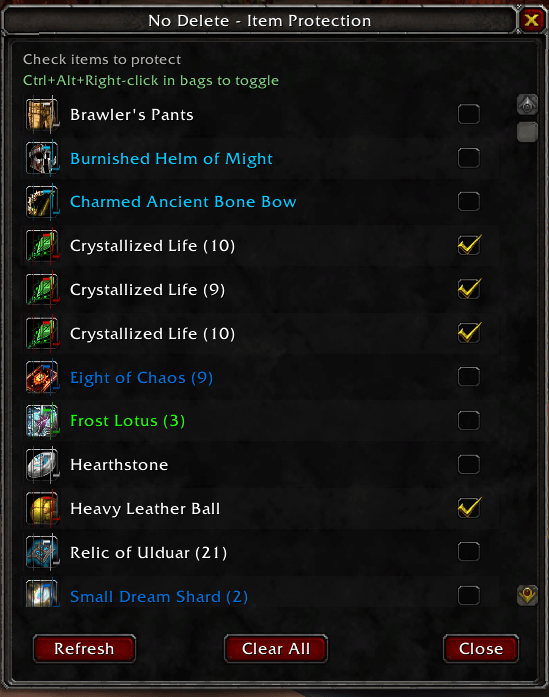
The main NoDelete interface showing protected and unprotected items with quality color coding
Protection Popups in Action
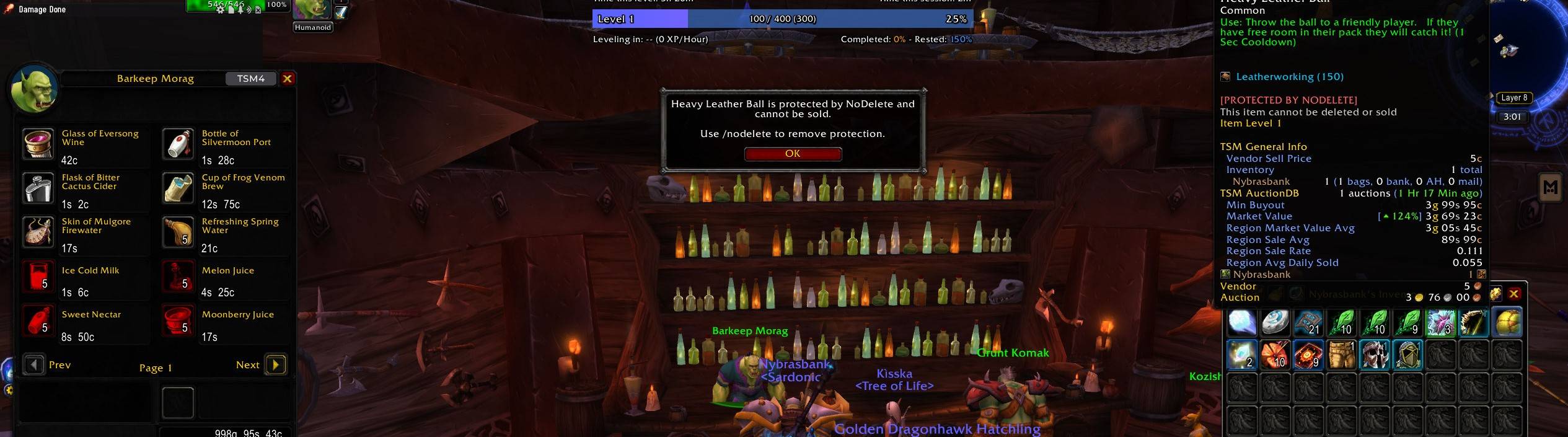
Warning popup when attempting to sell a protected item
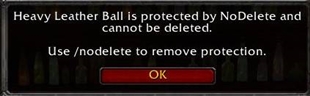
Warning popup when attempting to delete a protected item
Tooltip Protection Indicator
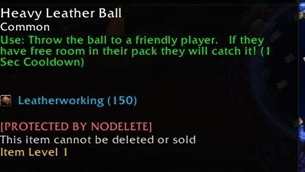
Protected items display clear indicators in their tooltips
Quick Toggle Feature
Ctrl+Alt+Right-click any item to instantly toggle protection
Features
🛡️ Complete Item Protection
- Anti-Delete Protection: Prevents accidental deletion of protected items
- Anti-Sell Protection: Blocks selling protected items to vendors
- Smart Buyback: If a protected item gets sold, the addon automatically buys it back
- Real-time Protection: Works instantly - no need to reload
🎯 Easy Item Management
- Intuitive GUI: Clean, sortable list of all your items with checkboxes to toggle protection
- Quick Toggle: Ctrl+Alt+Right-click any item in your bags to instantly toggle protection
- Visual Indicators: Protected items show "[PROTECTED BY NODELETE]" in tooltips
- Bulk Operations: Clear all protections at once if needed
🔧 Smart Compatibility
- Bag Addon Friendly: Works seamlessly with popular bag addons like Bagnon, ArkInventory, etc.
- API Compatibility: Uses proper WoW API compatibility layer for different game versions
- Non-Intrusive: Doesn't interfere with normal gameplay or other addons
📊 Quality of Life Features
- Item Sorting: Items automatically sorted alphabetically in the protection interface
- Stack Count Display: Shows stack quantities for stackable items
- Quality Color Coding: Items display with appropriate quality colors (white, green, blue, purple, etc.)
- Persistent Settings: All protections saved between sessions
Installation
- Install directly from CurseForge using your preferred addon manager (CurseForge App, WowUp, etc.)
- Or download manually from CurseForge and the addon manager will handle installation
- Restart WoW or reload UI (
/reload) - Type
/nodeleteto open the protection interface
How to Use
Opening the Interface
- Type
/nodeleteor/ndin chat - The protection window will show all items currently in your bags
Protecting Items
Method 1: Using the GUI
- Open the protection interface with
/nodelete - Find the item you want to protect in the list
- Check the checkbox next to the item
- The item is now protected!
Method 2: Quick Toggle (Recommended)
- Hold Ctrl + Alt and right-click any item in your bags
- The item protection will toggle on/off instantly
- You'll see a confirmation message in chat
Understanding Protection Status
- In Tooltips: Protected items show
[PROTECTED BY NODELETE]in red text - In Interface: Protected items have checked checkboxes and red borders around their icons
- Chat Messages: Green messages for protection, red for unprotection
Managing Protected Items
- View All: Use
/nodeleteto see all your items and their protection status - Bulk Clear: Use the "Clear All" button to remove all protections at once
- Auto-Refresh: The interface updates automatically when you move items around
Commands
/nodelete- Opens the item protection interface/nd- Short version of the main command
What Gets Protected
When an item is protected, NoDelete will:
✅ Block deletion attempts - Shows warning popup instead of deleting ✅ Block vendor sales - Shows warning popup instead of selling
✅ Auto-buyback - If somehow sold, automatically buys the item back ✅ Work with drag-and-drop - Prevents accidental selling by dragging to vendor ✅ Work with right-click selling - Blocks right-click sales at vendors
Compatibility
Game Versions
- World of Warcraft Classic
- Mists of Pandaria Classic (Interface 50400)
- Should work with other Classic versions with minor modifications
Addon Compatibility
NoDelete is designed to work alongside popular addons:
- ✅ Bagnon - Full compatibility
- ✅ ArkInventory - Full compatibility
- ✅ AdiBags - Full compatibility
- ✅ Default Blizzard Bags - Full compatibility
- ✅ Most other bag addons - Uses secure hooks for maximum compatibility
Technical Details
- Memory Efficient: Minimal memory footprint
- Performance Optimized: No impact on game performance
- Secure: Uses proper WoW API hooks without breaking game functionality
- Persistent: Settings saved in
NoDeleteDBsaved variable
Troubleshooting
"The addon isn't working!"
- Make sure the addon is enabled in the AddOns menu
- Try
/reloadto reload the interface - Check that you're using the correct key combination: Ctrl+Alt+Right-click
"Items are still getting sold!"
- Check if the item is actually protected (look for the tooltip text)
- Make sure you're not accidentally unprotecting items
- Some items may have restrictions that prevent protection
"The interface won't open!"
- Try typing
/nodeleteinstead of/nd - Check for any Lua errors with an error reporting addon
- Try disabling other addons to check for conflicts
Support
Having issues? Here's how to get help:
- Check Tooltips: Hover over items to see if they show protection status
- Test Protection: Try deleting/selling a protected item to see if it blocks
- Check Chat: Look for NoDelete messages when toggling protection
- Reload UI: Try
/reloadif something seems stuck
Version History
Version 1.0
- Initial release
- Complete item protection system
- GUI interface for managing protections
- Ctrl+Alt+Right-click quick toggle
- Auto-buyback functionality
- Compatibility with major bag addons
Enjoy worry-free item management with NoDelete! 🛡️
Never accidentally delete or sell your precious items again.
The No Delete Team

