
Nock Hunter HUD
- By
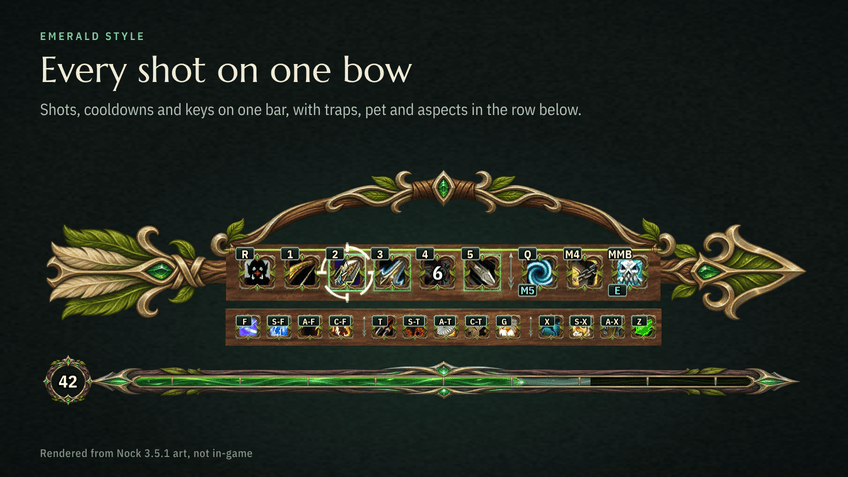
Shots, cooldowns and keys on one bar, with traps, pet and aspects in the row below.
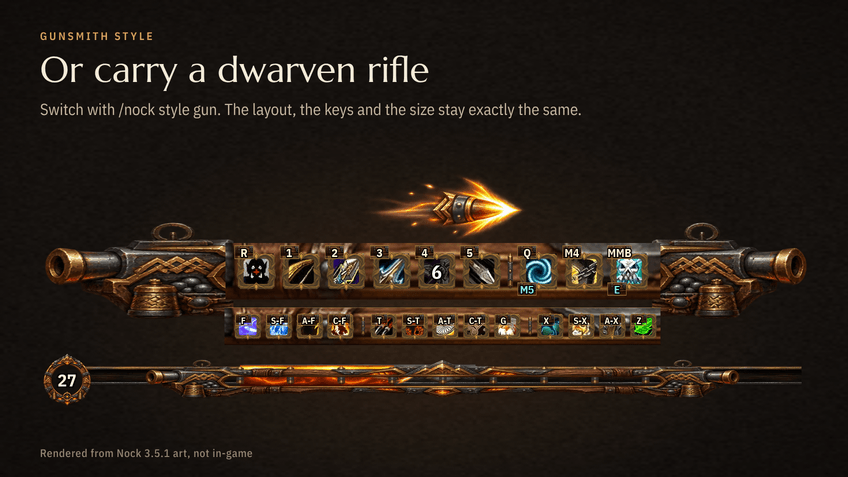
Switch with /nock style gun. The layout, the keys and the size stay exactly the same.
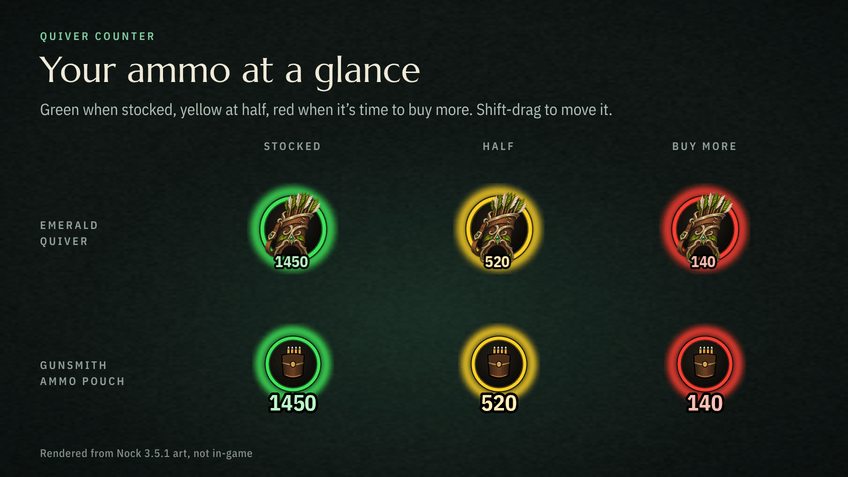
Green when stocked, yellow at half, red when it's time to buy more. Shift-drag to move it.
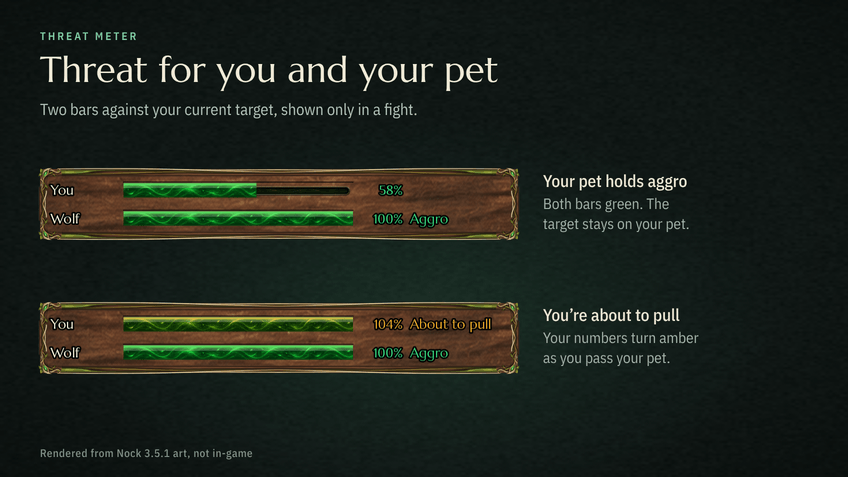
Two bars against your current target, shown only in a fight. Amber means you're about to pull.
Description
Nock
Nock is a keybind-first Hunter HUD for World of Warcraft: Forever. It shows your shots, pet, traps, experience, and threat in one readable bar, fills empty keys with a hunter layout, and includes a written rotation and talent plan. It does not play the game for you: you still aim and press the keys.
This addon is built for World of Warcraft: Forever (interface 16001, game version 1.60.1). It is not a Classic Era addon. Forever and Classic Era are different clients, and a Classic Era build will not load correctly on Forever.
Two looks are included: Emerald (the default bow) and Gunsmith (a dwarven rifle). Layout and size stay the same when you swap.
Features
The bar
- A hunter key bar with cooldowns on every button.
- Nock fills empty keys with a hunter layout the first time you log in. Keys you already set are left alone. Mouse 4, Mouse 5, and a wheel click are used only if those buttons are free.
- A written rotation and talent plan, plus one-click Beast Mastery and Marksmanship profiles for keys, macros, and a talent plan.
- A threat meter above the bar: you and your pet, against your current target.
Styles
- Emerald — the default night-elf bow look.
- Gunsmith — a dwarven rifle look. Open Nock, go to Options, and choose Style: Gunsmith, or type
/nock style gun//nock style emerald. The choice is saved per character.
Ammo and the map
- A movable quiver counter (an ammo pouch in Gunsmith) shows your ammo in big numbers: green when stocked, yellow at half, red when low. Shift-drag to move it.
- Hunter trainers, pet trainers, stable masters, and ammo vendors appear on the minimap and the world map for your faction, in the major cities and towns of Kalimdor and the Eastern Kingdoms.
Hunter tools
Eleven tools on one core, each on by default, with its own switch in Options > Hunter tools, a /nock command, and a section on the Tools tab (/nock kit). They read your level, the ranks in your spellbook, your spec from talents, and where you are (solo, group, dungeon, raid, battleground, arena).
- Pet — a warning when your pet is unhappy, and a Feed Pet keybind that picks the best food from your bags.
- Supplies — warnings for ammo, pet food, food, and water in town and when you leave.
- Vendor — auto-sell junk and auto-repair (from your own gold).
- Range — a melee / dead zone / too far readout, a Wing Clip prompt, a remaining-time readout, and a fall-off alert.
- Taming — rare tameable beast pins, and the ability ranks your pet is still missing.
- Aspects — Hawk in combat, no Cheetah or Pack in a fight, Cheetah when travelling.
- Feign Death — an alert when Feign Death is resisted.
- Route — a leveling route and hunter milestones; an endgame checklist at 60;
/nock route pvp. - Trainer — a ping when new ranks come online, and the nearest trainer.
- Tracker — kills to level and XP per hour; gold per hour at 60.
- PvP — an enemy player readout, trinket alerts, and PvP field notes.
At 60 the tools switch to endgame mode. In battlegrounds and arenas they switch to PvP mode. Type /nock tools to list them, mute alerts, or set endgame and PvP by hand.
Commands
Type /nock help in game for the full list. The ones you will use most:
| Command | What it does |
|---|---|
/nock |
Open the Nock window |
/nock style gun / /nock style emerald |
Swap the HUD look |
/nock size small / normal / large |
Bar and window size (default Large) |
/nock kit |
Open the Tools tab |
/nock unlock / lock / reset positions |
Move every Nock frame, or put them back |
/nock pet / supplies / vendor / range / tame / aspects / feign / route / train / tracker / pvp |
Toggle or open one tool |
/nock pins |
Toggle hunter map pins (/nock pins trainer / pet / stable / ammo / minimap / map / hostile for one part) |
/nock quiver |
Quiver counter (unlock / lock / reset) |
/nock threat |
Threat meter (unlock / lock / reset) |
/nock overlay |
Show or hide the key bar |
/nock button reset |
Put the movable Nock button back |
/nock mouse on / off |
Side mouse buttons for Wing Clip, Concussive, and Feign Death |
/nock restore |
Put your old keys back |
/nock save |
Remember this character's UI |
/nock profile save / load / list |
Account-wide UI setups |
You can also open Nock from the Escape menu, from the small on-screen Nock button (Shift-drag to move it), or from Key Bindings > AddOns > Nock.
Install
If you use the CurseForge app, set the game flavor to Forever and install Nock from there. The app should place it in:
World of Warcraft\_forever_\Interface\AddOns\Nock
For a manual install:
Close World of Warcraft: Forever if it is open.
Copy the
Nockfolder intoWorld of Warcraft\_forever_\Interface\AddOns, so this file exists:World of Warcraft\_forever_\Interface\AddOns\Nock\Nock.tocOn a Mac that folder is usually
/Applications/World of Warcraft/_forever_/Interface/AddOns.Do not copy it into the regular (non-Forever) AddOns folder, or into Classic Era / Retail.
Start Forever. At the character screen, open AddOns and make sure Nock is enabled. If the game says it is out of date, also enable "Load out of date AddOns".
Log in on a Hunter. The first time you install Nock (or after new textures), fully restart the game — quit and open it again, not just
/reload— so the art loads.
This addon is for Hunter characters, especially Beast Mastery and Marksmanship.
Credits
- Map pin and tameable-beast coordinates come from community QuestieDB Forever data (NPC facts only), licensed under the GNU General Public License, version 3.
- Trainer spell ranks are from the wowforever.one hunter spell list (Talents Forever data export, CC BY 4.0), with learn levels read from the Forever client.
- Pet family diets and ability ranks are from warcraftmaps.com, read from the Forever client. Rare beasts and which beast teaches which rank are Classic data as listed there; a beast may differ in Forever.
License
Nock is licensed under the GNU General Public License, version 3. Copyright (C) 2026 Benjamin Vilina (DAD-The-Developer).
Source and releases: github.com/DAD-The-Developer/nock
Nock Hunter HUD Team
