


next
- By
next is a World of Warcraft addon that highlights potential enemy targets, helping the player decide which enemy they should target next.
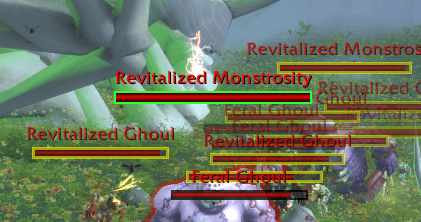
Easily pick out quest objective targets from non-objective targets (the Feral Ghoul)
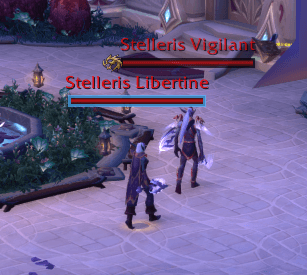
Pick out tough to spot World Quest targets
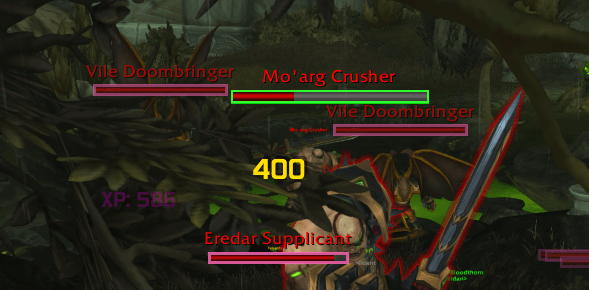
Find your current target amongst all the noise
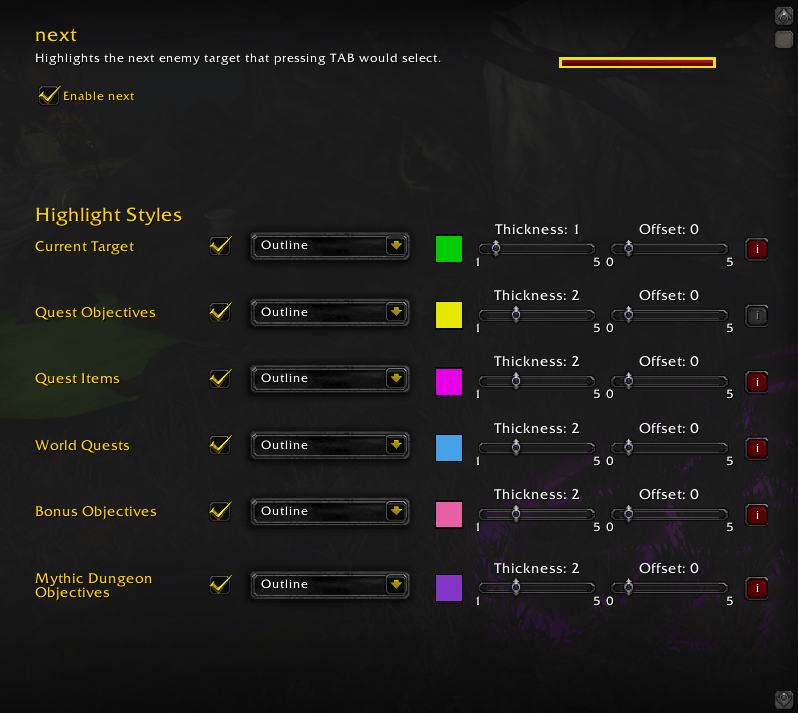
Customize in the settings panel!
Description
next - A Target highlighter
next is a World of Warcraft addon that highlights potential enemy targets, helping the player decide which enemy they should target next.The target highlighter uses the in-game tooltip information about each enemy within nameplate range to determine what to highlight, and the quest log to determine what color to use.
Features
- Quest Highlighting:
- Highlights nameplates for mobs relevant to your active quests:
- Quest objectives
- World quest targets
- Mythic+ Enemy Forces & Bosses
- Customizable Styles:
- Configure highlight color, thickness, and offset for each quest type.
- Settings panel available in Interface > AddOns or via
/next config.
Examples
Highlight the current target if its a quest objective. Keep track of what's an objective and what's not (the Feral Ghoul is not an objective)Usage
- Commands:
/next config— Open settings panel/next toggle— Enable/disable addon/next debug— Toggle debug window
Installation
- Download the latest
next.zipfrom the releases or clone the addon inside yourInterface/AddOns/folder - Restart WoW or reload the UI
- Configure via
/next configor Interface > AddOns > Next
Support
For issues or feature requests, open an issue on GitHub or contact the author.The next Team
