


NetInfo
- By
NetInfo Classic is a lightweight, fully localized addon that displays real-time performance and addon information for WoW Classic.
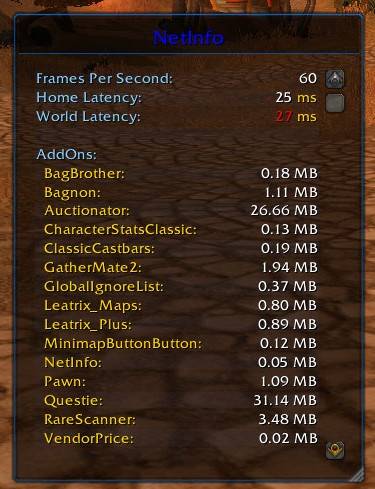
NetInfo_V1.3.jpg
Description
README.txt - NetInfo Addon for World of Warcraft (Classic)
==========================================================
Addon Name: NetInfo
Version: 1.3
Compatibility: World of Warcraft Classic
Description: Network and performance monitoring addon with real-time statistics
OVERVIEW
--------
NetInfo is a lightweight addon that displays real-time network and performance
information in a movable, resizable frame. It features alternating row striping
and a blue-themed interface for better readability.
FEATURES
--------
1. Performance Monitoring:
- Frames Per Second (FPS)
- Home and World latency
- Addon memory usage tracking
2. User Interface:
- Blue border and color scheme
- Alternating row striping (light/dark blue)
- Right-aligned values for easy reading
- Movable and resizable frame
3. Localization Support:
- English (default)
- German (deDE)
- French (frFR)
- Spanish (esES, esMX)
- Russian (ruRU)
- Korean (koKR)
- Chinese (zhCN, zhTW)
INSTALLATION
------------
1. Extract the addon folder to your World of Warcraft Classic AddOns directory:
- Windows: World of Warcraft\_classic_\Interface\AddOns\
- Mac: World of Warcraft/_classic_/Interface/AddOns/
2. Ensure folder structure is:
/AddOns/
└── NetInfo/
├── NetInfo.toc
├── NetInfo.lua
└── Localization files (if any)
USAGE
-----
The addon automatically loads when you log into the game and displays
a frame with network and performance information.
SLASH COMMANDS:
/netinfo show - Show the NetInfo frame
/netinfo hide - Hide the NetInfo frame
/netinfo version - Display version information
/netinfo help - Show help menu
MOUSE CONTROLS:
Shift + Left Click - Move the frame
Shift + Right Click - Toggle visibility
Bottom-right corner - Resize the frame
DISPLAYED INFORMATION
----------------------
- Frames Per Second (FPS)
- Home Latency (ms)
- World Latency (ms)
- Individual addon memory usage
- Total addon memory usage
CUSTOMIZATION
-------------
The frame features:
- Blue border (RGB: 0, 0.44, 0.87)
- Alternating row background colors
- Title bar with accent line
- Scrollable content area
TECHNICAL DETAILS
-----------------
- Update Interval: 1 second
- Frame Size: Default 300x400 (resizable)
- Memory Display: Individual and total in MB
LOCALIZATION FILES
------------------
The addon supports multiple languages through localization files.
If your language is not supported, it will default to English.
TROUBLESHOOTING
---------------
1. Frame not appearing:
- Type "/netinfo show"
- Check if addon is enabled in character selection screen
2. Performance impact:
- The addon is lightweight and updates only once per second
- Memory usage is minimal
3. Display issues:
- Use "/netinfo hide" then "/netinfo show" to reset
COMPATIBILITY
-------------
- World of Warcraft Classic Only
- Not compatible with Retail version
- Requires BackdropTemplate support
VERSION HISTORY
---------------
v1.3 - Added alternating row striping, blue border, right alignment
v1.2 - Improved localization support
v1.1 - Added slash commands and mouse controls
v1.0 - Initial release
AUTHOR
----------------
Created for the WoW Classic community by Feroartt
LICENSE
-------
Free to use and modify. Please credit the original author if distributing
modified versions.
NOTES
-----
- Frame position and size are saved between sessions
- All network data comes from WoW's internal GetNetStats() function
- Memory usage tracking uses Blizzard's AddOn memory API
ENJOY MONITORING YOUR NETWORK PERFORMANCE!
The NetInfo Team

