
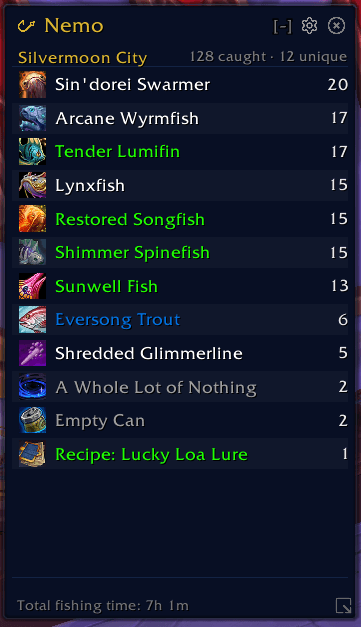
nemo_main.png
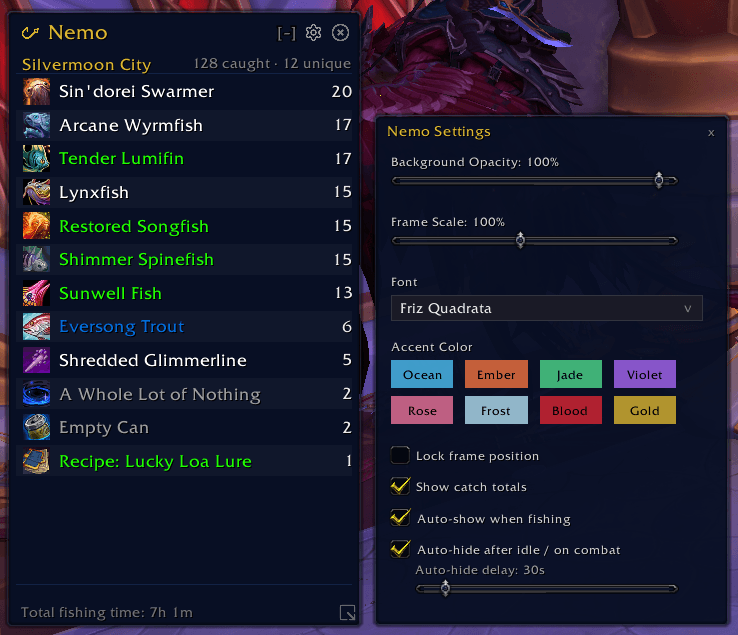
nemo_settings.png
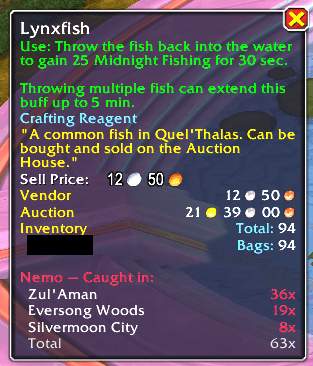
nemo_tooltip.png
Description
Nemo - Fishing Log
Nemo is a lightweight fishing tracker that logs everything you catch, zone by zone. It keeps a running tally of every item (and currency) you've fished up, sorted by how many times you've caught each one.
Why?
I wanted a simple way to see what I've been catching in each zone without digging through bags or trying to remember. Nemo just quietly tracks your catches and shows them in a clean little window. That's it.
What it does
- Tracks every item you catch while fishing, per zone
- Auto-shows when you start fishing, auto-hides when you stop (delay is configurable)
- Hover over items in your bags and Nemo will show you where and how many times you've caught that item
- Session stats (catches this session, time spent fishing)
- Total time fishing
- Quiet mode - Shrinks the window down to a single frame with only Zone name and total catches, keeping it out of the way and small. Re-enabling 'normal' mode, will still show all the catches in the list that you had during quiet mode
- Silent mode - Hides the window and tracks catches in the background. The minimap icon pulses when you catch something, and clicking it prints a summary of what you've caught to chat for the session.
- Minimap button - Left-click to toggle the window. Tooltip shows your last 3 catches.
- Voidstorm support - detects catches from
Oceanic Vortexwhich, sadly, doesn't work like regular fishing. There is no good way to auto-detect when a Vortex is near, but we will log it if you catch something from one - Hyper-Compressed Ocean support - detects catches from
Hyper-Compressed Oceantoy and logs the catch like normal - Sort By options - "Most Recent" and "Most Caught"
The UI
Dark, minimal, stays out of your way. Draggable, resizable, and you can tweak the opacity, scale, and accent color in the settings panel. Lock it in place when you've got it where you want it.
Slash Commands
/nemo - Toggle the window
/nemo settings - Open the settings panel
/nemo quiet - Toggle quiet mode
/nemo silent - Toggle silent mode
/nemo session - Show session stats in chat
/nemo zone - Show your current zone/map ID
/nemo remove <Item Name> - Remove a specific item from all zones (case-sensitive)
/nemo reset - Wipe all catch data (asks for confirmation)
Notes
The Voidstorm Vortex loot detection works by watching for different loot events that happen after a UNIT_SPELLCAST_CHANNEL_START on the player with the name Void Hole Fishing. This should avoid logging other items (like herbing/mining) after you catch something while fishing them.
Feedback
Found a bug or have a suggestion? Open an issue on the GitHub repo or leave a comment here.
Nemo Fishing Log Team
