
Neeo Auras
- By
A World of Warcraft (Retail 12.x) addon that shows boss auras to the players they are meant for — lines of text, icons and bars on boss mod timers — including which of your own cooldowns to press for a boss ability, whichever is ready.
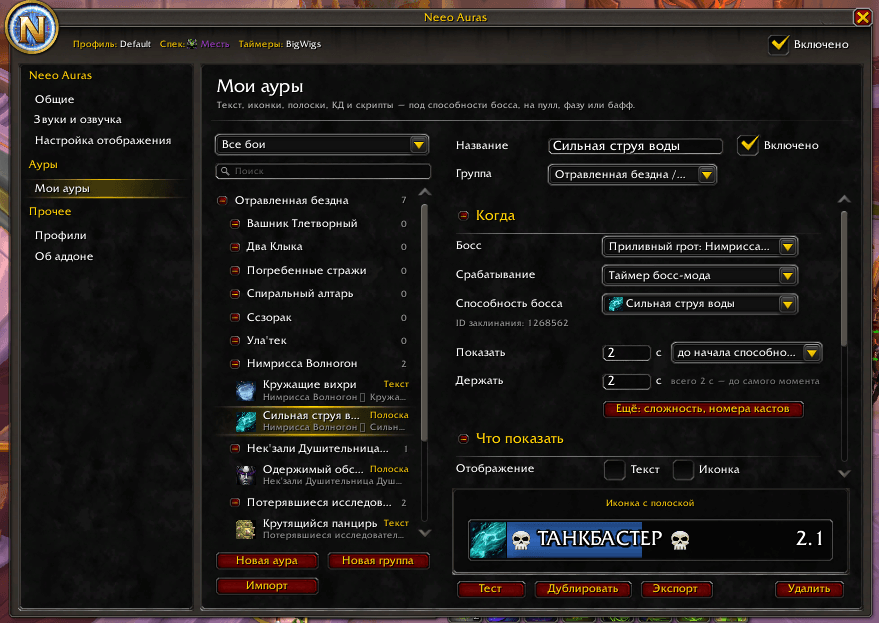
SCR-20261016-itrg.png
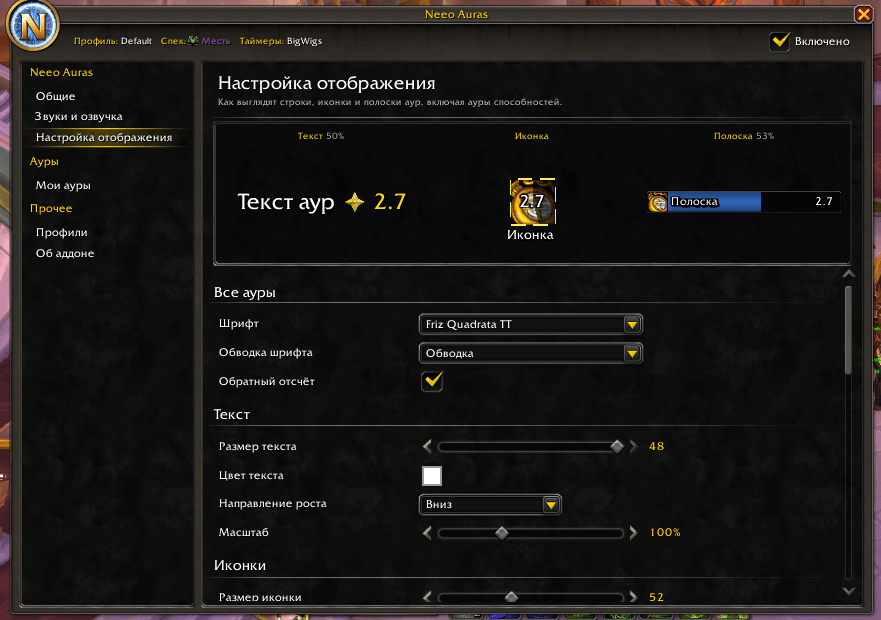
SCR-20261016-itwj.png
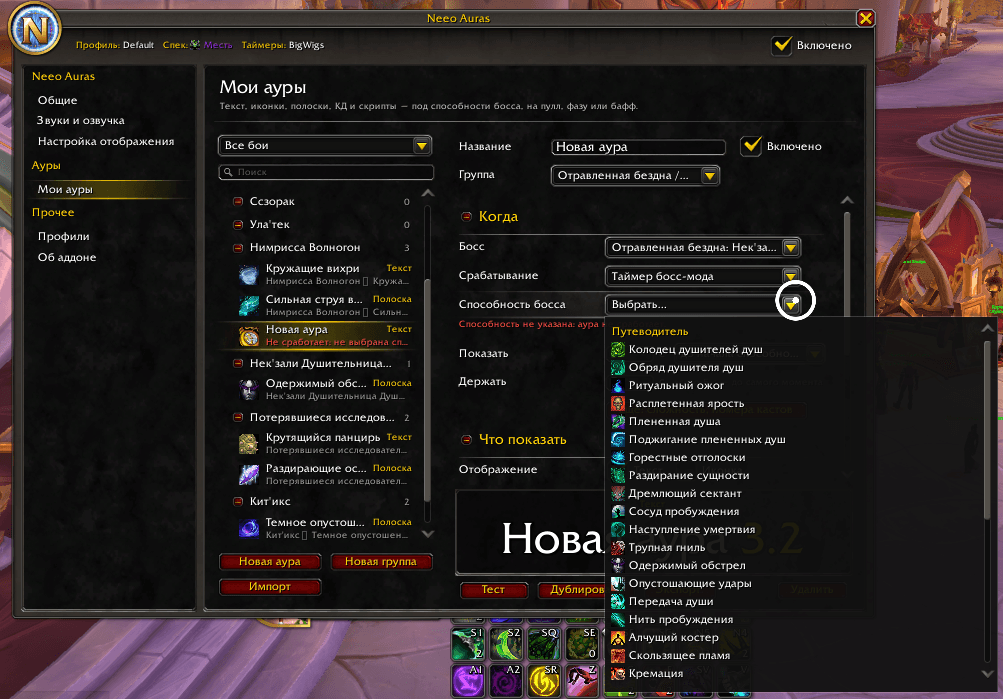
SCR-20261016-iubb.png
Description
ENGLISH
A World of Warcraft (Retail 12.x) addon that shows boss auras to the players they are meant for — lines of text, icons and bars on boss mod timers — including which of your own cooldowns to press for a boss ability, whichever is ready.
Features
- Auras: a line of text, an icon, an icon with a bar, an ability to press or a script — or several of them at once in one aura. An aura fires on a boss mod timer (before or after the ability starts), a boss mod warning, a time from the pull or from the start of a stage (or of every stage) — for one boss or any boss — or, out of combat only, on a buff or debuff on you (while it is on, or while it is missing; the game hides buffs from addons in combat, keys and PvP). It can be meant for roles, classes, specializations, raid groups or player names, for a difficulty, and only for certain casts (odd, even or numbered, counted from the pull or from each stage).
- Groups: auras live in groups you name, export, import or turn off as a whole. Groups go inside groups as deep as you like (Raid → Boss → auras), passing their switch and look down. The list shows each group's inner groups and auras in fight order, with their type, searches them, and marks in red an aura that can never fire as it is set; drag an aura or a group onto another group to move it.
- Editor: New Aura starts from what the aura is on — a boss ability picked from the Encounter Journal or from what your boss mod has shown, the pull, a stage, a buff on you. Boss abilities, icons and buffs are picked from lists (an ID for anything else), and a live preview of the aura stays pinned above its buttons while you edit.
- Ability auras: an aura of the Ability type names which of your abilities to press instead of a fixed icon. Pick one or more of your class's spells with a cooldown of 30 s or more, your racial, your equipped trinkets or any class's major cooldowns, and put them in order: it shows the first one that is ready, or every selected one at once (for damage cooldowns used together, crossed off as you cast them). Only players who know one of the abilities see it, so a raid plan can list several classes' cooldowns without targets. It goes on the icon, bar or text display, next to the other auras.
- Scripts: a Script part runs your own Lua when the aura fires and, if you like, when it
goes, with what fired it (
e.key,e.count,e.stacks, …) and a table of its own (e.store). Errors go to the chat. Code that came with an import stays off until you have read it and allowed it in the editor. - Chat links: Shift+click an aura or a group (or Link in chat in its menu) to put
[Neeo Auras: name]in chat. Everyone with the addon sees a link with that name; a click fetches the aura from you (addon whispers, in the background) and opens it in the import window to look at before importing — the chat never carries the import string itself. - Sharing: import/export strings for profiles, aura groups and single auras. The aura string is plain JSON inside, so other tools can make them.
- Presets (a separate download, not inside the addon): ready-made auras for every specialization in the current raid, on boss mod timers. Import them in My Auras.
- Timer sources: BigWigs, Deadly Boss Mods, or the game's own encounter timeline (experimental: the game hides most ability ids from it during combat).
- Look: one Display Settings page with a live preview for every aura, ability auras included: icon crop, border (solid or any shared media border), cooldown swipe, glow (action button, pixel, autocast, proc) and its color; bar texture, color, background, border and icon; fonts; which way stacks grow; the scale of each display. A group can change any of it for its auras, and an aura for itself. For an icon or a bar, pick the icon from your class's cooldowns, your spellbook or the boss's abilities instead of typing an id. The displays can also be moved in the game's Edit Mode.
- Profiles shared by all characters, a profile per character or per specialization.
- Debug mode: every aura meant for you fires on a made-up boss timer, no boss mod or boss needed.
- Settings window built from the game's own templates, so it looks like part of the default UI. English and Russian.
Usage
/na— open the settings (also: minimap button, the addon list under the minimap, Options → AddOns)./neeoand/neeoauraswork too./na auras— the aura list (My Auras)./na test— show a test ability aura with your specialization's main cooldowns./na move— unlock the displays to move them (/na lock,/na unlock)./na fake [seconds]— debug mode: every aura meant for you fires on a made-up boss timer (every 30 s unless you say otherwise). Also on the General page. A real boss fight pauses it; a reload turns it off./na profile [name]— show or switch the profile;/na minimap— show or hide the minimap button;/na status— version, profile, timer source, specialization and the current fight./na help— every command.
РУССКИЙ
Аддон показывает ауры на боссах тем игрокам, кому они назначены: текст, иконки и полоски по таймерам босс-модов, в том числе — какой из ваших КД прожать под способность босса, смотря что готово.
Возможности
- Ауры (текст, иконка, иконка с полоской, способность, скрипт — или несколько частей в одной ауре) по таймеру или предупреждению босс-мода, по времени от пулла или от начала фазы (или каждой фазы) — на конкретного босса или на любой бой — или, только вне боя, по баффу или дебаффу на себе (пока висит или пока его нет; в бою, ключах и PvP игра скрывает баффы от аддонов), с назначением по ролям, классам, спекам, группам и именам, на нужной сложности, только на нужные касты («Все чётные» / «Все нечётные», с пулла или заново с каждой фазы).
- Аура способностей — тип ауры «Способность», который вместо фиксированной иконки показывает, что прожать: одна или несколько способностей класса с КД от 30 с, расовая, надетые тринкеты или КД любого класса, в своём порядке (порядок — приоритет); первая готовая или сразу все выбранные (для КД на урон; прожатые вычёркиваются). Видит её только тот, у кого есть хоть одна из способностей, — в плане рейда можно перечислить КД разных классов без назначения. Показывается на фрейме иконок, полосок или текста — рядом с остальными аурами и в том же виде.
- Скрипт — часть ауры с кодом на Lua: выполняется, когда аура срабатывает, и (по желанию)
когда уходит; получает
e— что сработало (e.key,e.count,e.stacks…) иe.store— свою таблицу ауры. Ошибки — в чат. Код из импорта не выполняется, пока вы не прочитаете его и не разрешите в редакторе. - Группы аур — свои, с любыми названиями (план рейда, неделя, босс), со своим видом. Группы вкладываются друг в друга на любую глубину («Рейд → Босс → ауры»): выключатель и вид действуют на всё внутри. В списке группа → группы внутри неё → её ауры по ходу боя, у каждой подписан тип; ауру или группу можно перетащить мышью в другую группу; клик по группе — её название, место, выключатель и вид, ПКМ — новая аура или группа внутри, импорт в группу, экспорт, ссылка в чат, переименовать, выключить целиком, удалить.
- Ссылки в чате, как в WeakAuras: Shift+клик по ауре или группе (или «Ссылка в чат» в её
меню) вставляет в чат
[Neeo Auras: название]. У всех, у кого стоит аддон, это ссылка с названием; клик забирает ауру у автора (скрытыми сообщениями аддона) и открывает окно импорта — посмотреть и импортировать. Сама строка импорта в чат не попадает. - Строка обмена для группы или одной ауры:
!NEEO2!+ Base64 от DEFLATE JSON (или сам JSON текстом) — её легко собрать вне игры. - Настройка отображения — одна страница с живым предпросмотром для всех аур, в том числе аур способностей: рамки, обрезка иконки, свайп, подсветка (глоу) и её цвет, текстура, фон и рамка полоски, шрифты, направление роста, масштаб каждого фрейма. Группа может поменять вид для своих аур, аура — для себя. Иконку для иконки и полоски можно выбрать из КД своего класса, книги заклинаний или способностей босса. Фреймы двигаются и в режиме редактирования игры.
- Пресеты (отдельный архив, не внутри аддона): готовые ауры на каждый спек для текущего рейда, на таймерах босс-мода. Импорт — «Мои ауры» → «Импорт».
- Таймеры: BigWigs, DBM или встроенный таймлайн боя (экспериментально).
- Профили, профиль на персонажа или на спек, импорт/экспорт строкой — профиля, группы аур или одной ауры. Импорт — только своих строк.
- Режим отладки (
/na fakeили «Общие» → «Отладка»): ваши ауры появляются по фейковым таймерам (по умолчанию раз в 30 с) без босс-мода и без босса.
Neeo Auras Team
