NeatPlates_TargetShow
- By
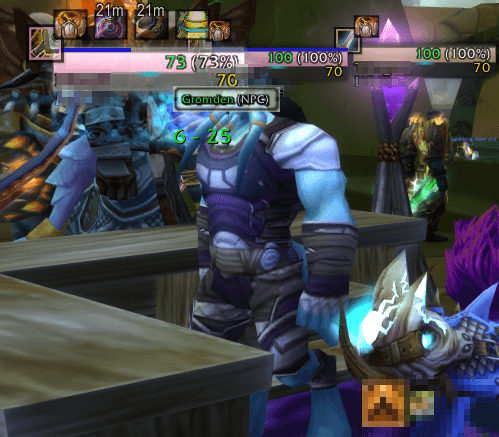
Plugin for NeatPlates to show target of plate's owner. Refreshed/activated on moveover event and combat log events.
NeatPlates_TS_01.png
NeatPlates_TS_02.png
NeatPlates_TS_03.png
Description
NeatPlates: Target Show
NeatPlates: Target Show is a lightweight, performance-friendly plugin for the popular nameplate addon NeatPlates and dedicated for game version: WoW TBC Anniversary. It enhances your default nameplate visibility by dynamically displaying the current target of your enemies directly below or anywhere around their health bars.
Perfect for tanks needing to spot loose mobs instantly, healers watching who is taking damage, or PvP players tracking enemy focus!
⚠️ IMPORTANT: Dependency Required
This is a plugin and DOES NOT work standalone. You must have the main addon installed for this plugin to function:
- Required Addon: NeatPlates or its updated fork - NeatPlates Community Edition
✨ Key Features
- Target of Target on Plates: Instantly see who your enemies are targeting without swapping your own target. It also can inform of that target role for you or your group (for example: Tank, DPS, Heal, NPC, -).
- Real-time Updates: Blazing fast performance utilizing native WoW API events (on Mouseover events and CombatLog events) to ensure names update instantly.
- Smart Visibility: Hides automatically when the enemy has no target or when the target is irrelevant.
⚙️ Configuration Options
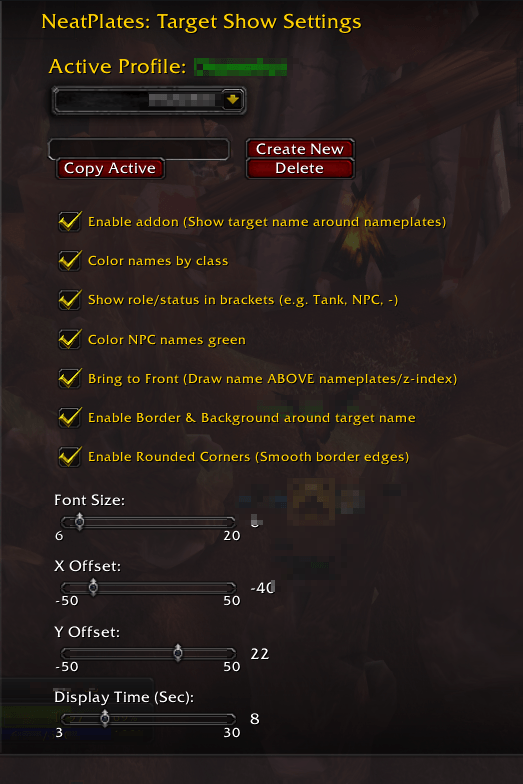
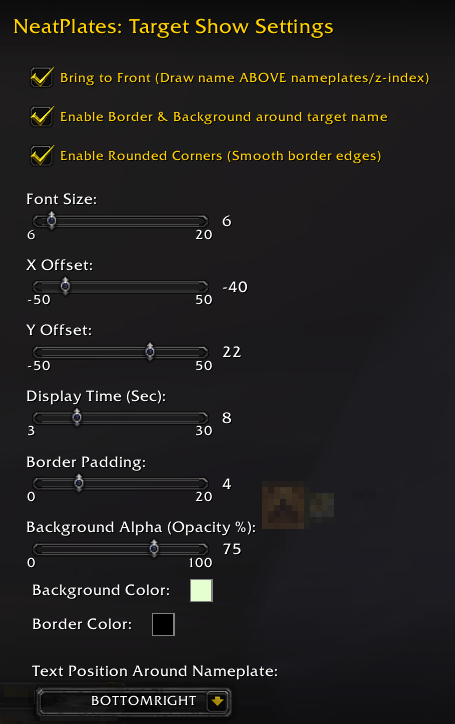
You can fully customize the look and behavior of the target text to match your current UI setup via the standard options panel or command
/npts :- Font Customization: Change font size for your liking.
- Precise Positioning: Adjust X and Y offsets to place the target name perfectly below, above, or inside the nameplate, whever you prefer.
- Color Coding:
- Color names by Class Colors for quick identification of players.
- Add box around name and color it's bacground
- Custom static color option for NPCs.
🚀 Installation & Setup
- Make sure NeatPlates is installed and enabled.
- Install NeatPlates: TargetShow.
- Open the NeatPlates: Target Show settings window in-game using
/npts. or by opening in-game Options and navigating to Addons tab and selecting NeatPlates: Target Show from the list.
The NeatPlates_TargetShow Team