NeatBuffs
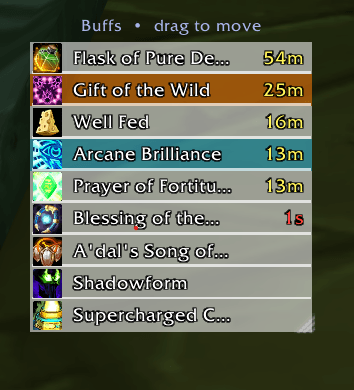
Clean movable buff tracker for TBC Anniversary in the classic CT_BuffMod style. Class-colored bars, weapon enchants, scale, opacity controls, and a simple options panel.
Screenshot 2026-08-10 160110.png
Description
# NeatBuffs
A clean, movable player buff tracker for **World of Warcraft Classic – The Burning Crusade Anniversary**, inspired by the classic **CT_BuffMod** look.
Compact list of your buffs with icons, names, and timers in a window you can place and resize anywhere.
## Features
- **Movable & lockable** window
- **Resizable** (drag the bottom-right grip while unlocked)
- **Scale** control (50–150%)
- **Grows downward** so new buffs don’t push the frame upward
- Bright icons and clear outlined text
- **Class-colored row backgrounds** (optional) — Mage blue, Priest white, Druid orange, Paladin pink, etc.
- **Class color strength** slider
- **Soft blue or fully clear** background with opacity slider
- **Bold separators** between buffs (stronger when class colors are on)
- **Weapon enchants** with scanned enchant names
- **Right-click to cancel** buffs (out of combat)
- Mouseover tooltips
- Sort by remaining duration
- Toggle permanent auras
- Hide the default Blizzard buff frame
- All settings saved between sessions
## Commands
| Command | Action |
|---------|--------|
| `/neatbuffs` or `/nb` | Toggle lock / unlock |
| `/neatbuffs unlock` | Unlock (move + resize) |
| `/neatbuffs lock` | Lock window in place |
| `/neatbuffs options` | Open options panel |
| `/neatbuffs bg` | Toggle Clear / Blue background |
| `/neatbuffs opacity N` | Set blue opacity (0–100) |
| `/neatbuffs class` | Toggle class-colored bars |
| `/neatbuffs classopacity N` | Set class bar strength (0–100) |
| `/neatbuffs scale N` | Set scale (50–150) |
| `/neatbuffs blizzard` | Toggle default Blizzard buffs |
| `/neatbuffs sort` | Toggle duration sorting |
| `/neatbuffs permanent` | Toggle permanent auras |
| `/neatbuffs weapon` | Toggle weapon enchants |
| `/neatbuffs reset` | Reset position & settings |
| `/neatbuffs help` | List all commands |
## Options Panel
Type `/neatbuffs options` for:
- Clear / Blue background buttons
- Blue opacity slider
- Class colors On / Off
- Class color strength slider
- Scale slider
## Installation
1. Extract the `NeatBuffs` folder into
`World of Warcraft\_anniversary_\Interface\AddOns\`
2. Restart the client or type `/reload`
3. Type `/neatbuffs options` to configure
## Compatibility
- **Client:** TBC Anniversary (Interface 20506)
- Lightweight single-file addon — no libraries required
NeatBuffs Team