NBK antiSpoiler - Don't get spoiled
- By
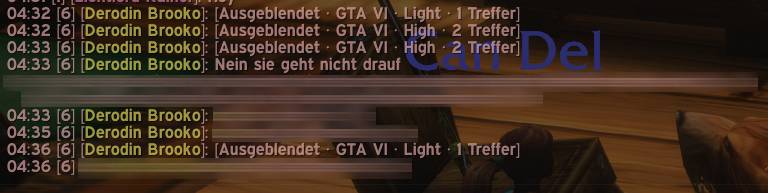
Don't get spoiled! anti-spoiler features hide messages that contain spoilers, currently for GTA 6.
nbkas_010-1.jpg
Description
NBK Anti-Spoiler
Don't get spoiled!
anti-spoiler features hide messages that contain spoilers
Compatible / integrated
- GTA VI / Grand Theft Auto VI
NBK Anti-Spoiler adds local spoiler protection for WoW chat to NerzorsBlacklistKeeper. The bundled GTA VI profile checks German and English names, keywords, critical plot events and short conversation context.
German, English, French and Spanish rules are active together. The menus follow the WoW client language with English as a fallback.
The add-on offers Light, Medium, High and Context levels, manual and temporary player mutes, and spoiler markers with encoded export. You can find the settings and the list of hidden players under /nbk config in the Anti-Spoiler tab.
required
This need NBK (NerzorsBlacklistKeeper)
- Find Here: nbk.nerzors.com
- Cursefoge: cf: NerzrosBlacklistKeeper
Installation
- Install and enable NerzorsBlacklistKeeper and its required data module.
- Extract the release ZIP. The
NerzorsBlacklistKeeper_AntiSpoilerfolder goes directly intoInterface/AddOns. - Start WoW, enable the add-on and choose Enable protection in the introduction.
Tested clients are Retail 12.1.5, Retail 12.1.7 and Forever 1.60.1. With NBK 2.2.0 Detection uses local rules and can produce false positives and miss spoilers. Levels and chat types can be configured individually.
Reporting spoilers
Right-click a name in chat, then NBK - ANTI SPOILER → Mark as spoiler …. Review the excerpt, remove anything private and save it as a marker. Under My spoiler markers, select the entries you want and choose Create export. Paste the copied NBKAS1.… string into a GitHub issue or as Comment. Keep the title as spoiler-free as possible.
Commands
| Command | Function |
|---|---|
/nbkspoiler intro |
Open the introduction |
/nbkspoiler muted |
Manage player mutes and transfer them to NBK |
/nbkspoiler mark |
Pick a recently received chat line to mark |
/nbkspoiler markers |
Manage and export saved markers |
NBK antiSpoiler - Don't get spoiled Team