Nat20
Tabletop-RPG play for WoW: Forever and Retail: an initiative bar, text combat narration, d20 rolls and a character with a personality, on a themed HUD. Every piece is optional.
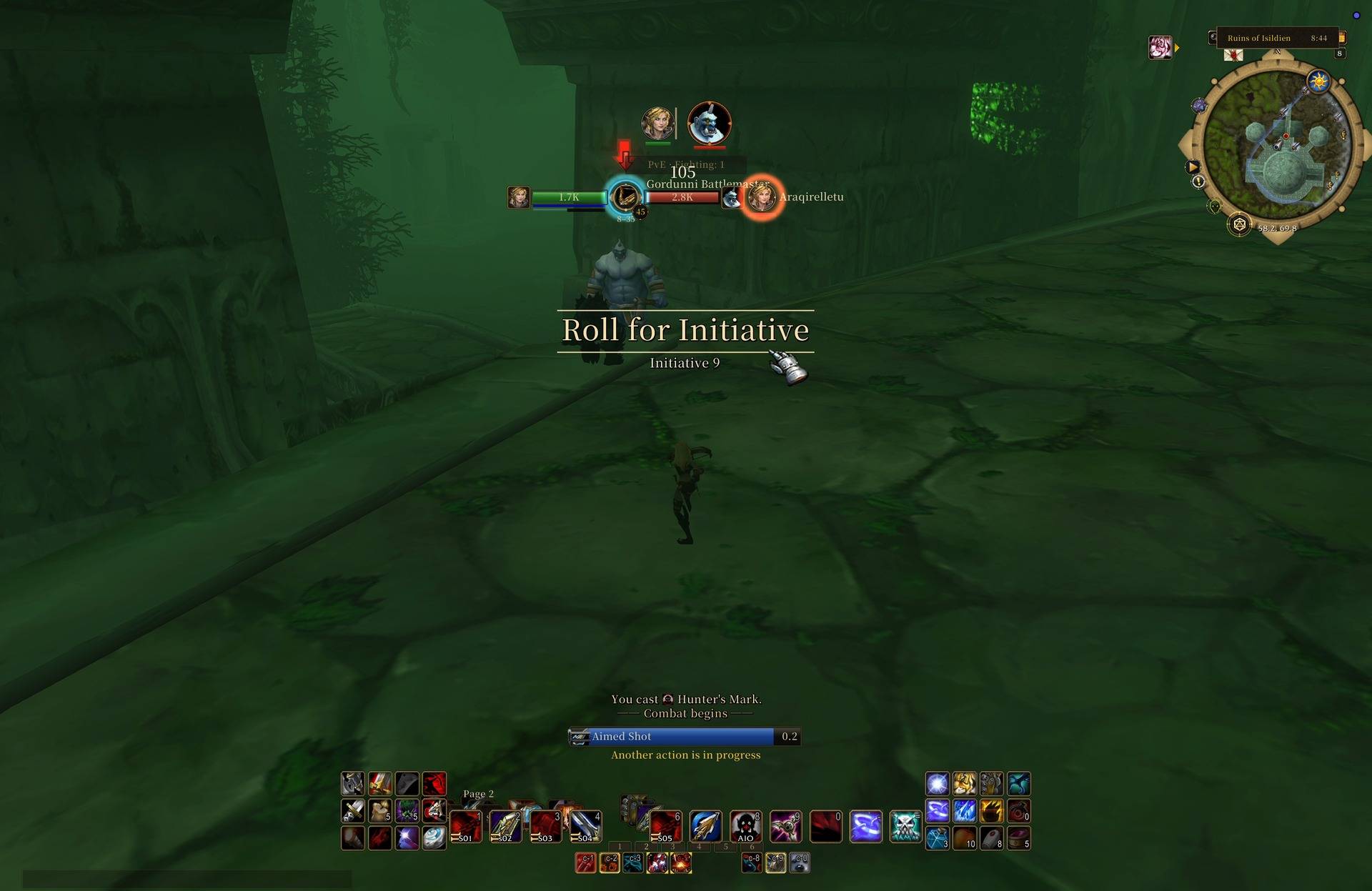
Combat opens with an initiative banner and a turn-order row over the versus plate.
Description
Nat20 turns World of Warcraft's interface into a tabletop-RPG table: leather-and-bronze panels, AI-generated portraits, an initiative bar, text narration that tells your fights like a game master, and real d20 rolls. Take the whole interface or only the parts you like. Every piece is optional, and Nat20 steps aside when you already run another UI addon for the same job.
What you get
Nat20 (required)
- Unit frames for you, target, focus, party, boss and arena. Party members can be tall portrait cards down the left edge, and your target faces you on a "versus" plate at the bottom of the screen. In battlegrounds the teammate cards can show portrait art or the game's own 3D portrait, and enemy info can follow the nameplates or sit in a panel on the right that lists confirmed interrupt targets.
- Level-up [+]: while talent points wait to be spent, a small [+] glows on your portrait; click it to open your talents.
- Action bars with page badges, hotkey layers and optional icon-art styles.
- A consistent look for bags, the character window, the spellbook, tooltips, chat, loot, the calendar, the Cooldown Manager, the damage meter, the game menu and Auctionator. Each skin has its own switch.
- Five themes (Classic Bronze, Obsidian Bronze, Crimson Gothic, Moonlit Silver, Restrained Antique), eleven city themes that take over while you are in a capital, and five sound styles (Dark fantasy, Elven, Dwarven forge, Tavern, Soft and quiet).
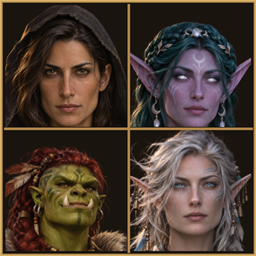
- Portraits (AI-generated, curated by the author) wherever the game would draw a model portrait (needs a portrait pack, see below).
- A real settings panel: up to nine tabs (PvP and Roleplay tabs come with their folders), search, a one-line explanation under every option, profiles, drag-to-arrange layout and quick presets.
Nat20 Combat (optional)
- Initiative row, action and bonus-action pips, and banners for crits, downed and revived allies and kills.
- Combat narration: a short scrolling log that tells the fight in sentences, like a game master.
- d20 roll:
/rolltumbles a real die on screen, and loot rolls tumble too. - Range emblem that shows melee, far and dead-zone distance on your target.
- Swing timers, reaction callouts, proc glow and icon effects on your action bars.
- Reach marker: a gold diamond beside an attackable enemy's nameplate while it is within your class's longest-range ability.
- Screen-edge cues for low health and crowd control, an examine card with a hit-chance estimate, and a condition glossary.
- GCD music: plays the next note of a tune on every global cooldown, so your rotation plays a melody.
Nat20 PvP (optional)
- Enemy radar with off-screen edge markers and arrival alerts, a tactics roster, and a threat card that lists an enemy player's strongest abilities.
- Arena: opponent roster and opening briefing, diminishing-returns icons, trinket cooldowns.
- Match journal with win-rate trends, plus a scoreboard and objectives skin.
Nat20 Roleplay (optional)
- Dialogue window with skill-check flavour on gossip replies (the die is drawn by Nat20 Combat), and a line your character can say back to a quest giver.
- Scene mode (hides names and nameplates while a scene runs), scene notes and a line wheel.
- Roleplay chat log with an optional English-to-Taiwanese gloss.
- Camp and rest banners, a note when food or drink has filled you up, discovery toasts, ambience layers, and a short campfire exchange after a hard fight.
- Character murmurs: your character mutters a line above the portrait on death, revive, level-up,
quests, a close win, full bags, junk loot, a new zone or worn-out gear, in one of eight personalities,
about 2,000 lines in all, and a line is not repeated until most of its set has been heard. Only you see
them. Add your own lines with
/nat20 murmur add. - Total RP 3 integration (optional): roleplay names, an in/out-of-character marker and a character card.
Nat20 Tools (optional)
- Macro workbench and layered macros shown on your action buttons.
- Macro language: spell names in your macros convert between the English and Taiwanese clients with
/nat20 macrolocale, or at every login if you turn that on. - Diagnostics:
/nat20 check,probe,report,verifyandperf(a per-fight cost report). - Talent planner (WoW: Forever only):
/nat20 planneropens a window to try any class's talent tree, change the level and share export and import codes, without touching your real talents.
Portraits (separate download)
Portraits live in Nat20 Portraits, one download for every race. A race without pictures in it keeps the game's own portrait. Pick your own portrait per character (and per specialization), let other players get a fitting picture by race, sex and class, assign a picture to a specific player, and tint the hair, eye and skin colours of your own. Choose what sits behind the picture: the original, nothing, a plain dark plate or one of ten scene backdrops. You can also add your own pictures. At launch there are packs for the nine races of WoW: Forever (the eight classic races and Skyborne); the other races follow later.
AI disclosure: Nat20 is made by one developer working with AI coding assistants (Claude and Codex). Every change goes through an automated suite of more than 1,900 tests, and the main features have been tested in game on WoW: Forever. The pictures in the portrait packs were generated with AI image tools and curated by the author. Some UI art is also AI-assisted: the optional action-bar icon sets, a few interface badges, the city crests and the 3D model behind the dice (made with Tripo AI). Theme frames, sounds and music are made procedurally by the project's own tools.
Install
- Download the zip and extract all folders into the AddOns folder of your client:
World of Warcraft/_retail_/Interface/AddOnsfor Retail,World of Warcraft/_forever_/Interface/AddOnsfor WoW: Forever. Nat20is required.Nat20_Combat,Nat20_PvP,Nat20_RoleplayandNat20_Toolsare optional and each needsNat20.Nat20_Tools_SpellDataandNat20_Roleplay_Glossare data that load only when needed.- Portraits: download the portrait pack (every race is in one file) from the Nat20 Portraits page.
Type /nat20 (or /n20) to open the settings.
Compatibility
Retail (12.1.5 and 12.1.7) and WoW: Forever (interface 16001) use the same download. A few options need the Forever client; on Retail they are greyed out and the option text says why.
First login
Nat20 can replace a lot of the default interface (unit frames, action bars, chat, bags and more), so the first login asks how to start: full Nat20, keep the default interface (safe mode), or choose in settings. You can change it any time. Safe mode is a global off switch for troubleshooting. Game settings that Nat20 changes (friendly nameplates, nameplate names, floating combat text) go back to your own values when you log out or turn on safe mode, so removing Nat20 leaves your game as it was.
Plays well with others
- Nat20 leaves unit frames to ElvUI, GW2_UI, ShadowedUnitFrames or PitBull4, action bars to GW2_UI, ElvUI, Bartender4 or Dominos, and nameplates to Plater, KuiNameplates, TidyPlates Threat Plates or NeatPlates when they are loaded. Window skins yield to ElvUI and GW2_UI.
- By default (an option you can turn off), Nat20's party and raid frames step aside when HealKit, VuhDo, Grid2, HealBot or Cell is loaded, so only one set shows.
- Total RP 3 and Questie are optional: features that need them are greyed out with a reason when they are missing.
Built for Midnight
Retail 12.x hides some combat data from addons ("secret values"). Nat20 is built around these limits, and options that cannot work under them are marked in the settings instead of failing silently. Addons cannot style friendly nameplates inside instances; Nat20 says so in the option text.
Languages
English and Taiwanese, plus a bilingual mode that puts both on screen where it helps.
FAQ
Does it replace my whole interface? Only what you let it. Choose "keep the default interface" at first
login, or switch individual skins and modules off.
Something looks wrong. How do I find out why? Turn on safe mode, then /nat20 check and /nat20 report.
Leave a comment on this page with what you see.
Will it slow my game? /nat20 perf prints what each module cost in the last fight. Large data (spell names,
the chat gloss dictionary) loads only when needed.
Where are my portraits? Install a pack from Nat20 Portraits and open /nat20 portrait.
Does it run on WoW: Forever? Yes, with the same download. Put the folders in the _forever_ AddOns folder.
Credits and licences
Built on oUF (MIT), LibActionButton-1.0 (BSD-3-Clause), LibButtonGlow-1.0 (BSD), LibStub (public domain) and CallbackHandler-1.0 (Ace3). The interface font is Noto Serif TC, cut down and renamed "Nat20 Serif" under the SIL Open Font License 1.1. UI sounds are original procedural audio generated by the project's own tools. The GCD music plays a generated arrangement of Bach's Prelude in C, BWV 846. The 3D dice model was generated with Tripo AI.
Nat20's code is MIT licensed. The portraits, textures and icon art are © Nameless One and may be used with Nat20; please do not redistribute them on their own.
Nat20 把 WoW 的介面變成一張桌上角色扮演的桌子:皮革與銅框的面板、AI 生成的頭像、先攻列、 像遊戲主持人一樣用文字替你的戰鬥旁白,還有真正的 d20 擲骰。整套都用,或只挑你要的;每個部分都能關, 而且你已經在用別的介面插件做同一件事時,Nat20 會讓開。
內容
Nat20(必要)
- 單位框架:玩家、目標、專注、隊友、首領、競技場。隊友可以排成畫面左側的直式頭像卡, 你和目標在畫面下方以「對決名條」面對面。戰場裡隊友卡可選頭像圖或遊戲原生 3D 頭像, 敵方資訊可跟著名條,也可移到右側面板,並列出可確認的打斷目標。
- 升級 [+]:有天賦點數還沒分配時,頭像左上角亮起小小的 [+],點一下就開天賦。
- 動作條:分頁徽章、快捷鍵圖層,圖示美術風格可選。
- 一致的外觀:背包、角色視窗、法術書、提示框、聊天、拾取、行事曆、冷卻管理員、傷害統計、遊戲選單與拍賣小幫手(Auctionator), 每一項都有自己的開關。
- 五個主題(經典銅框、黑曜古銅、酒紅哥德、月銀秘典、極簡舊金)、進主城時接手的十一個城市主題, 以及五組音效風格(黑暗奇幻、精靈、矮人鍛爐、酒館、柔和安靜)。
- 頭像(AI 生成、作者挑選):遊戲原本畫模型頭像的地方都能換(需要頭像包,見下)。
- 完整的設定面板:最多九個分頁(PvP 與角色扮演分頁隨各自資料夾出現)、搜尋、每個選項下方一行說明、配置、拖曳排版與快速套用。
Nat20 戰鬥(可選)
- 先攻列、行動與附贈行動點數,以及重擊、倒地、被救起與擊殺的橫幅。
- 戰鬥旁白:右下角一小段滾動紀錄,用句子把這場戰鬥說出來,像遊戲主持人。
- d20 擲骰:
/roll在畫面上擲出一顆真正的骰子,拾取擲骰也會。 - 距離圓框:顯示目標在近戰、過遠或死區距離。
- 普攻計時、反應提示、觸發光暈與圖示特效,直接做在動作條上。
- 射程標記:可攻擊的敵人在你職業最遠技能的射程內時,名條旁顯示金色菱形。
- 螢幕邊緣提示(低血量、控場)、附命中率估算的檢視卡,以及狀態詞典。
- GCD 音樂:每個全域冷卻播下一個音符,讓你的輸出循環變成一首曲子。
Nat20 PvP(可選)
- 敵人雷達(畫面外的邊緣標記與抵達提示)、戰術名單,以及列出敵方玩家最強技能的威脅卡。
- 競技場:對手名單與開場簡報、遞減效果圖示、飾品冷卻。
- 戰績與勝率趨勢,加上計分板與目標外觀。
Nat20 角色扮演(可選)
- 對話面板:NPC 對話選項帶技能檢定風味(骰子畫面由 Nat20 戰鬥套件繪製),你的角色也能回任務 NPC 一句話。
- 場景模式(場景進行時隱藏名字與名條)、場景筆記與台詞輪盤。
- 角色扮演聊天記錄,可選擇在英文下方加上台灣對照。
- 紮營與休息橫幅、吃喝補滿時的提醒、發現提示、氛圍層,以及苦戰後營火邊的一小段對話。
- 角色碎念:死亡、復活、升級、任務、險勝、背包滿、撿到垃圾、進入新區域或裝備快壞時,
角色在頭像上方自言自語一句,共八種個性、約 2,000 句,一組台詞大半說過才會重複。只有你自己看得到;
用
/nat20 murmur add加入自己的台詞。 - Total RP 3 整合(可選):角色扮演名字、戲內/戲外標記與角色卡。
Nat20 工具(可選)
- 巨集工作台與顯示在動作鈕上的多層巨集。
- 巨集語言:巨集裡的技能名稱可在英文與台灣客戶端之間轉換,輸入
/nat20 macrolocale,或打開「登入時自動轉換」。 - 診斷指令:
/nat20 check、probe、report、verify、perf(每場戰鬥的耗時報告)。 - 天賦規劃器(僅 WoW:Forever):
/nat20 planner開啟視窗,試排任一職業的天賦樹、調整等級, 並匯出與匯入代碼,完全不動你真實的天賦。
頭像(另外下載)
頭像放在 Nat20 Portraits,所有種族一個檔案;包裡還沒有的種族維持遊戲原本的頭像。 可以為每個角色(以及每個專精)選自己的頭像、讓其他玩家依種族、性別與職業配到合適的圖、 指定某位玩家固定用哪一張,並調整自己的髮色、眼色與膚色;可選擇頭像後面的背景:原圖、無、素色暗底或十張場景背景;也可以加入你自己的圖片。首發先提供 WoW:Forever 的 9 個種族(經典 8 族與天裔精靈),其他種族之後補上。
AI 揭露: Nat20 由一名開發者與 AI 程式助理(Claude、Codex)合作製作。每次改動都要通過 1,900 多項自動化測試,主要功能已在 WoW:Forever 遊戲內實測。 頭像包裡的圖片使用 AI 繪圖工具生成,並由作者挑選整理。部分介面美術也使用 AI:可選的動作條圖示、少數介面徽章、城市徽章,以及骰子的 3D 模型(Tripo AI)。主題邊框、音效與音樂由專案自己的工具程式產生。
安裝
- 下載 zip,把所有資料夾解壓縮到你的客戶端的 AddOns 資料夾:Retail 是
World of Warcraft/_retail_/Interface/AddOns,WoW:Forever 是World of Warcraft/_forever_/Interface/AddOns。 Nat20為必要;Nat20_Combat、Nat20_PvP、Nat20_Roleplay、Nat20_Tools可選,且都需要Nat20;Nat20_Tools_SpellData與Nat20_Roleplay_Gloss是需要時才載入的資料。- 頭像:到 Nat20 Portraits 下載頭像包(所有種族在同一個檔案)。
輸入 /nat20(或 /n20)開啟設定。
相容性
Retail(12.1.5 與 12.1.7)與 WoW:Forever(Interface 16001)使用同一個下載。少數選項需要 Forever 客戶端;在 Retail 上會變灰,選項說明會寫原因。
第一次登入
Nat20 可以取代很多原生介面(單位框架、動作條、聊天、背包等),所以第一次登入會先問你怎麼開始: 完整使用 Nat20、保留原生介面(安全模式)或自己到設定頁挑選,之後隨時能改。 安全模式是疑難排解用的總開關。 Nat20 改過的遊戲設定(友方名條、名條名字、浮動戰鬥文字)在登出或開啟安全模式時會還原成你原本的值,移除 Nat20 後遊戲就跟原來一樣。
與其他插件並存
- 載入 ElvUI、GW2_UI、ShadowedUnitFrames、PitBull4 時,單位框架交給它們;GW2_UI、ElvUI、Bartender4、Dominos 負責動作條;Plater、KuiNameplates、TidyPlates Threat Plates、NeatPlates 負責名條。視窗外觀遇到 ElvUI、GW2_UI 也會讓開。
- 預設(可在設定關閉)載入 HealKit、VuhDo、Grid2、HealBot 或 Cell 時,Nat20 的隊伍與團隊框架會讓位,只留一套。
- Total RP 3 與 Questie 為可選;缺少時,需要它們的功能會變灰並說明原因。
為午夜版本而寫
Retail 12.x 讓插件讀不到部分戰鬥資料(「秘密值」)。Nat20 依這些限制來設計, 受限制而做不到的選項會在設定頁標明,而不是默默失效。副本內插件無法為友方名條換樣式,這一點會寫在選項說明裡。
語言
英文與台灣,另有在需要時兩種語言並列的雙語模式。
常見問題
會取代我整個介面嗎? 只取代你允許的部分。第一次登入選「保留原生介面」,或個別關掉外觀與模組。
畫面怪怪的,怎麼找原因? 先開安全模式,再用 /nat20 check 與 /nat20 report,然後在本頁留言告訴我們你看到什麼。
會變慢嗎? /nat20 perf 會列出上一場戰鬥每個模組的耗時;法術名稱、聊天對照字典這類大型資料只在需要時才載入。
我的頭像呢? 到 Nat20 Portraits 安裝頭像包,再開 /nat20 portrait。
能在 WoW:Forever 上用嗎? 可以,下載同一份,把資料夾放進 _forever_ 的 AddOns 即可。
致謝與授權
使用 oUF(MIT)、LibActionButton-1.0(BSD-3-Clause)、LibButtonGlow-1.0(BSD)、LibStub(公有領域)與 CallbackHandler-1.0(Ace3)。介面字型為思源宋體(Noto Serif TC),依 SIL Open Font License 1.1 裁切並改名為「Nat20 Serif」。 介面音效為專案自己的工具以程式生成的原創音訊;GCD 音樂播放的是巴哈 C 大調前奏曲 BWV 846 的程式產生編曲。骰子的 3D 模型由 Tripo AI 生成。
Nat20 的程式碼採 MIT 授權。頭像、貼圖與圖示美術為 © Nameless One,可搭配 Nat20 使用,請勿單獨轉散布。
Nat20 Team