MyzRebuff
- By
One-click raid buff management for Classic Era. Automatically finds the group member with the lowest buff duration and queues the cast. Drag-and-drop assignment manager lets multiple buffers coordinate coverage across all 8 raid groups.
Screenshot 2026-02-10 120848.png
Screenshot 2026-02-10 120805.png
screenshot_buff_manager1.png
ready_check_buff_warning.png
Description
A buff management addon for World of Warcraft Classic Era. Keeps your raid fully buffed with minimal effort.
What it does
Rebuffing mid-fight is expensive. MyzRebuff exists to make sure the raid is completely buffed before the pull, and to make that easy to verify at a glance.
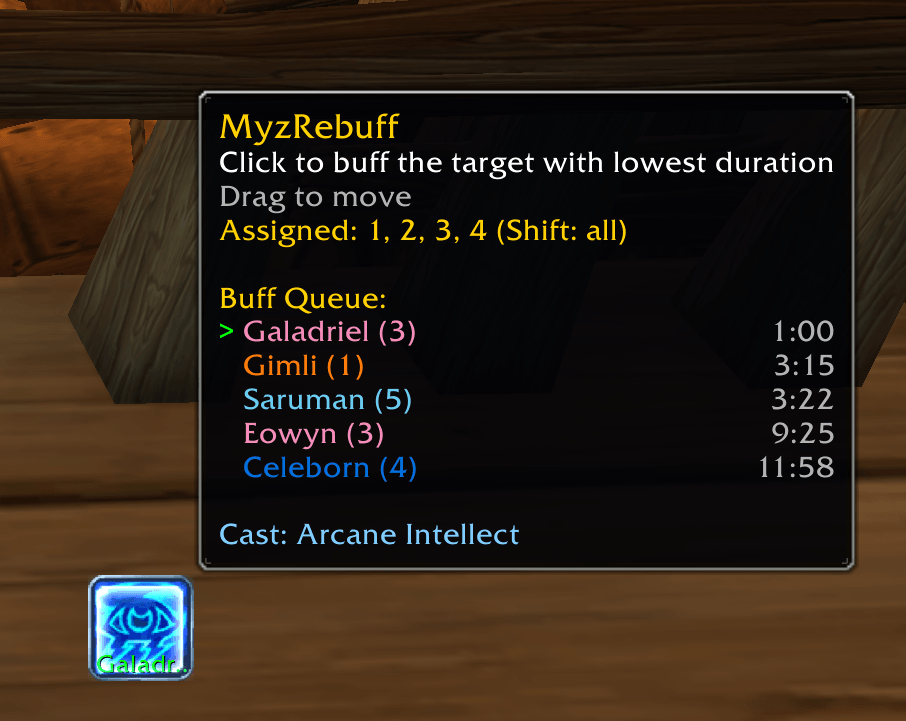
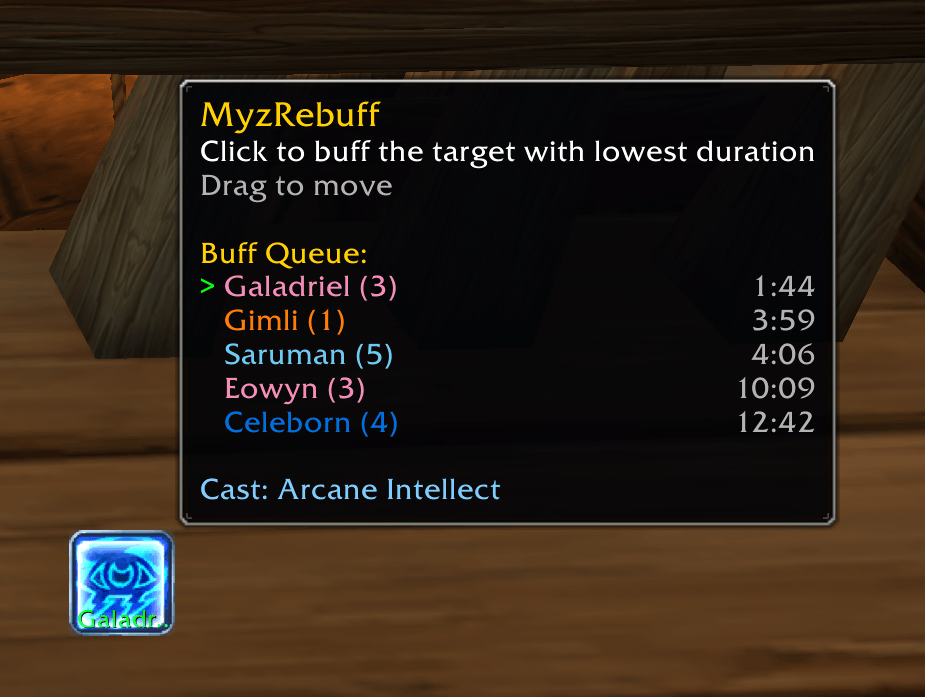
It adds a small button to your screen that automatically picks the group or raid member with the lowest remaining buff duration and queues the rebuff cast for you. Just keep clicking the button until everyone is covered.
Supported classes:
- Mage: Arcane Intellect and Arcane Brilliance
- Druid: Mark of the Wild and Gift of the Wild, plus Thorns
- Priest: Fortitude, Divine Spirit, and Shadow Protection
- Warlock: curse assignments (see below)
Classes with multiple buff types get a separate button for each, so you can manage them independently. Any other class can still open the Assignment Manager to coordinate raid buff coverage.
Features
Smart buff targeting
- Scans your group or raid and finds whoever needs a buff the most
- Automatically switches between single-target and group buffs depending on how many people in a subgroup need rebuffing, and falls back to single-target when you are out of reagents
- Skips dead, disconnected, and out-of-range players
- Greys out the button when you don't have the mana to cast
- Temporarily blacklists targets after a failed cast to avoid spam
- Mages can skip feral druids for Arcane Intellect. Specs are inspected in the background, and druids that haven't been identified yet are always buffed to be safe.
Modifier keys
Hold a modifier while hovering the buff button:
- Shift: ignore your group assignments and consider the whole raid
- Ctrl: force a single-target buff, bypassing the group buff threshold
- Alt: ignore the range check. Out of range players are shown marked
[OOR].
Assignment Manager
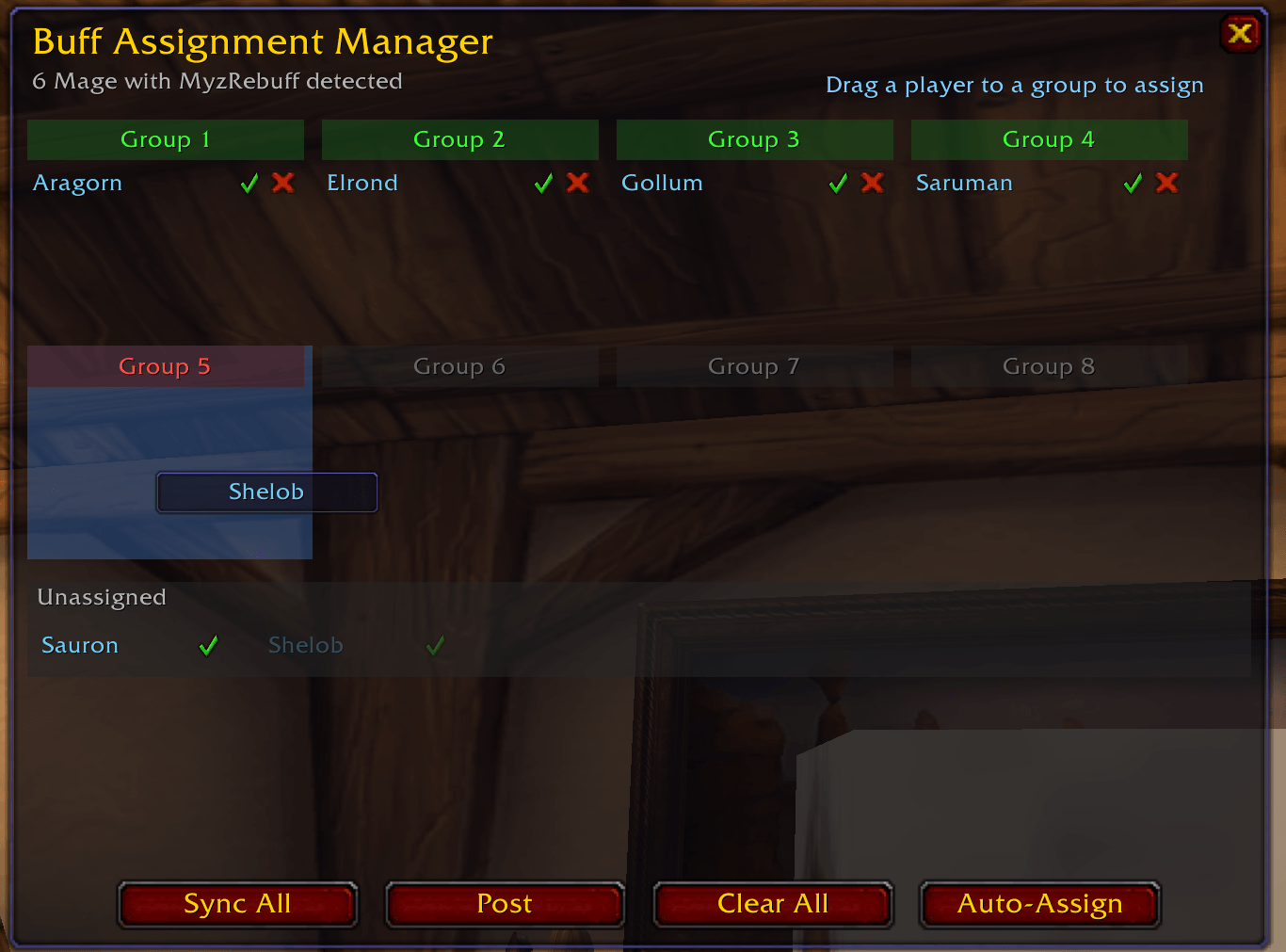
When multiple buffers of the same class are in the raid, the Assignment Manager lets you split coverage so nobody double-buffs and no group gets missed.
- Drag and drop: drag players into group columns to assign them
- Color coded group headers: green means covered, red means a group needs a buffer, grey means nobody in that group needs your buff
- Buff type tabs: classes with multiple buff types (Priest, Druid) get separate tabs so you can assign each buff independently
- Link All: one checkbox to make every buff type share the same assignments, so you only distribute groups once
- Auto-Assign: distributes groups evenly among available buffers, skipping empty groups and groups that don't need your buff
- Spec icons: each player card shows their talent spec, with a tooltip listing their talent point distribution. A scan progress line and Retry Missing / Rescan All buttons sit below the unassigned area.
- Addon sync: assignments are shared automatically between all raid members running MyzRebuff, and an icon on each card shows who has the addon installed
- Post to chat: share assignments to raid, raid warning, party, or any custom channel
- Whisper: send players without the addon their assignment directly
- Update notice: a marker appears if someone in your raid is running a newer version
Supervisor mode
Raid leaders, raid assistants, and party leaders can switch the Assignment Manager to any supported class through the class selector at the top, and manage that class's assignments directly. Handy when the mages in your raid have never heard of the addon.
Everyone else can still switch classes to view assignments read-only. Post and Sync All stay available to all, while Auto-Assign and Clear All are disabled with an explanation. This works from any class, including ones with no buffs of their own.
Warlock curse assignments
Warlocks use the same manager with a different layout: one row per curse (Recklessness, the Elements, Shadow, Agony, Doom, Tongues, Weakness) instead of raid groups. Each curse takes exactly one warlock, and dragging a warlock onto a curse takes it from whoever held it and clears that warlock's previous curse.
Auto-Assign ranks curses by how much of your raid actually gains from them. Armor reduction is scored against the physical damage dealers, Curse of the Elements against mages and destruction warlocks, Curse of Shadow against warlocks, shadow priests and arcane casters. A melee heavy raid leads with Curse of Recklessness, a caster heavy raid with Curse of Shadow. Hovering a curse shows how many members benefit and where it sits in the auto-assign order.
Warlocks get a button showing their assigned curse with its icon and name. It only displays the assignment and never casts, so unlike the buff buttons it stays visible during combat, which is exactly when a curse reminder is useful.
Buff report
The Report button posts a chat report of everyone whose buff is missing or running low, grouped by subgroup, naming the assigned buffer for each group, or "no buffer" when nobody is assigned. Pick the channel from the same menu as Post: raid, raid warning, party, or a custom channel. Raid leader and assistants only, since it broadcasts raid wide state.
The report menu can also whisper each assigned buffer only the groups they are responsible for, instead of posting the whole thing.
Hovering the Report button previews the exact lines that would be posted, so you can check it before sending. The preview works for everyone, even without permission to post.
Ready check alerts
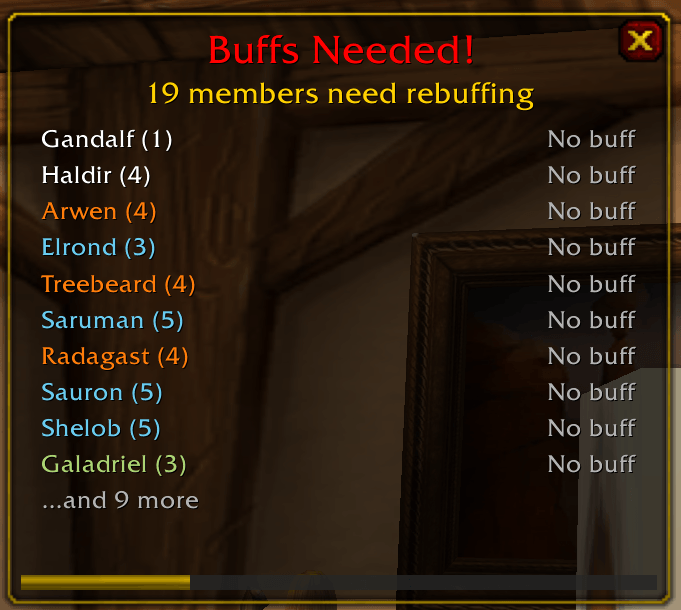
When a ready check fires, a popup shows exactly who still needs buffing across all your buff types. For Priests and Druids, each buff type gets its own section, so a missing Divine Spirit or Shadow Protection is no longer overlooked. Catch the gaps before the pull.
Configurable
All settings are under Interface > AddOns > MyzRebuff, or type /mr settings:
- Lock or unlock the button position, and reset it if it ends up off screen
- Hide the button when nobody needs a buff
- Skip feral druids for Arcane Intellect
- Adjust button size and how many members the tooltip lists
- Rebuff time threshold: how low a buff must be before it counts as needing a rebuff
- Group buff threshold: how many subgroup members need a buff before the group version is used
- Buffs to Cast: a checkbox per buff your class can cast. Uncheck one, say Shadow Protection, to hide its button and leave it out of ready check alerts and reports. Assignments and syncing stay untouched.
- Ready check alert: toggle it, restrict it to assigned groups or to missing buffs only, set its own threshold, and fire a test alert
- Report threshold: which remaining durations are listed in the chat report
Quick access buttons
Three small buttons appear next to the buff buttons:
- Arrow: move handle. Drag it to reposition without accidentally casting.
- Gear: opens settings
- A: opens the Assignment Manager
Slash commands
/mr settingsopens settings/mr manageropens the Assignment Manager
Languages
- English
- German
- French
Installation
Copy the MyzRebuff folder into your Interface/AddOns directory, or install via CurseForge.
MyzRebuff Team