MyTradeChatSpammer
- By
MyTradeChatSpammer is a World of Warcraft addon for storing trade messages and posting them to Trade chat in a rotating loop.
MyTradeChatSpammer
MyTradeChatSpammer is a World of Warcraft addon for storing trade messages and posting them to Trade chat in a rotating loop.
I like the new crafting system, but one of its downsides is that, in order to craft for others, people need to know you exist. This led to the creation of this addon, which solves that problem. It allows you to set up multiple messages to post in trade chat, such as “LFW [Blacksmith] – can craft max ilvl tools!” or “LFW – crafting all tools, /w me!” The messages rotate in a cycle while you are in a city and actively playing.
For a long time, I was hesitant to share this addon publicly to avoid contributing to trade chat spam. However, I noticed that other addons already offer similar functionality, so I decided to release this one as well. There are built-in limits to prevent excessive messaging beyond what someone would send manually by clicking a macro. The only difference is that with this addon, you do not have to click the macro — you can simply play the game.
What it does
- Stores reusable ad messages per character.
- Lets you manage messages in a simple UI.
- Can post messages to Trade chat on a timed loop when enabled.
- Supports slash commands for basic message management.
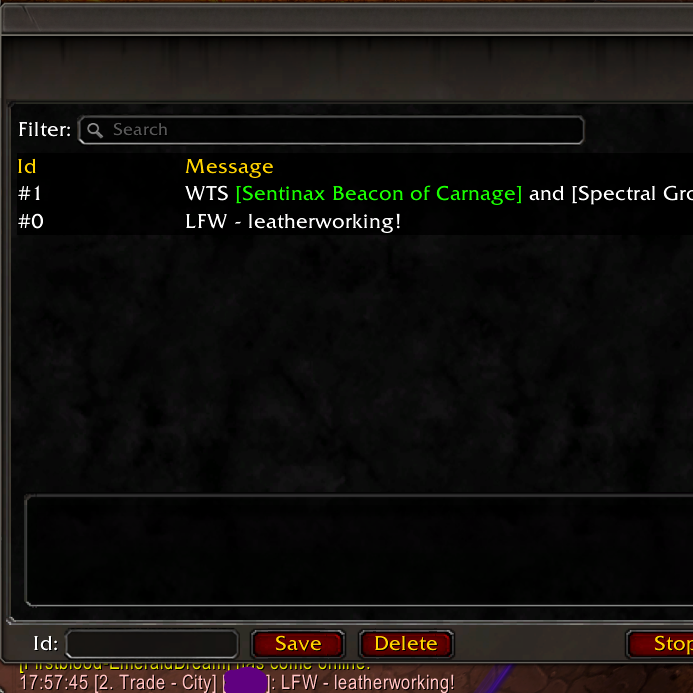
Opening the addon
- Click the addon in the Addon Compartment menu (top-right addon icon area).
- This opens the main message-management window.
UI usage
- Enter an
Id(optional) and message text. - If you leave
Idempty, the addon auto-generates IDs like#0,#1, etc. - Saving with an existing
Idoverwrites that entry. - Click
Saveto add/update a message. - Select a row in the list to load it back into the input fields.
- Click
Deleteto remove the message by currentId. - Use the
Filterbox to search byIdor message content. - Click
Start spamming/Stop spammingto toggle the posting loop.
Slash commands
Base command: /mtcs
/mtcs r <message>- Save a message with an auto-generated ID.
/mtcs record <id> <message>- Save/update a message with a specific ID.
/mtcs delete <id>- Delete a saved message.
/mtcs print [id]- Print all saved messages, or one saved message when
idis provided.
- Print all saved messages, or one saved message when
/mtcs send- Send the next saved message.
/mtcs send <id> [chatType]- Send one saved message by ID.
/mtcs toggle- Toggle automatic spam mode.
Spamming behavior
- The spam loop runs only when both conditions are true:
- Spam is enabled
- You are currently in Trade - City
- When enabled, it allows one immediate post by setting the message counter to the threshold.
- After each message is sent, it tracks the number of messages posted by other players and waits to avoid overspamming the trade channel.
- Messages are only sent while you are actively playing the game, such as when pressing buttons.
License
See LICENSE.
MyTradeChatSpammer Team