MythicFriendRater (MFR)
- By
Track, rate, and manage players you group with. Rate party members, flag favorites, blacklist bad players, and see ratings in the Group Finder. Works across M+, dungeons, raids, arenas, and battlegrounds.
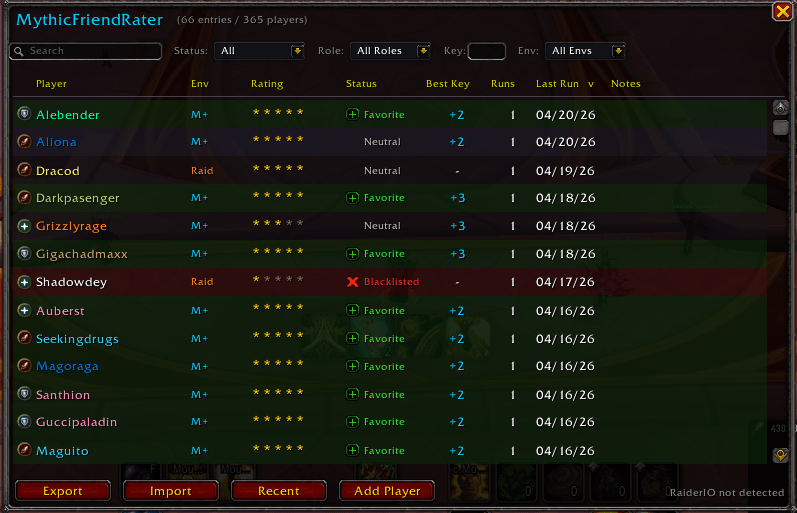
mfr-mainframe-updated-4-20.png
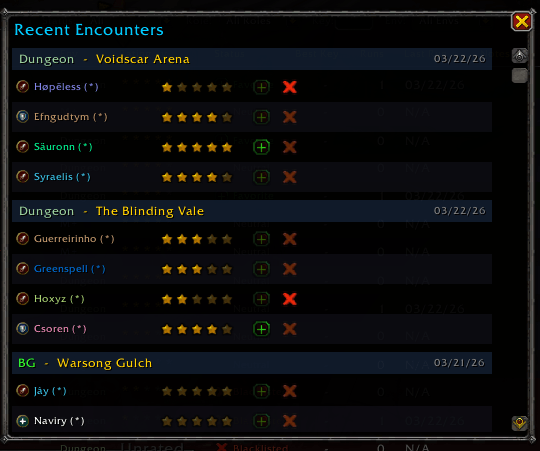
mfr-recents.png
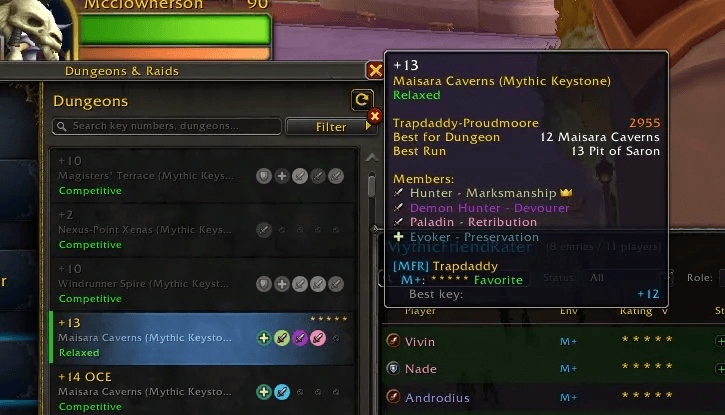
mfr-lfgbrowser.png
Description
MythicFriendRater — Rate Players, Track Groups, Avoid Bad PUGs
The player rating and tracking addon for WoW Midnight. Rate party members after every run, flag your favorites, blacklist bad players, and see your ratings inside the Group Finder. Never forget who you grouped with and never accidentally invite that one guy again.
Works everywhere you group: Mythic+, dungeons, raids, arenas, and battlegrounds.
Why Use MythicFriendRater?
It's a player reputation system that lives in your addon folder. Every player you group with gets tracked automatically, and you decide who's worth remembering. Rate them 1–5 stars, mark favorites, blacklist the toxic ones, and add notes - all scoped per content type so your M+ ratings stay separate from your raid ratings.
When you're browsing the Group Finder, MFR shows your data directly on group listings. You'll see at a glance if a group leader is someone you've favorited, blacklisted, or rated - before you ever hit Apply.
Key Features
Rate and Track Players Automatically
After you leave any group content, a compact popup shows each party member with a 5-star rating, favorite button, and blacklist button. One click and you're done.
Already have opinions about a player before you group with them? Use the Add Player button to manually add anyone to your database with a rating, status, role, and notes.
Group Finder Integration - See Ratings Before You Apply
When you browse groups in the LFG Group Finder, MFR overlays your data onto every listing:
- Colored sidebar on group listings: green = favorite leader, red = blacklisted, blue = rated
- Star ratings displayed on the listing itself
- Tooltip data when you hover: your rating, run history, best key, and notes for the group leader
When you're the one listing a group and reviewing applicants, the same overlays appear on applicant entries so you can spot your favorites (and avoid your blacklisted players) instantly.
Player Notes and Run History
Add notes to any player ("great healer, always uses CDs" or "left key at +2 on first pull"). View full run history in the detail panel - M+ runs show key level, timed/depleted, completion time, and deaths. Non-M+ runs show instance, difficulty, and date.
Environment-Aware Ratings
The same player can have completely different ratings for M+, dungeons, raids, arenas, and battlegrounds. A great M+ healer might be a terrible PvP partner - MFR keeps those ratings separate so your data stays meaningful.
Searchable Player List
Open the main browser (/mfr) to see everyone you've rated:
- Search by name, realm, or notes
- Filter by status (favorites, blacklist), role (tank, healer, DPS), environment, and minimum key level
- Sort by any column - rating, name, runs, last run, best key, status
- Right-click any row for quick actions: whisper, invite, favorite, blacklist, view detail, remove
Favorites and Blacklist
Flag players as favorites (green) or blacklisted (red). These statuses appear everywhere - tooltips, Group Finder listings, applicant entries, the player list, and right-click menus. Favorited and blacklisted players are never auto-pruned.
Tooltip Integration
Hover over any player in the world, on a unit frame, or on their portrait - MFR injects your rating data directly into the native WoW tooltip. See their rating, status, run count, best key, and notes without opening any windows.
Right-Click Menu Integration
Right-click any player portrait (party, target, focus, raid frames) to rate them, flag them, or view their MFR detail panel - directly from the context menu.
Recent Encounters
Browse your last 50 group runs organized by instance. Rate, favorite, or blacklist directly from the encounter history - useful when you forgot to rate someone after a run.
RaiderIO Integration
If RaiderIO is installed, MFR captures player scores during runs and displays them alongside your ratings using RaiderIO's color tiers.
Smart Data Management
- Auto-prune removes unrated, neutral players after a configurable number of days (default 10)
- Players with ratings, favorites, or blacklist status are never pruned
- Export/import your entire database as text - share with friends or transfer between accounts
Slash Commands
/mfr- Open the player list/mfr config- Open Settings/mfr export- Export player data/mfr import- Import player data/mfr minimap- Toggle minimap button/mfr help- Show all commands
Settings
- Toggle auto-popup per environment (M+, dungeon, raid, arena, BG)
- Adjust popup delay after leaving an instance
- Toggle tooltip and Group Finder indicator display
- Configure auto-prune threshold
- Show/hide minimap button
- Data management: export, import, purge all data
Feedback
This addon is in active development. If you encounter bugs, please report them on the project page with any error messages from BugSack/BugGrabber. Feature requests are welcome.
MythicFriendRater (MFR) Team