Mythic Raider Tools
- By
Your cooldown plan on screen during the pull, a death recap the second you wipe, raid and party frames that keep every player where you put them, and a raid roster export. One addon.
timeline and queue.webp
deaths 1.png
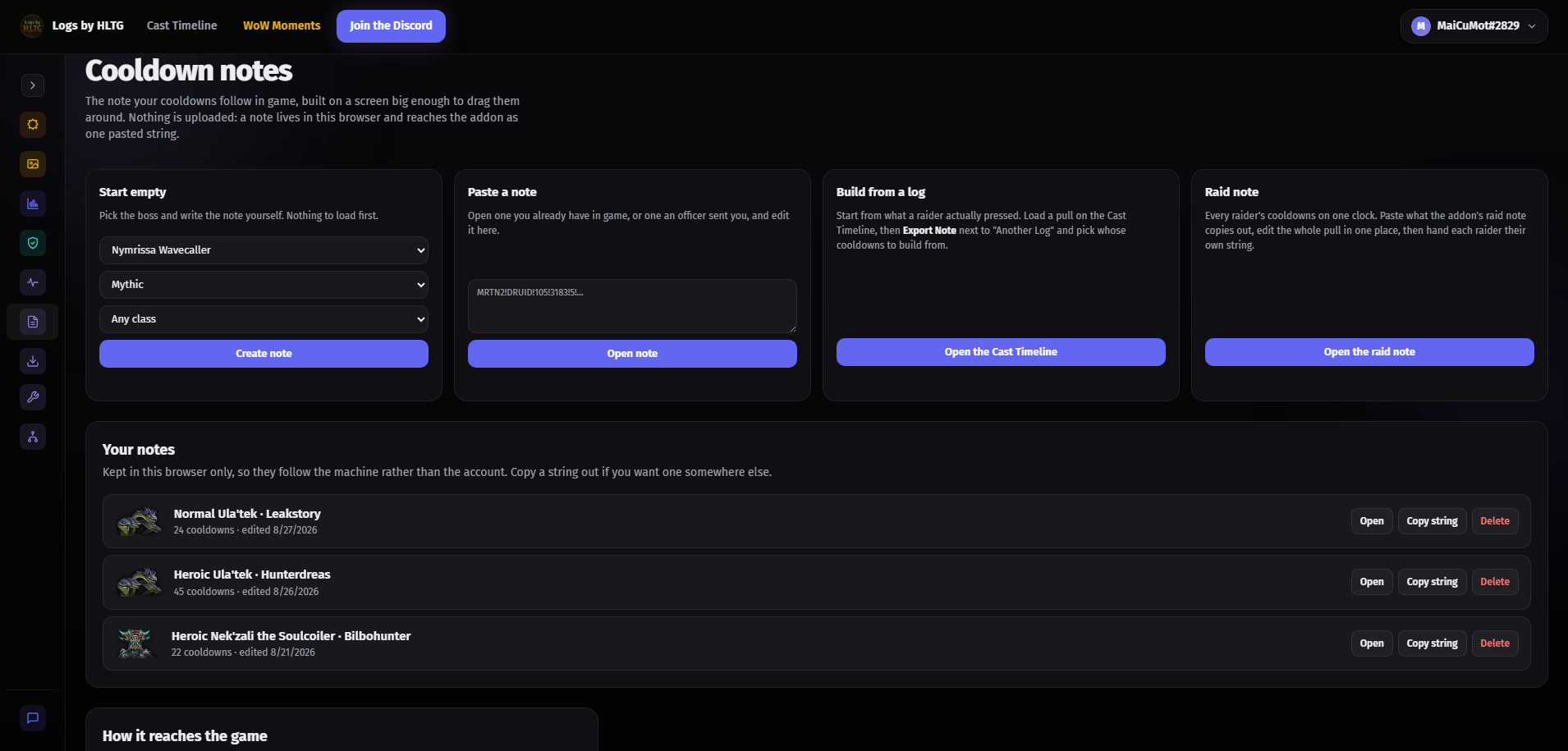
image.png
deaths 2.png
Description
# Mythic Raider Tools
Everything a raid needs on the night, in one addon: the plan during the pull, the answer after the wipe, raid frames that keep every player where you put them, and who's already saved before you invite.
It used to be three separate addons. Mythic Raider Deaths and HLTG Raid Check are both inside this one now, and their old commands still work.
## Raid notes: change the plan, press Send, done
You know this night. The plan lives on some website. Wipe three, the boss AoE comes ten seconds earlier than you thought, so you move one healer cooldown by 10 seconds. Now: tell them to do it, or export the string, paste it in Discord, @here, wait. Two people import it. One is alt-tabbed. One imported the message above it. Pull four goes off with half the raid on last week's plan, and you find out when the cooldown that was supposed to cover the third set never lands.
Here you move the cooldown and press **Send to raid**. That's the whole loop.
- **Only what changed goes out.** Retiming one cooldown is two addon messages, not a whole document re-broadcast at everyone. Five full rotations is about eight seconds. Nobody copies anything, nobody pastes anything, nobody has to be looking at Discord.
- **You can see who has it.** Every raider's row shows the version their client is actually holding. Not "I posted it", not "did you get it?" The page tells you who is on the current plan and who isn't, before you pull.
- **Nobody gets promoted just to fix their own timing.** Any raider may edit their own row, only leader and assists may write somebody else's. Your healers retune their own cooldowns without you handing out assist, and a pug with no rank cannot touch anyone's lane.
- **Two people editing the same lane doesn't lose work.** If a raider retimes their own row while you're editing it, the row tells you theirs is newer, and pressing Send again publishes over it deliberately.
## The guild note: one row the whole raid runs
The kill order, the soak rotation, the thing the lead says on voice every pull and half the raid forgets by the third wipe. It lives on one **Guild timeline** at the top of the note page now.
- Lead and assist write it, everyone sees it during the pull on the **Guild Anchor**, including raiders who have no note of their own.
- Lines and abilities in any mix, on the same Send to raid as everything else.
- **Every line is the raid's, how it reaches you is yours.** Right-click an entry to change its voice, sound or timing for yourself only: an air horn on the call you keep missing, ten seconds early because you're the soak. Default hands it back to the raid.
- **A ready check names who has the Guild Anchor switched off**, the last moment that's still fixable.
## Build the plan wherever you like
- **In game.** Create a note for a boss straight from the list, add cooldowns out of your own spellbook, type lines in your own words, drop ability icons and raid markers into the text. Nothing has to leave the game.
- **On the website.** Build it at logsbyhltg.com with a mouse, a keyboard and a big screen. **Copy roster** hands the planner your group in one paste, and **Import raid note** brings the whole plan back the same way: every row at once, including players who aren't in the group yet. It lands unsent, so nothing goes out until you press Send.
- **Same note either way.** Start it on the site and finish it in game, or the other way round. Export a copy whenever you want one.
## The boss timeline above your plan
Not a guess and not somebody's memory: built from real kills on Warcraft Logs and rebuilt from the latest kills with each update, so you can see your cooldown sitting exactly where the raid damage actually lands.
- **One timeline per difficulty**, because a boss on Normal does not keep Mythic's clock. Each says how many kills it was read from. Early in a tier that number is small and the heading says so, rather than letting you plan a night around a shape that won't survive the week.
- **Stages are drawn** with the game's own names, and a stage your raid pushes shows the window it can start in.
- **The note follows your fight, not the average one.** Push a stage early and every cue after it moves with it. The addon reads the game's own encounter timeline, and with BigWigs installed it lines up on the stage change itself the moment it happens.
- **Shuffled abilities are drawn where they actually happen.** Sszorak deals its tank combo in one of eighteen orders, and the row redraws each cast where your pull puts it.
- **Hover any ability for what it does.** Hold ALT for the abilities its description names, and for an add's 3D model beside the tooltip.
## On screen during the pull
The note arms itself and runs. Your anchors, all yours to place:
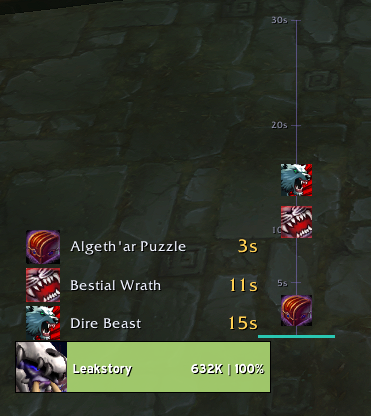
- **Queue**: what's coming, in order, counting down.
- **Timeline**: cooldowns falling down a lane, crossing a line the moment they're due.
- **Guild Anchor**: the raid's guild note.
- **Ten text anchors**: your own words anywhere on screen, in any font your other addons already registered (BigWigs, WeakAuras, ElvUI), at any size and colour.
**The Layout page is a map of your screen.** Every anchor sits where it really is, drawn over outlines of your own UI (action bars, unit frames, chat, damage meters), so you place it next to things rather than at coordinates. Or press Move anchors and drag them on the real screen, with a control bar and one panel for whichever you click. Kept per profile with a sub-profile per spec, so your Resto layout isn't your Balance layout.
**It talks.** Every cue can announce itself through the game's own text-to-speech in a voice you pick per ability, or play a sound from DBM, BigWigs or any voice pack you already have. Set a lead so it arrives before the cast, not with it.
**You always know what the next pull runs.** One line names the boss, difficulty, note and how many cooldowns. Notes are grouped by boss in raid order. Double-click or press **Use** to pick one; saving, pasting and reading never change it behind your back.
## Deaths: what killed you, before the argument starts
The pull just wiped. Someone asks "what happened?" and three people start typing three different answers in three different colors while the raid leader waits.
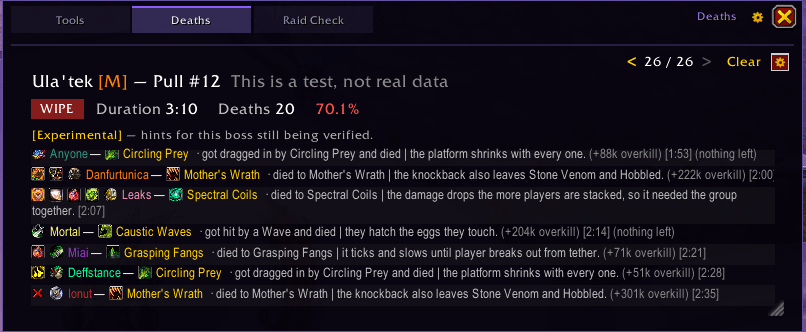
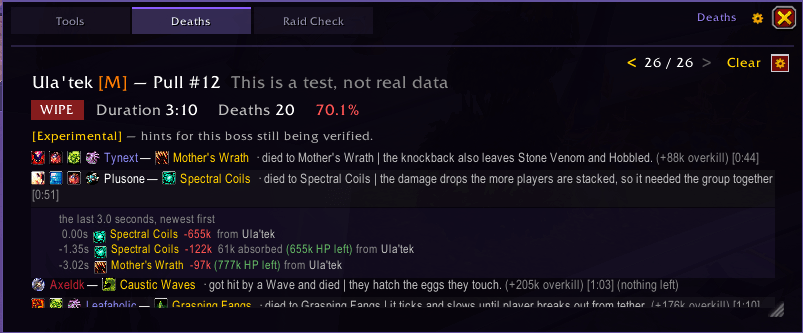
The second the wipe hits, the recap is already open:
> Player1 · Heaven's Glaives · got hit by the glaives and died. (+16k overkill) 1:23
>
> Player2 · The Darkwell · walked into the Darkwell well and died. 1:44
>
> Player3 · Dissonance · died because runes were out of order. (+87k overkill) 1:51
Every death that pull, in order, class-colored, with the boss ability and its icon.
- **Plain-English hints, not just a spell name.** "Stood in the puddle and died." "Died because the cast wasn't interrupted." 499 hand-written hints across 20 bosses, both Midnight raid tiers, Kith'ix included.
- **What they still had when they died.** Icons in front of each name show the defensives that player never pressed, plus a health potion or healthstone. A raider who spent everything reads "(nothing left)", and one who never answered gets a cross, so the two never look the same.
- **Click a death for the hits that led to it**, the last few seconds before the killing blow.
- **Hover any ability** on a death row for its tooltip, unspent defensives and potions included.
- **Boss HP % at the wipe**, to track progress pull over pull. Council fights show each boss separately.
- **Overkill**, which tells a 2% miss apart from a one-shot at a glance.
- **Pull counter per boss**, resetting each raid night, and up to 100 stored pulls to flip back through, kept across reloads. Post a recap to chat when you need to.
The current tier's hints are marked experimental in the panel: written from the encounter journal and the first nights of live logs, and corrected as the tier is raided. Deaths on any other encounter are still captured and listed, just without the explanation.
## Raid and party frames that keep every player where you put them
Off until you switch them on: `/mrtools`, then **Frames** under Raid Check.
- **Players stay put.** Drag a name onto a slot and that player is drawn there every pull, whatever group they are in. Only your screen changes. Up to 40 frames in any grid up to 8 by 8. In a party the rest fill tank, healer, damage, so a pug lines up the same way every key.
- **Start from a ready look, then change it on the frames.** Healer, Tank, Damage, Clean, Compact, Dark or Blizzard. Then click any piece and drag it, right-click for quick moves, or type it: `/mrf debuffs bottom left bigger`. Ctrl+Z steps back.
- **Rules for the situation.** Bigger debuffs only in Mythic raid, the raid marker only on bosses, anything only when you play healer.
- **Healer buffs in the order you watch them**, with a starting order for every healer spec built from 118 top-ranked raid and Mythic+ fights.
- **Test on a real pull.** Paste a raid pull from logsbyhltg.com/frame-look and watch it play on your own frames, with what your look hides drawn faintly. Or run a test with made-up raiders, one dead, one offline, one out of range.
- **Share your frames** with a guildmate as a profile string, and undo any saved change from the list of recent ones.
- **Works with your UI.** Asks before replacing Blizzard's frames or EllesmereUI, ElvUI, DandersFrames, EnhanceQoL and Unhalted Unit Frames. Clique sees these frames.
Auras are drawn by the game's own aura system, so they keep working in combat on Midnight, where addons are not allowed to read them.
## Quality of Life
- **Raid templates.** A Presets button beside Title and Details when you list a group in the group finder: pick a boss and a role split, or one of your own lines. Midnight doesn't let addons type into those boxes, so the line lands in a copy box ready for Ctrl+C, Ctrl+V.
- **Power Infusion.** An icon with a countdown while Power Infusion is on you. As the priest, a card with the spell and the name when your focus target (or anyone, in a dungeon) presses a big cooldown. Needs the addon on both ends.
Each page has its own switch. Off means nothing from it is drawn or sent.
## Raid Check: who's already saved, before you invite them
Stop guessing who's locked out. Join a raid group, type `/raidcheck`, and you get a copy-paste string. Paste it at logsbyhltg.com/raid-check, log in with Battle.net, pick Normal / Heroic / Mythic, and every raider who's already killed this week's bosses is flagged: the players who'll bring no extra loot.
It reads your roster and nothing else: name, realm, class, region. All the lookups happen on the website. Paste a fresh string whenever you invite more people and only the new names get scanned.
Saved status is best effort, from Blizzard's Armory and Warcraft Logs, so double-check before you bench anyone.
## Why this works on Midnight
Patch 12.0 locked addons out of the combat log, which is the data source every death recap addon used to rely on. That approach is dead.
This one reads deaths from Blizzard's own native damage meter and death recap API, the same source of truth the in-game damage meter uses. Frames draw their auras through the game's own aura system. And what one client can't see about another (unspent defensives, Power Infusion, who holds which plan) travels between copies of the addon over the addon channel instead.
## Commands
- `/mrtools`: open the window. `/mrtools help`: every command.
- `/mrtools note` · `/mrtools deaths` · `/mrtools raidcheck`: straight to a page.
- `/mrtools anchor on`: place your anchors. `/mrtools preview on`: watch a note run.
- `/mrf`: edit your raid frames (`/mrtools edit` if another addon owns `/mrf`). `/mrf test`: play a pull from logsbyhltg.com/frame-look.
- `/mrd`, `/raidcheck` and `/hltgrc` still work, so nothing you have bound changes.
## Why use the addon and the website?
They answer different questions.
- **The addon** answers what just killed us, and what am I pressing next: in game, this pull, while you can still act on it.
- **logsbyhltg.com and the Discord** answer how is our raid trending: full raid-night graphs, pull-over-pull death trends, recaps shareable with people who weren't online. It's also where raid notes are planned, where frame tests come from, and where you get support, report bugs and see updates first.
## FAQ
**Does this work on WoW: Midnight / patch 12.1.5?** Yes, it was built for it. Deaths come from Blizzard's native damage meter and death recap API, not the combat log.
**Do I need an account or a companion app?** No. The website is optional.
**Why no full damage-taken breakdown before death?** Blizzard marks detailed combat values as protected in 12.0. The addon shows everything Blizzard exposes: killing ability, overkill, death order and timing, the last hits before the death, plus our own mechanic explanations.
**Does it work in Mythic+?** The frames, Power Infusion and the group finder templates do. Notes and death recaps are built around raid bosses.
**Why do some features need other raiders to run it too?** Midnight won't let an addon read another player's cooldowns or buffs in combat. Sending the raid note, the unspent defensives on a death row and the Power Infusion cards all work by copies of the addon telling each other. A raider without it simply shows nothing, never a guess.
**English clients only?** Mechanic hints match English boss and ability names for now. Death capture works on any client, and so do the notes and the frames.
**I had Mythic Raider Deaths or HLTG Raid Check installed.** Uninstall them. Both are inside this addon, and their slash commands are claimed automatically when the old addons aren't there.
## Contact
- Discord: mihai_mm08
- Website: https://logsbyhltg.com
Mythic Raider Tools Team