Mythic Public Rating (MPR)
- By
Mythic Public Rating (MPR)
Overview
MPR is a community reputation addon for World of Warcraft. Raider.IO shows what a player has completed. MPR shows what they're like to group with.
After a dungeon, raid, Mythic+, arena or battleground, rate your teammates. Everyone's ratings combine into one public MPR Score from 0 to 100. You'll see it in tooltips, in Group Finder and on mprscore.com.
Getting Started
- Install MPR and log in. You don't need an account.
- Play a dungeon, raid, Mythic+, arena or battleground.
- When it ends, the rating window opens. Pick Great, Average, Needs Improvement or Blacklist for each player.
- Hover any player or browse Group Finder to see their MPR Score.
Already using another rating addon? MPR imports your old ratings automatically (see Importing).
Detailed Usage
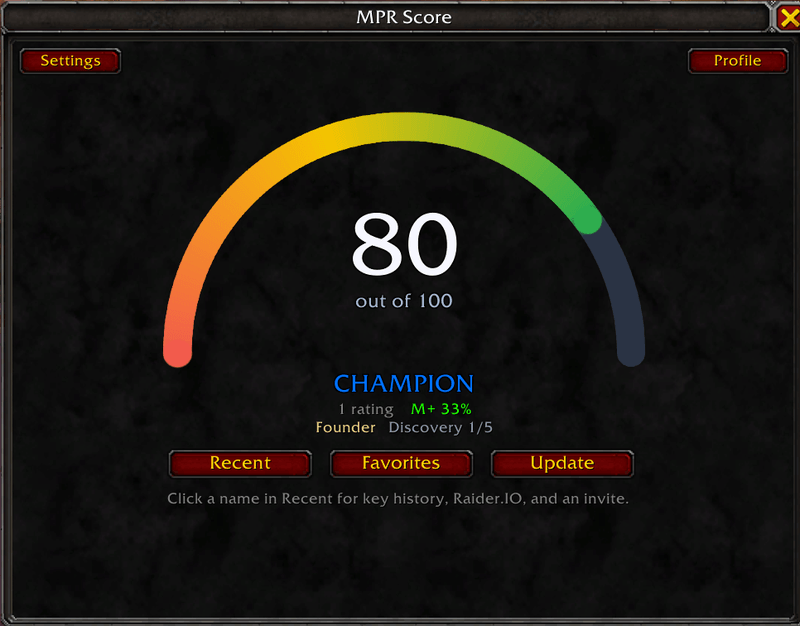
Your MPR Score Window
Type /mpr gui or click the minimap button.
- A gauge shows your public score out of 100.
- Your tier is shown under the gauge:
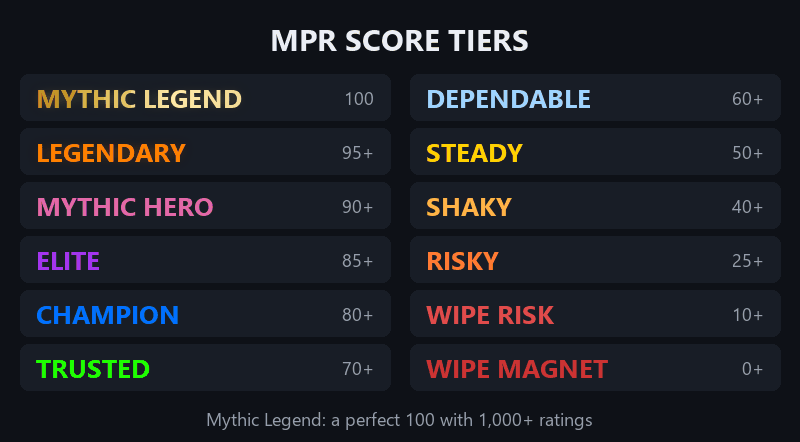
- Your rating count, Mythic+ parse and badges are also shown.
- Recent, Favorites and Update buttons are under the gauge. Settings and Profile (your copyable mprscore.com link) are at the top.
Recent Players
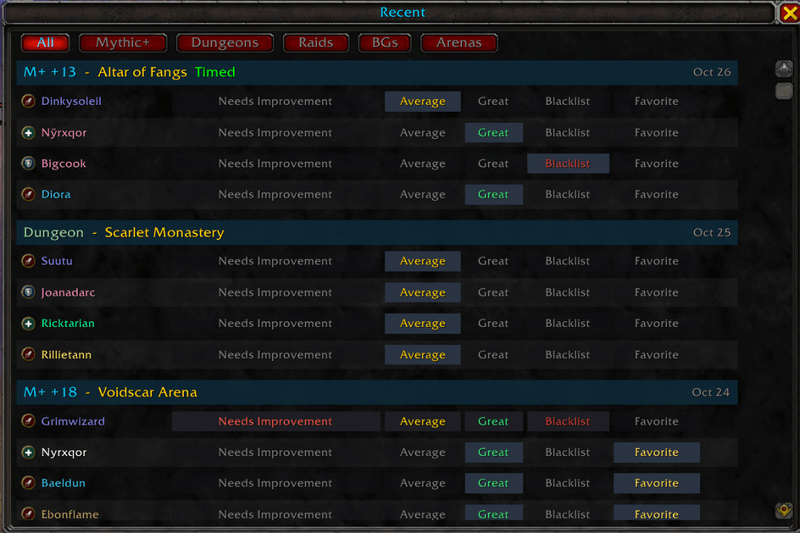
/mpr recent lists every group you've played with, grouped by run, with the dungeon, key level, and whether it was timed.
- Filter by All, Mythic+, Dungeons, Raids, BGs or Arenas.
- Rate, blacklist or favorite anyone in one click, even players who already left.
- Click a name to see your key history together, their Raider.IO info, and an invite button.
Tooltips and Group Finder
- Hover any player to see their MPR Score, tier, badges and your own rating.
- In Group Finder, listings and applicants show the MPR Score, your mark and their Warcraft Logs parse.
- Applicant alerts: a chat warning when a blacklisted or low-rated player applies to your group.
Profile Window
Right-click any player and choose Show MPR Profile, or type /mpr profile Name-Realm. It shows:
- their MPR Score, tier and badges
- your ratings, notes, and favorite or blacklist status
- Warcraft Logs Mythic+ and raid parses (raid parses need the Warcraft Logs addon)
- the runs you've done together
Notes, Favorites and Blacklist
- Notes: one per dungeon. Private by default, or make it public feedback other players can read. Notes with profanity always stay private.
- Favorites: your own mark for players you'd group with again.
- Blacklist: shows a red X on Group Finder rows and counts as the lowest public rating.
- All of these are saved for your whole WoW account, so every character sees them.
Badges
- Top Rated, Highly Rated, Rising Star and Improving are earned through community ratings.
- Founder is for the first 10,000 players to rate with MPR.
- Discovery shows while a player's first 5 ratings come in.
Friendly Whispers
When you rate or favorite someone, they get a short whisper, at most once a day. Only a Great rating is named; any other rating just says they were rated.
Live Scores
MPR shares public scores with other MPR players in your group, so scores update before the website does.
Right-Click Menu
Show MPR Profile and Copy MPR Score URL appear on player, guild, community, friend, chat and Group Finder names.
Bonus Mythic+ Helpers
- Keystone helper at Lindormi: pick a level, and MPR lowers your keystone for you.
- Auto-insert keystone when you open the Font of Power.
- Auto-accept dungeon prompts for campfires and helper NPCs. Hold Ctrl to skip.
mprscore.com
- Search any character by name or Name-Realm.
- Player cards show:
- the MPR Score gauge, tier and badges
- how many people rated them
- their Mythic+ score and Warcraft Logs parses
- Public feedback: read the public notes other players left.
- How it works: a plain-English page explaining scores, badges and privacy.
- For addon authors: a free API and creator accounts let other rating addons send their ratings to MPR and show MPR Scores in their own addon. See mprscore.com/developers and mprscore.com/creators.
- Contact: report a bug, an abusive note or a wrong score at mprscore.com/contact.
Importing
At login, MPR imports ratings, blacklists, favorites and notes from:
MythicFriendRater, CharacterNotes, M+ Personal Player Ratings, PugRoster, RepKeeper, PugSense, PugCheck, Pug Rater and Mythic Social Tracker.
Imported ratings follow your Public/Private setting. Imported notes always stay private.
Privacy
- Ratings are public by default and anonymous. Nobody can see who rated them.
/mpr privatekeeps every rating, note, favorite and blacklist on your account only. Ratings you already shared are removed./mpr publicturns sharing back on.
Commands
Windows
/mpr: shows the help/mpr gui: opens the main window/mpr recent: recent players, for rating/mpr profile Name-Realm: opens a player's MPR profile/mpr favorites: your favorites list/mpr stat: parses, public scores and ratings waiting to send/mpr logs Name-Realm: Warcraft Logs parses (defaults to your target)/mpr settings: opens the options/mpr minimap: shows or hides the minimap button
Rating
/mpr great Name-Realm/mpr average Name-Realm/mpr needs improvement Name-Realm/mpr blacklist Name-Realm/mpr score Name-Realm Great: same as above, with the rating at the end/mpr clear Name-Realm: removes your rating (a blacklist stays)
Personal
/mpr note Name-Realm: adds a note (defaults to your target)/mpr favorite Name-Realm: adds or removes a favorite/mpr unfavorite Name-Realm: removes a favorite
Privacy and Import
/mpr publicor/mpr private/mpr import: runs the import and shows what came in/mpr import offor/mpr import on
Settings
Open Options > AddOns > MPR Score (/mpr settings). Each of these can be turned off:
- the rating window after a run
- whispers
- live score sharing
- tooltips and Group Finder scores
- applicant alerts
- right-click menu buttons
- the minimap button
- the keystone and dungeon helpers
FAQ
Can one person tank my score?
No. Many different players have to agree, and repeat ratings from the same person count much less.
Can I recover from bad ratings?
Yes. Old bad ratings fade over time, so good runs bring your score back up. The Improving badge shows you're on the way up.
Do people see who rated them?
No. Ratings are anonymous. Public notes are the only thing that shows your character name, and notes are private unless you choose to make them public.
Does uninstalling MPR remove my score?
No. Your public score stays on mprscore.com.
Does it work with Raider.IO and Warcraft Logs?
Yes. MPR shows next to them; it doesn't replace them.
Feedback
Found a bug or have an idea? Leave a comment here or use mprscore.com/contact.
Your performance gets you noticed. Your reputation gets you invited.
Mythic Public Rating (MPR) Team