Mythic Dungeon Tools - Next Pull Info
- By
Description
Mythic Dungeon Tools - Next Pull Info
Know what's dangerous in your next pull before you pull it.
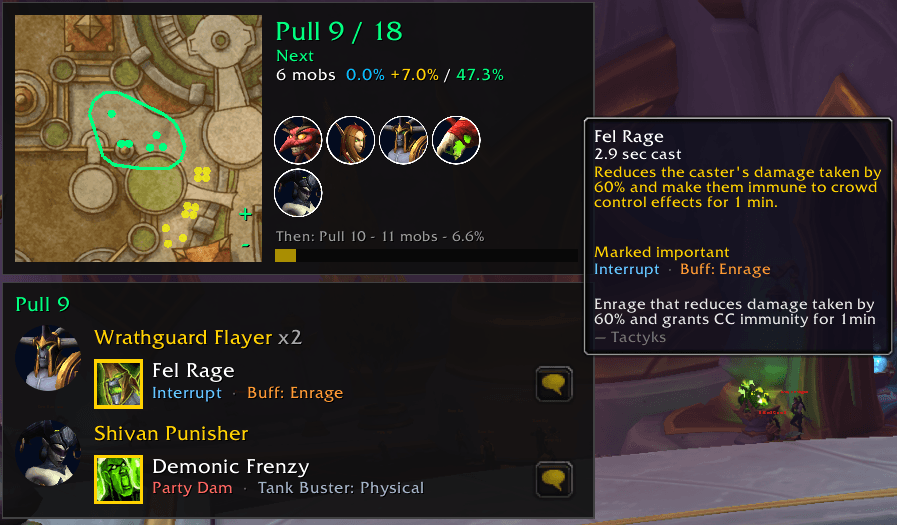
Next Pull Info is a companion for Next Pull Tracker. Next Pull Tracker shows which pull of your MDT route is next; Next Pull Info adds a panel beside it listing the enemies in that pull and the abilities that matter.
Requirements
- Mythic Dungeon Tools
- Mythic Dungeon Tools - Next Pull Tracker
Getting started
- Install this add-on along with Mythic Dungeon Tools and Next Pull Tracker.
- Select a route in MDT.
- Start your key. The panel appears next to the Next Pull Tracker beacon.
To try it without a key: open MDT on a route, then type /npt start and /npt skip 3.
Features
Next pull panel
- The enemies in your next pull and the abilities to watch for
- Hover an ability for its spell tooltip, notes and counters (Stoneform, Shadowmeld, Freedom, line of sight), or share it with your party
Trash overview
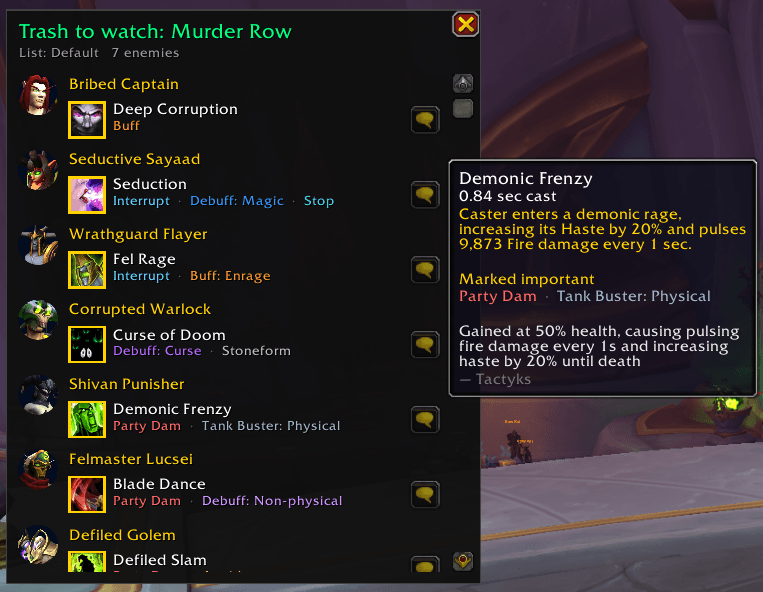
Zone into a Mythic dungeon and, before you start the key, a window lists all the trash with important abilities in that dungeon. It closes on its own when the key starts. Type /npi overview to open it any time.
Your own important lists
- Two modes: Important (default) shows only enemies with important abilities; All shows every enemy and ability
- Pick exactly which abilities count as important on the Important abilities options page
- Keep several lists per dungeon, like MDT routes ("Default", "Pug", "Push"…)
- Import and export lists as text strings to share with your group
Ability data by Tactyks
Ability tags, notes and default important picks for Midnight Season 1 and Season 2 come from Tactyks' M+ Ability Tracking Sheets, used with his permission. Huge thanks to him for the work behind them.
Tags include: Important, Interrupt, Party Damage, Avoid, Frontal, Tank Buster, Stop, Buff / Debuff (Magic, Curse, Poison, Disease, Bleed, Enrage), Add Spawn and CC Effect.
Support Tactyks:
- YouTube: https://www.youtube.com/@Tactyks
- Twitch: https://twitch.tv/tactyks
- Patreon: https://patreon.com/tactyks
Options
Esc > Options > AddOns > MDT Next Pull Info, or type /npi.
| Command | What it does |
|---|---|
/npi |
Open the options |
/npi overview |
Show or hide the trash overview |
/npi toggle |
Turn the panel on or off |
/npi mode important or /npi mode all |
Important abilities only, or everything |
/npi side right, left, top or bottom |
Where the panel attaches |
/npi rows 1-8 |
Maximum enemies shown (default 4) |
Credits
- Ability data: Tactyks
Found a wrong tag or a missing ability? Please report it on the issues page.
Mythic Dungeon Tools - Next Pull Info Team