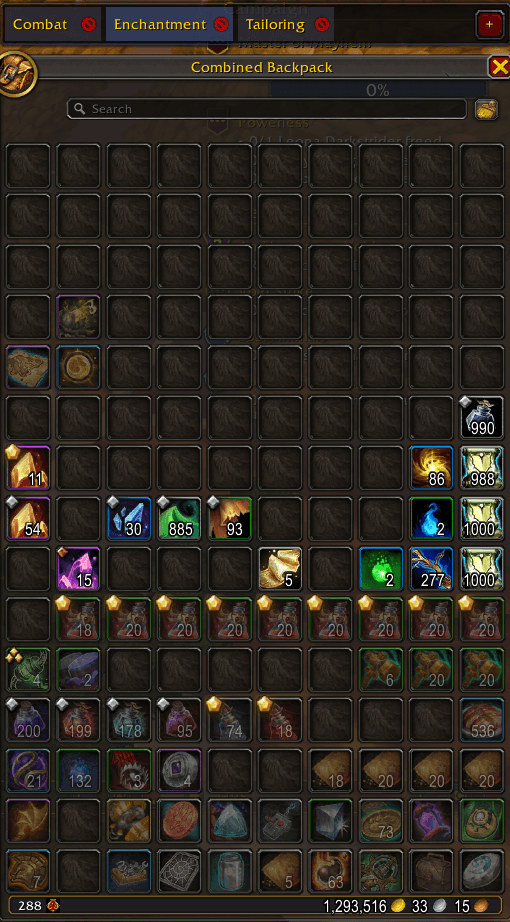
Screenshot 2026-05-06 144446.png
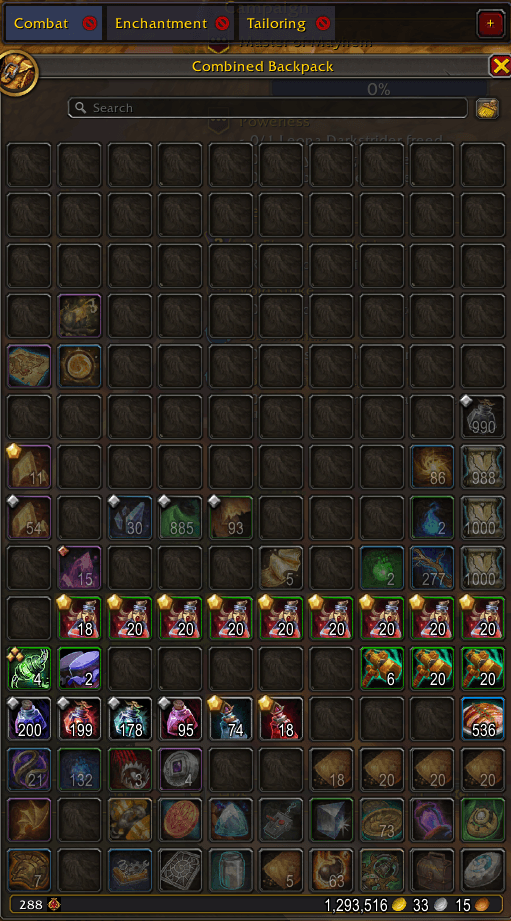
Screenshot 2026-05-06 144432.png
Description
Myrras Bag Explorer
Organise your bags into folders — without replacing the native UI.
Myrras Bag Explorer adds a lightweight folder system that sits on top of Blizzard's default bag frame. No bag replacement, no new inventory window — just a clean tab bar above your existing bags that lets you group, label, and focus on exactly the items you care about.
✨ Features
📂 Folder Tabs
A scrollable tab bar appears directly above your bag frame whenever your bags are open. Each tab represents a folder you've created. Click a tab to activate it and instantly focus your view on only those items.
🔍 Visual Item Filtering
When a folder is active, every item not assigned to it is dimmed to a low opacity. Items in the selected folder stay fully visible, letting you spot them instantly — even in a cluttered bag.
🖱️ Ctrl + Right-Click to Assign
Hover over any item in your bags while a folder is selected and Ctrl + Right-Click to assign it to that folder. Do the same again to unassign it. The tooltip shows a hint reminding you of the action and which folder is active.
✏️ Rename & Delete Folders
- Double-click a folder tab to rename it.
- Each tab has a small × button to delete the folder. Deleting a folder also removes all item assignments from it.
📜 Scrollable Tab Bar
Create as many folders as you need. The tab bar scrolls horizontally and supports mouse wheel scrolling, so it never gets in your way no matter how many folders you have.
🗺️ Minimap Button
A minimap icon (draggable, position saved between sessions) lets you toggle your bags open and closed with a single click. The button also appears in the addon compartment (the puzzle-piece menu on your minimap).
💾 Persistent Storage
All folders and item assignments are saved per-account in MyrrasBagExplorerDB and persist across sessions and reloads automatically.
🎮 Usage
- Open your bags — the folder tab bar appears above them automatically.
- Click + on the right side of the bar to create a new folder.
- Select a folder tab to activate the filter.
- Ctrl + Right-Click items to assign or unassign them.
- Double-click a tab to rename the folder.
- Click the active tab again to deselect and restore full visibility.
💬 Slash Commands
| Command | Description |
|---|---|
/mbe |
Shows available commands |
/mbe reset |
Clears all saved folders and assignments |
/mbe debug |
Dumps bag frame diagnostics to chat (for troubleshooting) |
ℹ️ Notes
- Works with both the combined bag view and individual bag windows.
- Does not replace or modify Blizzard's bag UI in any way — it overlays on top of it.
- Lightweight: no Ace3, no settings panel, no bloat.
- Supports reagent bag sub-panels.
🐛 Bugs & Feedback
Found a bug or have a suggestion? Leave a comment on the CurseForge page or open an issue. This addon is in early development (v0.1.0) and feedback is very welcome!
Made with ❤️ by Myrras
Myrras Bag Explorer Team