
My Journey
- By
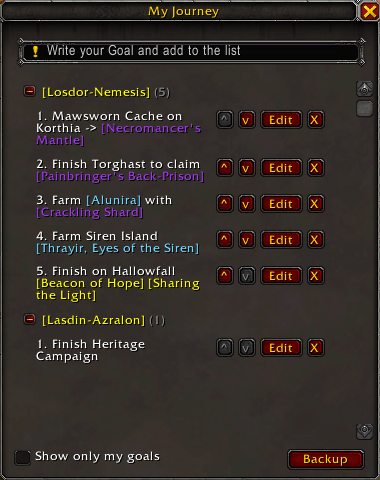
Description
Developed entirely on the pure Blizzard API (native Lua), the addon was designed to be extremely lightweight, stable, and free of dependencies on third-party frameworks (such as Ace3).
✨ Features
Centralized Tracking: A clean and intuitive window to manage your notes and objectives in real time.
Native Link Magic (Shift+Click): Full support for linking items directly from your bag or collections using the original WoW system. For other elements such as achievements, quests, skills... it is necessary to link to the game chat and use the command (Shift+Click).
Modern Texture Support: Updated interface icons using numeric FileDataIDs for full compatibility with the latest versions of the game.
Character Filter: Visual option to switch between displaying all saved objectives on the account or only the objectives of the current character (Name-Realm).
Integrated Editor: Click "Edit" to return the objective to the input field, allowing quick corrections without losing data.
Dynamic Text Wrapping: Prevents long texts or extensive links from being truncated (...), dynamically adapting line heights to maintain perfect readability.
Backup: Click the "Backup" button to copy and save your goals, or to paste and import saved goals.
🎮 How to Use
Type /mj in the game chat to open or close the main window.
Click on the text box to focus the cursor, hold Shift and click on any item in your bags, your collection, or a shared link in the chat to insert it as a direct link.
Check the "Show only my objectives" box at the bottom to filter the list by your current character.
My Journey Team
