My Crafting Buttons
- By
Designed to improve usability and enhance the user interface when using professions a lot to earn gold.
I've set up a small Discord Server for my addons https://discord.gg/j3vQVnWUYv Feel free to use it if you have any problems, suggestions or just a simple feedback - I am grateful for everything!
2 explanation videos i've made. Activate the subtitles if you have problems understanding my german accent. I'm not used to speak english a lot.
How to setup the Craft Routine of "My Crafting Buttons" on a fresh install:
https://www.youtube.com/watch?v=LbtBda9kamI
Showing the craft routine using "My Crafting Buttons" AddOn for World of Warcraft:
https://www.youtube.com/watch?v=vQ9Q84EBs2c
Addon Configuration
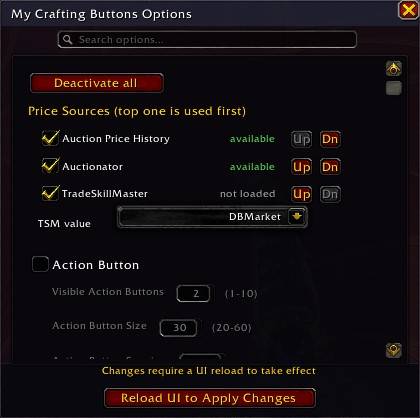
Type /mcboptions in the chat to open the options menu where you can enable/disable individual features.
All modules are active by default (except the suboption from automail that adds a contactlist and some ui changes in the mail window, some suboptions from the UI Adjustments, the auto quest where you turn in a Dawn Crystal, the delete favorites button that clears your favorites in the ah, profession and order window, the suboption from Crafting Routine to stay in the order overview when making orders and the restock button in the NPC merchant frame) - uncheck what you don't need, then hit the button to reload UI.
The settings are saved for your whole account.
/mcbhelp shows you all the slash commands that come with the addon in the chat.
/mcbslash shows you a frame where you can execute all slash commands with a button click.
You can chose at the top of the options which price sources the modules that has price checks uses: Auction Price History, Auctionator, TSM (has 7 different sources to chose from) and/or Oribos Exchange and in which order.
And it has a search field for quicker navigation.
UI Adjustments & Helper Buttons
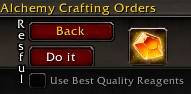
Adds two small buttons to the work order window that let you handle five actions right next to each other:
- Do it: Accepts, confirms that you're using your own material, creates, and completes an order with left click. A right click toggles the concentration.
- Concentration Button: A mirrored version of the concentration button that shows a yellow check mark when you click/activate it.
This saves a good chunk of time and mouse movement when you’re doing a lot of work orders to earn some gold.
Search, Back, Do it, Concentration and Use best material button can be made movable in the /mcboptions
You can set a hotkey with /mcbdokey key that does the same as the Do it button. E.g. /mcbdokey space and you can use space to make the order instead of clicking the button. /mcbdoreset and it deletes the hotkey. You can use all 3 modifiers as well, e.g. ctrl-f ; shift-h ; alt-m as hotkey. The hotkey works per default on the recipe site as well. And if you want to you can activate in the /mcboptions that it uses the Create All mode instead of single create and that it activates concentration as well.
The search and back buttons have been moved closer to the three main buttons - less mouse travel, more convenience.
The checkboxes for “use highest materials” were moved closer to the three main buttons, and in the main window closer to the create button.

A small pulsing square appears to the right of the “Do it” and over the "Create" button when you start a craft. This can also be moved when unlocked the movement for the other UI helper buttons.
Number Pad
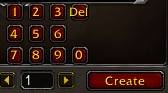
There’s now a number input field, so you can pick any amount from 1–999 without touching your keyboard.
Action Button

There’s also a freely movable button where you can drag something onto it. It can be increased to up to 10 buttons in the options, and their size can also be adjusted.
I use it for a /logout macro since I can’t create a normal clickable logout button in the addon (protected function).
This is basically a workaround using an action button.
Warning: Right-click deletes the macro from the button. So stick to left-clicking it.
If you want the same macro, you need to create it yourself in-game and drag it onto the button - macros are saved by the game, not the addon.
Fleeting Flask Alert (TWW)
When crafting flasks or potions, if you happen to get a rank 3 fleeting flask/potion (the kind without special usage conditions) as a byproduct, a flashing button + sound will appear.
Left-clicking the button consumes it for a chance to get an empty rank 3 phial to sell.
The button only shows up when you have 5 potions or 1 flask of them.
With fewer it stays hidden - no point wasting time for almost that little chance.
Spend All Points Button
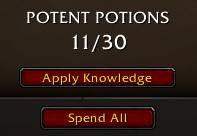
Theres a Spend All button under the Apply Knowledge button - hit the button and you go all in with just one click.
Tool Text Display

The addon shows a small text hint indicating which profession tool is currently equipped.
The hint appears in the main profession window and in the work order window.
Can be made movable in the /mcboptions
Profession Shortcut Buttons at Ak'itaz
When talking to Ak’itaz (NPC in Azj-Kahet), the addon now automatically shows your learned profession icons on the right side of the dialogue window:
- Each button uses the proper profession icon.
- Clicking an icon immediately selects the correct gossip option for that profession.
- Only your real primary professions appear.
What this does for you (the big time-saver):
Ak’itaz can summon any profession workstation right next to you.
Instead of running from one craft table to another:
- Talk to Ak’itaz
- Click your profession icon
- The correct crafting table appears instantly
- A large movable message appears - click it to open your profession book
- Start crafting right away
This essentially turns Ak’itaz into a three-clicks personal profession switcher.
Tip: Bind a hotkey to the Interact with Target Button, stand close to Ak'itaz and face him. Now you can talk to him without the need to close the profession window.
Moxie Reward Banner

A small collapsible banner appears above the profession window when the currently opened profession has at least 600 Artisan Moxie.
It only shows for the matching profession and reminds you that you can trade the Moxie for that profession’s surplus reagents bag.
If you want you can activate in the suboptions that when the profession book is closed a text display shows when you have 600 moxie or you can replace the banner completely with that text display.
Default Recipe Setter
You can set a default recipe per profession and character. Select a recipe in the profession window and press ctrl-F to save it as the default.
Every time you open the profession window, the saved recipe will be automatically re-selected. This removes the need to search for the same recipe again when crafting repeatedly.
During TWW, I ran into several cases where the profession window didn’t open with the correct favorite recipe.
No more accidentally mass-producing the wrong items while being brain-AFK watching Netflix! Take that, you nasty Blizzard bug!
Slash commands:
/mcbresetkey Clears the saved default recipe for the currently active profession.
/mcbsetkey key Changes the key used to set the default recipe.
Examples:
/mcbsetkey shift-G
/mcbsetkey ctrl-3
/mcbsetkey alt-V
/mcbsetkey H
Current default: ctrl-F
→ Just type the single letter/number with/without modifier you want — do NOT write key!
Auto Close Craft Result Window
The crafted-items popup closes automatically after 3 seconds if nothing new was crafted during that time.
As long as new items are still being produced, the timer keeps resetting and the window stays open.
It only closes once no new item has been crafted for 3 seconds.
The time can be changed with /mcbtime value - e.g. /mcbtime 1 will hide after a second.
Merchant Quick Buy Buttons
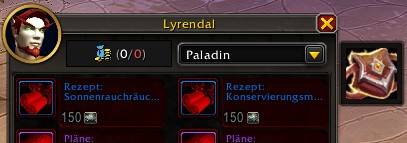
Compact icon buttons appear on the right side of the merchant window for the Surplus Reagent Bags that cost 600 Moxie, so it is no longer needed to switch to the last page to buy them. The buttons only appear if that merchant actually sells them and you can currently afford them.
Default Enchanting Vellum Button
Enchanting vellum is inserted automatically as the default optional target whenever a valid vellum is available, so the extra target does not need to be selected manually each time.
If the target is changed manually, a small quick button appears below the slot and allows switching back to vellum with a single click.
Character Concentration List
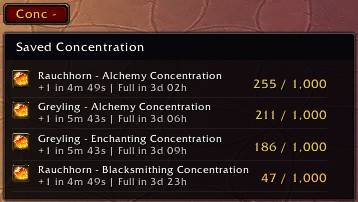
Shows a freely movable button on the profession window that opens a collapsible list with your characters' saved Concentration values.
Entries are sorted from highest to lowest, the list supports scrolling, and the addon remembers whether it was expanded or collapsed. You can also open/close it with /mcblist
If you don't wanne see a profession on the list you can disable it in the addon options e.g. leatherworking.
You can use the concentration list to quickly log to a different char. Just put a /logout macro into the header button, left click a name and use copy paste shortcuts (ctrl+c ; ctlr+v) like shown in this gif: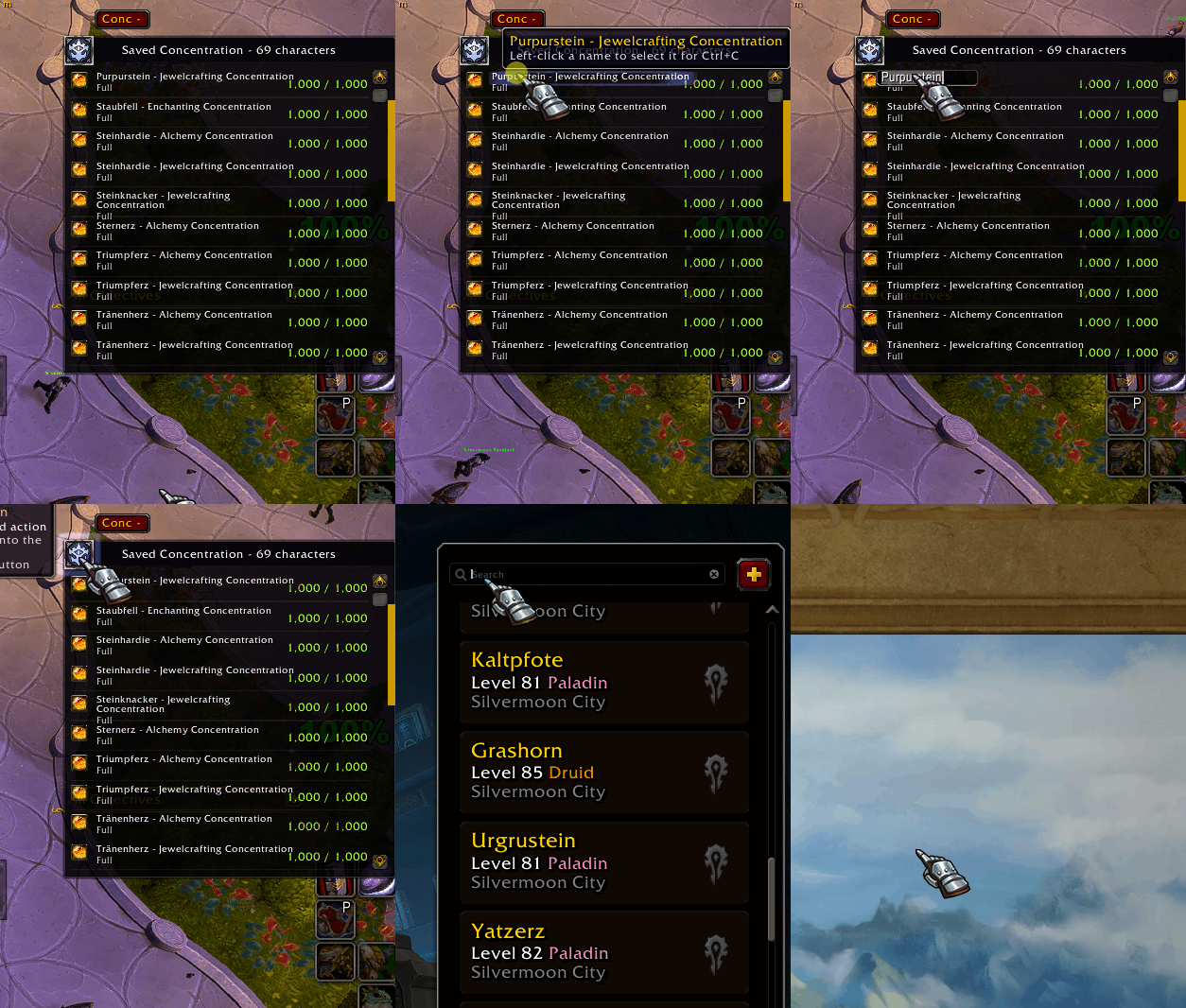
In case you deleted one of your chars you can remove it from the concentration list with /mcblistcharremove Charname or /mcblistcharremove Charname-Realm
In the suboption of /mcboptions under Character Concentration List you can activate that the Conc button to open/expand your chars concentration list is always visible: Keep list button visible outside profession window.
Tool Switch Frame
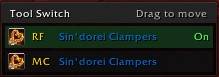
Shows a freely movable frame on the profession window whenever the current profession has more than one available tool.
The frame moves together with the profession window, remembers its position after being dragged, and lets you switch tools with a single click without opening your bags.
Concentration Max Rank Warning
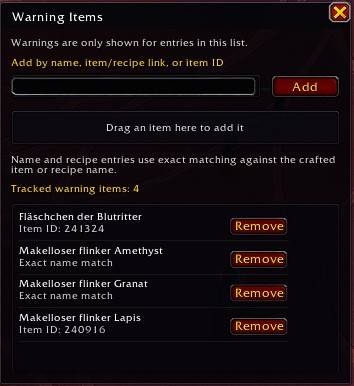
Shows a confirmation popup before crafting if Concentration is disabled and using it would allow the highest quality rank for an item on your warning list.
The warning only appears for items you add yourself. The list is managed in a separate options window opened from a button in the addon options (or with /mcbwarn), where items can be added by name, item ID, item link, recipe links, or by dragging them into the list. Entries can also be removed there at any time.
And you can activate an option that you get a warning when you don't have a mulitcraft tool equiped for the items in the list if you want to.
Quick Buy
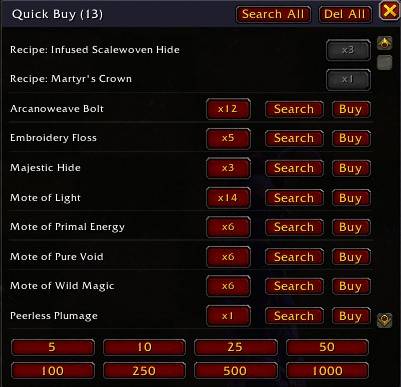
Create a custom shopping list directly from the profession window or craft order window by using Ctrl-left or Ctrl-right click on reagents or entire recipes or the circled items that will be produced. When adding a full recipe, all required materials are automatically included with the correct amounts based on your selected craft quantity. You can click a recipe/item multiple times if you want to buy the materials for more than one.
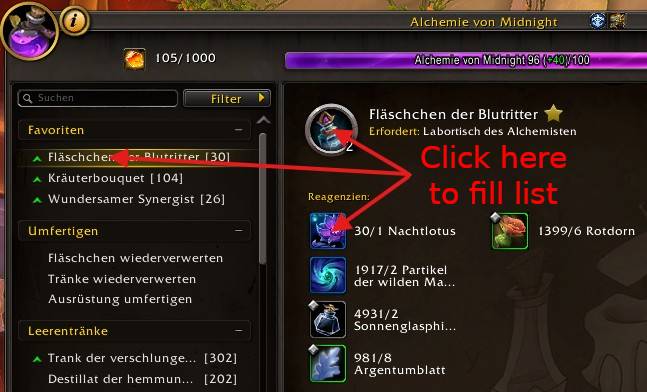
A dedicated search button lets you instantly look up the selected material in the Auction House without typing anything manually. Clicking the quantity number fills the visible buy amount field on the buy page.
There are some number buttons under the list that can be used to fill the buy amount field, too.
The list can be opened with /mcbshop in case you closed it after adding stuff from the profession window.
If you want to change the rank of a single item just left click its name. If you want to change every rank item in the list click the Change Rank button. Both works as toggle.
If you want to change the amount of an item just left click the number.
If you want to delete a single item from the list just right click it.
You can change some behavior in the addon options (show list button, auto hide when closing profession book or auction house, only add the missing material when adding npc craft orders to the list or if the direct capture on the front page of the craft order window is active).
Works with the default AH and Auctionator.
The Buy button will directly buy the item with the shown quantity (and rank) from the auction house. Gives a warning if the price is 10% higher than your latest price source scan. The bought item via the button will be deleted from the list.
If you click the Restock button with your middle mouse button it puts everything in the Quick Buy list to the Restock frame.
Orders List Layout
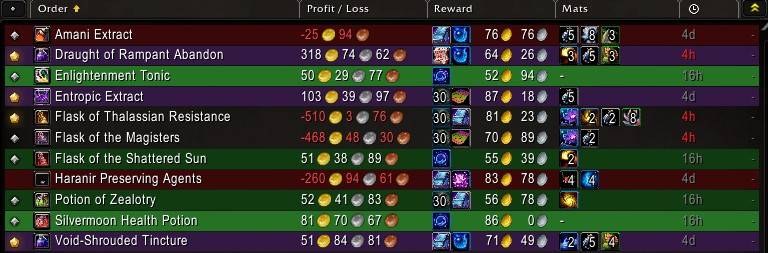
Reformats the crafting orders list to make it easier to scan and sort through at a glance.
It adds a cleaner custom layout for public, guild, customer, and personal orders, including quality indicators, profit / loss, materials, rewards, and clearer row highlighting. Profit / loss uses the data sources you chose in the /mcboptions (Auction Price History, Auctionator and/or TSM).
Color explanation
Black: No profit - only make for skill points if needed
Dark red: Recipe not learned - ignore or buy recipe
Dark green: Profit, needs materials - always make
Light green: Profit, all materials included - always make
Light blue: Default max 100g loss (can be changed in the options), gives 30 moxie, no own concentration needed - always make
Blue: 50/100g loss (can be changed in the options), gives a knowledge point item, no own concentration needed - always make when you want knowledge points
Dark Yellow: Maxrank order, profit, no own concentration needed, needs materials - always make
Light Yellow: Maxrank order, profit, no own concentration needed, all materials included - always make
Orange: Maxrank order, no profit, no own concentration needed - only make for moxie or skill points when not much loss
Dark Purple: Maxrank order, profit, needs own concentration, needs materials - only make when big profit
Purple: Maxrank order, profit, needs own concentration, all materials included - only make when big profit

The purple rows show how much concentration you need to make them (dark purple uses rank 1 material if you have to add it yourself).
The yellow and orange rows uses the material ranks it needs to make them without using concentration. So depending on the recipe difficulty r1 or r2 reagents.
You can chose in the /mcboptions which colors are shown for the order rows or hide all of them.
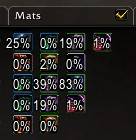
You can activate a suboption (Show own reagents percentage) if you want to know how much of your stocks are used from an order, instead of the item amounts. It's off by default. When you activate it you have a small checkbox right of the Mats label to switch between the normal amounts and percentage of your stocks. A little helper to see if you need to restock an item or have none at all (N/A).
There are 3 special suboptions in the Orders List Layout /mcboptions: Use Real Container Worth, Use Resourcefulness Proc Data and Show Profit Variants with Modifier Keys. By default not active.
- Use Real Container Worth - shows the profit/loss with the data from your container openings and real moxie worth of the 30, and 5 and 10 from the KP items.
- Use Resourcefulness Proc Data - shows the profit/loss with calculated resourcefulness procs
- Show Profit Variants With Modifier Keys - you can hold shift, ctrl or alt and it shows different profit/losses:
- Shift = Raw profit
- Ctrl = With real container and moxie worth
- Alt = With real container, moxie and resourcefulness procs worth
And the expire time is shown completely in hours or minutes, no more in days.
Recipe Profit Frame
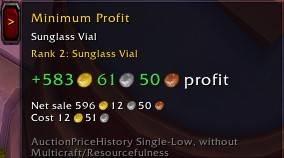
Shows a collapsible profit frame on the right side of the profession crafting window whenever a recipe is currently selected.
The frame displays the rank that the craft is currently set to produce and the minimum profit or loss for exactly that result, without including Multicraft, Resourcefulness, or other proc effects.
The price data source you chose in the /mcboptions (Auction Price History, Auctionator and/or TSM) is used as the price source for both reagents and the crafted item.
The frame can be moved by dragging either the side button or the frame itself. Its position is saved relative to the profession window, so it moves together with the profession window and keeps the same placement after reopening it.
Persistent Concentration Toggle Bar

Gives you a freely movable frame where you can set a hook that concentration is always active.
Shatter Essence Reagent
In the options you can set a reagent that is auto inserted for quicker shattering with the enchanting profession.
Concentration Profit List
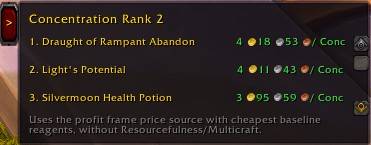
Gives you a freely movable frame where you can see the most profitable recipes when doing concentration crafts. Only shows something when you have enough concentration to make the craft.
You can change how many entries you see at a glance in the /mcboptions from 1-20 before the need of scroll down. And there are 2 suboptions to hide Equipment and Gleeful Glamour - default they are not active.
There's a checkbox (show all) if you want to see every max rank item that you can make with your current concentration value, even the ones that give a loss.
A left click on a list entry opens directly the recipe.
Auto Mailer
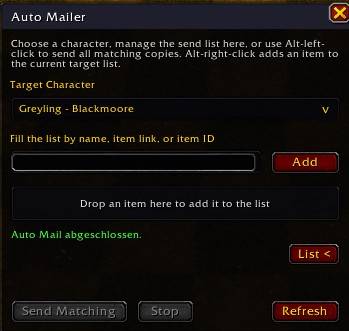
Adds a freely movable frame to the Mail window that lets you add things to a list to send them quickly to a char you use for trading.
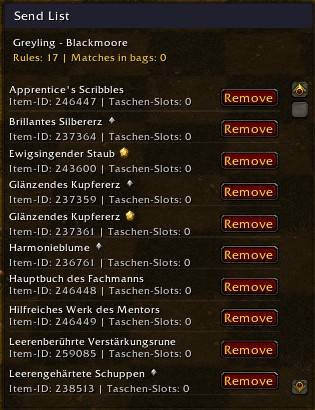

You can minimize the Auto Mailer window and send directly from the minimized frame.
If you want a postal like contact list and a small ui change with the received letters you can activate it in the suboptions of AutoMailer. Personally i never used more from Postal than that, so i just added something for myself. And if you want to take the attachment from one mail you can just simply right click it.
Bonus function: With Alt-left-click you can instantly send all matching copies of an item to the selected character.
If you want to send gold from many chars to one you can activate in the /mcboptions a button to send gold - how much you keep can be adjusted from 30c to goldcap. The value you write is always in copper. So if you want 1g to remain you need to add 4x 0 behind the 1 and add the 30 copper send cost (10030). Default that button is hidden.
You can set a favorite character from the Auto Mailer list with right click a name for quicker changing to your trading character.
Missing Ingenuity Phial Warning
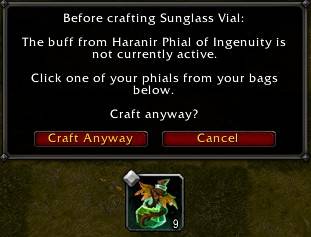
Gives you a warning popup when doing a craft with activated concentration and you're missing the Ingenuity Phial buff. Shows button(s) under the popup for easy using the phial of your choice as long as you have it in your inventory.
NPC Order Resourcefulness Switch
When opening the npc order tab your tool switches automatically to resourcefulness if you have multiple tools.
Bank Transfer
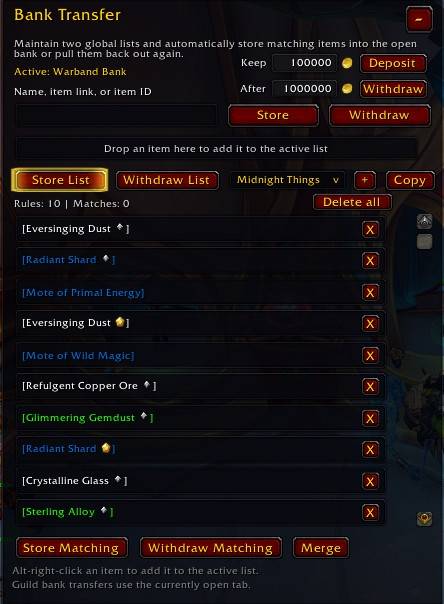
Lets you store/withdraw items in a bulk to the bank/warbandbank/guildbank with a single button click by defining a list what to store/withdraw.
You can make up to 100 custom lists, sort them by drag and dropping and rename them with just a right click.
In case you need to reset the window frame: /mcbtransreset
In case you wanne make a list with all your items already in your bank you can use the slash command /mcbaddbankitems - Take care, it will add every item from your opened bank to the active list in the ui.
The items of a list can be right clicked to change the amount you store or withdraw. Or left clicked if you want to remain a fixed amount in your bank.
You can deposit and withdraw money with a button click from the warband bank. Numbers are saved globally in the number fields. Buttons are only shown with the warband bank.
Works with the default UI, Baganator, Bagnon and Ellesmere UI.
Missing Shatter Buff Warning
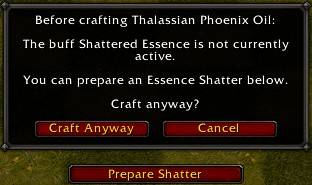
Gives you a popup warning as enchanter when you have no buff from shatter essence active when producing something. And a button under the warning that you can use to switch directly to that recipe.
Tool For Recipe
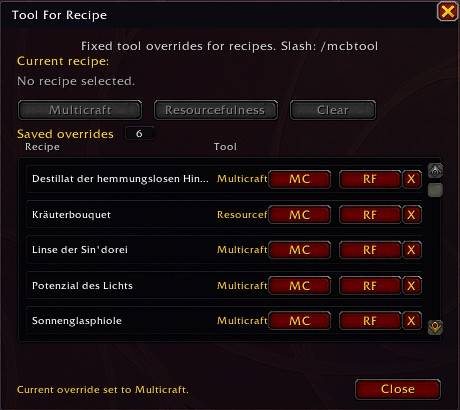
You can set a tool for a recipe that auto switches to it when you open that recipe for producing.
Frame for settings opened with /mcbtool or per button click from the normal /mcboptions. Have it open with the profession book when selecting the recipe for the tool.
NPC Order Weekly Quest Warning
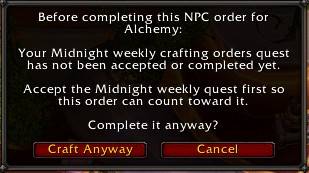
A popup warning will prevent you from doing a NPC order when you haven't accepted or finished the weekly profession quest. Can be deactivated like all the other things in the /mcboptions.
There's a whitelist option: /mcbblock if you don't want to do the profession quests on a char.
Auto Weekly Profession Quests
The profession weekly quests are now accepted and turned in automatically. By default the enchanting quest where you turn in a Dawn Crystal is disabled, but can be enabled in the options.
If you hold down Alt, Ctrl, or Shift while talking to the NPC, the auto-quest feature will not be triggered.
Auto Open Containers
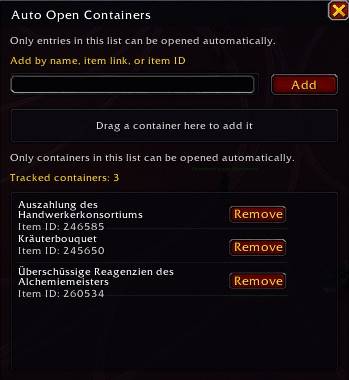
You can add container items to a list that will be auto opened. Open the list with /mcbcontainer or through the normal /mcboptions
Theres a delay when opening mails, it starts 0.5 seconds after you got the last item from it to prevent bugs. You can change the time in the /mcboptions
If you get grey containers that can only be opened after a relog change the delay between the auto opening of containers /mcboptions -> Auto Open Containers -> Container Open Delay - Default 0.15s - guess it depends on your internet connection and how fast the server reacts if that will happen. Have in mind as long it opens containers just watch and do nothing else or you will get them grey, too. And if you loot other stuff while the opening happens you can get falsely detected items, so just watch and wait.
Expansion Filter
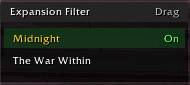
In case you want to do NPC orders from TWW for profit or just a frame for quicker expansion changes there's now a freely movable switch frame. You can change what expansions are shown in the list in the /mcboptions - Default: Midnight and TWW. It's shown on every window of the profession book, so no need to switch back to the recipe list to change the expansion.
Mirror Concentration Button

There's a freely movable mirror of the concentration button in the recipe window so you can activate it quicker when using the hotkey for making crafts. Just drag it somewhere where you find it helpful or just deactivate it in the /mcboptions.
When you have concentration active you can right-click the button and it does a produce all action for quick concentration crafts. There's a suboption in the /mcboptions if you want to activate the right-click for every craft.
Mass Shopping
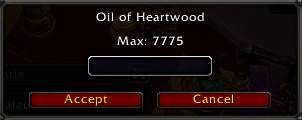
When you shift right-click an item from a merchant you can buy as much as you want (only limit is your gold and bag space).
Open Orders Tab
By default it will now always open the NPC order tab when switching to the orders and start a search. This behavior can be changed in the /mcboptions
Disenchant List
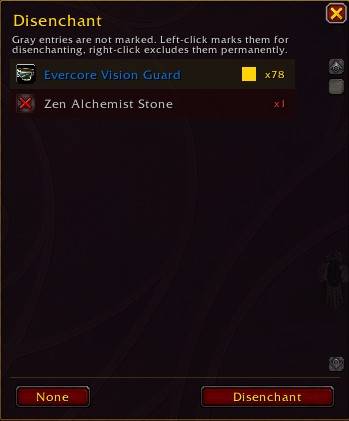
A simple list that shows all your weapons/armor for easy disenchanting with a single click.
List can be opened with the minimap button or /mcbdisenchant
The minimap button can be hidden in the /mcboptions
You can set a hotkey via /mcbdisenchantkey key - e.g. /mcbdisenchantkey space or /mcbdisenchantkey MOUSEWHEELDOWN
You delete the hotkey with /mcbdisenchantnokey
Delete Favorites Button

If you ever need to delete favorites from the auction house, profession book or profession order page you can activate an option that will put a small button in these windows so you can delete all the favorites with a single click.
By default this option is not active.
Auto Open Orders
Adds a freely movable button to the NPC order tab to auto open the orders you have active in the /mcboptions using the color system (both green, blue and/or yellow orders).
If you want that it starts completely automatically just uncheck the "Use button to start Auto Order" checkbox and it starts by just opening the NPC order tab.
When you hold SHIFT the module does nothing when switching to the orders. If you want to skip an order just hit the Back button.
There are 3 special sub-options:
- Only open Glimmer when 24h or less remaining - default off.
- Exclude Flicker Orders
- Automation Minimum Profit (from 0 - 1000g)
- Automatically insert order materials - this does a bit more. When calculated it needs a rank 2 material for the order to make, it auto inserts it to the craft. And if you're missing a material it puts it directly to the Quick Buy frame for easy buying. Only does the correct rank for the midnight orders, tww it uses all ranks of items for the automation.
And you can set in the options to use the real profit prices for the auto opening of the orders or real profit prices with procs. By default it uses real profit prices.
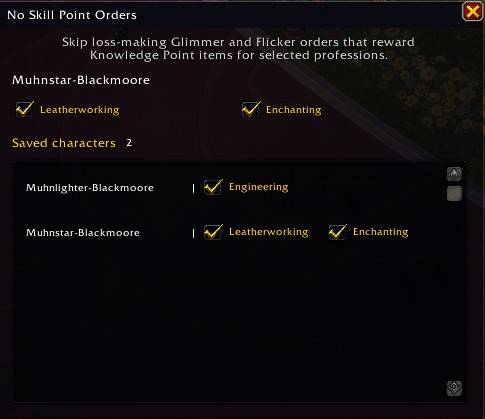
With the slash command: /mcbnoskillpointorders you open a frame where you can prevent on a profession by character base that a dark blue order gets auto opened. In case you are fully skilled and don't want to do a Glimmer/Flicker order with a loss.
If you have a profession where you don't want to do Concentration Crafts with (e.g. leatherworking) you can activate in the Suboptions from Auto Open Orders that this profession uses it's concentration for max rank orders.
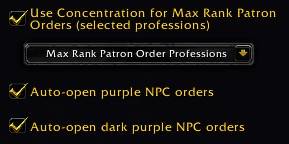
- Use Concentration for Max Rank Patron Orders
- Auto-open purple NPC orders
- Auto-open dark purple NPC orders
must be checked and the profession in the dropdown list (Max Rank Patron Order Professions) must be checked as well.
Need theses other functions activated in the /mcboptions to work:
- Auto Open Orders
- Orders List Layout
Order Own Costs

Adds a small freely movable frame to the NPC orders that shows your costs, your real profit (with 30 moxie, kp-item-moxie value (when opened at least 1 surplus bag for that profession) and container (when at least 1 container data recorded) as reward) and your real profit with resourcefulness procs (uses theoretical value when under 100 recorded crafts, from 100-300 own recorded crafts a % weighted of it, and over 300 own craft data it uses it completely). It has a tooltip for all 3 lines that breaks down the costs/profit in detail.
Can be hidden in the /mcboptions -> Order Own Costs and its position can be locked.
Uses the price data you chose in the /mcboptions (Auction Price History, Auctionator, TSM and/or Oribos Exchange).
Own Costs Display

Adds a small freely movable frame to the crafting page that shows your costs. Can be hidden in the /mcboptions -> Own Costs Display and the position can be locked.
It has a tooltip for the line that breaks down the costs in detail.
Uses the price data you chose in the /mcboptions (Auction Price History, Auctionator, TSM and/or Oribos Exchange).
Use Knowledge Points Button
Adds a freely movable button that lets you use the profession knowledge point items that you get regulary with a single click - supports midnight and tww items.
If you want to you can make a hotkey for it in the normal keybindings of the game under My Crafting Buttons.
In case you want to add or remove items from the button write a /mcbkpoints in the chat.
Set Missing Recipe

In case you have a lot of chars doing the profession game and you want to quickly see if someone misses a recipe you can set it with /mcbsetrecipe and it shows a small movable text frame when you're in a resting area.
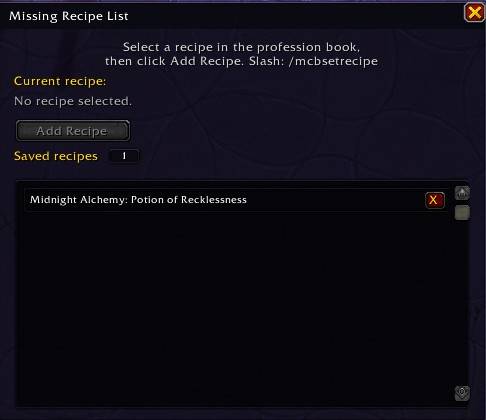
Since there's no API from the game itself to check for that, each profession book on each character must be opened once so that MCB can write it to its database.
Position can be locked in the /mcboptions and made click through.
Block Concentration Crafts
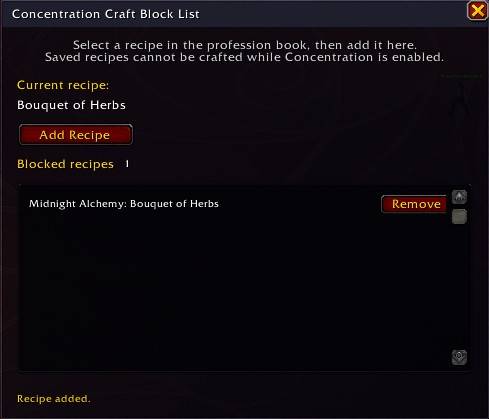
With /mcbblockcrafts you can open a window to add recipes directly from the profession book, preventing them from being crafted with Concentration active. This helps prevent mistakes, for example when crafting a Bouquet of Herbs.
Add Own Order Material to Quick Buy List
Adds a freely movable button to the NPC order tab that adds every material that you must provide to the orders you want to make configured in the Auto Open Orders options (both green, blue and/or yellow orders) to the Quick Buy list for easy buying from the auction house.
Left click puts every material you must provide to the Quick Buy list.
Right click checks your bag and uses a bank and warbank snapshot what is missing in your stocks and puts only that to the Quick Buy list.
Have in mind the snapshot from bank and warbank has only actual data when you open them. So if you used some material for crafts or orders from them the numbers in the snapshot are no longer correct until you open them again.
Own Concentration

Adds a small freely movable display showing your both profession's concentration on all tabs of your profession book.
Position can be locked in the /mcboptions and made click through.
Restock
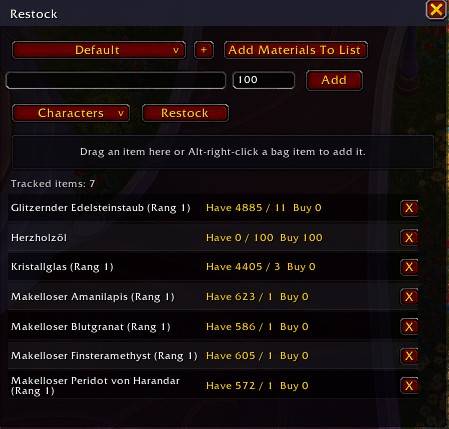
Lets you configure a list to restock material via QuickBuy that you buy regulary.
The window can be opened via slash /mcbrestock , from a new minimap button (RS - left click to open restock, right click for QuickBuy window) or from the QuickBuy window via a right click on the new Restock button.
To restock just do a left click on the Restock button or the Restock button from the QuickBuy window. It will put everything into the QuickBuy window for easy buying.
If you want to change the amount just left click it in the restock list.
When you left click an item name that has a rank it changes it to the other. Switches only betweeen rank 1 and 2.
You can configure Restock in the /mcboptions what sources it should consult. And if the minimap button is shown.
Include Current Charakter looks into the bag, bank and mail. If installed it uses the Syndicator addon for the mail contents.
Works with the auction house and npc merchants.
You can make different lists (up to 100) in the Restock frame. And copy them over from other lists cause by default everything goes to the Default list when adding items from the Quick Buy frame. These lists are only used from the Restock frame when you click the Restock button. Then the items from the opened list goes to the Quick Buy frame.
There's a suboption (Show Restock Button at Merchants) that shows when activated a freely movable button at a merchants window. Left click does the restock, right click opens the restock configuration window, middle click opens the Quick Buy frame so you can restock single items. If you want to use this function you need to add the merchant items to the special "NPC Merchant" list found in the expandable drop down list (click on Default) in the Restock frame. Not active by default.
Weekly Quests Done Display

Shows a small freely movable reminder when you can turn in both profession weekly quests. Only shown in a resting area.
If you have already turned in one it's shown for the last to turn in. If you're enchanter it shows only for your other profession.
Position can be locked in the /mcboptions and made click through.
Simulate Craft
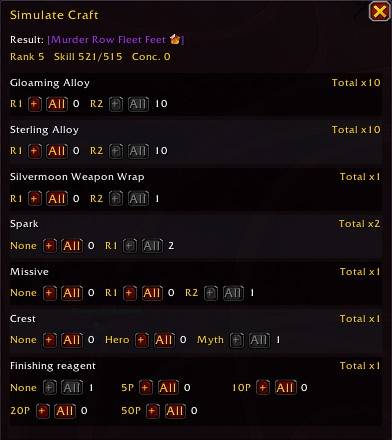
Adds a freely movable button to the profession window that opens a crafting simulator, letting you preview the materials required to reach the maximum item rank.
In case you need to reset the button position you can write in the chat: /mcbsimbuttonreset
Default Order Commission
You can set in the /mcboptions default values that are inserted for guild, personal and/or public orders. By default there's only one active: Guild orders are always set to 1 silver when switching to them.
Rank 2 Material
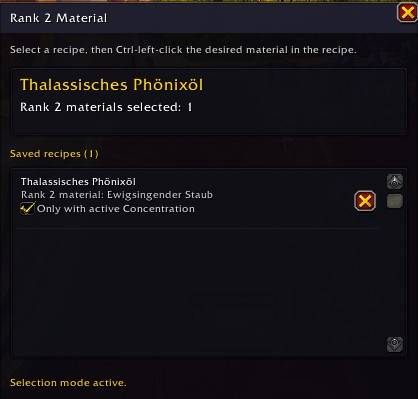
Via /mcbrank2 or with a button click from the /mcboptions a new window can be opened where you can add material(s) from a recipe with ctrl left-clicking it that then is always used as rank 2 material in a craft. Each material in the list has a small hook field so it only uses rank 2 when you have activated concentration for the craft.
All Tradable Items
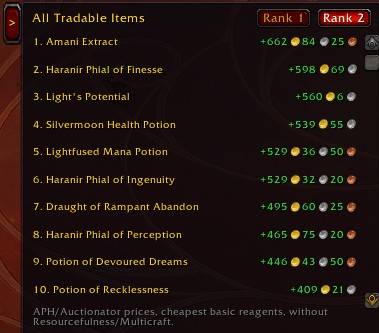
A collapsible list that shows all tradable items and their profit/loss at a glance. Equip, gleeful glamour and housing stuff can be hidden in the options. And you can change how many items you see at once before the need of scrolling from 1-20.
A left click on a list entry opens directly the recipe.
And there's a check field. When activated it shows them with resourcefulness and multicraft procs.
Auction Sell
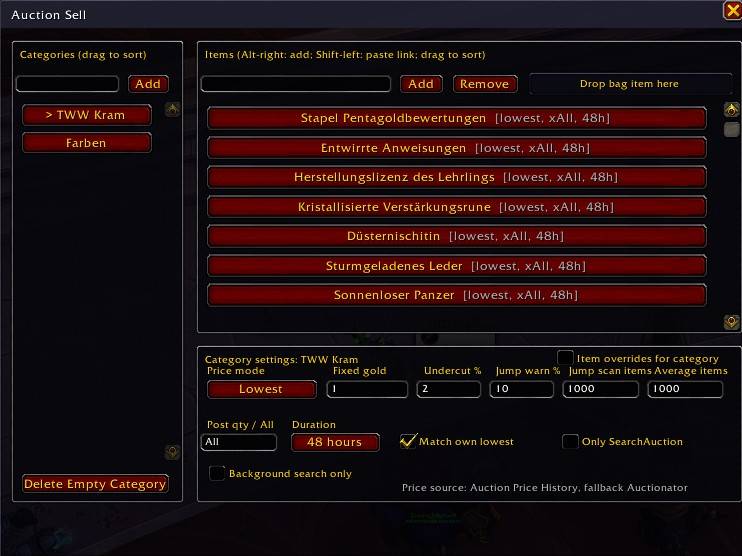
Adds 3 new freely movable buttons to the auction house window: Auction List, QuickAuction and SearchAuction.
Auction List opens a new window where you can add categories, fill them with items via alt right-click on an item or using the Add field writing a name or shift left-click an item or per drag and drop on the "Drop bag item here" field. And it lets you configure for how much the whole category or single items will be placed into the auction house using the QuickAuction or SearchAuction button. The list can be opened also with the slash /mcbauction
Price Mode can be switched with a left-click between: Lowest, Average or Fixed price post method.
Duration can be switched with a left-click between 12, 24 and 48 hours.
QuickAuction is using prices from the price data source you chose in the /mcboptions (Auction Price History, Auctionator and/or TSM) and puts them with just a click in the auction house. Or you can use the mouse scroll wheel for that when hovering over the button. In the /mcboptions you can change that the QuickAuction button needs 2 clicks, one for an invisible background search, one to post it cause APH/Auctionator/TSM only has one price for the cheapest item so the undercut protection won't work.
SearchAuction button does always a normal search with a left click for the next item, a right click will post it, a click with the middle mouse button will post it at the same price as your lowest own auction.
You can use the 3 different price methods to set a fixed price in gold for each item/category (Fixed) or how much it should be undercutted in %, when you will get a price jump warning to conquer price tricks from other sellers, how many items should be looked in the jump warning (Lowest) or you can set an average item amount that will be looked for their prices and that will be used to post your stuff with an average price of all that items (Average).
If you want to set a different price for each item in a category just set the item overrides hook for the whole category and/or for single items.
The Post qty / All field can have a number or the word All for everything you have in your bag written inside.
There's a hook (Never lower) you can activate and enter an amount that will never be lower for Lowest and Average auction prices.
And you can exclude items/categories from the use of the QuickAuction button by checking the Only SearchAuction field.
Who Can Craft

Adds a tiny line to the tooltip of an item if one of your chars can make it with its profession. Each char must be logged in once to make this work.
In the /mcboptions you can limit it to characters of your choice.
Container Worth
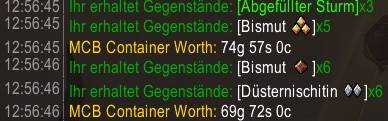
Shows the worth of the items of a container opened with the auto open container function as chat print. Uses the price data sources you chose in the /mcboptions (Auction Price History, Auctionator and/or TSM).
The new slash command /mcbconworth shows you the average value of every container you've opened with the auto open function.

If you don't want the chat print with every opening, but keep the slash command to see the average, you can set a suboption hook in the /mcboptions of Container Worth (Don't Show Chat Output). And you can set if recipes are included in the profit amount.
You can use /mcbconworthpercentage if you want to see the percentage of every item in a bag the container worth module had recorded.
If you want to see it in a separate window use /mcbdata and click the Containers button.
Crafting Proc Tracking
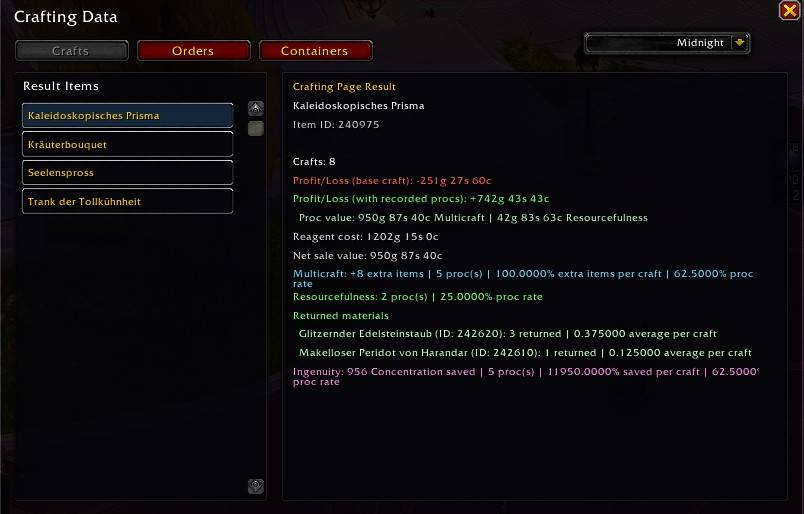
It saves all the procs (resourcefulness, multicraft and ingenuity) you have while crafting and making orders (only resurcefulness) in its database.
The data can be shown with the command /mcbdata or the new freely movable Show Data button on your crafting page.
It even shows how that effects your profits (only resourcefulness+multicraft) when crafting stuff.
In case you want to reset all the data you can use /mcbresetprocdata
Prevent Rank 2 order materials
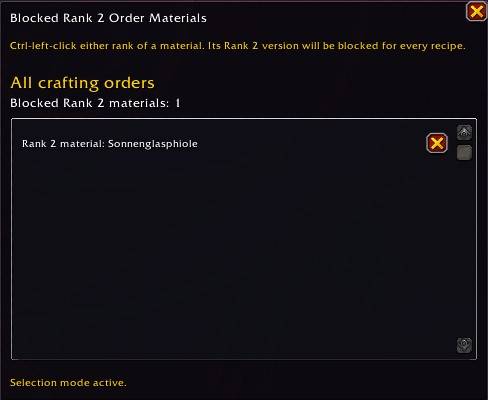
With /mcbpreventmats you open a frame where you can add materials to a list that when used as rank 2 in an order it activates a popup warning to prevent the automatic use of it. You add them when you hold ctrl and left click an item in your profession book while the frame is open. Doesn't matter which rank it has, it will be always be added as rank 2.
Endless Craft
Let Crafts, Prospects, Millings etc. to continue its job as long as you have reagents in your bag without the need to start them again when the limit from the game is reached.
Shows a freely movable little check field on your crafting page where you can activate that behavior when the check mark is set.
You can activate in the /mcboptions for Endless Craft 2 suboptions that the Radiant Shatter craft as enchanter stops when you lose the shatter and/or ingenuity phial buff so you can reapply it before continuing the craft.
Automatic Finishing Bonus Item
Puts in your finishing items automatically when the craft/order has the configured state in the options. And adds a freely movable little frame (Bonus Item Conversion Bar) to the crafting page showing the 3 small items that you can turn into bigger bonus items when you have 5 of it with a left click on the icon in the frame.
The order item is always resourcefulness and you can configure how high the total cost of all used order items must be to use the item. For the normal crafts the multicraft and ingenuity items are used only when you activate concentration.
By default only the 3 better items are used, but you can activate that the less bonus giving items are used, too. In case you want to skip the clicks to turn the small ones into the big ones.
And it shows a freely movable check field on the crafting and order page: Auto Bonus Item. Used to quickly control if the automation is active or not. It uses a different position save for each page, cause they have different sizes.
Use All Rank 2 For Max Rank
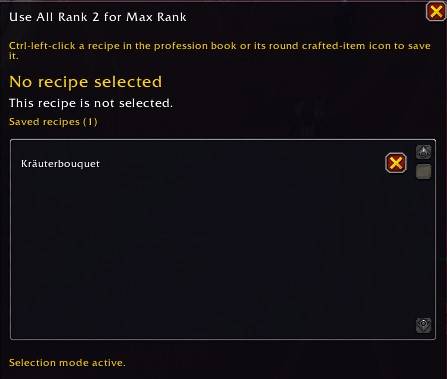
If you have a recipe that you always want to make with rank 2 mats, but only if it reaches max rank with it, you can open with /mcbuseallmax a frame where you can add a recipe from your profession book by ctrl left clicking it and it automatically adds the rank 2 materials for you when you craft it. So no more self checking if not all of your crafters are on the same skill level who can do this.
Crafting Routine
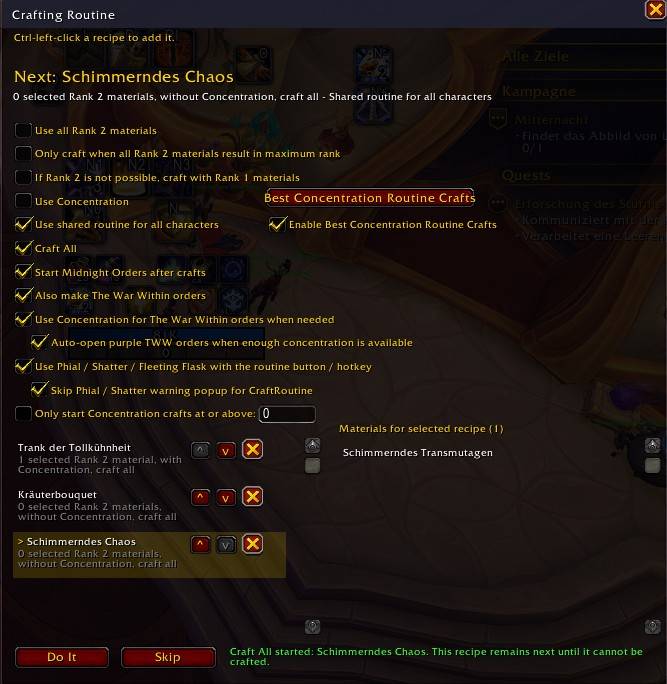
Adds a freely movable button to the crafting page (Craft Routine), that lets you open a frame with a right click or /mcbroutine where you store recipes that you add with a ctrl left click on a recipe in your profession book. And under what conditions you want to make them. Then you can left click the button to produce them.
Every recipe switch needs 2 clicks on the button to start the next craft. First click switches the recipe, second starts the craft.
If you want to you can activate that the button click switches to the npc orders after the crafts are done and make them, too. So a truly one button for all the crafting routine. Even the switch from Midnight to TWW orders can be activated for the button. (It needs the Auto Open Orders module activated, without orders won't work with the Craft Routine button.)
And you can set a hotkey for the Craft Routine button with /mcbroutinekey key and delete it with /mcbroutinekeydel
You can activate an option in the craft routine options that the ingenuity phial refresh, shatter buff refresh and the tww alchemy procs are done with the craft routine button/hotkey, too. And if wanted the purple orders from tww are also auto opened and made with concentration as long as you have enough concentration.
If you check the field for Enable Best Concentration Routine Crafts its button became clickable and opens a list that you can fill with recipes from your profession book. The one with the best gold per concentration profit will be chosen by the craft routine to make. Doesn't matter what you have in the main list, this here gets chosen first.
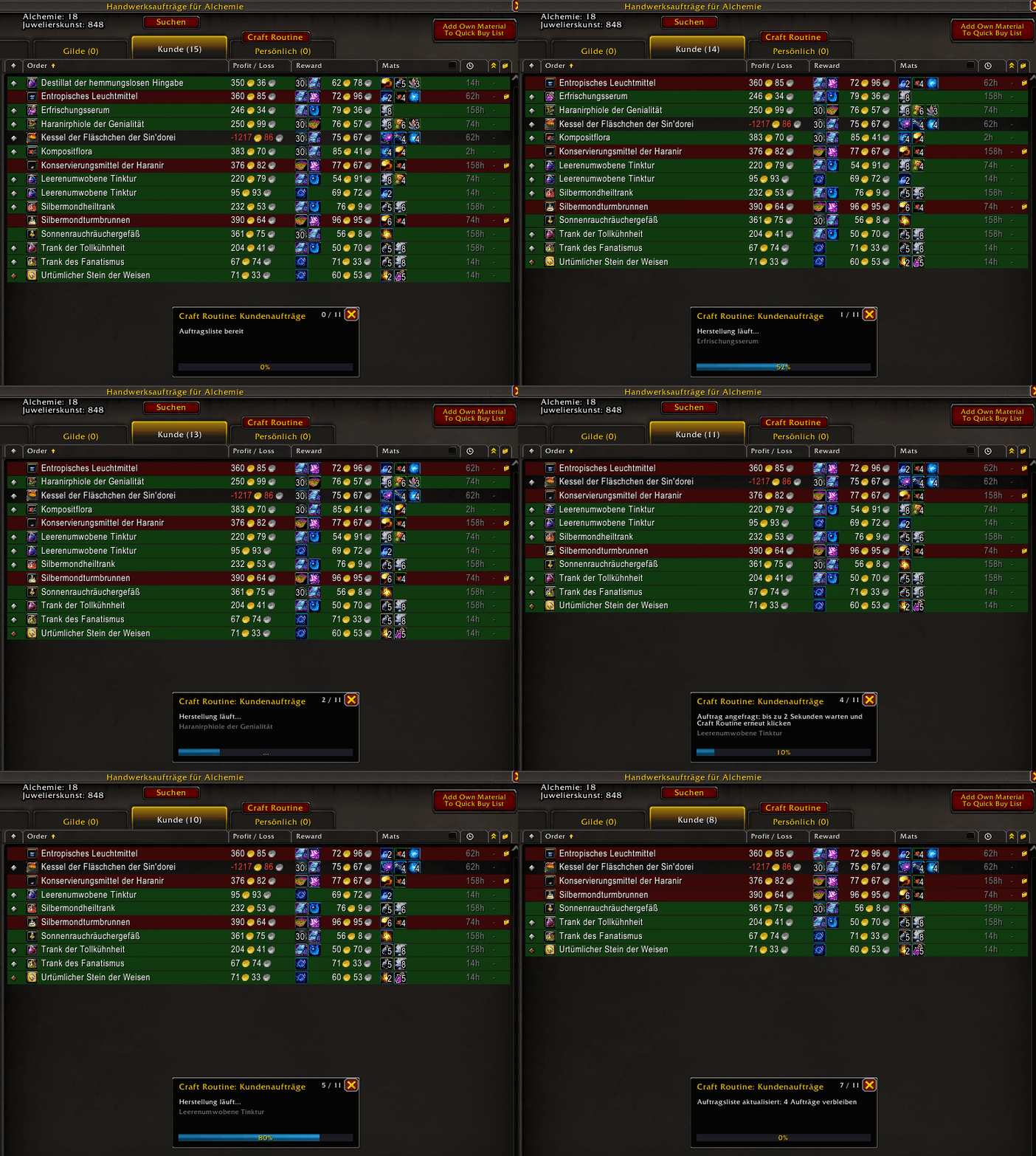
There's an option in the /mcboptions under Crafting -> Crafting Routine when enabled it makes the patron orders directly from the overview. Saves some time and is less CPU consuming: "Make Orders directly from the Order List". By default not active.
The Crafting Routine is the only function that depends on a lot of other modules. These must be activated if you want to use it fully:
- Crafting Routine
- Quick Buy
- UI Adjustments
- Auto Open Orders
- Orders Layout
- Expansion Filter
- Insert Bonus Item
- Fleeting Flask Alert (only if you want to do TWW orders)
- No Ingenuity Phial
- Shatter
- Set Missing Recipe or Who Can Craft
- Recipe Profit Frame
- Concentration Profit List
What To Skill
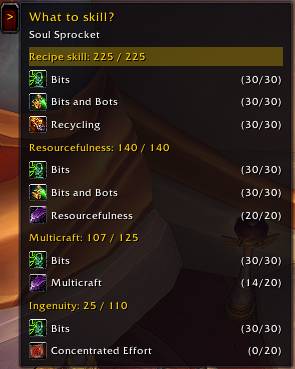
Shows a freely movable and collapsible frame on every profession tab with the recipe you clicked as last and what you need to skill to reach full skill, resourcefulness, multicraft and ingenuity. On each tab with its own position, cause the tabs vary in width.
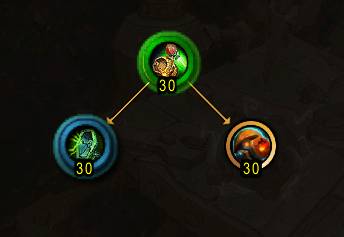
You can left click the header frames in the list to put a green circle over all nodes or each single skill for a blue circle. Clicking a single skill switches to its tab and selects the node.
Recipe Unlocks
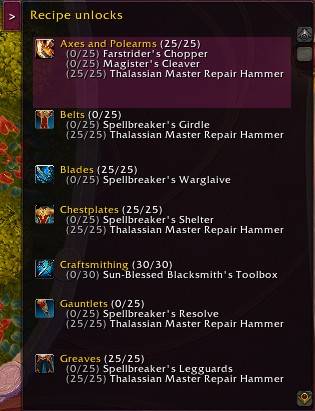
Shows a freely movable and collapsible frame on every profession tab showing which recipe is taught by which node. On each tab with its own position, cause the tabs vary in width.
You can left click a text line in the frame to put a pink circle over the node, switches to its tab and selects that node.
Daily Profit
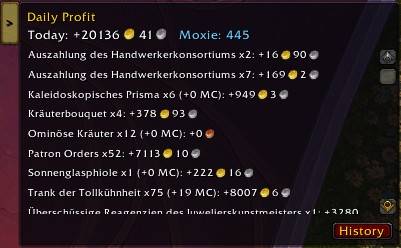
Shows your daily profit from crafting and making patron orders, including the container worth you opened from it on that day and shows you how much moxie you earned. Has a history button that shows you the profit from each day.
It uses Recipe Profit Frame, Order Own Costs and Container Worth functions - if you have one of these not active in the /mcboptions it will not work.
Allowed Rank 2 Order Materials
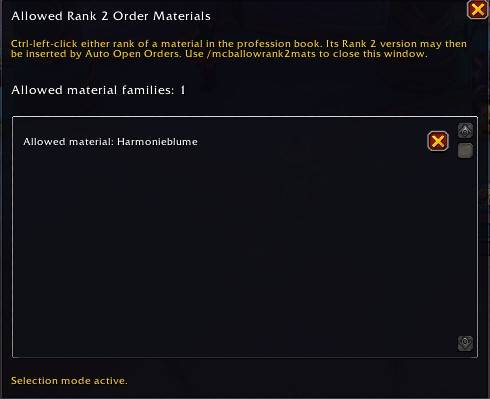
With /mcballowrank2mats you open a frame where you can add items from your profession book with a ctrl left click that then are used as rank 1 or 2 while making orders depending on your stocks and no more only rank 1 items.
My Crafting Buttons Team