Murgle
- By
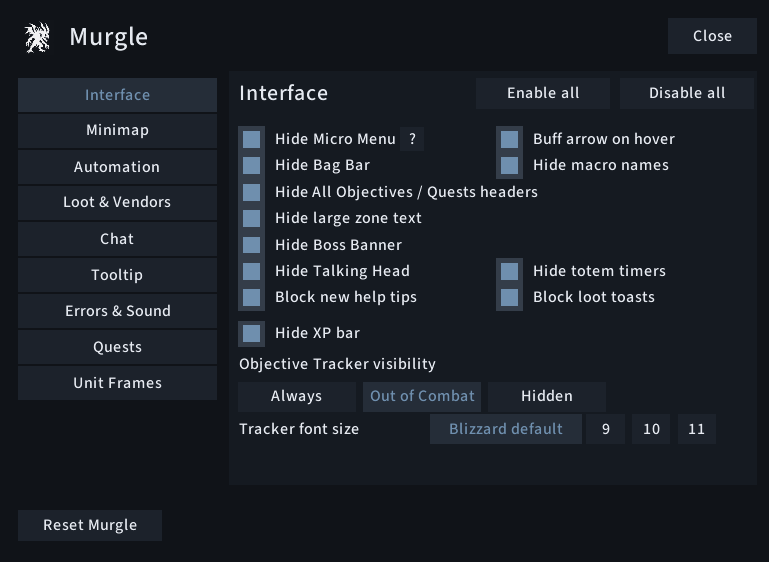
Menu v1
Description
Murgle
Lightweight, native-first quality-of-life improvements for WoW Forever.
Murgle is for players who like Blizzard's UI but want it cleaner, less intrusive and more convenient
It removes unnecessary clutter, automates repetitive interactions and exposes useful native functionality without replacing the game with a large UI framework.
Blizzard, just cleaner.
Lightweight by design
Performance is a core part of Murgle's design.
- 0% average CPU reported by WoW's in-game profiler during testing
- Approximately 459 KB memory during testing
- No external runtime libraries
- No Ace3 or LibStub
- No permanent polling loops
- Settings UI is only created when opened
Murgle prefers Blizzard's own APIs, CVars and existing UI wherever possible. Continuous background processing and replacement systems are deliberately avoided.
Performance figures are measured profiler results and may vary depending on enabled features and client state. A displayed 0% average CPU is not a claim of literally zero CPU work.
Compact Blizzard unit frames
Clean up Blizzard's existing unit frames without replacing their underlying health bars, power bars or interactions.
- Compact Player Frame
- Compact Target Frame
- Compact Target-of-Target Frame
- Remove unnecessary portraits and decorative artwork
- Hide player level and resting artwork
- Optional player-name hiding
- Optional enemy-player faction icon filtering
Clean up Blizzard's interface
- Hide Micro Menu and Bag Bar
- Hide XP bar
- Hide macro names and totem timers
- Hide Talking Head, Boss Banner and large zone text
- Clean up Objective Tracker headers
- Adjust Objective Tracker font size and visibility
- Show the buff collapse arrow only on hover
- Block new help tips
- Block standard loot-reward toasts
A cleaner minimap
- Square Minimap with a subtle border
- Hide minimap rim
- Hide day/night artwork
- Hide minimap header and zone text
- Hide clock and calendar
- Hide tracking and zoom buttons
- Hide addon compartment
Murgle modifies Blizzard's existing minimap rather than creating a replacement.
Quest automation
Automate predictable interactions while leaving anything that requires a real decision to the player.
- Auto-accept eligible quests
- Auto turn-in when no reward choice or money cost is involved
- Hold Shift for manual interaction
- Automation is bypassed during combat
- Reward choices and uncertain quest states remain manual
World Refresh handling
Murgle can handle WoW Forever's World Refresh warning.
Just hide — hides the automatic warning. This does not cancel the scheduled transfer.
Accept & hide — accepts the transfer and hides the warning.
Accept & hide is not recommended for Hardcore characters.
Spell Queue Window
Control WoW's native Spell Queue Window directly from Murgle.
- Adjustable from 0–400 ms
- 400 ms clearly marked as Blizzard's default
- On-demand latency-based suggestion
- Built-in tuning guidance
- No continuous latency monitoring
Fast Loot & Vendors
- Fast Loot while respecting WoW's native Auto Loot behaviour
- Automatic repair
- Prefer permitted guild repair funds
- Personal-gold fallback
- Automatic junk selling
Chat & Tooltips
- Hide Menu and Channel buttons
- Hide Combat Log tab
- Hide voice-chat buttons
- Default, Fade or Hide behaviour for chat tabs
- Position tooltips left, right or directly at the cursor
- Hide unit, object and corpse tooltips during combat
Item and spell tooltips remain available.
Quests & Reputation
- Use Blizzard's native sparkle effect for required quest objects
- Automatically watch recognised reputation gains
Errors & Sound
Choose between All and Important only error messages, and selectively mute repetitive sounds without muting the rest of the game.
Individual controls are available for 13 sound groups, including:
- Spell fizzles and error speech
- Footsteps, mechanical footsteps and hooves
- Train emotes
- Clock chimes
- UI clicks
- Ready checks
- Cat yawns
- Piccolo / Seduction
- Mechanostriders
- Zeppelins
Native nameplate visibility
Choose between Game settings, Combat and Hidden.
Game settings means Murgle steps aside and respects your normal WoW configuration.
Commands
/murgle— open or close Murgle settings/murgle v— display the installed version/murgle r— reset settings after confirmation/rl— reload the UI if the alias is available
Why Murgle?
Murgle is deliberately not a complete UI replacement.
It's designed for players who:
- Like Blizzard's default UI
- Want less visual clutter
- Want useful automation without losing control
- Don't want ten separate addons for ten small fixes
- Care about addon CPU and memory usage
- Prefer native game functionality over replacement systems
If you want Blizzard, just cleaner, that's exactly the point.
Feedback & feature requests
Bug reports and feature suggestions are welcome on GitHub Issues.
Comments are also welcome for general questions and feedback.
Support Murgle
Murgle is free and no functionality is paywalled.
If you enjoy it and would like to support its development and maintenance:
Support is completely optional and does not unlock any features.
Murgle Team