Multiple House Teleports
- By
Save multiple housing plot locations and create macros to teleport between them instantly.
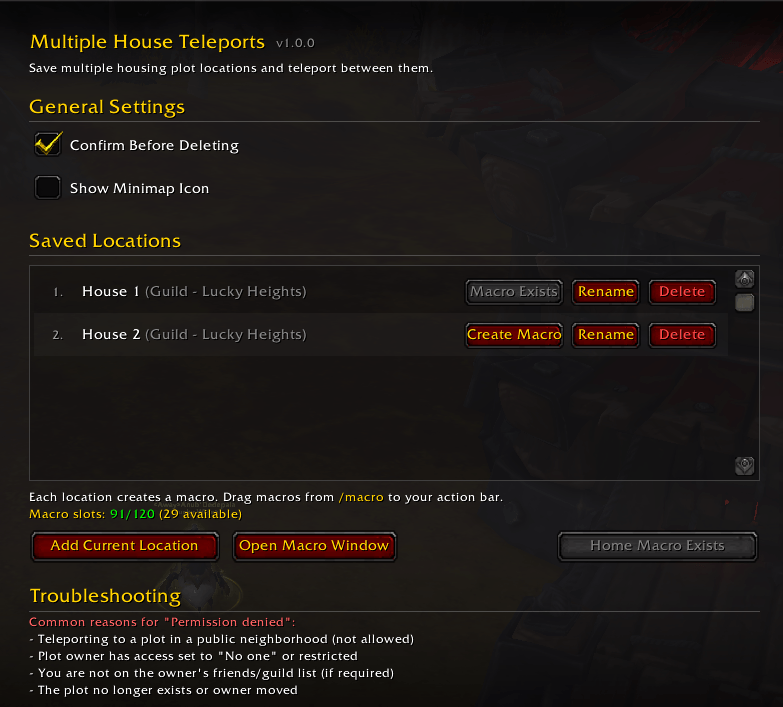
Main options 153701.png
Description
Multiple House Teleports
Save and teleport to multiple housing plots in World of Warcraft: Midnight.
License for this addon is Creative Commons Attribution-NonCommercial 4.0, which means you are free to use it with attribution for non-commercial purposes.
For example; you can't "borrow" code and make people subscribe to your Patreon for access, but you're free to copy the whole or parts of it to your own addon as long as you credit the source and don't charge for it.
Source code is available on github.
This is meant as a MVP, but everything still works in the stand-alone addon, it does not however change the icons or macro to the teleport back version that housing dashboard has.
Features
- Save multiple locations - Visit any housing plot and save it for quick access later
- One-click macro creation - Each saved location can create a macro for your action bar
- Home teleport macro - Quickly create a macro to teleport to your own home
- Neighborhood info - See the neighborhood type (Public, Guild, Charter) and name for each location
- Auto-refresh stale IDs - Teleport data is automatically updated on login and when visiting houses
- Smart retry - If a teleport fails due to outdated data, just press the macro again — the addon cycles through possible IDs automatically and tells you when it finds the right one
- Clean options panel - Manage all your saved locations from the WoW Settings menu
How to Use
# 1.  Visit a housing plot you want to save
# 2.  Open options with `/mht` or through the game Settings menu
# 3.  Click **Add Current Location** to save it
# 4.  Click **Create Macro** next to the location
# 5.  Click **Open Macro window** and drag the macro from `/macro` to your action bar
# 6.  Click to teleport!
If you get "Permission Denied" to teleports you have previously used
Housing IDs can become outdated when you exit the game. The addon handles this automatically with smart retry:
# 1.  Press the macro again — the addon increments the housing ID and tries the next one
# 2.  Keep pressing until it works (up to 9 attempts)
# 3.  Once the correct ID is found, the addon saves it and tells you in chat
# 4.  Future teleports use the updated ID — no more retrying needed
If it goes through all 9 without success, scroll down to Troubleshooting instead, most likely the plot owner updated permissions or moved.
You can also fix outdated IDs by visiting the neighborhood and plot directly — the ID updates automatically on arrival.
Macros
The addon creates macros named MHT 0: My Home for your home and MHT 1-9: <name> for saved locations. These use secure action buttons to perform the teleport, allowing them to work from your action bar.
Commands
| Command | Description |
|---|---|
/mht |
Show commands |
/mht add [name] |
Add current location |
/mht list |
List saved locations |
/mht teleport <#> |
Teleport to location |
/mht delete <#> |
Delete a location |
/mht options |
Open options panel |
Troubleshooting
Note: Not all teleport failures are caused by outdated IDs. Common reasons:
- You cannot teleport to plots in public neighborhoods
- The plot owner may have restricted access
- You may need to be on the owner's friends or guild list
- The plot may no longer exist (owner moved, you need to delete and create a new macro)
Requirements
- World of Warcraft: Midnight (Retail)
- LibStub (embedded)
- LibDataBroker-1.1 (embedded)
- LibDBIcon-1.0 (embedded)
Multiple House Teleports Team