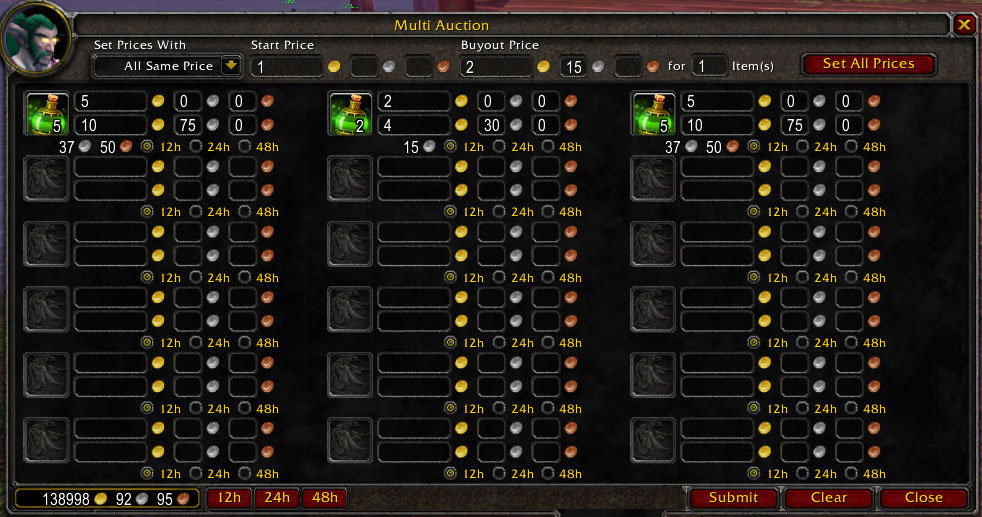
Main Display
Description
What this mod does
This addon will allow you to auction multiple items at once using different pricing schemes. I loved the idea of Igor's Mass Auction, but it had a few bugs in it and a few features I wish were incorporated.
A few differences
- I completely rewrote the addon trying to keep the same look and feel from Igor's.
- Price schemes can be added by authors much more easily.
- I wanted to allow pricing schemes to not add an item if they have no data for initial bid or buyouts.
- I decided not to use the one-click feature, as alt-clicking replaces it.
- A max of 18 auctions still exists, but if people demand more, I'll create a scrolling window, and add more! (With more than 18 auctions, this might be a bit harder to review your auction prices, so I didn't implement this yet)
- Fixed the coloring of items in your bags (I do not know if this will work with all those bag addons or not)
Basic Pricing Schemes
- Default - Initial bid and buyout are set to the default initial / buyout values.
- All Same price - If you leave the number of items empty, values are set for the entire stack. Or enter a number, and the values are set for each # of items in the stack.
- Value Multiplier - Lets you set Starting / Buyout prices as a percentage of different selections.
- Vendor value
- Default starting price
- Default buyout price
- Starting price you set.
Usage
Opening the Multi Auction Window
- Open the main Auction Window
- click on the Multi Auction tab at the bottom of the Auction Window
Selecting Price Schemes
- Main pricing schemes are selected from the drop down labeled "Set Prices With"
- Each pricing scheme may have several options to choose from (Such as Value Multiplier may have a few starting and buyout price selections)
Setting durations
- Select the radio button for an individual auction to the desired duration
- Click the desired duration button at the bottom of MultiAuction to set durations for all auctions
Adding an item to MultiAuction
- Select a pricing scheme
- Add the item with one of the following methods:
- Drag and Drop the item into an empty item.
- Alt+Click an item from your bags
- Check the One Click checkbox at the bottom of MultiAuction, and just left click an item from your bags
Setting prices for an item
- Add an item as normal
- If an item is already listed, you may manually change the price
Notes
- Changing the pricing scheme while items are already listed in MultiAuction will not change their prices.
- If you wish to set all items in MultiAuction using the selected pricing scheme, simply click the button labeled "Set All Prices"
- If a pricing scheme does not supply a starting or buyout price, the item will not be added.
- If a pricing scheme supplies a starting price of 0, the item will not be added. (You can't start an auction with no starting price)
- ValueMultiplier can fallback to the auction house default values in a pricing system does not return price values for it using the default fallback checkboxes
- To add part of a stack of items, split the stack into your backpack first and then add the stack to the auction
The MultiAuction (WoW) Team