MS FPS Counter
- By
MSFPSCounter is a lightweight, high-performance utility designed to monitor your system and connection at a glance. It displays a compact overlay showing your Frames Per Second (FPS) and Network Latency (Home & World).
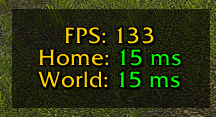
The Display
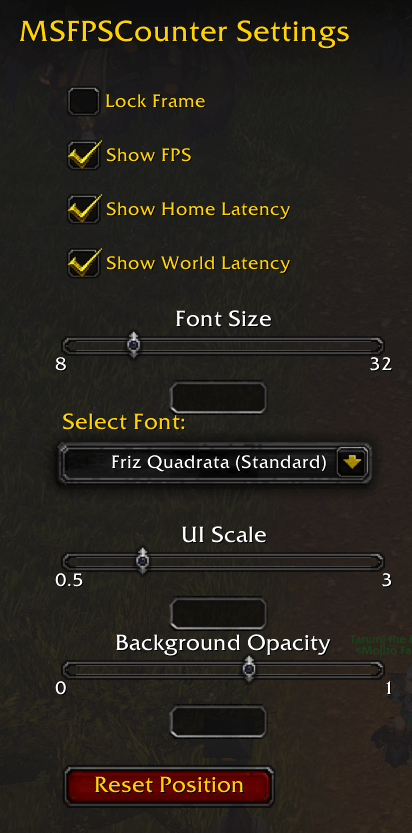
Options Menu
Description
MSFPSCounter
MSFPSCounter is the essential performance HUD for players who want to keep a close eye on their technical performance without cluttering their screen.
Unlike the default WoW performance display, which is often hidden in menus or fixed in place, MSFPSCounter gives you total control over where and how your stats are displayed.
MSFPSCounter – Version 1.2 Update
New Features
- Font Customization: Added a new dropdown menu in the settings to switch between several built-in WoW fonts (Friz Quadrata, Arial Narrow, Skurri, and Morpheus).
- Visibility Toggles: You can now choose exactly what to display. New checkboxes allow you to toggle FPS, Home Latency, and World Latency individually.
- Smart Background: The background frame now automatically hides if all display elements are disabled.
- Latency Color Coding: MS values are now dynamically colored based on performance:
- Green: < 100 ms
- Yellow: 100–200 ms
- Red: > 200 ms
Enhanced Chat Commands
Added a robust slash command system using /msfps:
| Command | Action |
|---|---|
/msfps |
Opens the configuration panel. |
/msfps fps |
Toggles FPS display. |
/msfps home |
Toggles Home latency display. |
/msfps world |
Toggles World latency display. |
/msfps reset |
Resets the frame to the center of the screen. |
Reset Button
Added a "Reset Position" button inside the options menu for easier recovery of frames that have been moved off-screen.
MS FPS Counter Team