
worldmap.jpg
Description
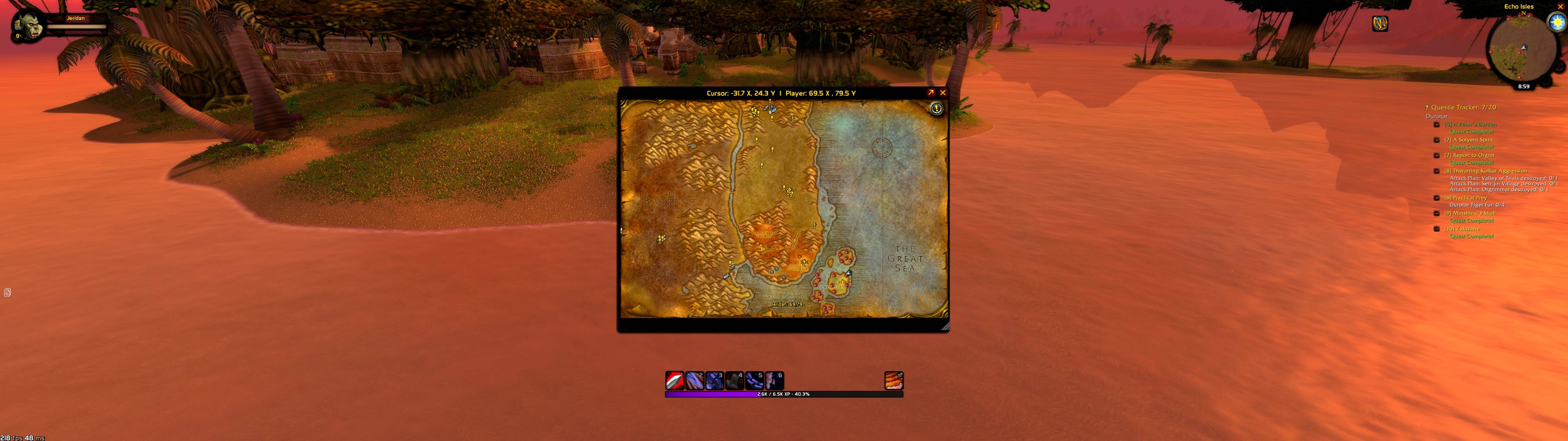
MoveWorldMap frees the World Map from its fixed, centered position and fixed size, letting you move it and scale it to fit your own screen layout instead of Blizzard's default.
Features and how they change your experience:
- Drag the map anywhere on screen. A thin drag strip appears across the top of the map when it's open. Click and hold it to move the entire map window to wherever suits you — off to one side while you keep an eye on your action bars, tucked into a corner next to your quest log, or wherever fits your UI. No more the map always popping up dead-center and covering half your screen.
- Resize the map on the fly. Grab the small grip in the bottom-right corner and drag diagonally to scale the map up or down (50%–180%). Want a bigger map to plan a long travel route or read cluttered zone text more easily? Scale it up. Want it small and unobtrusive while you check your position mid-fight? Shrink it down. Because Classic's map uses a fixed-layout design rather than a stretchy canvas, MoveWorldMap scales the whole frame proportionally (the same approach the classic addon Mapster used), so nothing clips or leaves blank space — the map, borders, and buttons all resize together cleanly.
- Your layout is remembered. Once you set a position and size you like, that's it — close and reopen the map (even relog or restart the game) and it opens exactly where and how big you left it. You only have to set it up once.
- One-command reset. Typed
/movemap resetrestores the map to its original centered, default-sized state, in case you want to start over or troubleshoot.
Why download it: the default World Map is locked in place and locked to one size, which can be awkward depending on your resolution, UI layout, or multi-monitor setup. MoveWorldMap removes that restriction entirely — you decide where the map lives on your screen and how big it is, and it stays that way every time you play.
The Move World Map Team
