Move Search Eye – Move the Search Icon Anywhere

Move the LFG eye and the Minimap Tracking icon anywhere (Alt-drag), with a clean settings panel and per-character saves.
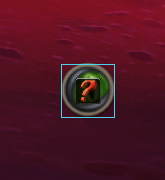
Movesearch - Déplacement.png
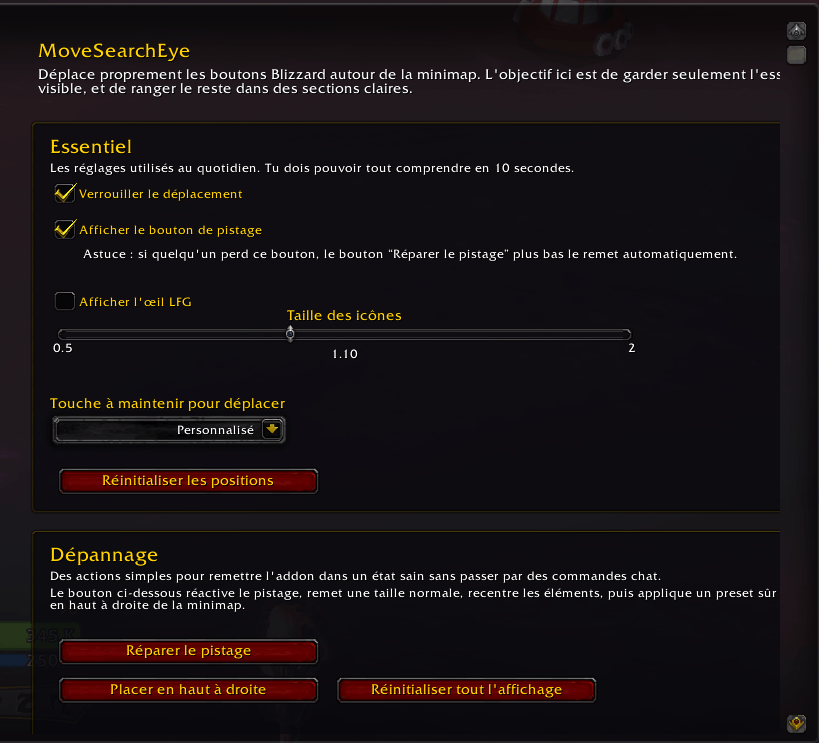
Movesearch - Déplacement.png

Movesearch.png

Movesearch.png

Description

MoveSearchEye lets you freely move the LFG eye and the Minimap Tracking (magnifier) icon anywhere on your screen—no more being stuck to the minimap’s edge. It uses safe “holder” frames you drag (Alt + Left-Click), stores per-character positions, and works with the modern Settings UI. Zero taint hooks, combat-safe behavior, and simple commands.

Features

Drag to move (hold Alt + Left-Click) — positions are per-character.

Move both Queue/LFG eye and Minimap Tracking (magnifier) icon.

Settings panel (Interface → AddOns) with:

Lock/unlock dragging

Show/Hide each icon

Scale (0.5 → 2.0)

Reset positions

Safe design: no SetPoint hooks, no re-parenting Blizzard frames; uses external holders.

Resilient to minimap addons; auto-reanchors when Blizzard/UI tries to move icons.

Slash Commands
/mse                 → help
/mse lock            → lock movement
/mse unlock          → unlock (Alt + Left-Click to drag)
/mse scale 1.2       → set icon scale (0.5–2.0)
/mse reset           → reset positions near the minimap
/mse enable tracking → show the tracking (magnifier) icon
/mse disable tracking
/mse enable lfg      → show the LFG eye
/mse disable lfg

Installation

Unzip to: World of Warcraft/_retail_/Interface/AddOns/MoveSearchEye/

Files: MoveSearchEye.toc, MoveSearchEye.lua, MoveSearchEye_Options.lua

Make sure ## Interface: matches your client build (Retail 11.x).

(Re)start the game or /reload, enable MoveSearchEye on the AddOns screen.

How to Use

Hold Alt, Left-Click on the icon’s area (there’s a small invisible holder under it) and drag.

Use the AddOns settings panel for scale, visibility toggles, lock, and reset.

Works alongside minimap overhaul addons; the addon re-applies your positions automatically.

Compatibility & Notes

Retail Dragonflight / The War Within (Settings API).

Classic support possible (frame names differ) — open an issue with your exact version and we’ll provide the Classic build.

In combat, moving is disabled by design to avoid protected frame operations.

Troubleshooting

Icons don’t move? Check /mse unlock and hold Alt while dragging.

Settings panel missing? You might be on an older client; the addon includes a legacy fallback.

Crashes/taint in other builds? Update to the latest version of MoveSearchEye (safe holders build).

The Move Search Eye – Move the Search Icon Anywhere Team

profile avatar
  • 2
    Followers
  • 14
    Projects
  • 12.9K
    Downloads

More from Shadow_CVIView all

  • Community Crafts  project image

    Community Crafts

    • 13
    • Addons

    Guild and community crafting directory for WoW Retail with an attached artisan side-sheet, searchable browser, favorites, and quick crafter contact tools.

    • 13
    • June 3, 2026
    • Addons
    • +1
  • Boss Brief – Target. Read. Pull project image

    Boss Brief – Target. Read. Pull

    • 145
    • Addons

    Transform the Adventure Guide into a clean, instant boss briefing. Target a boss or enter combat to get a compact popup with key mechanics, role-based reminders, spell highlights, and optional group chat broadcast.

    • 145
    • June 3, 2026
    • Addons
    • +3
  • Mail Profit – Track Gold Earned From Your Mail project image

    Mail Profit – Track Gold Earned From Your Mail

    • 239
    • Addons

    A smart mailbox summary addon that shows your total gold, mail stats, expiring mail, session earnings, and lets you collect gold faster.

    • 239
    • June 3, 2026
    • Addons
    • +4
  • Reputation Search – Search & Filter Factions project image

    Reputation Search – Search & Filter Factions

    • 314
    • Addons

    Adds a smart search box to the Reputation window to instantly filter factions.

    • 314
    • June 3, 2026
    • Addons
    • +4
  • Community Crafts  project image

    Community Crafts

    • 13
    • Addons

    Guild and community crafting directory for WoW Retail with an attached artisan side-sheet, searchable browser, favorites, and quick crafter contact tools.

    • 13
    • June 3, 2026
    • Addons
    • +1
  • Boss Brief – Target. Read. Pull project image

    Boss Brief – Target. Read. Pull

    • 145
    • Addons

    Transform the Adventure Guide into a clean, instant boss briefing. Target a boss or enter combat to get a compact popup with key mechanics, role-based reminders, spell highlights, and optional group chat broadcast.

    • 145
    • June 3, 2026
    • Addons
    • +3
  • Mail Profit – Track Gold Earned From Your Mail project image

    Mail Profit – Track Gold Earned From Your Mail

    • 239
    • Addons

    A smart mailbox summary addon that shows your total gold, mail stats, expiring mail, session earnings, and lets you collect gold faster.

    • 239
    • June 3, 2026
    • Addons
    • +4
  • Reputation Search – Search & Filter Factions project image

    Reputation Search – Search & Filter Factions

    • 314
    • Addons

    Adds a smart search box to the Reputation window to instantly filter factions.

    • 314
    • June 3, 2026
    • Addons
    • +4