MountTracker for Local Zones
Shows the mounts you can still earn in the zone you're standing in — including their prerequisites — and where to go for them.
Captura de pantalla 2026-10-27 145608.png
Captura de pantalla 2026-10-27 145631.png
Captura de pantalla 2026-10-27 145654.png
Description
Summary
Shows the mounts you can still collect in the zone you're standing in — whether you can get them right now — and where to go for them.
Mount Tracker: Local Zones
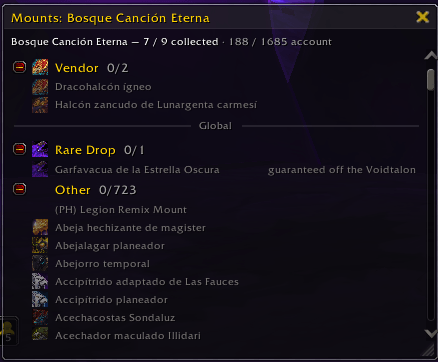
You ride into a zone and you don't remember which mounts drop there, or which vendor sells one you could already afford. This addon answers that. It puts a small window on your screen listing the uncollected mounts tied to your current zone, whether you can get each one right now, and — for the ones with a known spot on the map — where to go.
It follows you. Change zones and the list changes with it. Collect a mount and the row updates. No setup, no import, no account login.
What it does
- Per-zone mount list. A window listing the uncollected mounts for your current zone, grouped by source — Dungeon & Raid, Rare Drop, Vendor, Quest, Zone Drop, World Event, Profession — or by expansion, newest first.
- Obtainability at a glance. Each row tells you where you stand: available now for a vendor mount you can afford, the reputation or renown you still need for a quartermaster mount, farmable — weekly for an instance you haven't run this reset, a drop-chance hint for an open-world rare. Collected mounts are hidden by default; switch them on to see them greyed out.
- Collapsible groups with an icon and a collected/total count.
- Global mounts (optional). Turn this on to also list mounts with no single home zone — class, racial, PvP, trading-card, promotion and shop mounts — under a "Global" divider below the zone list. Those sections start collapsed so they stay out of the way.
- Hover for details. Point at any mount for Blizzard's full tooltip, plus the obtainability breakdown.
- Click to open. Click a row to jump straight to it in the Mount Journal.
- Shift-click to link. Drop the mount's link into chat.
- Right-click for actions. On a row or on a map icon: place a map pin at the mount's location, send it to TomTom as a waypoint (when TomTom is installed), summon it (if you have it), or hide it.
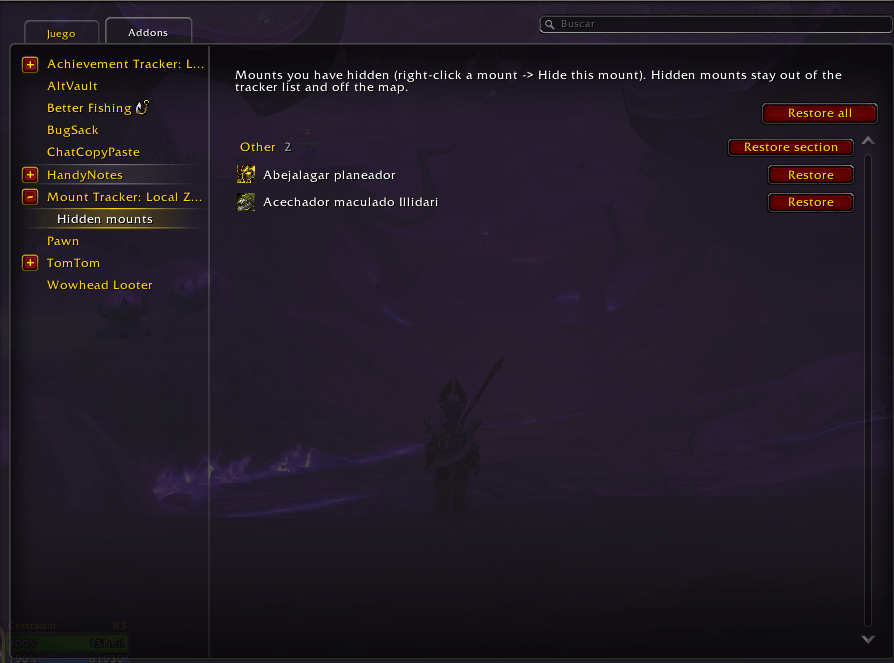
- Hide what you'll never chase. Hidden mounts leave the list and the map. Bring them back from Options → Hidden mounts.
- World map icons. Every uncollected mount with a known location gets an icon on the world map, so you can see at a glance which zones still have something for you — and where in a zone to look.
- Minimap icons. The same markers show on the minimap as you travel near them.
- Minimap button. Left-click toggles the window, right-click opens the options.
Languages
The addon follows your World of Warcraft client language. Anything not yet translated falls back to English, so nothing is ever missing.
Translations are community-contributed through CurseForge Localization. If you'd like to see the addon in your language — or fix a string that reads wrong — you can help on the Localization page for Mount Tracker: Local Zones.
Commands
| Command | Action |
|---|---|
/mtlz |
Toggle the tracker window |
/mtlz list |
Print the current zone's mounts to chat |
/mtlz config |
Open the options |
/mtlz map |
Rebuild the map and minimap icons |
/mtlz reset |
Reset the window position and expand all groups |
Options
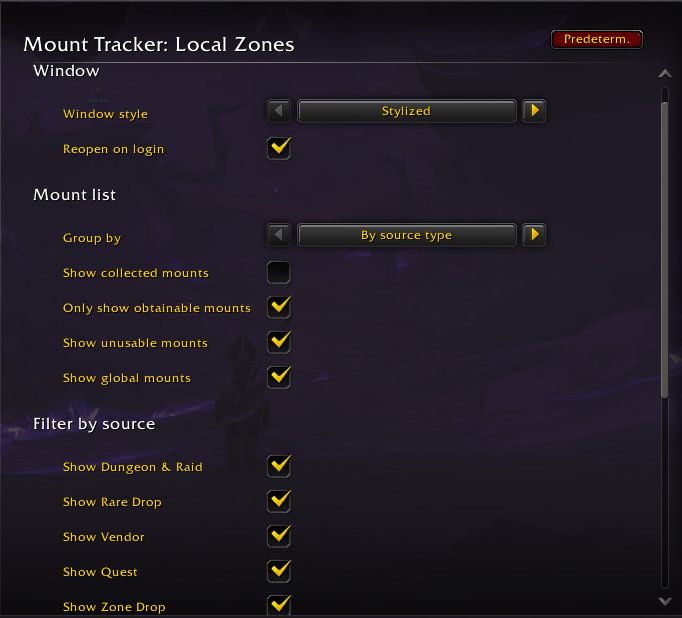
Open with /mtlz config, or through Game Menu → Options → AddOns.
Window
- Window style — Classic (Blizzard dialog frame and scrollbar) or Stylized (flat dark panel with minimal controls). Reload your UI after changing it.
- Reopen on login — bring the window back at login if it was open when you logged out.
Mount list
- Group by — by source or by expansion.
- Show collected mounts — include mounts you already have, greyed out.
- Only obtainable now — hide mounts gated behind reputation, an achievement or a reset you've already used.
- Dim unusable mounts — keep mounts your class or faction can't ride in the list, greyed, instead of hiding them.
- Show global mounts — also list mounts with no home zone, under a "Global" divider.
Filter by source — a checkbox per source (Dungeon & Raid, Rare Drop, Vendor, Quest, Zone Drop, World Event, Profession) to drop that whole group from the list.
Map & minimap
- Show minimap button
- Show world map icons
- Show minimap icons
Hidden mounts — a sub-page listing everything you've hidden, with a Restore button.
Compatibility
- Built for current retail World of Warcraft.
- TomTom — optional. When it's installed, the right-click menu can send a mount's location to TomTom as a waypoint. The addon works fine without it.
- Mount collection is account-wide; settings are saved per character.
How the zone data is built
There is no WoW API that maps a collectable mount to the zone you get it in, so the association is datamined from the game's own data files, refreshed each patch, and shipped with the addon. Anything that can't be resolved automatically is hand-curated or listed as a global mount. Coverage is partial and improving — if a mount is missing from a zone, or in the wrong one, please say so (see below).
Credits
Bundles the following open libraries: LibStub, CallbackHandler-1.0, AceLocale-3.0, LibDataBroker-1.1, LibDBIcon-1.0, and HereBeDragons-2.0. Thanks to their authors.
Source and bug reports
Found a bug, or a mount in the wrong zone? A few ways to reach me:
- The comments on this CurseForge page, or the CurseForge addon forum.
- @Cestt_Plays on X / socials.
A screenshot and the zone / mount name help a lot.
MountTracker for Local Zones Team