MountNicknames
- By
Screenshot 2026-10-18 163410.png
Screenshot 2026-10-18 164152.png
Description
This is my first addon, created for ouside my machine, to please be kind...
Mount Nicknames
Give your favourite World of Warcraft mounts a name of their own!
Ever wished you could give your trusty steed, dragon, gryphon or other mount a personal name?
Mount Nicknames is a lightweight World of Warcraft addon that allows you to assign custom nicknames to your mounts, adding a personal touch to your collection without changing Blizzard's original mount information.
Whether it's a loyal companion you've ridden for years or a newly acquired mount, you can finally give it a name that feels right.
Features
- Custom Mount Nicknames: Give your mounts personalised names using a simple chat command.
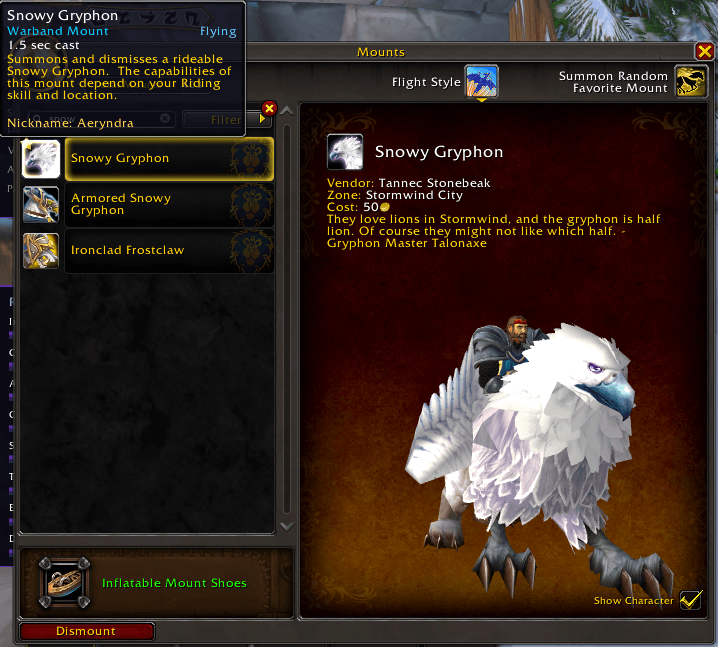
- Mount Tooltips: Displays your chosen nickname in the mount's tooltip alongside its official Blizzard name.
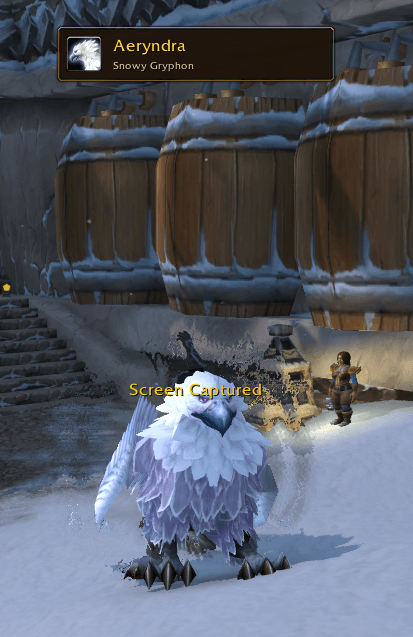
- Summon Notifications: Shows a small, Warcraft-themed notification when you summon a mount you've named.
- Persistent Names: Nicknames are saved between game sessions, so you don't need to rename your mounts every time you log in.
- Movable Notification: Reposition the notification and lock it in place wherever you prefer.
- Lightweight Design: No complicated configuration screens, unnecessary windows or intrusive UI elements.
- Warcraft-Inspired Styling: Gold accents and dark backgrounds designed to complement the game's interface.
Getting Started
-
Install Mount Nicknames into your World of Warcraft
Interface/AddOnsfolder. -
Log into the game and summon any mount you own.
-
While mounted, enter the following command:
/rmount name Ashfall -
Your current mount will now have the nickname Ashfall.
-
The next time you summon that mount, its nickname will appear in a small notification. You can also see it in supported mount tooltips.
It's that simple!
Slash Commands
| Command | Description |
|---|---|
/rmount name <nickname> |
Name your currently summoned mount |
/rmount forget |
Remove your current mount's nickname |
/rmount current |
Display your current mount and its nickname |
/rmount list |
List your named mounts |
/rmount test |
Preview the notification for your current named mount |
/rmount lock |
Lock the notification position |
/rmount unlock |
Unlock and move the notification |
/rmount show |
Enable notifications |
/rmount hide |
Disable notifications |
/rmount reset |
Reset the notification position |
/rmount version |
Display the installed addon version |
You can also use /rmounts instead of /rmount.
How Does It Work?
Mount Nicknames associates your custom names with Blizzard's internal mount IDs and stores them locally using World of Warcraft's SavedVariables system.
The addon does not modify the original mount names, mount collection or game files.
Important: Custom nicknames are visible only to you. Other players will still see your mount's official name, and nicknames are not synchronised between different installations.
Compatibility
- Designed for World of Warcraft Retail.
- Built for the Midnight-era interface.
- No additional addon dependencies.
- Does not modify combat mechanics or protected mount actions.
About
Mount Nicknames was created for players who want a little more personality in their adventures across Azeroth.
Sometimes a mount is more than just a way to travel. It's a companion that has been with you through countless quests, battles and adventures.
Now you can give it a name!
Version: 1.0.0
Feedback and Suggestions
Found a bug or have an idea for improving Mount Nicknames? Share your feedback through the CurseForge project page.
Happy adventuring, and may your mounts always carry you safely! 🐎
MountNicknames Team