MountGrid
- By
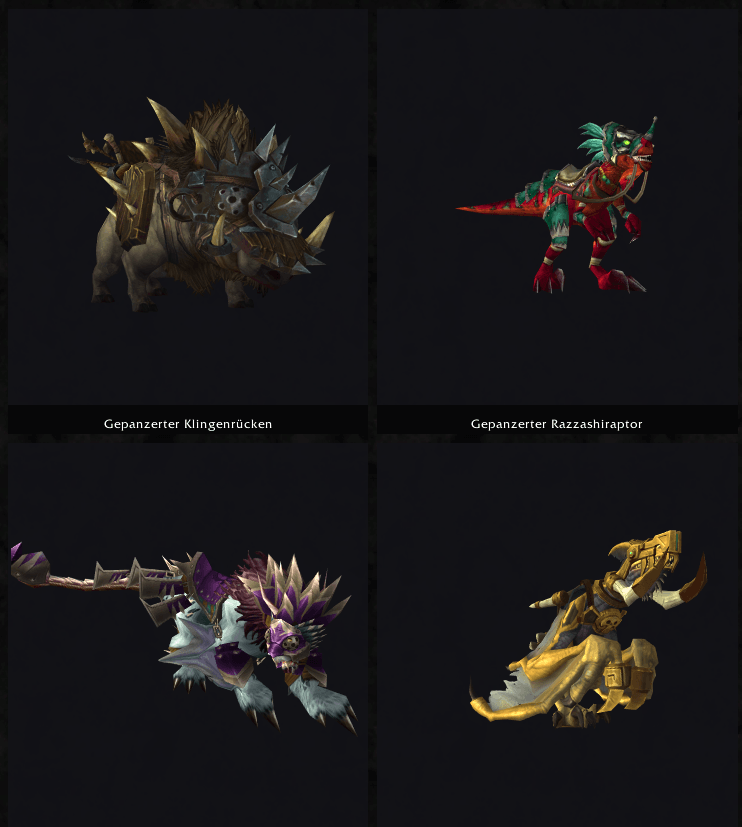
A World of Warcraft addon that replaces the mount list with a browsable grid of live 3D previews. MountGrid renders your mounts as tiles with rotating 3D models, so picking one is a visual decision instead of a memory exercise.
MountGrid
A World of Warcraft addon that replaces the mount list with a browsable grid of live 3D previews.
The default Mount Journal shows your collection as a narrow scrolling list of icons — fine for searching by name, less useful when you actually want to see what you own. MountGrid renders your mounts as tiles with rotating 3D models, so picking one is a visual decision instead of a memory exercise.
Features
- 3D tile grid — every mount rendered as a live model instead of a static icon
- Adjustable tile size — slider from 110 to 300 px; the grid reflows automatically
- Large preview panel — click a tile to inspect the selected mount up close; drag to rotate, scroll to zoom
- Icon mode — a compact icon grid for when you want density or want to save frames
- Search and filters — filter by All, Collected, Missing or Favorites, plus name search
- Favorites and summoning — right-click toggles favorite, double-click summons or dismisses
- Resizable, movable window — position, size, view mode and tile size persist between sessions
Uncollected mounts are shown desaturated and dimmed rather than hidden, so the grid doubles as a view of what's still out there.
Installation
- Download the latest release and extract it.
- Copy the
MountGridfolder intoWorld of Warcraft/_retail_/Interface/AddOns/. - Restart the game or run
/reload.
The folder name must be exactly MountGrid so it matches the .toc file.
Usage
| Action | Result |
|---|---|
/mountgrid or /mg |
Toggle the window |
| Tiles button in the Mount Journal | Toggle the window |
| Left-click a tile | Select and preview |
| Double-click a tile | Summon or dismiss |
| Right-click a tile | Toggle favorite |
| Drag in the preview | Rotate the model |
| Scroll in the preview | Zoom in and out |
Notes
Performance. 3D models cost considerably more than icons. Only the tiles currently on screen are rendered, models are reused while scrolling rather than reloaded, and everything is released when the window closes. Even so, on lower-end hardware the icon mode is the friendlier option — the toggle sits next to the filter buttons.
Journal filters. Toggling favorites requires the display index from the Blizzard journal, so on login the addon enables all source and collection filters there. If you keep a customised filter set in the default Mount Journal, this will override it.
Game version. Built against interface version 120007. Blizzard's UI templates change between expansions, so a major patch may require an update to the ## Interface line or to individual API calls.
MountGrid Team