MountCollector
- By
Mount rarity database (Armory % + server owners estimate), account-wide boss/rare attempt tracker, 3D Rare NPC radar with sound alert & waypoints, and World Map spawn pins for uncollected mounts & mount items.
Description
MountCollector — Quest Chain Navigator, Rarity Census, Attempt Tracker & Rare Boss Radar
Version: 1.3.0
Authors: Gemini (Tiger) & Anya (5cr3am1ng5oul)
Compatibility: World of Warcraft: Retail / Midnight (12.1.7, 12.1.5) & The War Within (11.2.7)
Source Repository: https://github.com/nakesreong/MountCollector
License: MIT
Overview
MountCollector is a modular mount collection, progression, and radar suite for World of Warcraft. It unifies multi-step questline tracking, egg incubation checklists, global and realm rarity statistics, account-wide boss/rare attempt counters, and open-world rare navigation into a cohesive dark flat UI modeled after ElvUI.
- Step-by-Step Quest Chain & Egg Incubation Navigator: Tracks progress across complex multi-day questlines, secret mounts, Class Order Hall campaigns, and hatchling incubation chains (
MountQuestsDB), with automated TomTom and Blizzard 3D waypoint routing. - Two-Column Control Center (
/mc) & Mount Journal Side-Dock: Features a standalone two-column browser (/mc) alongside a synchronized side-column docked directly to the right edge of the standard Mount Journal (CollectionsJournal). - Global & Realm Rarity Census: Integrates Data for Azeroth global ownership percentages (
MountsRarity-2.0) with realm population ownership estimates and a live out-of-instance player mount scanner. - Account-Wide Attempt Counter & Probability Engine: Tracks boss and rare NPC kills across all characters on your account (
MountCollectorDB), bridges with Rarity and Blizzard's internal kill statistics (GetStatistic), and calculates cumulative drop odds (1 - (1 - 1/N)^K). - World of Warcraft 12.x (Midnight) Taint-Safe Architecture: Engineered with
C_Secrets.ShouldAurasBeSecret(),C_Secrets.ShouldUnitAuraIndexBeSecret(), andissecretvalue()guards, avoiding protected minimap vignette events (VIGNETTE_MINIMAP_UPDATED) to guarantee zero taint in modern combat and instance environments. - Bilingual Interface: Instant live switching between English (
enUS) and Russian (ruRU) without reloading the UI.
Architecture & Core Subsystems
1. Quest Chain & Multi-Day Incubation Tracker
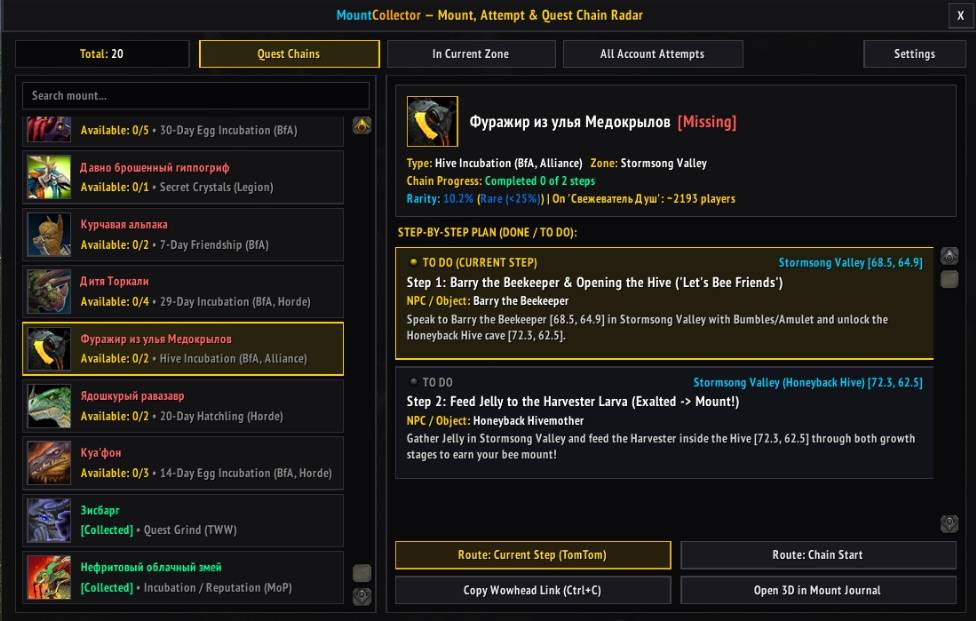
Tracks 20 major multi-step questline, secret, and incubation mounts (including High Priest's Lightsworn Seeker, Shadowbarb Drone, Siesbarg, Springfur Alpaca, Ochre Dreamtalon, Sinrunner Blanchy, Loyal Gorger, Lizi's Reins, Otto, Child of Torcali, Kua'fon, Honeyback Harvester, Long-Forgotten Hippogryph, all four Legion Falcosaurs, Jade Cloud Serpent, Venomhide Ravasaur, and Winterspring Frostsaber):
- Live Step Evaluation: Queries
C_QuestLog.IsQuestFlaggedCompleted,C_QuestLog.IsOnQuest, andGetAchievementInfoin real time to classify every stage asDONE,TO DO (CURRENT STEP), orTO DO. - Automated TomTom & SuperTrack Routing: Clicking any step or pressing Route: Current Step (TomTom) places both a TomTom navigation arrow and a native Blizzard 3D
UiMapPoint(C_SuperTracked). When a step's completion quest is turned in (QUEST_TURNED_IN), MountCollector automatically advances the waypoint to the next step in the chain. - In-Game Wowhead Link Generator: Right-clicking any quest step or clicking Copy Wowhead Link (Ctrl+C) opens a pre-highlighted copy box with the exact locale-aware Wowhead URL for that quest or mount.
2. Two-Column Radar Window (/mc) & Integrated Settings
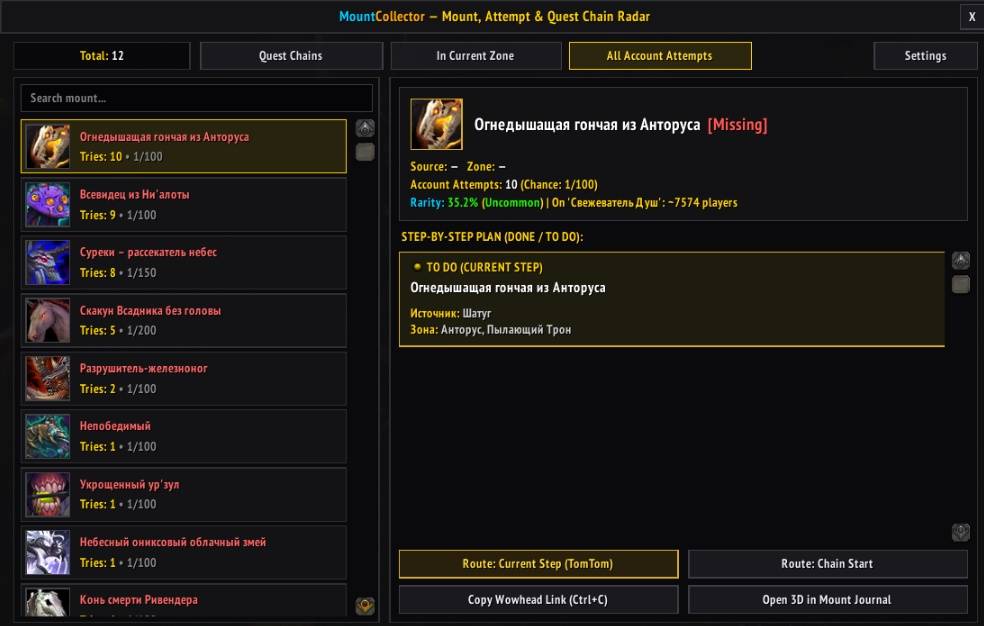
A standalone dark flat interface (MountCollectorRadarFrame) organized into three data views and an integrated configuration tab:
- Quest Chains Tab: Prioritizes uncollected class-specific and started quest chains at the top of the list, with live search filtering by mount name or category.
- In Current Zone Tab: Lists all uncollected drop and rare mounts available in the player's current zone (
C_Map.GetBestMapForUnit("player")), sorted by daily lockout status and attempt count, with a one-click Pin All on Map action. - All Account Attempts Tab: Displays all uncollected mounts with recorded attempts across your account, sorted by total tries.
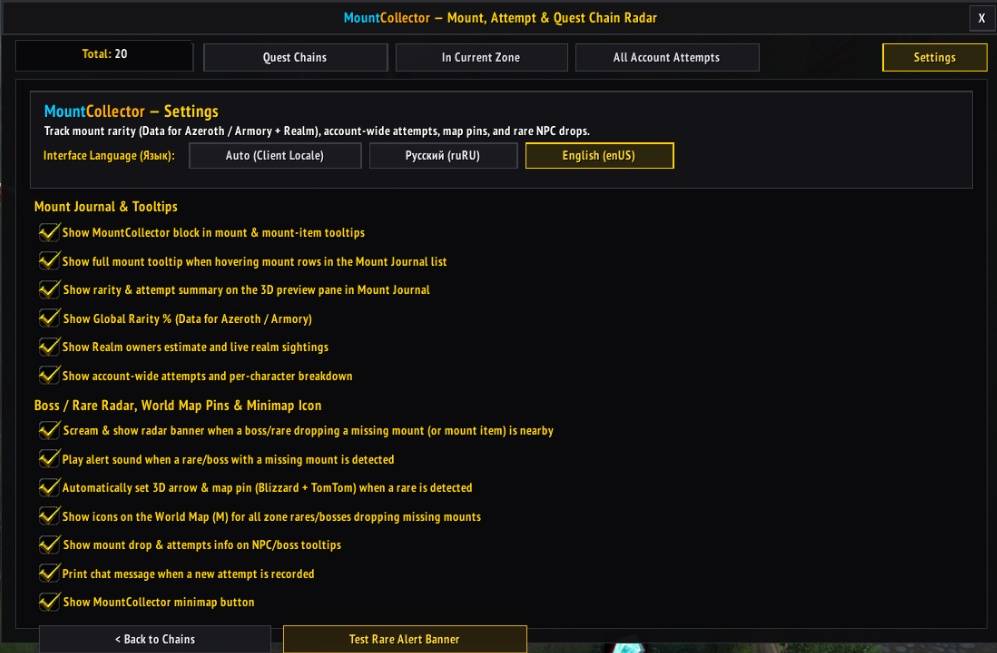
- Integrated Settings Tab: Opens directly inside
/mcwithout spawning separate floating popup windows, alongside full registration in Blizzard's standardESC -> Options -> AddOns -> MountCollectormenu.
3. Mount Journal (CollectionsJournal) Integration & Side-Dock
Enhances Blizzard's native Mount Journal without replacing it:
- Docked Inspector Column (
MountCollectorJournalDock): Attaches a collapsible checklist and navigation panel to the right side ofCollectionsJournalthat updates automatically as you select mounts in the journal. - Full Row-Hover Tooltips: Hovering anywhere over a mount row in the journal list displays its full tooltip (Mount Name, Collection Status, Drop Source, Lore, Rarity, Account Attempts, and Quest Chain Step) without requiring you to hover the small spell icon.
- 3D Preview Pane Summary: Appends rarity, attempt statistics, and a direct Quest Chain Guide (TomTom) button inside the 3D model preview panel.
4. World Map Pins, Open-World Rare Radar & Source Item Tooltips
Built on a database of 264 drop mounts, 353 rare NPCs, and 200+ mount-related items:
- World Map Pins (
WorldMapFrame): Renders interactive mount icons at exact spawn coordinates on the World Map (M) for uncollected zone rares and bosses. Icons automatically desaturate when the rare is already killed on the active character today ([Locked]). - Proximity Rare Alert Banner: Monitors
NAME_PLATE_UNIT_ADDED,PLAYER_TARGET_CHANGED, andUPDATE_MOUSEOVER_UNITfor uncollected mount-dropping NPCs, triggering a movable alert banner with audio notification and optional automatic waypoint placement. - Mount Source Item Tooltips: Appends target mount ownership and rarity information directly onto tooltips of eggs, keys, fragments, and quest items required to obtain mounts.
Slash Commands & Controls
/mcor/mountcollector— Toggle the main MountCollector window./mc configor/mc settings— Open MountCollector directly on the Settings tab.- Left-Click (Minimap Button): Toggle the MountCollector window.
- Right-Click (Minimap Button): Open the Mount Journal (
CollectionsJournal). - Middle-Click (Minimap Button): Open the Settings tab.
- Left-Click (Quest Step / Map Pin): Set a TomTom and Blizzard 3D waypoint to the target coordinates.
- Right-Click (Quest Step): Open the Copy Wowhead Link (
Ctrl+C) dialog for that quest.
MountCollector Team