
MountBinder
- By
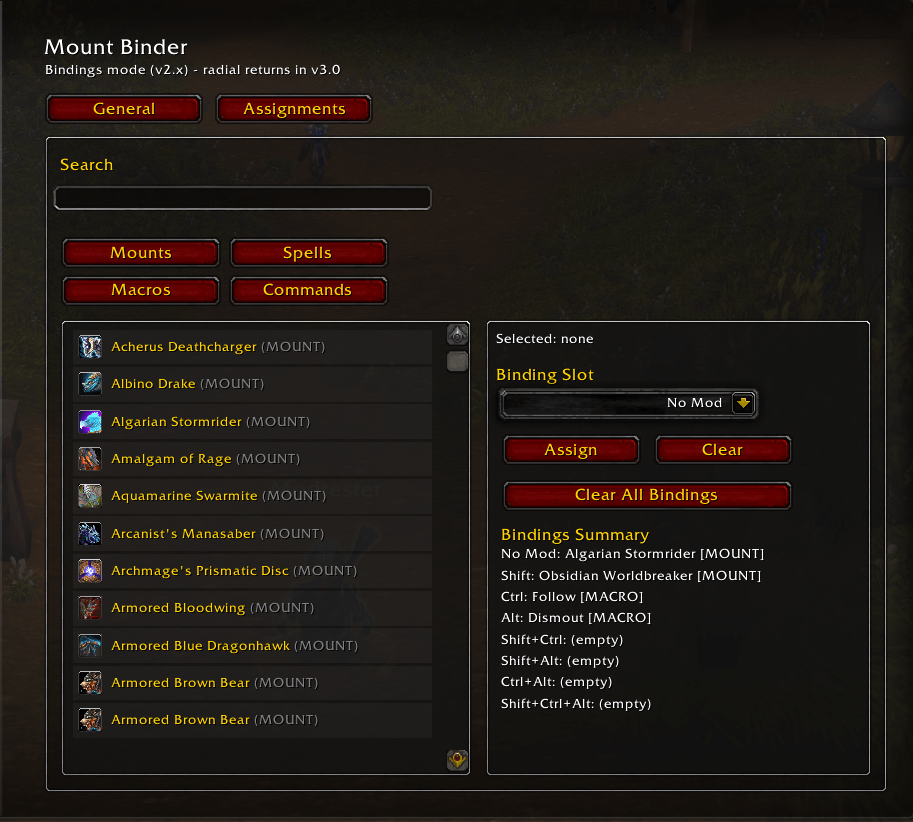
Screenshot 2026-02-24 195036.png
Description
MountBinder
MountBinder is a World of Warcraft addon designed to streamline your mount selection process by binding multiple mounts to a single key, utilizing different modifier keys. Say goodbye to cluttered action bars and hello to a more efficient way to summon your favorite mounts!
Features
- Simple Keybinding: Assign a single key to summon different mounts based on modifier keys (Shift, Ctrl, Alt).
- Advanced Mode: Unlock additional mount slots with complex modifier combinations like Shift+Ctrl, Shift+Alt, Ctrl+Alt, and Shift+Ctrl+Alt.
- Drag-and-Drop Interface: Easily assign mounts by dragging them from your Mount Journal into the addon.
- Per-Character Settings: Customize mount selections for each of your characters individually.
- Movable Frame: Adjust the position of the addon window to suit your UI layout.
How It Works
Access the Addon Interface:
- Use the slash command
/mountbinderto show or hide the MountBinder window.
- Use the slash command
Assign Mounts to Modifiers:
- Basic Slots:
- No Mod: Mount summoned when no modifier key is pressed.
- Shift, Ctrl, Alt: Mounts summoned when the respective modifier key is held.
- Advanced Slots (optional):
- Enable Advanced Mode to access additional slots for combinations like Shift+Ctrl, Shift+Alt, etc.
- Assigning Mounts:
- Drag a mount from your Mount Journal and drop it onto the desired slot in the addon window.
- The slot's icon will update to reflect your chosen mount.
- To clear a slot, Shift+Click on it.
- Basic Slots:
Set Your Keybind:
- Click the "Set Mount Keybind" button in the addon window.
- Press the key you wish to use for summoning mounts.
- The keybind is saved globally, so it persists across all characters and sessions.
Summon Your Mounts:
- Press your bound key along with the desired modifier(s) to summon the corresponding mount.
- Example: Press your key with the Shift key held down to summon the mount assigned to the Shift slot.
- Press your bound key along with the desired modifier(s) to summon the corresponding mount.
Installation
- Download the MountBinder addon.
- Extract the folder into your
World of Warcraft/_retail_/Interface/AddOns/directory. - Restart your game client if it's running.
- Enjoy a more organized mount experience!
Commands
/mountbinder- Toggles the MountBinder interface.
Known Issues
- Mount Memory Lapses: Occasionally, the addon might forget which mounts you've assigned. We suspect gremlins—or maybe we just need to fix our code.
- Advanced Mode Overconfidence: Advanced Mode might be a bit too ambitious for its own good. Use with caution (and maybe a pinch of patience).
Feedback and Suggestions
MountBinder is a humble project that's still finding its wings (much like our attempts at Mythic+). We warmly welcome any feedback, bug reports, or feature suggestions you might have. After all, even the best mounts stumble—our addon is no exception!
Feel free to reach out through comments or in-game whispers. If you happen to catch us online, we're probably the ones failing at jumping puzzles.
Thank you for trying out MountBinder! May your journeys be swift and your mounts ever at the ready.
MountBinder Team
