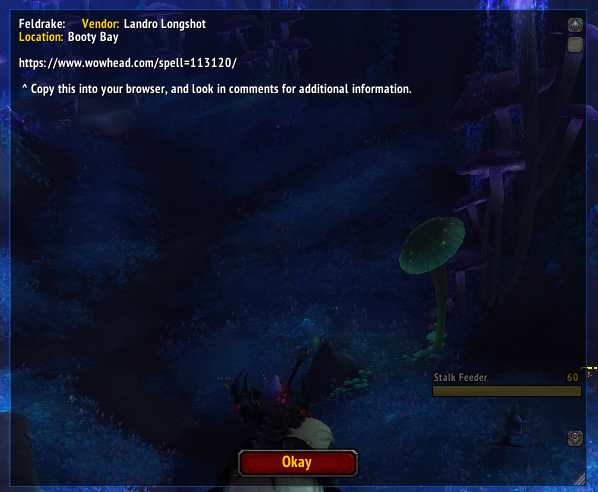
Pop-up that is displayed once user searches a mount
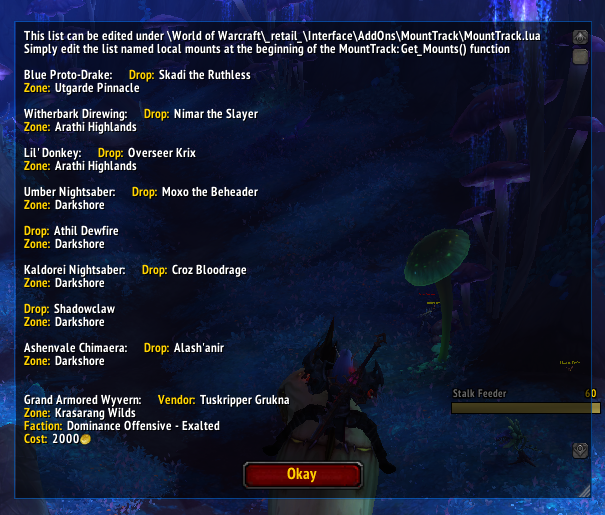
Pop-up that is displayed once minimap button is clicked.
Description
MountTrack
World of Warcraft addon to track a specific list of mounts

Usage
- Install and unzip into
\World of Warcraft\_retail_\Interface\AddOns - Once in game, list of mounts can be viewed clicking on the minimap tooltip.
- To search the source of a specific mount, type
/mountT mountnamein chat. - Toggle minimap button by typing
/mountT minimapin chat. - If minimap is disabled, type:
/mountTin chat to display list. - To view these in game, type
/mountT helpin chat
Editing for own-use
- Due to Blizzard's blocking of file I/O streams, the list must be edited within source code.
- In Get_Mounts() the mount table is listed with mount IDs you wish to track.
- IDs can be found on the mount's SPELL page on wowhead (Ex. https://www.wowhead.com/spell=288503/umber-nightsaber mount ID = 1203)
- Mounts can also be added by name as seen by
Blue Proto-Drakein table. - Example: local mounts = {"Blue Proto-Drake", 1332, 1185, 1182, 1203, 1205, 1200, 527}
IMPORTANT NOTE
- After updating addon, list will be overwritten with empty list, save your list externally to update it again easily after update.
Please post any issues with the addon on: https://github.com/josh894/MountTrack
Mount Track Team