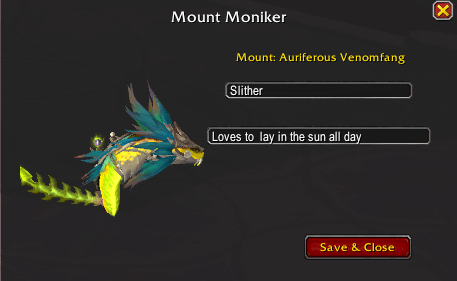
While Mounted /mm
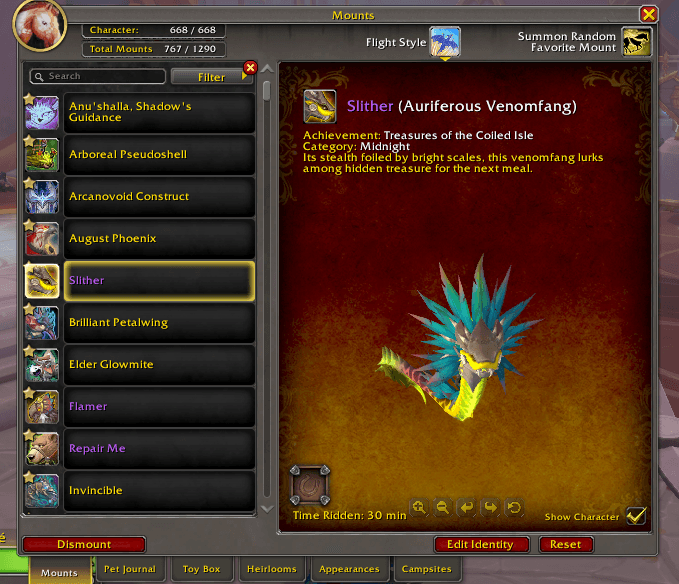
Edit Identity and reset name to default buttons
Description

Mount Moniker
You have spent countless hours farming your favorite mounts. Now, it is time to give them the personality they deserve.
Mount Moniker transforms your standard Mount Journal into a fully personalized stable, allowing you to name, reset, track, and interact with your collection like never before. This lightweight, highly polished addon adds a completely new layer of immersion to your World of Warcraft adventures.
🌟 Key Features
- Custom Identities & Quick Reset: Click the Edit Identity button to give any mount a custom name and unique personality, which overlays the default name in a stunning epic purple font across your journal. Changed your mind? Use the dedicated Reset button right next to it to instantly revert a mount's identity to default while safely preserving your tracked statistics!
- The Mount Odometer: Ever wonder who your true favorite mount is? Mount Moniker tracks exactly how much time you spend riding each individual mount, displaying clean hours and minutes directly on the journal page.
- Immersive 3D Dressing Room: Editing a mount isn't just a boring text box. The custom
/mmediting UI spawns a stunning, fully animated 3D model of your mount right next to your text cursors so you can watch them breathe and move as you write their story. - Automatic Roleplay Emotes: When you summon a named mount, the addon automatically broadcasts a custom immersive emote to your local area (e.g., "Saddles up on Shadow, who is ready to run.").
- Journal UI Improvements: Say goodbye to UI clutter! Mount Moniker surgically cleans up the default Mount Journal by separating your Account Total vs. Character Total mounts into accurate, stacked boxes, shifting the bulky Equipment Slot out of the way, and expanding the scrolling list so you can see more of your collection at once.
🤝 Full Compatibility
Mount Moniker was built to play nicely with others. It is completely independent, but fully compatible with Mount Journal Enhanced (MJE). If you run MJE, Mount Moniker smartly steps back and lets MJE handle layouts while still powering your custom names, odometer, and 3D editing features.
⚙️ How to Use
- Open your standard Mount Journal (Shift-P).
- Select any mount in your list.
- Click Edit Identity or Reset at the bottom, or type
/mmwhile actively riding a mount. - Give them a name, define their personality, and hit Save!
Mount Moniker Team

Owner