Screenshot 2026-10-25 085110.png
Description
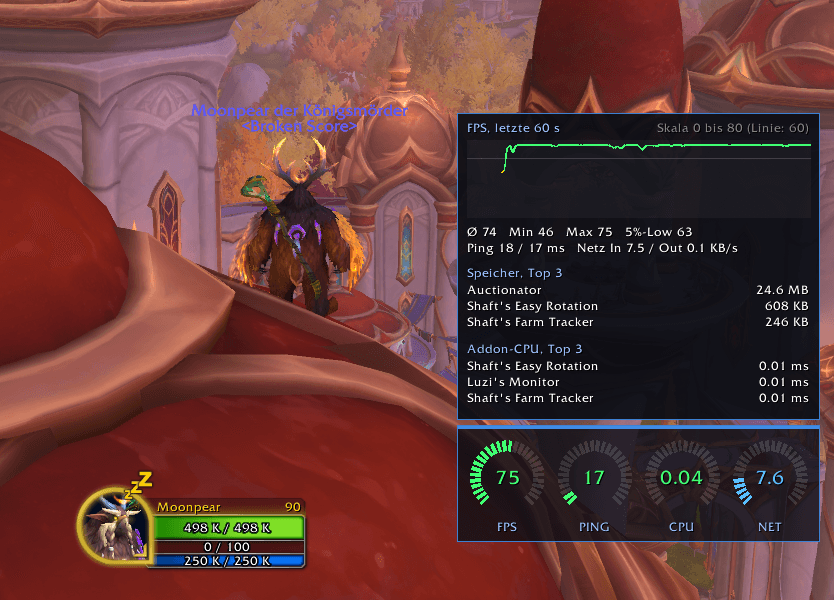
Compact performance monitor with four round gauges: FPS, ping, addon CPU and network traffic. Hover for an FPS graph and the top addons by memory and CPU. English and German.
**Monitor** shows the numbers that matter for smooth gameplay in a compact, good-looking display. The addon speaks English and German and follows your game language automatically.
**Four round gauges**
- **FPS**: green at 60 and above, yellow from 30, red below
- **PING**: world latency in ms
- **CPU**: processing time all addons use per frame
- **NET**: network traffic in KB/s (incoming plus outgoing)
The arcs fill smoothly and change color with the value. Each gauge can be hidden.
**Detail window** (on mouseover, or always visible)
- FPS graph of the last 60 seconds
- Average, minimum, maximum, and 5% low FPS
- Ping (home and world) and network in and out
- Top 3 addons by memory and by CPU, so you can spot what slows you down
**Settings**
Everything is under Options, AddOns, Monitor: scale, background opacity, FPS scale, lock position and language.
**Good to know**
- WoW addons cannot read your real CPU or GPU load, the game does not allow it. "CPU" here means addon processing time.
Monitor Team