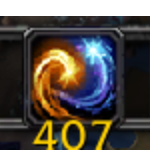
MondTargetItem shows a movable, scalable frame displaying counts of specific items you choose to track. Save your items per-character and never lose track of your most important gear or consumables.
Features:
-
✅ Track items by full name or partial match.
-
✅ Add items directly from item links
[Healthstone]. -
✅ Delete tracked items by full name, link, or partial match.
-
✅ Only real items currently in your bags are tracked.
-
✅ Per-character saved data: items, frame position, and scale.
-
✅ Movable and resizable UI frame.
-
✅ Counts automatically update when your bags change.
How to Use
Commands:
-
/m add <name>– Add an item by name (partial match). 🔍 -
/m add [Item]– Add an item by its in-game link. 📎 -
/m del <name>– Remove an item by name (partial match). ❌ -
/m del [Item]– Remove an item by in-game link. -
/m list– List all tracked items. 📝
UI:
-
Drag the frame to move it.
-
Use the mouse wheel to adjust scale.
Notes:
-
Only items actually in your bags can be added.
-
Names are saved exactly as returned by the game (capitalized).
The MondTargetItem Team