


MobLife
- By
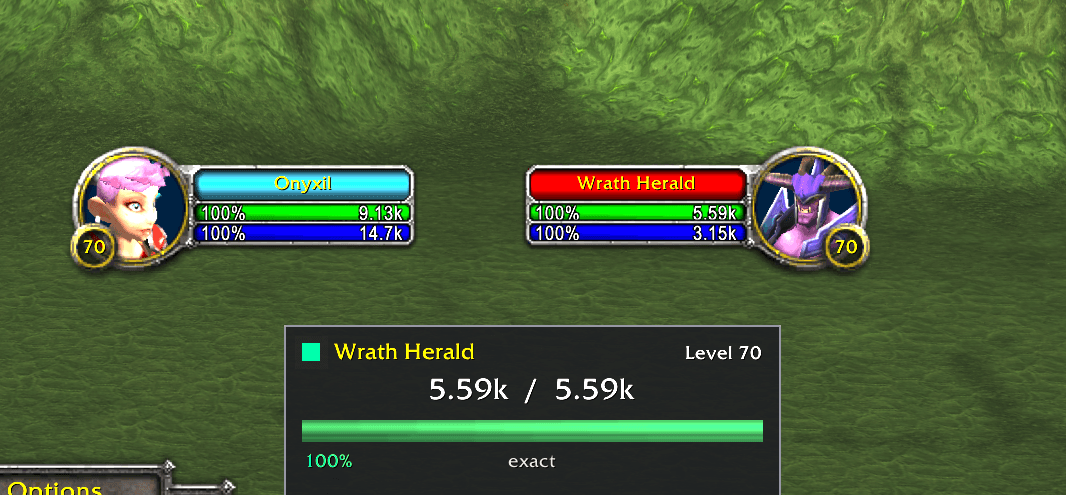
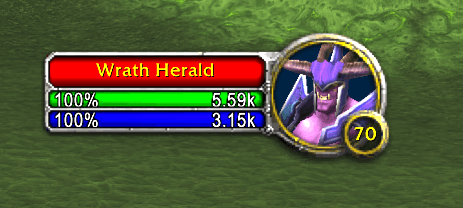
See the real health of any mob or enemy player, worked out from the damage they take and shown on your target frame, nameplates and tooltips.
Screenshot 2026-10-19 223722.png
Screenshot 2026-10-19 223736.png
Screenshot 2026-10-19 223829.png
Description
# MobLife
**See the real life of mobs.**
The Burning Crusade client does not always tell you how much health something
actually has — a lot of the time all you get is a bar and a percentage. MobLife
works out the real number from the damage it takes, the way MobHealth3 did in
vanilla, and puts it where you already look.
It works on enemy players too.
---
## How it works out the numbers
MobLife watches two things at once. The combat log says how much damage actually
landed. The unit frame says what fraction of the bar that damage removed. Divide
one by the other and you have the target's real maximum health.
Three things feed the estimate:
- **Running ratio** — the figure tightens as the fight goes on.
- **Overkill calibration** — the killing blow reports its overkill, so
`damage − overkill` is exactly the health the target had left. One hit, one
calibration.
- **Full to death** — if MobLife watched something from a full bar all the way
down without a break, the damage it counted **is** the maximum health. No
ratio, no estimate, exact.
Learned values are stored per **creature ID and level**, so the second Fel
Reaver you meet already reads true. Enemy players are worked out live during the
fight and deliberately not saved, because their gear changes their health.
## It tells you how much to trust it
Nobody likes a number that might be wrong and does not say so.
| Label | Meaning |
|---|---|
| `exact` | proven by a full-to-death watch, or reported directly by the client |
| `good` | a large part of the bar was seen moving |
| `fair` | a decent sample |
| `rough` | an early guess |
| `learning` | nothing known yet, so only the percentage is shown |
A `~` in front of a number means it is still an estimate.
## Where the numbers show up
- **Target frame** — health and mana, percentage against the left edge and the
value against the right, the way the client lays out its own status bars
- **Your own frame** — the same, so you do not have to rely on the client's
global Status Text option
- **Nameplates** — compact health, with its own separate percentage toggle
- **Tooltips** — a health line plus the estimate quality
- **Status board** — a small movable panel for your current target: a status
lamp, level and classification, the big number, a bar, and **time to die**
with incoming dps
## It looks like it belongs
MobLife does not guess at a font. It copies the one the client itself draws on
that very bar, so the size and boldness match whatever your build uses, and it
follows your UI scale and resolution automatically.
The text is measured against the real width of the bar, so it always fits. A
boss whose `6,070,400 / 6,070,400 100%` is wider than any target frame drops to
`6.07M / 6.07M 100%` at the normal size rather than being squeezed into
something unreadable.
It also mutes the client's own numbers **only** on the bars it draws on, so you
do not get two sets of numbers fighting for the same space, and the frames it
does not touch are left exactly as they were.
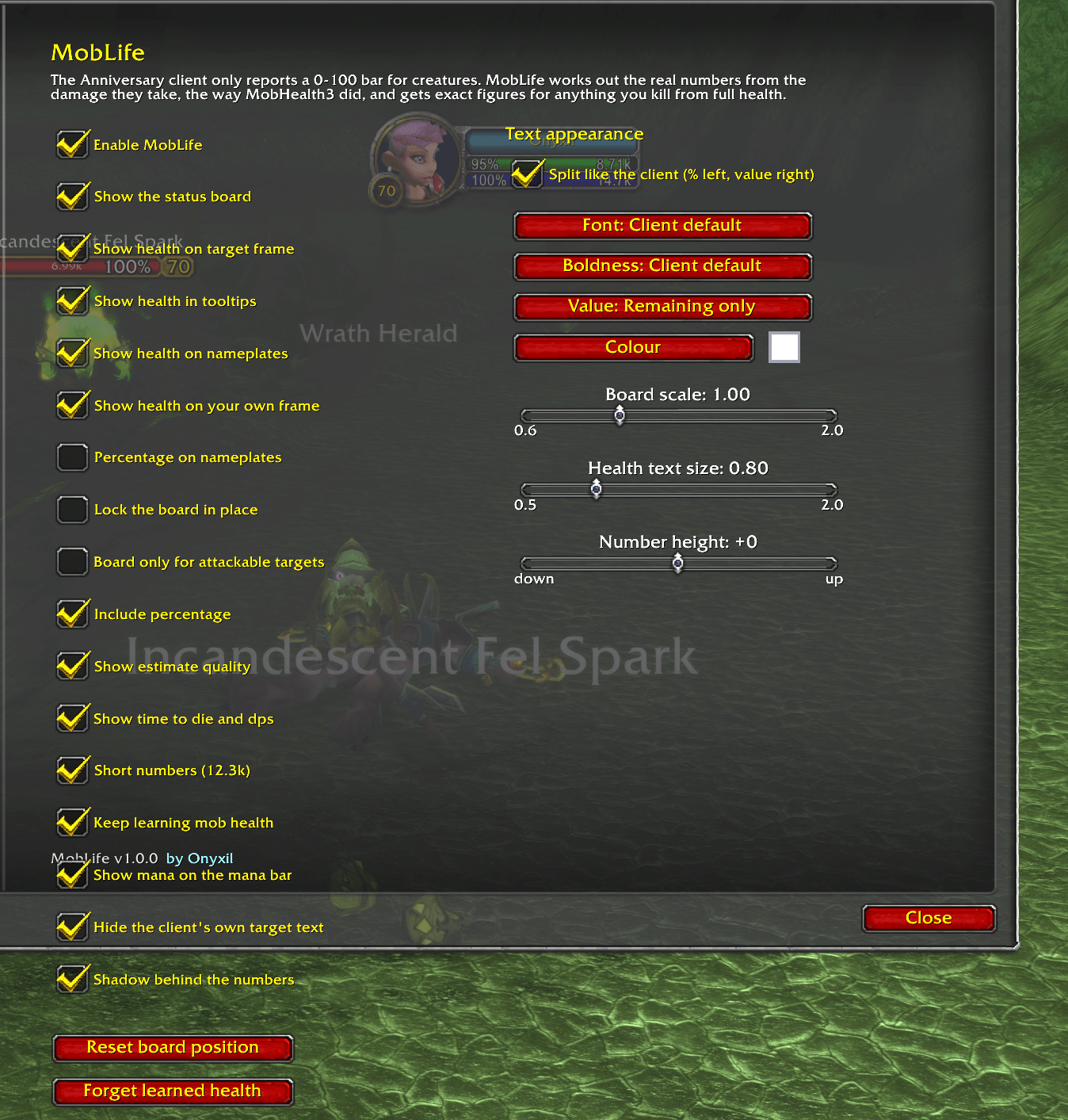
## Make it yours
Everything starts from the client's own text and is an optional override, so an
untouched install looks like stock Blizzard.
| Setting | Options |
|---|---|
| Font | Client default, Friz Quadrata, Arial Narrow, Skurri, Morpheus, 2002, 2002 Bold |
| Boldness | Client default, none, outline, thick outline |
| Colour | full colour picker |
| Shadow | on or off |
| Layout | split like the client, or one centred string |
| Value | remaining only, or remaining / total |
| Text size | 0.5x to 2x the client's own size |
| Number height | nudge up or down to centre it by eye |
## Commands
`/moblife` (or `/mlife`) opens the settings panel.
| Command | Does |
|---|---|
| `/moblife on` / `off` | turn it on or off |
| `/moblife board`, `lock`, `hostile` | status board options |
| `/moblife targetframe`, `playerframe`, `tooltip`, `nameplates` | where to show health |
| `/moblife percent`, `platepercent`, `short`, `confidence`, `ttd` | what to show |
| `/moblife color`, `font`, `outline`, `shadow`, `layout`, `value` | appearance |
| `/moblife textsize <0.5-2.0>`, `y <-20..20>` | size and height |
| `/moblife scale <0.6-2.0>`, `reset` | the board |
| `/moblife stats`, `wipe` | learned health data |
| `/moblife debug` | the raw numbers for your target |
## Notes
- **Status Text** in the interface options is a single global setting with no
per-frame option. MobLife leaves it alone and mutes only the bars it draws on
— or you can switch it off entirely and let MobLife own every frame.
- **Enemy player health is learned per fight**, not remembered between sessions.
That is on purpose: their gear changes it.
- If you run another mob-health addon, turn it off. Two addons writing to the
same spot on the target frame will overlap.
## For addon authors
A MobHealth3-compatible shim is included, so anything written against the old
API keeps working:
```lua
local cur, max, trustworthy = MobHealth3:GetUnitHealth("target")
local cur = MobHealth_GetTargetCurHP()
local max = MobHealth_GetTargetMaxHP()
```
And MobLife's own:
```lua
-- cur, max, confidence, isExact, isEstimated
local cur, max, conf, exact = MobLifeNS.GetHealth("target")
local dps = MobLifeNS.GetIncomingDPS("target")
local ttd = MobLifeNS.GetTimeToDie("target")
```
---
Built for **The Burning Crusade Classic (Anniversary, 2.5.6)**.
Bug reports and suggestions welcome — especially which creatures it gets wrong,
and what it looks like at UI scales other than mine.
MobLife Team
