MobIconizer
- By
Assigns custom icons to mobs by their name, highlighting important casters or focus targets.
icon.png
Description
MobIconizer
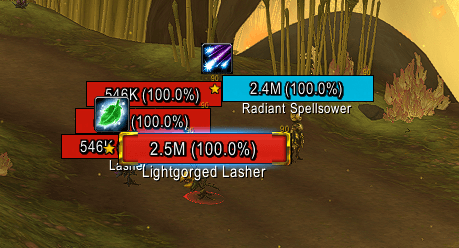
Puts an icon of your choice above a mob's nameplate
Preconfigured for an English client
MobIconizer matches icons against the mob's name, exactly as your client displays it. The addon ships set up for an English client, so the texture files are named with English mob names.
On any other client language you need to rename the files to match the mob's name.
Features
Icon above any nameplate
Works with the default Blizzard nameplates and with Plater, ElvUI, Platynator, RyoUI and ThreatPlates. The icon anchors to the nameplate's health bar, and re-anchors itself if your nameplate addon moves its frames around.
Placement and appearance
- Anchor - nine attachment points around the health bar
- Offsets - horizontal and vertical fine-tuning, +/- 500px
Name labels
Show Mob Name draws each mob's name underneath its icon. This is how you find out what to call your files - read the name off the screen, name a file after it.
Mobs with an icon out of the box
21 mobs are covered by the bundled textures. Several share an icon - the art is a hint at what the mob does, not a portrait of it.
| Icon | Meaning | Mobs |
|---|---|---|
 |
somewhat important kick, probably no wipe |
Angry Krolusk, Dominated Brawler, Faithless Subjugator, Fractured Shivercore, Frigid Mauler, High Evolutionist, Primal Serpent, Tempest Channeler, Twisted Hexxer, Wrathguard Flayer |
 |
some volley |
Radiant Spellsower, Risen Hexer, Voidtouched Magi |
 |
heals enemies |
Earthwhisper Tender, Lightgorged Lasher |
 |
AoE CC, probably wipe |
Kilivore Screamer, Lightfeather Petalwing |
 |
also some volley |
Felonious Mage |
 |
chainlightning |
Stormbound Mystic |
 |
mindcontrols a player |
Seductive Sayaad |
 |
polymorph |
Phantom Hex Priest |
Those are English names, so this is the set that works on an English client. On any other locale, rename the files to that locale's names for the same mobs.
The source art is kept in Media\ under its Blizzard icon name alongside the mob-named
copies, so you can see what each group is and duplicate it for a new mob.
Adding an icon
- Drop a texture named after it into
Interface\AddOns\MobIconizer\Media\, for exampleRavenous Bat.tga. Use.tgaor.blpwith power-of-two dimensions (32x32, 64x64, …). - Reload the UI.
Every mob with that name now shows that icon. Mobs with no icon do not show anything.
Commands
| Command | Effect |
|---|---|
/mi |
Open the settings panel |
/mi ids |
Toggle the mob name label on nameplates |
/mi test |
Toggle test mode |
/mi folder |
Print the texture folder currently in use |
/mi debug |
Toggle developer mode |
Settings also live at ESC -> Options -> AddOns -> MobIconizer.
Author
Created by Demonperson (a.k.a. 92Garfield)
MobIconizer Team