


Mob Ledger
- By
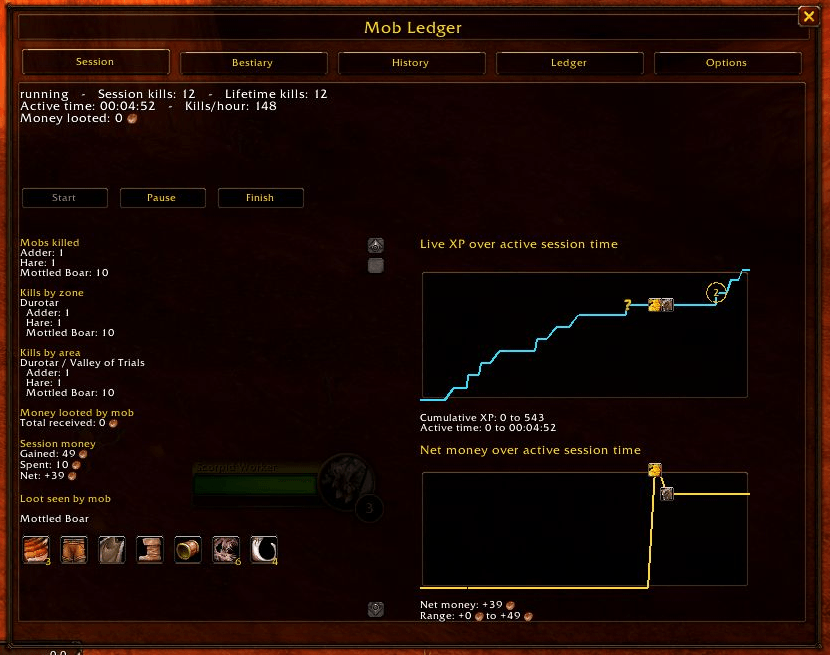
Live session XP and money graphs with quest, spending, and level-up markers.
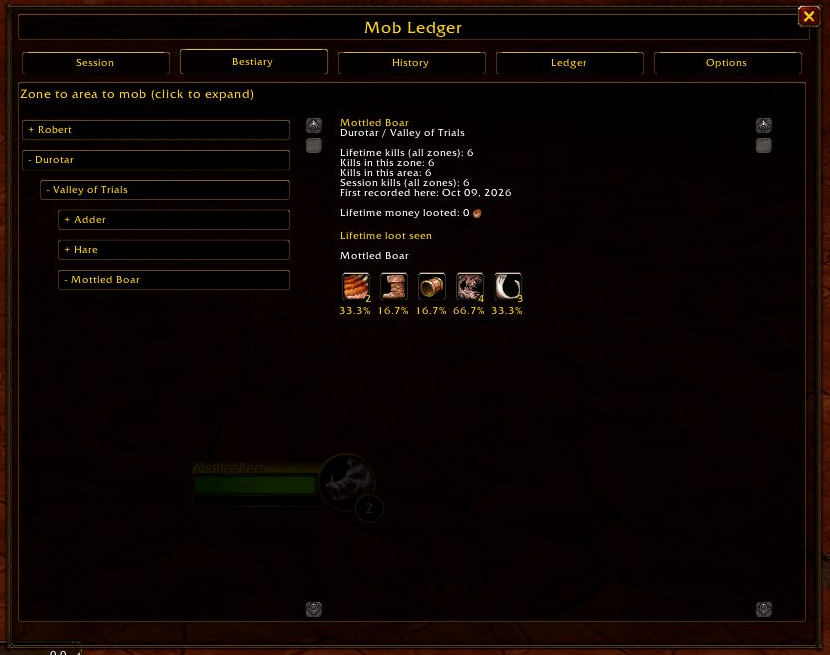
Expandable Bestiary organized by zone and area, with lifetime kills, loot quantities, and observed drop percentages.
Description
Mob Ledger — WoW Forever Beta
Turn your grind into data!
Every kill, level, and copper tells part of your character’s story. Mob Ledger records your adventures in WoW Forever with floating kill counts, a lifetime Bestiary, live progress graphs, and a detailed item and money ledger. See what you fought, what you found, and where your gold went.
Know Your Grind
- Floating kill counts: Display session kills, lifetime kills, or both, with customizable colors and separate bouncing animations.
- Live session tracking: Sessions start automatically at login. Pause, resume, or finish whenever you choose.
- XP gained and XP/hour: Keep your leveling progress visible in a compact, movable display.
- XP and money graphs: Follow your progress live, with optional transparent graphs beside the minimap.
- Milestone markers: Review level-ups, quest turn-ins, and money transactions through graph tooltips.
- Group tracking: See eligible party kill credit and magenta XP graph segments during group play.
Build Your Bestiary
Discover a personal record of Azeroth, organized into expandable zones, areas, and creatures.
- Track lifetime kills alongside kills recorded in each location.
- Browse observed loot through item icons and mouseover tooltips.
- See total item quantities and drop percentages based on your own recorded encounters.
- Accumulate money looted from creatures.
- Record supported gathering and object loot sources, including fishing, chests, and quest pickups.
- Explore your character’s own entry, with an editable Arrival in Azeroth date and recorded level milestones.
Older kills reported by the client that lack encounter details appear in Missing Chronicles—a small chapter for adventures the ledger could not witness.
Follow the Loot and the Gold
The Ledger tracks items entering and leaving your inventory, alongside money gained and spent.
Review sources such as mob loot, skinning, quests, crafting, vendors, trades, mail, and the Auction House. Supported spending events also identify skill training, talent resets, pet skill resets, flight fares, and barber services.
Confirmed item destruction is labelled Destroyed. Recognized food consumption and crafting reagent use receive their own entries.
Export your ledger as copyable text for Excel, Google Sheets, or your own records.
Keep Your History
Finished sessions preserve their recorded kills, loot, XP, money, and graphs. Rename sessions, add notes, compare your adventures, or delete old session records while keeping your lifetime Bestiary.
Your data is stored by character GUID, so a newly created character with the same name begins a fresh story.
Getting Started
Click the ML button above the right side of your XP bar, or type /ml or /mobledger to open the panel.
Explore the Session, Bestiary, History, Ledger, and Options tabs. Displays can be moved, and their positions reset through Options.
Useful commands:
- /ml start — Start or resume a session.
- /ml pause — Pause session tracking.
- /ml finish — Finish and save the session.
- /ml bestiary — Open the Bestiary.
- /ml history — Open session history.
- /ml options — Open settings.
- /ml save — Save through a UI reload while preserving the current session.
- /ml test — Preview floating kill text.
Use /played all to review recorded level milestones, or /played # for a particular level.
About the Records
Loot seen records items observed in a loot window, whether collected or left behind. The Ledger records actual inventory changes. Bestiary drop percentages reflect your recorded loot observations.
Tracking depends on information the beta client exposes. Some loot sources and transactions may remain unattributed. Enable enemy nameplates to improve creature tracking coverage.
Recovery snapshots are maintained in memory; writing data to disk still requires a UI reload or logout.
Made for WoW Forever
Built for the WoW Forever beta. Retail compatibility is not currently supported. Your grind. Your gold. Your story.
Feature requests and bug reports are welcome in the comments! Include your addon version, client build, any Lua error text, and what you were doing when the issue occurred.
Mob Ledger Team
