Misty Muffin's Return that Buff
- By
Return buff good hearted players and say thank you when they buff you.
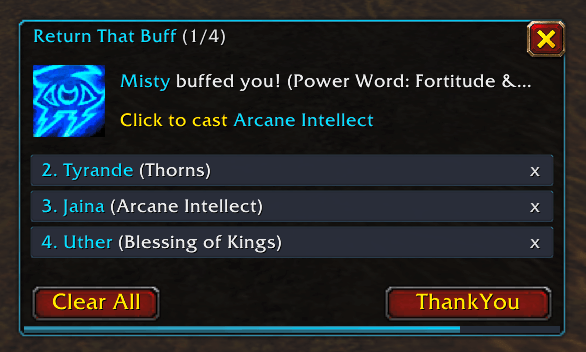
Return your selected buff to the player buffing you, or just say thank you if you already buffed them. Stacks multipple players buffing you.
Description
Return That Buff is a lightweight quality-of-life addon for World of Warcraft: Forever that makes it quick and effortless to return the favour when a passerby buffs you out in the world.
Whenever another player casts a buff on you, a clean, movable pop-up appears showing who buffed you and what they cast. Click the popup (or press your optional keybind) to cast your chosen return buff(s) back at them and send a friendly thank-you message—without breaking your stride.
Key Features
- One-Click Return Buffing & Multi-Buff Support: Pick one or more return buffs from your spellbook in your preferred cast order. Click the popup once per spell to step through your buffs cleanly, or click ThankYou to send a thank-you without casting.
- Multi-Player Queue: If several players buff you in a row, Return That Buff queues them neatly with a counter. Click any queued player to bring them to the front, remove individual entries, or clear the entire queue.
- Smart Mutual Buff-Back Detection: Automatically remembers players you recently buffed (for 3 minutes). If they buff you back, the popup switches to Thank-Only mode so you never get stuck in an endless buff loop.
- Non-Mana Class Filtering: Optional toggle to automatically skip mana-only buffs (Arcane Intellect, Arcane Brilliance, Divine Spirit, Prayer of Spirit, Innervate, Blessing of Wisdom, Greater Blessing of Wisdom) when returning a buff to a Warrior or Rogue—either casting only your applicable buffs or switching to Thank-Only mode.
- Customizable Thank-You Messages & Delay:
- Add multiple thank-you lines (one is chosen at random each time) using
%player%and%buff%placeholders. - Choose between Say (default) or automatic Whisper (batched cleanly when someone casts multiple buffs on you).
- Configurable 0–4 second thank-you delay:
0ssends immediately, while1–4swaits before sending (automatic for Whisper; uses a brief countdown button for Say to comply with WoW's hardware-event rules). - Built for WoW Forever's First and Last names—uses first name only by default, with an option to use full character names.
- Optional
/thankemote alongside your message.
- Add multiple thank-you lines (one is chosen at random each time) using
- Smart Filters & Ignore Lists:
- Ignore buffs from party and raid members (enabled by default).
- Ignore short buffs and HoTs under 1 minute (enabled by default).
- Ignore buffs while AFK, dead, or a ghost (enabled by default).
- Optional toggle to ignore buffs in rested areas and cities.
- Dedicated Ignore List tab for specific buff spells and player names, including a one-click Ignore Last Buffer button.
- Flexible UI, Scaling & Keybindings:
- Popup Scale (75%–150%) scales the popup frame, icons, buttons, and text proportionally.
- Lock Popup Position prevents accidental dragging, and a Reset Popup button re-centres both the popup and settings windows.
- Configurable popup timeout (5–120 seconds), optional sound alert, and optional Restore Previous Target after casting your final buff.
- Accessible via the Blizzard Addon Compartment, an optional draggable minimap button, Blizzard Options -> AddOns, or slash commands.
- Optional keybindings under their own Return That Buff section in WoW's Keybindings menu (
Cast Return Buff & ThankandThank Only (No Cast)).
- Full 12-Language Localisation: Available in English (US), English (UK), German, Spanish (EU), Spanish (LA), French, Italian, Korean, Portuguese (BR), Russian, Simplified Chinese, and Traditional Chinese, with localised buff detection.
Slash Commands
/rtbor/returnthatbuff— Open the settings window/rtb test— Preview the popup with a sample multi-player queue/rtb clear— Clear all queued entries and hide the popup
Setup
- Open settings via
/rtbthe minimap button, or the Blizzard Addon Compartment. - Under Buff & Messages, select one or more buffs from your spellbook to cast in return and customize your thank-you lines if desired.
- Adjust your filters, pop-up scale, lock state, and delay under Options.
Misty Muffin's Return that Buff Team