MistsDebuffs
- By
An Addon for Tracking Debuffs on Party Frames. Now with sounds, notifications, and m+/raid debuffs default!
Description
DISCONTINUED
MistsDebuffs
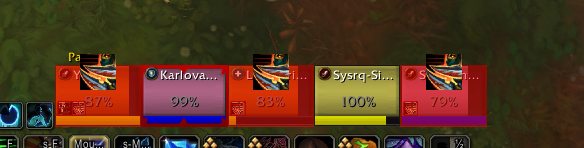
MistsDebuffs is an addon for World of Warcraft that highlights party frames when specific debuffs are present on the party members. Also provides option for raid/party frames while solo. It provides visual indicators to quickly identify important debuffs during group encounters. Made in collaboration with Evamist
Features
- Track and highlight custom debuffs of your choice on party frames.
- Enable solo raid/party frames
- Toggle Test Mode to enable highlighting for testing purposes, regardless of debuff presence.
- Customize the highlight color and opacity to suit your preference (or remove the highlight at all and only keep the icon).
- Option to display debuff icons on the party frames alongside the highlight color.
- Adjustable size and position of the debuff icons.
- Case-insensitive debuff matching for more flexibility.
- Seperate visuals for dispellable vs non-dispellable debuffs (by your class, automatically detected)
- Sound notification for debuffs (option for seperate sound for dispellable ones)
- Auto filled debuffs for m+ and raids
- Text notifications on different debuff types.
- Works in any group sizes!
- Can now track Buffs too!
Installation
- Download the latest release of MistsDebuffs from the CurseForge page. (if you dont have the curse client continue with step 2 and 3)
- Extract the downloaded ZIP file.
- Copy the "MistsDebuffs" folder to your World of Warcraft_retail_/Interface/AddOns directory.
Usage
MistsDebuffs works automatically once installed. Party frames will be highlighted with the specified color or debuff icons when the tracked debuffs are present on party members. You can access the addon settings by typing "/mists" or going to the Interface Options -> AddOns menu.
Configuring Tracked Debuffs
- Open the addon settings by typing "/mists" or going to the Interface Options -> AddOns menu.
- The already tracked debuffs will be in the "Tracked Debuffs" section
- Use the input box to enter the name of a debuff you want to track and click "Enter" to add it to the tracked debuffs list.
- To remove a tracked debuff, select it from the list.
Customizing Highlight Color
- Open the addon settings by typing "/mists" or going to the Interface Options -> AddOns menu.
- Click the "Highlight Color"
- Adjust the sliders to set the desired highlight color.
Displaying Debuff Icons
- Open the addon settings by typing "/mists" or going to the Interface Options -> AddOns menu.
- Toggle the "Show Icon" option to enable or disable the display of icons on the party frames.
- Adjust the "Icon Size" slider to set the desired size of the debuff icons.
- Use the "X Offset" and "Y Offset" sliders to customize the position of the debuff icons relative to the party frames center.
Support
If you encounter any issues or have suggestions for the addon, please comment on this addon on CurseForge.
Credits
Authors: Skye & Evamist
MistsDebuffs Team